Defect triage is the cross-functional decision process that turns raw bug reports into ranked, ownable work: it separates severity from priority, assigns a disposition, and hands each defect to a named owner. Done well, it produces a backlog nobody argues about after the meeting ends. Tooling and AI can speed up intake and catch duplicates before a human ever opens the ticket.
TL;DR:
- Automated duplicate detection and rich contextual data from recordings can significantly reduce triage time at high bug volumes.
- Severity judgments are solely technical, while priority depends on explicit business impact factors like customer exposure and release deadlines.
- Triage should always produce validated reports, assigned severity and priority, clear disposition outcomes, and designated ownership for effective backlog management.
- Regular cadence meetings, including daily quick passes and weekly deep reviews, help prevent backlog drift and ensure timely bug resolution.
- Ensuring ownership for each disposition and enforcing complete, validated intake data improves triage accuracy and decision-making consistency.
Table of Contents
- What Is the Defect Triage Process and Where Does It Fit?
- How Do You Triage Bugs Step by Step?
- Who Runs Triage, and How Often Should It Happen?
- Severity vs. Priority: The Decision Framework That Actually Holds Up
- What Are the Six Triage Disposition Outcomes?
- How Can Automation and AI Speed Up Bug Triage?
- Which Metrics Show Your Triage Process Is Actually Working?
- What Should a Triage Meeting Agenda Look Like?
- What Do Teams Get Wrong About Defect Triage?
- How Wezard Fits Into Your Triage Workflow
- Sources
What Is the Defect Triage Process and Where Does It Fit?
Triage sits between two moments: a tester or user reports a bug, and a developer picks up work for the next sprint. Skip triage, and engineers end up self-selecting which bugs to fix based on interest rather than business risk. That is how critical checkout bugs sit untouched for weeks while a cosmetic typo gets fixed the same afternoon.
Most mature teams run triage at three different rhythms. A daily quick-pass catches anything new or flagged high severity overnight. A weekly backlog review works through the accumulated middle tier and prevents drift. A pre-release deep triage happens right before a build ships, when the team needs a final answer on every open defect tied to that release.
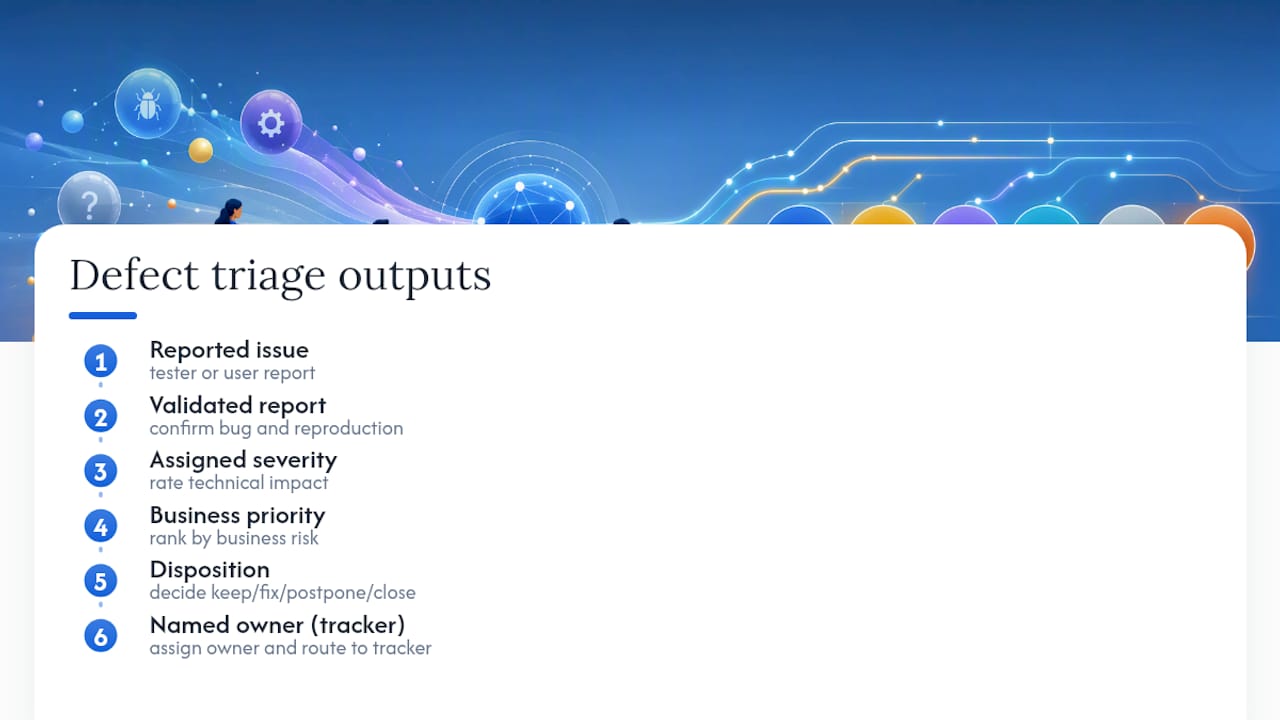
Each triage pass should produce the same five outputs regardless of cadence: a validated report, an assigned severity, a business priority, a disposition, and a named owner routed into the tracker. If a triage session ends without those five things nailed down for every item discussed, it was a discussion, not a bug triage process that actually moves work forward.
How Do You Triage Bugs Step by Step?
Running defect prioritization consistently means following the same sequence every time, whether it is bug number three or bug number three thousand.
- Validate first. Reproduce the issue, check the report has enough detail to act on, and reject anything that is not actually a defect (feature requests and environment misconfigurations get redirected, not triaged).
- Check for duplicates. Search the backlog before ranking anything. Consolidating duplicates preserves whatever priority signal the strongest report carried, instead of splitting votes across five near-identical tickets.
- Categorize. Tag the defect by type (functional, performance, UI, security), affected component, and which release it touches.
- Assess severity. This is a technical judgment: does the app crash, does data get corrupted, or is a button one pixel off?
- Set priority. This is a business judgment: how many customers hit this, does it block a contract renewal, is there a release deadline in three days?
- Decide disposition. Pick one of the six standard outcomes (covered below) and write down why.
- Assign an owner and route it. Send the ticket into Jira, Azure DevOps, or whatever tracker the team uses, with severity, priority, and rationale carried over as fields, not buried in a comment.
- Verify and close. Define upfront what “fixed” means for this bug: which build, which test case, who signs off.
A few habits separate teams that trust their backlog from teams that do not:
- Never let a bug sit “in triage” for more than one cycle; every item gets a disposition, even if that disposition is “need more information.”
- Carry the original reporter’s evidence (screenshots, recordings, logs) all the way through to the assigned developer.
- Re-triage anything that gets reopened. A closed bug that resurfaces is a new decision point, not an automatic reassignment.
Who Runs Triage, and How Often Should It Happen?
Triage needs three voices in the room, and confusing their jobs is the fastest way to break the process. Engineering owns severity and effort estimation. Product or support owns customer and business impact. A triage owner or facilitator makes the final priority call when the other two disagree, and that person’s decision is the one that sticks.
Severity and priority get set by different people for a reason: an engineer judging both technical impact and business urgency tends to underweight the customer side, and a product manager judging technical severity tends to underweight the coupling risk. Keeping the severity and priority judgments separate is what makes the whole triage discipline auditable later.
Cadence and timeboxing matter as much as attendance:
- Daily quick-pass: a short meeting focusing on new and high-severity items.
- Weekly backlog review: a focused meeting reviewing the accumulated middle-tier defects.
- Pre-release triage: a dedicated session reviewing all open defects tied to the upcoming release.
Pro Tip: Cap discussion time per bug at 90 seconds during daily triage. If a defect needs more debate than that, park it for a named engineer to investigate offline and bring back next session with an answer, not a guess.
Severity vs. Priority: The Decision Framework That Actually Holds Up
Severity measures technical damage. A defect that corrupts saved user data is high severity no matter who reports it. Priority measures business urgency: how soon it needs fixing given customers affected, revenue at stake, and what else is on the release calendar.
The most defensible way to set priority uses four factors, borrowed from a cross-functional triage framework: benefits of fixing now, opportunities a fix might unlock, costs of the fix itself, and risks of leaving it alone or of the fix introducing new problems. When benefits plus opportunities clearly outweigh costs plus risks, the bug moves up the list.
- P1: High severity, high business urgency. Fix now, possibly a hotfix.
- P2: High severity, moderate urgency, or moderate severity with major customer exposure. Fix before this release ships.
- P3: Moderate severity, low urgency. Scheduled for a future sprint.
- P4: Low severity, cosmetic, or edge case. Backlog, revisit later.
The practical rule: start priority equal to severity, then only move it up or down when someone names a specific business reason and writes it on the ticket.
What Are the Six Triage Disposition Outcomes?
Binary thinking (“fix it” or “don’t”) is how backlogs rot. A mature triage program uses six distinct outcomes instead:
- Fix immediately — production is broken or data is at risk; someone drops what they’re doing.
- Fix before this release — confirmed defect, tied to a specific ship date.
- Schedule for a near-term iteration — real bug, not urgent enough to bump current work.
- Fix in the future / backlog — valid but low value relative to everything else competing for time.
- Accept / won’t fix — a documented decision that the cost of fixing outweighs the benefit, with the reasoning attached to the ticket.
- Need more information / duplicate — send back to the reporter or merge into an existing ticket.
Each disposition needs an owner for follow-up, even “accept,” since someone has to answer a customer who asks about it later, as part of best practices in inspection documentation and industrial QA. Dispositions also feed directly into release notes: a “fix before this release” item becomes a changelog entry, while an “accept” item becomes a documented known issue instead of a support surprise.
How Can Automation and AI Speed Up Bug Triage?
Manual triage holds up fine at a hundred open bugs. At a thousand, it collapses, and that is exactly where AI-assisted triage earns its keep: filtering noise, flagging likely duplicates, and surfacing flaky-test patterns before a human wastes ten minutes reproducing something already fixed.
Screen recordings and real-time transcripts change the intake step itself. A recorded repro carries the exact click sequence, the console error, the browser state, all the context a text description usually loses, which cuts the back-and-forth that “need more information” dispositions usually trigger.
What automation is good at:
- Deduplicating near-identical reports before they ever reach the triage queue.
- Auto-populating environment, build, and reproduction fields from a recording.
- Routing validated tickets directly into Jira or Azure DevOps with severity fields intact.
What it should not do: make the priority call. AI can rank likely duplicates and flag noise, but the benefits-versus-costs judgment behind priority still needs a human who understands the business.
Pro Tip: When evaluating a triage tool, check integration fidelity (does it map fields correctly into your tracker), audit trail (can you see who set what and when), and whether attachments carry through as evidence, not just a link that expires.
Which Metrics Show Your Triage Process Is Actually Working?
A triage process that looks fine in the room can still be failing on paper. Track it with numbers, not vibes.
- Time-to-triage: how long a new report sits before getting a severity and priority.
- Age distribution: how many open bugs are older than 30, 60, or 90 days.
- Duplicate rate: what percentage of intake gets merged, a proxy for how much noise your reporting process generates.
- MTTR by priority: whether P1s actually get fixed faster than P4s, or whether the labels are decorative.
- Backlog growth rate: whether the queue is shrinking, holding steady, or quietly expanding every sprint.
Pair the metrics with two governance rules: every disposition needs a named owner and a written rationale, and every deferred item gets a scheduled re-review date instead of disappearing into the backlog forever. If age distribution keeps skewing older, that is your signal to add a cadence, not just a lecture about backlog hygiene.
What Should a Triage Meeting Agenda Look Like?
A workable triage meeting agenda for a 30 minute weekly session:
- New high-severity items (10 minutes): quick validation and priority assignment only.
- Quick decisions on straightforward items (10 minutes): anything with an obvious disposition.
- Deferred and aging review (7 minutes): revisit anything past its re-review date.
- Action confirmation (3 minutes): read back owners and next steps out loud before ending.
Every ticket entering triage should already carry: summary, reproduction steps, environment and build, severity, initial priority, customer impact, and attachments. Missing fields get bounced back before the meeting, not during it.
What Do Teams Get Wrong About Defect Triage?
The biggest mistake teams make isn’t skipping triage, it’s running it without deciding who owns the tiebreak. When engineering and product disagree on priority and there’s no designated tiebreaker in the room, the loudest voice wins by default, and that’s rarely the right signal to optimize for.
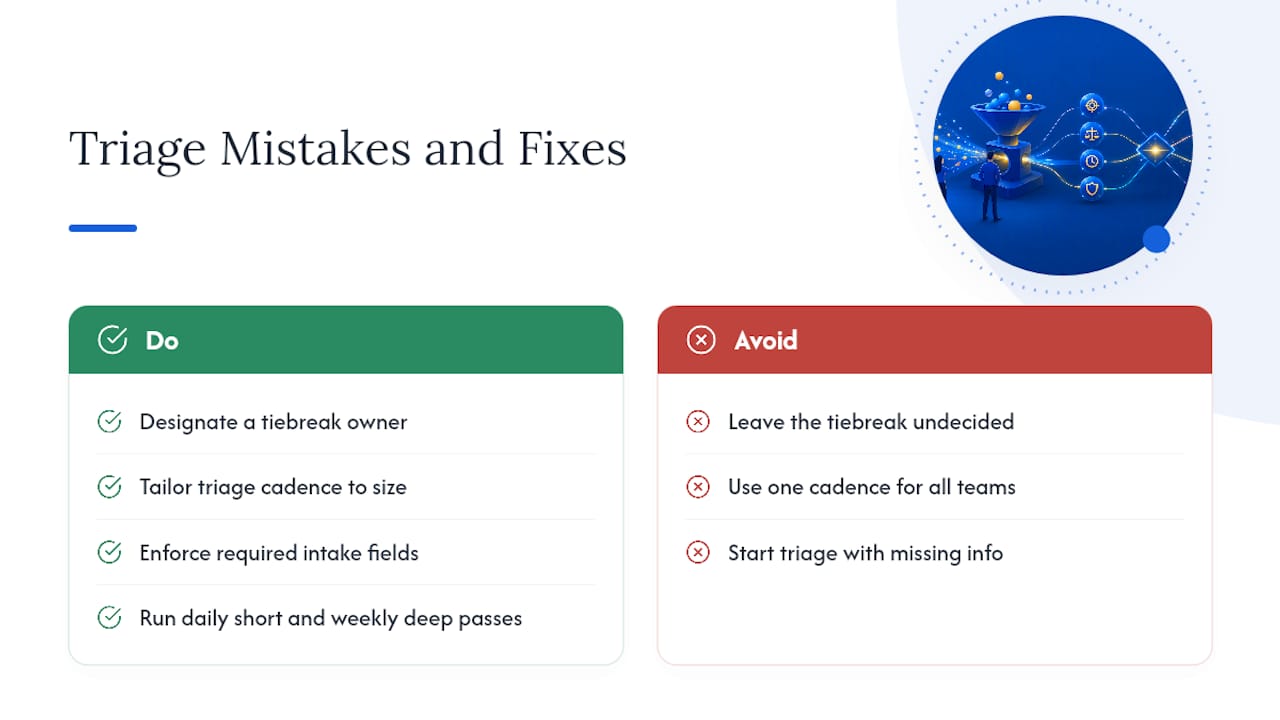
The second mistake is treating triage cadence as one-size-fits-all. A five-person startup shipping weekly does not need a formal pre-release deep-triage session. A 200-person enterprise running quarterly releases across multiple teams absolutely does, or cross-team dependencies get discovered the week before launch instead of the month before.
Enforce required fields at intake so triage doesn’t spend its first ten minutes chasing missing information. Run a short daily pass to catch anything that would block a release overnight, and a weekly deep pass to stop the backlog from drifting into a graveyard nobody wants to clean up.
— Marketing
How Wezard Fits Into Your Triage Workflow
There are tools designed to address the exact bottleneck most triage sessions hit: bad intake. Some solutions record the screen when a tester or business user hits an issue, transcribe what they’re describing in real time, and run AI duplicate detection before that report ever lands in your backlog. This way, tickets showing up in Jira or Azure DevOps can carry reproduction context, rather than a brief description that might require follow-up questions.
For teams evaluating UAT and bug reporting tools, the practical question is whether your intake process feeds triage clean data or noisy data. Wezard’s AI bug tracking connects directly into your existing tracker with one-click routing, so the triage meeting spends its time deciding priority, not decoding what the reporter meant. Start a trial and run your next triage session against reports that already come pre-validated.
Sources
- Bug Triage: A Cross-Functional Framework for Deciding Which Defects to Fix | Rex Black Inc.
- Bug triage process: How to run it and what to prioritize | Plane Blog
- Defect Triage: What It Is and How AI Is Making It Faster
- Bug Triage Meeting Agenda Template: Practical QA Template – QAPractices