
A good ServiceNow UAT form captures six things for every result: what the tester did, what they expected, what happened, how bad it is, where it happened, and proof. Standard ServiceNow forms cover only part of that, so most teams add or configure a few fields. Wezard is built around the same idea: a tester records the screen and speaks the issue, the transcript fills in the detail, and the ticket reaches your backlog already enriched and checked for duplicates.
TL;DR
- Every UAT result needs a test case ID, steps, expected result, actual result, status (Pass, Fail, Blocked), severity, environment and evidence.
- ServiceNow’s standard forms give you Short description, Description, Impact, Urgency, Priority and assignment fields, but not a full test-result structure.
- Make fields mandatory with Form Designer, dictionary settings or UI Policies, and test the form with each tester role.
- Keep severity (how bad the defect is) separate from priority (how soon it gets fixed).
- Wezard captures screen recordings, live transcription and attachments, and flags duplicates before tickets reach ServiceNow.
Table of Contents
- The fields every UAT result needs
- Which fields ServiceNow already gives you
- Configuring the fields in ServiceNow
- Recording a result the way a developer can use it
- Where Wezard fits
- Perspective
- FAQ
- Sources
The fields every UAT result needs
UAT (user acceptance testing) is the final check where business users confirm the system supports their work. Sources differ in naming, but they agree on the core. One UAT template guide lists a test case ID, a business-language description, tester name and role, environment, prerequisites, numbered steps, expected result, actual result, a Pass/Fail/Blocked status, severity and priority, and attachments such as screenshots or error logs.
Here is a practical set for a ServiceNow feedback form:
| Field | What the tester enters | Why it matters |
|---|---|---|
| Test case ID | Reference to the script or story | Links the result to a requirement |
| Tester name and role | Who ran it and as which persona | Permissions often explain failures |
| Environment and build | Instance name, release or clone date | Results are only comparable within one build |
| Preconditions and test data | Records, roles and values used | Lets a developer recreate the state |
| Steps taken | Numbered actions | Makes the defect reproducible |
| Expected result | What should have happened | Without it, feedback is opinion |
| Actual result | What did happen | The core of the defect |
| Status | Pass, Fail, Blocked | Blocked means the step could not run, which is not a failure |
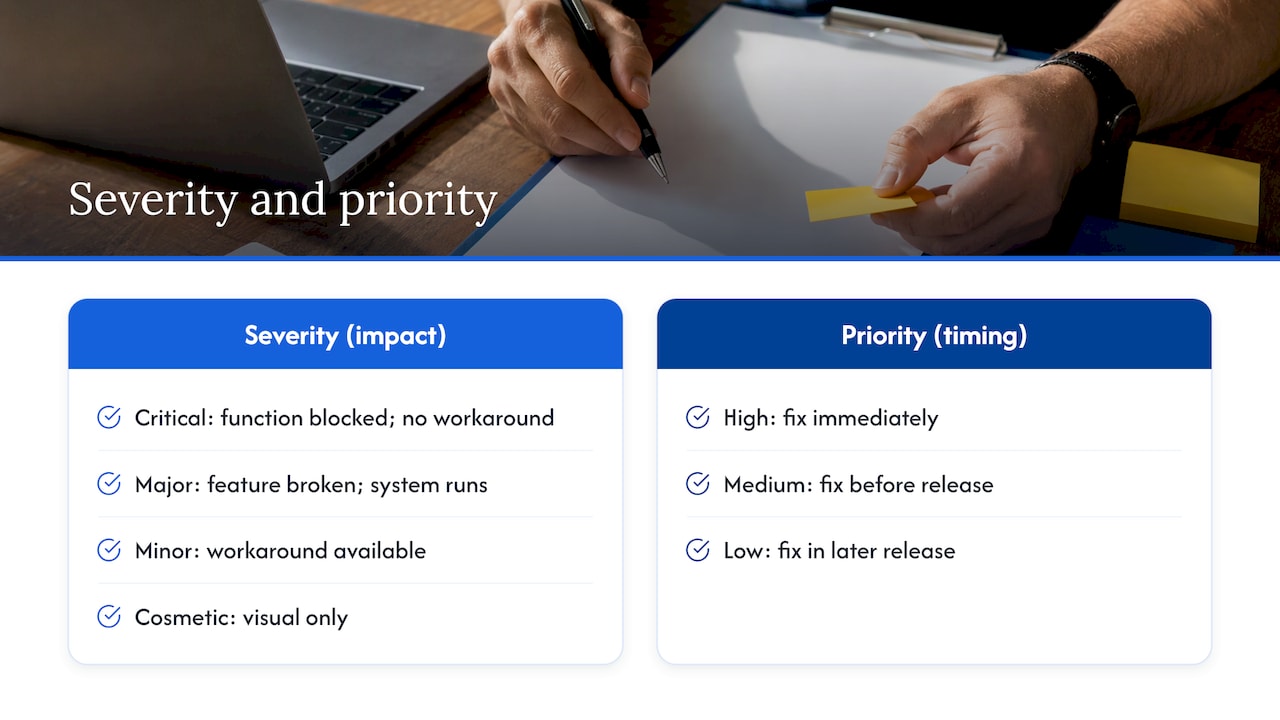
| Severity | Critical, Major, Minor, Cosmetic | Describes impact |
| Evidence | Screenshot, recording, log | Settles arguments quickly |
A DeviQA guide makes the same point on status: record Blocked separately from Fail, so a missing dependency does not inflate your defect count.
Severity and priority are two fields
Severity measures impact. One template defines Critical as blocking a whole function with no workaround, Major as a significant feature broken while the system runs, Minor as having a workaround, and Cosmetic as visual only. Priority is the order of repair: High means fix immediately, Medium means fix before release, Low means a later release (LegalClarity). Testers should set severity. Priority is a decision for the product owner or process owner, so consider making it read-only for testers.
Add the field that makes feedback actionable
One practitioner recommends asking testers what they expected, and triaging each item as a bug, change request, copy issue, training issue or won’t fix. A “Finding type” choice field with those values saves a triage meeting.
Which fields ServiceNow already gives you
The Task table is the base for Incident, Problem and Change, and every table extending it inherits its core fields. The standard Problem form shows what that looks like: Number, Category, Service, Configuration item, State, Impact, Urgency, Priority (calculated from impact and urgency), Assignment group, Assigned to, Problem statement, Description and Workaround.
That covers triage and routing well. It does not give you separate fields for expected result, actual result, test case ID, environment, build or tester role. Those are the ones to add or configure.
| Need | Standard field | Usually add |
|---|---|---|
| Summary | Short description | Keep, make mandatory |
| Detail | Description | Template with steps, expected, actual |
| Impact | Impact, Urgency, Priority | Severity choice list |
| Routing | Assignment group, Assigned to | Finding type |
| Test context | None | Test case ID, environment, build, tester role |
| Outcome | State | Pass/Fail/Blocked status |
| Proof | Attachments | Recording link |
A real example of standard configuration: UC Berkeley’s incident form requires Short description and limits it to 80 characters because it feeds the subject line. Short descriptions that must stay brief are a good reason to put the detail elsewhere.
The application matters too. A community contributor points out that Incident UAT differs from Service Catalog UAT, which has to cover catalog items, variables, UI policies, client scripts, approvals and catalog tasks. Build the field set per application.
Configuring the fields in ServiceNow
Three tools do most of the work.
- Form Designer. Admins can add, remove and arrange fields and edit label, mandatory and read-only properties, according to a community walkthrough.
- Field properties. In Table Builder you can set Label, Active, Read only and Mandatory, and Mandatory means data must be entered before the form saves. The same page covers default values, dynamic defaults taken from another field, and dependent choices.
- UI Policies. These make fields mandatory, read-only or hidden under conditions. A common pattern: when Status is Fail, require Actual result and an attachment. When Status is Pass, hide them.
One caution from ServiceNow’s form administration docs: a Required Form Fields rule on the Task table applies to every extended table, including Incident, Change Request and Problem, unless an extension overrides it. If your UAT form shares the Task lineage, a new rule can affect other teams.
For catalog-based feedback, the ServiceNow SDK variables guide lists text, dropdown, radio, Yes/No, checkbox, date and attachment variables, with mandatory, hidden, tooltip and example text properties. Example text is useful: show testers a model “actual result” right in the field.
Validate the form before testers use it
Run the form yourself with each persona. Check that mandatory fields trigger when expected, that read-only fields stay locked for testers, that conditional fields appear on Fail, and that attachments upload on the devices testers use. Our guide to UAT environment requirements covers the environment side: production-like permissions, data and integrations.
Recording a result the way a developer can use it
On a failed step, a ServiceNow UAT scripting guide says to log the steps leading up to it, the data used, and what did or did not occur, with a screenshot. Compare two entries:
- Weak: “Approval doesn’t work.”
- Usable: “TC-14, role: Manager, build 2026-11 clone. Submitted the laptop request for $1,200, approver received no notification. Expected: email and task within 5 minutes. Actual: request stuck in Requested. Severity: Major. Recording attached.”
The second takes a minute longer to write by hand. That gap is why testers skip fields and why many forms end up half empty. See our UAT test case writing practices and UAT test scenario examples for scripts that fit these fields.
Do not rewrite the expected result
One ServiceNow UAT guide warns against quietly changing the expected result to make a failure disappear. Change the requirement or accept the limitation through an accountable decision. A “Disposition” field (fix, accept, defer) with a named decision-maker gives that decision a home.
Sign-off fields
Close each script with tester, date and result. For release, define exit criteria and keep evidence attached to the change record. Our posts on UAT exit criteria and signing off test cases show what to collect.
Where Wezard fits

A long form with many mandatory fields protects data quality but can wear testers out. Wezard lets business testers report by voice or video: it records the screen, transcribes the issue in real time, and supports guided ticket submission with screenshots and file attachments. Its AI detects duplicate tickets before they reach your backlog, and it integrates with Jira, Azure DevOps and ServiceNow. Our own claim is a reduction in duplicate noise of up to 40% compared with manual processes or basic feedback tools. Wezard is SOC 2 certified and supports SSO.
Plans are published at wezardapp.com/pricing: Starter is $25 per month, Team $70, Business $160, and Enterprise is priced on request.
If you want to see how transcription turns into ticket fields, read real-time bug transcription for UAT, or how to prevent duplicate tickets at capture.
Perspective
Most UAT forms fail the same way: they ask the tester to do the analyst’s job. A business user who has just watched an approval stall should not have to translate that into severity codes, build numbers and reproduction steps from memory.
We design Wezard so the tester shows the problem and says it out loud. The recording holds the steps, the transcript holds the words, and the ticket arrives with the evidence attached. Structured fields still matter, and we think they work best when the tool fills in what it can and the tester confirms the rest.
Duplicates are the other cost. Ten testers hit the same broken approval and file ten tickets. Catching that before the backlog keeps your triage time for new findings.
Marketing
FAQ
What is the minimum set of fields for ServiceNow UAT feedback?
Test case ID, steps, expected result, actual result, status, severity, environment and evidence. Add tester role if your approvals or permissions differ by persona. Everything else can be derived or added later.
Can I use the standard Incident form for UAT?
Yes, for a start. Short description, Description, Impact, Urgency and assignment fields work for routing. You will want extra fields or a description template for expected and actual results, as the standard form has no dedicated fields for them.
How do I make a field required only on failures?
Use a UI Policy with a condition on your status field, for example Status is Fail, and set the actual result and attachment fields to mandatory. The community guide describes this pattern. Test it with each role.
Who should set priority?
The product or process owner. Testers describe impact through severity, and the owner weighs that against release timing and business need.
Sources
- User Acceptance Testing Template: Fields and Sign-Off
- User Acceptance Testing: Process, Checklist & Examples (DeviQA)
- User Acceptance Testing (UAT): How I Run It
- ServiceNow: Important fields (Task table)
- ServiceNow: Problem form
- UC Berkeley: Field Descriptions for Incident Management
- UAT test scripts, ServiceNow Community
- Mastering Form Configuration in ServiceNow
- ServiceNow: Field configuration in Table Builder
- ServiceNow: Advanced form configuration
- ServiceNow SDK: Service Catalog Variables
- Write ServiceNow UAT Test Scripts
- ServiceNow UAT: Business-Owned Validation Approach