UAT is done when four conditions are true at once: every planned critical test case has been executed, pass rates clear the agreed threshold (commonly 95% or higher for P1/P2 scenarios), zero Severity 1 defects remain open, and a business stakeholder has signed a document accepting the current state. Everything else, deferred low-priority bugs, documented workarounds, training completion, is negotiable if it’s written down and approved. Nothing else should be. Agree these numbers before testing starts, not while everyone is staring at a launch date.
TL;DR:
- UAT exit criteria must include a 95 to 100 percent critical test case execution, zero open Severity 1 defects, and a pass rate of at least 95 percent on high-priority cases.
- Thresholds should be tailored to the project’s risk level, with stricter criteria such as 100 percent pass rate and signed data reconciliation required for regulated or financial systems.
- When criteria are unmet near launch, options include deferment, partial release, formal exceptions, or deadline renegotiation, with all decisions documented and signed off by owners.
- Tracking progress daily with metrics like test coverage, pass rate, open defects, and aging helps prevent last-minute sign-off disputes or overlooked risks.
- Rich bug evidence, such as recordings and clear repro steps, alongside duplicate ticket detection, significantly shortens the verification cycle and reduces delays during sign-off.
Table of Contents
- What Are UAT Exit Criteria, and Why Do They Matter?
- Common Measurable UAT Exit Criteria (With Real Thresholds)
- How to Set Thresholds That Actually Match Your Project’s Risk
- A Copy-Ready UAT Exit Criteria Checklist and Template
- Tracking Progress and KPIs During UAT
- When UAT Exit Criteria Aren’t Met: Your Real Options
- Key Takeaways: The Short Version
- Why Better Bug Evidence Shortens the Sign-Off Fight
- Capture UAT Evidence That Actually Speeds Up Sign-Off
- Sources
What Are UAT Exit Criteria, and Why Do They Matter?
UAT exit criteria are the specific, measurable conditions a release must satisfy before user acceptance testing closes and the product moves toward production. They’re the opposite of “looks good to me.” Without them, sign-off turns into a negotiation driven by whoever is loudest in the room, usually the person under the most schedule pressure.
Entry criteria and exit criteria solve different problems. Entry criteria decide whether UAT can start, things like a stable test environment, completed system testing, and available test data. Exit criteria decide whether UAT can end. Confusing the two is how teams end up testing in an environment that was never ready, or worse, calling UAT “complete” because the calendar said so rather than because the metrics said so.
Exit criteria also differ from the gates used in earlier testing phases. System testing and regression testing check that the software works against technical specifications. UAT exit criteria check that real business users can complete real workflows, which is a different question entirely. A system can pass every regression suite and still fail UAT if the checkout flow confuses the people who’ll actually use it.
Objective criteria matter for one blunt reason: they prevent two failure modes at once.
- Premature releases, where a broken critical path ships because nobody defined “broken” in advance.
- Endless testing, where UAT drags for weeks because there’s no defined finish line, just a rotating list of nice-to-have fixes.
Common Measurable UAT Exit Criteria (With Real Thresholds)
Generic advice like “make sure testing is thorough” is useless in a sign-off meeting. What works is a short list of numbers everyone agreed to in week one. Here’s what practitioners actually use.
- Pass-rate thresholds by priority. A 95% or higher pass rate on P1/P2 test cases is a widely cited bar for proceeding toward go-live, though high-risk systems, banking cores, healthcare records, often push P1 to a flat 100%.
- Defect severity rules. Zero open Severity 1 defects. Severity 2 issues need either a fix or an approved workaround with a documented owner. Severity 3 and below can typically roll into a post-launch backlog without blocking sign-off.
- Non-functional checks. Performance baselines met under expected load, security scans clean, and no unresolved regressions introduced by last-minute fixes.
- Documentation and training. User guides finalized, support teams briefed, and any regulatory or compliance sign-offs collected.
A pass rate alone doesn’t tell you the release is safe. A team can hit 96% on P1/P2 cases and still have a single open Severity 1 defect that corrupts customer records. Combine pass-rate thresholds with hard defect rules, never treat either one as sufficient on its own.
How to Set Thresholds That Actually Match Your Project’s Risk
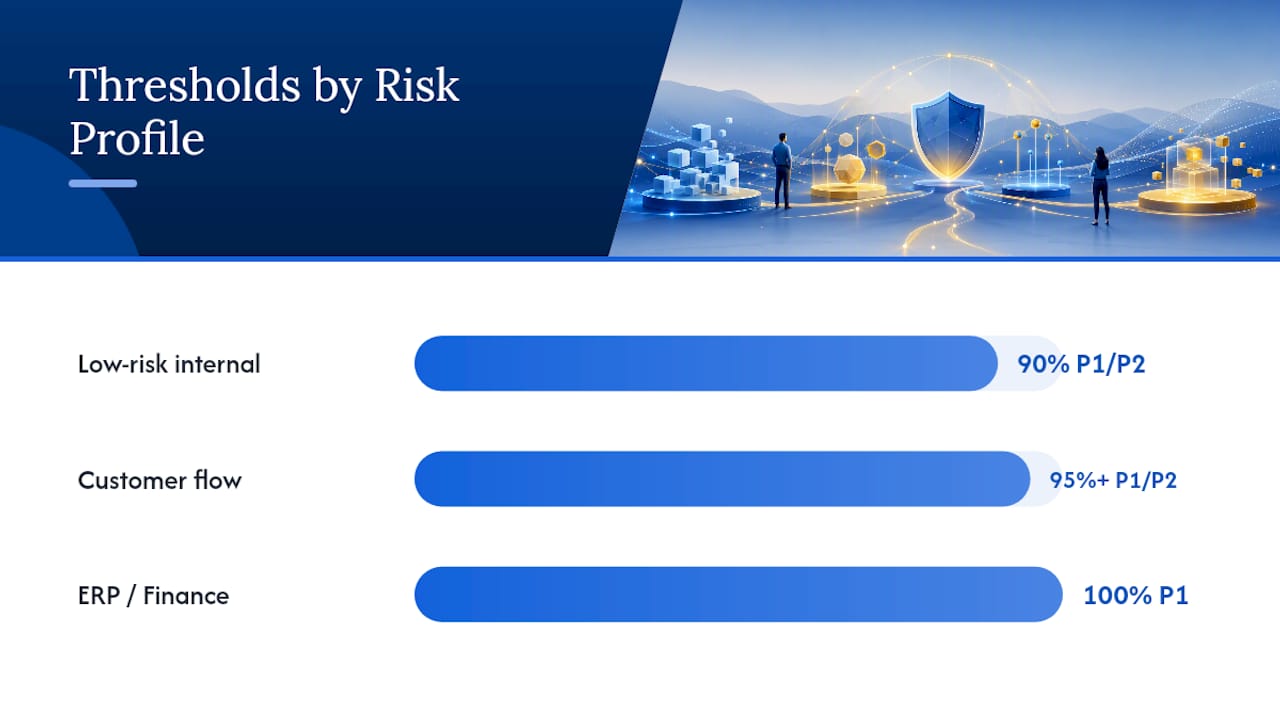
Copying someone else’s 95% threshold onto a project with a different risk profile is how teams end up either over-testing a low-stakes feature or under-testing a system that touches money. Set thresholds around business impact, not habit.
Start with the critical path. Prioritize the workflows that generate revenue, touch compliance, or affect large user populations rather than trying to chase perfection across every edge case a tester can dream up.
Thresholds should scale with what’s at stake:
- Low-risk internal feature (a UI tweak, a new report filter): 90% P1/P2 pass rate, Severity 1 and 2 resolved, Severity 3 deferrable.
- Customer-facing transactional flow: 95%+ P1/P2 pass rate, zero Severity 1 and 2 open.
- ERP, finance, or regulated system: 100% P1 pass rate, zero Severity 1/2, signed data reconciliation from finance.
When a criterion can’t be met on schedule, don’t leave it ambiguous. Document the exception with five fields: the specific defect or gap, the business impact if it ships as-is, the mitigation or workaround, a named owner, and a firm remediation deadline. That exception then needs sign-off from whoever owns the business risk, not just the QA lead who found the bug.
Pro Tip: Get the business owner, not just the project manager, to initial the exception log. The person who owns the revenue or compliance risk needs to be the one accepting it, otherwise the “exception” is just an unresolved argument waiting to resurface at launch.
Bring the right people into the threshold-setting conversation early: the business owner, QA lead, release manager, and one senior end user who actually performs the critical workflow daily. If you set thresholds without an end user in the room, you’re guessing at what “acceptable” means to the people who’ll judge the product after launch. For a deeper look at how entry-side readiness feeds into this, see how entry criteria set up UAT for success.
A Copy-Ready UAT Exit Criteria Checklist and Template
A sign-off meeting moves faster when everyone is looking at the same rows instead of arguing from memory. Build your checklist around these categories, then fill in real numbers for your release.

Walk this table row by row in the sign-off meeting rather than debating the release as a whole. Any row marked “Not met” gets routed into the exception process instead of stalling the entire conversation. The Stanford UAT exit criteria template is a good example of how a formal institution structures this same logic. For a version you can adapt directly, the UAT checklist built for QA teams covers the same rows with more detail on each.
Tracking Progress and KPIs During UAT
Sign-off politics happen when nobody’s been tracking the numbers along the way, so the final week turns into a scramble to reconstruct what actually happened. Report five metrics consistently and the ending writes itself.
- Executed tests (%) against the plan, tracked daily during active test cycles.
- Pass rate (%) broken out by priority, not blended into one misleading average.
- Open defects by severity, so a spike in Severity 1 issues is visible immediately, not buried in a total count.
- Defect aging, how long issues sit open, which flags a team that’s finding bugs faster than it’s fixing them.
- Fix verification rate, the percentage of “fixed” defects that actually passed retest.
Status reports should show progress against plan, pass rate by functional area, and open defects by severity so the steering committee sees a trend, not a snapshot. Report daily to test leads and weekly to steering committees or sponsors. A single day’s numbers can mislead; a testing team that closed 40 defects on Tuesday looks great until you notice 35 reopened on Wednesday. Velocity over several days tells you whether you’re actually converging on the exit criteria or just generating motion.
When UAT Exit Criteria Aren’t Met: Your Real Options
A missed threshold two days before launch isn’t a crisis if you have a process for it. It’s a crisis only when nobody decided what happens next.
- Defer the release. The straightforward option when the business can absorb a delay and the defect is genuinely blocking.
- Partial release. Ship the parts of the system that meet criteria and hold back the module that doesn’t, when the architecture allows it.
- Formal exception. Document the gap, the business impact, the mitigation, an owner, and a fix deadline, then get sign-off from the business owner who accepts that risk.
- Renegotiate the deadline. Sometimes the honest answer is that the original date was never realistic given what testing has uncovered.
Releasing with unmet critical criteria and no formal exception erases traceability, so if something breaks in production, nobody can point to who accepted that risk and why. Record every deferred or accepted defect in the sign-off document itself, with an owner, mitigation plan, and target date, and schedule a follow-up review to confirm those post-release fixes actually landed. For the mechanics of getting that document signed, see how to sign off on test cases after UAT.
Key Takeaways: The Short Version
- Agree measurable exit criteria, coverage, pass rate, defect severity rules, before UAT begins, not during the final week.
- Hold the line on zero open Severity 1 defects and a realistic pass-rate threshold for critical tests.
- Use daily dashboards and a written sign-off document so the final call is evidence-based, not a debate.
| Rule of thumb | Why it works |
|---|---|
| Set thresholds before testing starts | Removes last-minute negotiation over what “done” means |
| Zero Sev-1, Sev-2 fixed or workaround | Keeps critical risk out of production |
| Document every exception | Preserves accountability if something breaks later |
Why Better Bug Evidence Shortens the Sign-Off Fight
Most UAT sign-off delays aren’t caused by bad code. They’re caused by ambiguous bug reports that take three rounds of “can you reproduce this?” before a developer even starts fixing anything. Richer evidence, screen recordings, clear repro steps, voice notes, cuts that back-and-forth dramatically and speeds up the verification cycle that ultimately decides whether your defect count is real.
Duplicate tickets are the other quiet killer of clean metrics. If three testers log the same login bug as three separate tickets, your open-defect count is lying to the steering committee, and your pass rate looks worse than reality. Automatic duplicate detection keeps that KPI dashboard honest, which matters more than most teams realize once sign-off day arrives.
— Marketing
Capture UAT Evidence That Actually Speeds Up Sign-Off
Wezardapp gives testers a faster way to produce exactly the kind of evidence that shortens verification cycles instead of dragging them out. Testers record their screen, describe the issue out loud, and the platform transcribes it in real time into a structured ticket, no more vague bug reports that bounce back for clarification three times before a developer can even start.

Because Wezardapp flags duplicate tickets before they hit your backlog, your open-defect counts and pass-rate KPIs stay accurate through the entire UAT cycle, which matters when a steering committee is deciding whether to sign off. Tickets sync directly into Jira, Azure DevOps, or ServiceNow, so there’s no manual re-entry slowing down your defect resolution timeline. If you’re building out exit criteria for an upcoming release, take a look at the UAT testing feedback tool and see how a structured evidence trail changes what your sign-off meeting actually looks like.