AI tools in test reporting are defined by their ability to convert raw test execution data into structured, prioritized, and human-readable reports without manual consolidation. QA teams that have adopted AI-driven test analysis report cutting report generation time from over 60 minutes to 5 minutes, a shift that fundamentally changes how engineers spend their day. Google’s Auto-Diagnose system, built on large language models, achieved 90.14% accuracy in root-cause identification across real-world integration test failures. The impact of AI in testing is no longer theoretical. It is measurable, operational, and reshaping how QA organizations deliver quality at speed.
How AI tools in test reporting automate data consolidation
Manual test reporting is one of the most underestimated time sinks in QA. Engineers pull logs from multiple sources, reconcile timestamps, classify failures by type, and write summaries that stakeholders can actually read. That process routinely consumes more than an hour per release cycle, and it scales poorly as test suites grow.
AI changes this by processing structured inputs automatically. The key word is structured. Successful implementations prioritize data pipelines that normalize timestamps and classify defect types before any AI model touches the data. Teams that skip this step and layer AI directly over raw logs get hallucinated explanations and inconsistent outputs. The preprocessing step is not optional. It is the foundation.

Once inputs are clean, AI-powered report writing tools can generate consistent, traceable summaries integrated directly into tools like Jira and Azure DevOps. The 90% efficiency gain reported by teams using AI-assisted report writing comes from eliminating the manual data-gathering phase, not from replacing human judgment on what the data means.
Key capabilities that drive this automation include:
- Automated metric extraction: AI pulls the eight most critical standardized metrics from test runs without manual selection.
- Consistent formatting: Every report follows the same structure, which reduces reviewer fatigue and speeds sign-off.
- Direct backlog integration: Generated reports push findings directly to Jira tickets or Azure DevOps work items.
- Audit trails: AI-generated reports include source references, making traceability straightforward for compliance reviews.
Pro Tip: Before deploying any AI reporting tool, audit your test data pipeline first. If your logs contain inconsistent timestamp formats or undefined failure categories, fix those upstream. Clean inputs produce trustworthy AI outputs. Dirty inputs produce confident-sounding nonsense.
Human-in-the-loop review remains non-negotiable. AI handles the repetitive consolidation work. Engineers validate conclusions, catch edge cases, and make the final call on release readiness.
How does AI-driven root-cause analysis improve failure diagnosis?
Diagnosing why a test failed is often harder than fixing the underlying bug. Engineers scan log streams, cross-reference timestamps, and try to distinguish a genuine product defect from a flaky environment or a poorly written test. At scale, this triage work consumes entire sprints.
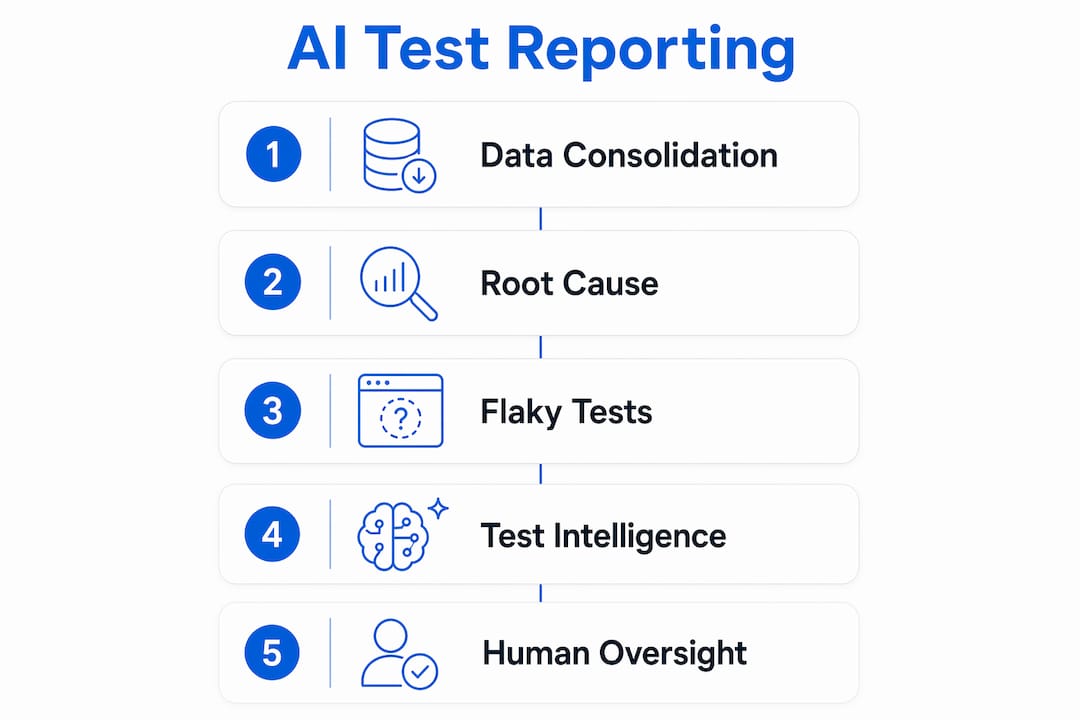
LLM-based diagnostic tools attack this problem with stepwise, constrained prompting. Google’s Auto-Diagnose scans logs, summarizes failure patterns, and uses hard negative constraints in its prompting strategy to refuse conclusions when evidence is insufficient. This design choice is what keeps hallucination rates low and diagnostic confidence high. The system’s “not helpful” feedback rate was only 5.8% across 224,782 test executions, which is a meaningful benchmark for any team evaluating AI diagnostic tools.
Effective AI-driven test analysis classifies failures into four distinct categories:
- Product bugs: Genuine defects in application code that require developer action.
- Flaky tests: Intermittent failures caused by test design or timing issues, not product regressions.
- Environment issues: Failures caused by infrastructure, configuration drift, or dependency unavailability.
- Authoring errors: Test scripts that are incorrectly written and produce false negatives or false positives.
This classification matters because each category demands a different response. Treating an environment issue as a product bug wastes developer time. Treating a product bug as a flaky test delays a critical fix.
“AI analyzes patterns across multiple test runs, enabling teams to differentiate genuine regressions from infrastructure noise or flaky test behavior.” This shift from reactive triage to pattern-based diagnosis is what makes AI-driven test analysis a genuine productivity multiplier for QA organizations.
AI also groups related failures together. Instead of seeing 47 individual test failures in a report, an engineer sees three failure clusters with a shared root cause. That reduction in noise is one of the most practical benefits of AI in test reporting.
What is test intelligence, and how does AI address flaky tests?
Test intelligence is the practice of analyzing patterns across historical test runs to produce insights that raw pass/fail data cannot provide. It represents a shift from reporting what happened in a single run to understanding what is happening across many runs over time.
Flaky tests are the clearest example of why this matters. A test that passes 90% of the time and fails 10% of the time with no code change is not reporting a real defect. It is generating noise. Without AI, engineers must manually track intermittent failures across runs to identify flakiness. With AI, failure grouping and flakiness detection happen automatically, and flagged tests are separated from genuine regression alerts.
Here is how AI-powered test intelligence compares to traditional reporting:
| Capability | Traditional reporting | AI-powered test intelligence |
|---|---|---|
| Failure visibility | Pass/fail per run | Clustered failures with shared root cause |
| Flaky test detection | Manual tracking over time | Automated flagging based on historical patterns |
| Trend analysis | Requires manual spreadsheet work | Built-in trend visualization across runs |
| Triage prioritization | Engineer judgment only | AI-ranked by severity and recurrence |
| Report generation time | 60+ minutes | Under 5 minutes |
The practical outcome is that QA teams spend less time asking “why did this fail?” and more time asking “what does this pattern mean for our release?” That is a more valuable question, and it is only possible when AI handles the aggregation work.
Pro Tip: Use AI flakiness scores as a maintenance queue. Any test flagged as flaky more than three times in a sprint should be scheduled for rewrite or quarantine. Letting flaky tests accumulate in your suite degrades the signal quality of every future report.
AI-assisted teams deliver significantly more test coverage than non-AI teams, but the quality of that coverage depends on how well the team manages test reliability. AI intelligence dashboards make that management tractable at scale.
How to integrate AI test reporting tools with existing QA workflows
The adoption gap in AI-powered QA is striking. Nearly 90% of organizations experiment with generative AI in QA, but only 14% have operationalized it at scale. That gap exists because experimentation is easy and integration is hard. Dropping an AI tool into a broken workflow produces faster broken outputs.
Successful integration follows a layered approach:
- Start with CI/CD pipeline hooks: Connect AI reporting tools to your existing pipeline triggers so reports generate automatically on each build. No test rewrites required.
- Standardize your test data schema: Define consistent field names, failure codes, and severity levels across all test frameworks before AI processing begins. This is the structured data pipeline principle in practice.
- Use observability tooling alongside AI: AI reporting tells you what failed. Observability tools like distributed tracing tell you where in the system it failed. Combining both gives you the full picture. Pairing AI reports with reliable structured data practices reduces the risk of acting on incomplete diagnostics.
- Build a feedback loop: When engineers override an AI classification, log the correction. Feed those corrections back into the model’s context over time to improve accuracy.
- Maintain human sign-off gates: AI-generated reports should inform release decisions, not make them. Keep a human reviewer in the approval chain, especially for production deployments.
One critical limitation to understand: AI automation can report tests as passing despite user-perceived failures caused by timing issues and visual rendering problems. Structural validation and real user experience are not the same thing. Teams that rely exclusively on AI-generated pass signals without perceptual or intent-based validation checks create a false sense of quality. The AI productivity paradox in test automation is real: more automation does not automatically mean better quality unless the automation is measuring the right things.
AI is strongest when paired with strong engineering discipline. It accelerates test review, generates draft summaries, and analyzes failure traces. It does not replace the engineer who understands the business context behind a test.
Key takeaways
AI tools in test reporting deliver their highest value when structured data pipelines, human oversight, and continuous feedback loops work together rather than when AI operates in isolation.
| Point | Details |
|---|---|
| Automation cuts report time | AI reduces manual consolidation from 60+ minutes to under 5 minutes per release cycle. |
| Root-cause accuracy at scale | Google’s Auto-Diagnose reached 90.14% accuracy across 224,782 test executions using constrained LLM prompting. |
| Flaky test separation | AI test intelligence flags intermittent failures separately, keeping genuine regression alerts clean and actionable. |
| Structured inputs are mandatory | Normalizing timestamps and defect classifications before AI processing prevents hallucinated outputs. |
| Adoption gap is the real challenge | 90% of QA organizations experiment with AI, but only 14% have operationalized it at scale. |
Why AI in test reporting still needs a human in the room
The teams I see getting the most out of AI-powered reporting are not the ones with the most sophisticated tools. They are the ones with the most disciplined engineering practices underneath those tools. AI is a quality amplifier, not a quality guarantee.
What concerns me about the current wave of AI adoption in QA is the confidence gap. Teams see a 90% accuracy rate from a system like Auto-Diagnose and assume their reporting is 90% reliable. But that accuracy number applies to a specific, well-structured input set. Feed the same model inconsistent logs from three different test frameworks and the accuracy drops fast. The tool did not get worse. The inputs did.
The future of test reporting will include perceptual testing and intent-based validation, where AI checks not just whether a button exists in the DOM but whether a user can actually see and interact with it as intended. That is the next frontier, and it addresses the ghost interaction problem that current structural automation misses entirely.
My honest advice: treat your AI reporting tool as a junior analyst. It is fast, tireless, and good at pattern recognition. It needs clear instructions, clean data, and a senior engineer reviewing its conclusions before anything ships. The teams that build that relationship get exponential returns. The teams that hand over the keys entirely get confident-sounding reports about software that does not actually work.
— Marketing
See how Wezardapp handles AI-powered test reporting
Wezardapp is built for QA teams that need more than a test runner. It records your screen during UAT sessions, transcribes issues in real time, and uses AI to detect duplicate tickets before they reach your Jira or Azure DevOps backlog.

If you are evaluating where AI fits in your QA process, the UAT testing workflow is one of the highest-leverage places to start. Wezardapp connects directly to Jira for automated bug tracking, turning session recordings into structured tickets without manual write-up. For teams comparing testing approaches, the UAT vs. system testing breakdown clarifies exactly where AI-assisted reporting adds the most value in your pipeline.
FAQ
What is the role of AI tools in test reporting?
AI tools in test reporting automate data consolidation, classify failures by root cause, detect flaky tests, and generate structured summaries that integrate with tools like Jira and Azure DevOps. They reduce manual report generation time by up to 90% while improving diagnostic consistency across large test suites.
How accurate is AI at diagnosing test failures?
Google’s Auto-Diagnose system achieved 90.14% accuracy in root-cause identification across 224,782 test executions using constrained LLM prompting. Accuracy depends heavily on input data quality and structured preprocessing before AI analysis begins.
Can AI replace human QA engineers in test reporting?
AI handles repetitive consolidation and pattern recognition, but human engineers remain responsible for validating conclusions, interpreting business context, and making release decisions. AI is most effective as a quality amplifier paired with disciplined engineering practices.
Why do so few organizations fully operationalize AI in QA?
Nearly 90% of QA organizations experiment with generative AI, but only 14% operationalize it at scale. The gap comes from inadequate data pipelines, inconsistent test schemas, and insufficient human oversight structures rather than tool limitations.
What is test intelligence in AI-powered reporting?
Test intelligence analyzes patterns across multiple historical test runs to differentiate genuine regressions from flaky tests and infrastructure noise. It produces trend visibility, failure clustering, and severity rankings that raw pass/fail data cannot provide.