Context is the single most important element in a bug report. Without it, developers cannot reproduce the issue, cannot diagnose the root cause, and cannot deploy a fix. The industry term for this practice is “contextual bug reporting,” and QA teams that master it see dramatically shorter fix cycles. Why context matters in bug reports comes down to one fact: a vague complaint wastes everyone’s time, while a context-rich ticket gets resolved. This article breaks down what context actually means, what happens when it’s missing, and how testers can capture it consistently.
Why context matters in bug reports: the core elements

Context in a bug report is defined as every piece of information a developer needs to reproduce and diagnose an issue without asking a single follow-up question. That definition sets a high bar. Most bug reports fall short of it.
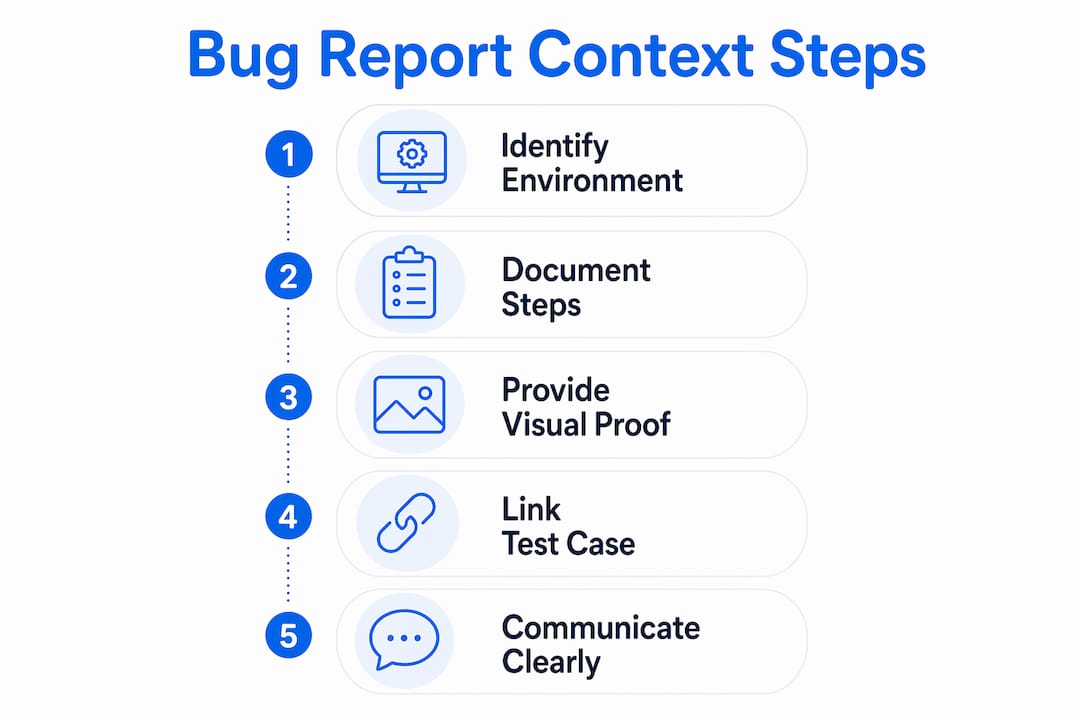
The six elements that form complete context are:
- Exact reproduction steps from a known starting state. Numbered steps written during the reproduction, not from memory, are the foundation. Capturing reports live during reproduction avoids post-memory reconstruction errors that introduce gaps.
- Environment details. OS version, browser, device model, app version, and network conditions all matter. Clear environment details help differentiate configuration mismatches from real bugs and prevent invalid “cannot reproduce” closures.
- Visual evidence. Screenshots, screen recordings, and annotated images show the broken state directly. Visual evidence short-circuits “cannot reproduce” triage and makes developers more willing to spend time hunting the bug.
- Logs and error messages. Console errors, network traces, and timestamps give developers clues that no UI screenshot can provide. Technical logs help diagnose root causes, especially for vague or intermittent symptoms.
- Expected vs. actual results. Writing a bug report as an experiment, stating what should happen and what did happen, creates a reproducible, actionable ticket structure.
- Severity, priority, and business impact. Describing user impact clarifies severity and business priority for bug fixes. Contextual connection to business impact enables developers and product managers to assess priority through an informed lens.
Pro Tip: Link your bug report directly to the relevant test case or user story in your project management tool. That single connection gives developers the business context they need without requiring a meeting.
What happens when context is missing?
The most common outcome of a low-context bug report is a “cannot reproduce” closure. That label feels like blame, but it is actually a process signal. It means the ticket did not contain enough information for the developer to recreate the conditions that triggered the bug.
“Bug reporting is a communication translation issue. The tester describes what they saw in user-flow language. The developer needs to understand it in code-path language. When context is missing, that translation fails completely.”
Low-context reports create a predictable chain of problems:
- The developer cannot reproduce the issue. Without numbered steps, a known starting state, or environment details, the developer is guessing. Guessing wastes time.
- The ticket enters a comment loop. The developer asks for more information. The tester responds hours or days later. The developer has moved on mentally. Resolution slows to a crawl.
- The bug gets closed incorrectly. A ticket marked “cannot reproduce” and closed is a bug that still exists in production. Users keep hitting it. Trust in the QA process erodes.
- Priority disputes emerge. Without user impact context, product managers and developers argue about severity. Linking bug reports with related documentation reduces time wasted on these disputes.
Experienced QA teams treat “cannot reproduce” rates as a process metric, not a blame signal. They conduct five-minute conversations to clarify ambiguity rather than trading long comment threads that drag resolution out for days.
How to capture and communicate rich context effectively
The most common mistake testers make is writing the bug report after the fact. Memory degrades fast. Details that seemed obvious during reproduction become fuzzy within an hour. The fix is to capture context during the reproduction, not after it.
- Record the screen during reproduction. A screen recording captures every click, every state change, and every error message in real time. It removes the need to reconstruct steps from memory and gives developers a visual walkthrough they can pause and replay.
- Annotate screenshots with explicit labels. Annotating screenshots with explicit UI labels removes assumptions and developer confusion. Use arrows, circles, and text callouts to identify exactly what is wrong and where it appears on screen.
- Use a structured template focused on facts. A fact-only bug report is more effective than one padded with emotional or speculative content. The template should include: title, environment, steps to reproduce, expected result, actual result, severity, and attachments. Nothing else.
- Document environment and configuration systematically. Build a checklist that testers complete before submitting any ticket. OS, browser version, app version, user role, and data state should all be standard fields, not optional additions.
- Collaborate with developers to refine context standards. Ask developers which fields they actually use during triage. Their answers will reshape your template. Teams that review rejection reasons regularly see faster bug resolution because they close the feedback loop between reporting and fixing.
Pro Tip: Keep a shared “context checklist” pinned in your team’s Slack channel or Confluence page. Before submitting any ticket, testers run through it in under 60 seconds. The habit compounds over weeks.
The impact of rich context on team productivity and fix speed
The business case for context-driven debugging is direct. High-context bug reports that include the URL, numbered reproduction steps, response codes, and visual proof reduce total time from bug detection to fix deployment to under one day. That is a dramatic improvement over the multi-day cycles common with low-context tickets.
“The best bug reports read like experiments. They state a hypothesis, document the conditions, and record the result. That structure is what makes them reproducible and fixable.”
The productivity gains extend beyond fix speed. Lower “cannot reproduce” rates mean less triage overhead for senior developers. Better severity context means product managers spend less time in priority meetings. Contextual information about user impact and workarounds assists product managers and development leads in making faster, better-informed prioritization decisions. The result is a QA process that functions as a genuine accelerator for the development team rather than a bottleneck.
Strong communication culture amplifies these gains. When testers and developers share a common vocabulary for bug context, the entire team moves faster. New testers onboard more quickly because the template does the teaching. Developers trust the backlog more because every ticket meets a known quality standard. That trust reduces the time developers spend second-guessing reports before they start working on a fix.
Key Takeaways
Context-rich bug reports are the single most effective way to reduce fix time, lower “cannot reproduce” rates, and improve collaboration between QA teams and developers.
| Point | Details |
|---|---|
| Context defines reproducibility | A bug report without environment details, steps, and visual proof cannot be reliably reproduced by a developer. |
| Live capture beats memory | Recording bugs during reproduction eliminates the reconstruction errors that create gaps in reproduction steps. |
| “Cannot reproduce” is a process signal | Treat high “cannot reproduce” rates as a template problem, not a blame issue, and fix the process. |
| Facts outperform speculation | Structured, fact-only reports accelerate triage and reduce misunderstandings between testers and developers. |
| Context cuts fix time sharply | High-context reports that include visual proof and logs can reduce fix deployment time to under one day. |
The translation problem nobody talks about
The most underrated insight in QA is that bug reporting is a translation problem. Testers observe software behavior through a user’s eyes. Developers diagnose it through a code path’s logic. Those two perspectives use completely different vocabularies, and a bug report is the only document that has to satisfy both.
I’ve seen teams spend weeks arguing about whether a bug is “high severity” or “medium severity” when the real problem was that the report never described who was affected or what they couldn’t do as a result. The severity field was filled in, but the context behind it was missing. The argument was a symptom of a context gap, not a genuine disagreement about priority.
The teams that close this gap fastest are the ones that treat bug report quality as a shared discipline, not a tester-only responsibility. Developers who flag missing context in a ticket, rather than just closing it, teach testers what they actually need. That feedback loop is worth more than any template. Pair it with a standardized reporting process and the improvement compounds quickly.
The uncomfortable truth is that most QA teams invest heavily in test coverage and almost nothing in report quality. A test that finds a bug is only half the job. The other half is writing a report that gets it fixed.
— Marketing
How Wezardapp captures context automatically
QA teams that rely on manual context capture face a consistent problem: the quality of a bug report depends entirely on the tester who wrote it. Wezardapp removes that dependency.

Wezardapp is the only user acceptance testing software that records your screen, transcribes the issue in real time, and uses AI to detect duplicate tickets before they reach your Jira or Azure DevOps backlog. Every report includes automatic screen recordings, annotated screenshots, environment metadata, and reproduction steps, captured live during the session. Testers submit a complete, context-rich ticket in one click. Developers receive everything they need to reproduce and fix the issue without a single follow-up question. If you want to see how it works in practice, the AI bug tracking tool page shows the full workflow. For teams running UAT, the UAT testing feedback tool integrates directly into your existing process.
FAQ
What is context in a bug report?
Context in a bug report is all the information a developer needs to reproduce and diagnose an issue without asking follow-up questions. It includes reproduction steps, environment details, visual evidence, logs, and business impact.
Why do “cannot reproduce” errors happen so often?
“Cannot reproduce” errors happen when bug reports lack environment details, precise reproduction steps, or visual proof. Treating this rate as a process signal rather than blame leads to faster improvements in report quality.
What environment details should a bug report include?
A bug report should include the operating system, browser name and version, device model, app version, user role, and network conditions. These details help developers confirm whether a bug is environment-specific or universal.
How does visual evidence improve bug resolution?
Visual evidence, such as annotated screenshots and screen recordings, shows developers the broken state directly and removes ambiguity about what went wrong. Reports with visual proof see faster developer engagement and lower “cannot reproduce” rates.
How does context affect bug fix speed?
High-context bug reports that include numbered steps, response codes, and visual proof can reduce total fix time to under one day. Low-context reports trigger comment loops and triage delays that stretch resolution across multiple days.