A clear bug report is a structured, reproducible description of a software defect that gives developers everything they need to find, confirm, and fix the issue without asking follow-up questions. When you submit clear bug reports to developers, you reduce back-and-forth communication, cut resolution time, and build the kind of trust between QA and engineering that makes the whole team faster. The industry term for this practice is defect reporting, and the difference between a vague ticket and a well-structured one often determines whether a bug gets fixed in the next sprint or sits in the backlog for months. Tools like Jira, Azure DevOps, and Wezardapp all support structured reporting, but the quality of what you write inside those tools is entirely up to you.
What are the critical components of an effective bug report?
Well-structured bug reports with a specific title, numbered steps, expected versus actual behavior, and environment details enable developers to reproduce and triage without follow-ups. Every component carries weight, and skipping even one can send a developer down the wrong path.
A precise, descriptive title
The title is the first thing a developer reads, and it should summarize the bug in one sentence. Compare “Login broken” to “Login button unresponsive on Chrome 124 after entering incorrect password twice.” The second title tells the developer the feature, the trigger, the browser, and the version before they even open the ticket. Specificity in the title also helps with duplicate detection, since vague titles make it harder to spot overlapping reports.
Numbered reproduction steps with preconditions
Reproduction steps are the backbone of any defect report. List them as a numbered sequence, starting from a known application state. Include preconditions like user role, account type, or any feature flags that must be active. Repro steps should be deterministic, meaning any developer following them exactly should hit the same bug every time.

Expected versus actual results
State what the application should do, then state what it actually does. Reference your product requirements document, acceptance criteria, or a previous working build if the correct behavior is documented. Concrete differentiation between expected and actual behavior guides developers in verifying and resolving the issue without guessing your intent.
Environment details
Include environment details like OS, browser and version, app version or build number, deployment context (staging versus production), and any active feature flags. Without this information, a developer may debug the wrong version entirely, wasting hours on a configuration that cannot reproduce the problem.
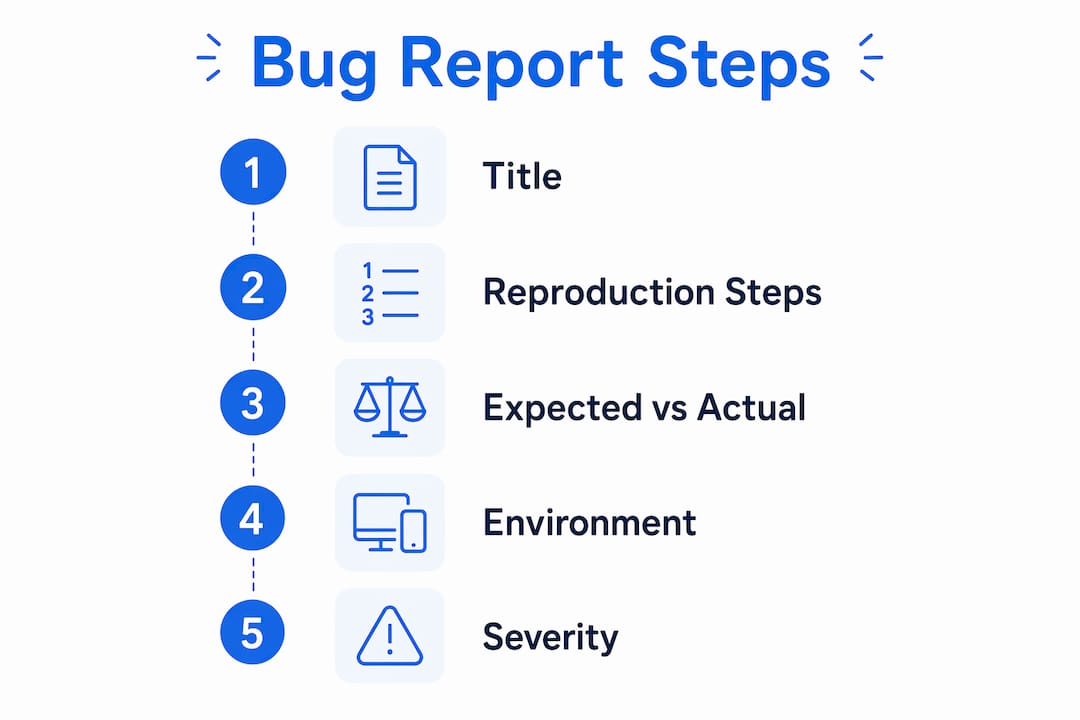
Severity and priority classification
Classify severity by user impact using labels like Critical, High, Medium, or Low. Severity describes how badly the bug affects the user. Priority is separate and reflects how urgently the team needs to fix it, factoring in workarounds and business context. Conflating the two leads to misaligned sprint planning and delayed fixes for genuinely blocking issues.
Here is a quick reference for severity levels:
| Severity | Definition | Example |
|---|---|---|
| Critical | Application crashes or data loss occurs | Checkout flow throws 500 error |
| High | Core feature broken, no workaround | User cannot log in |
| Medium | Feature partially broken, workaround exists | Filter returns wrong results |
| Low | Minor UI or cosmetic issue | Button color misaligned |
Pro Tip: Write your title last. After filling in all other fields, you will have a much clearer picture of the most precise one-line summary.
How do you write clear and unambiguous reproduction steps?
Reproduction steps are where most bug reports fall apart. The starting state or preconditions are often skipped but are crucial for reproducibility and preventing “Cannot Reproduce” closures. Writing steps that any engineer can follow, without prior context, is the real skill here.
Follow this numbered approach for every report:
- Define the starting state. Specify the exact URL, page, user role, and any data conditions. “Logged in as a standard user on the staging environment at app.example.com/dashboard” is a starting state. “In the app” is not.
- Number every action. Each step should be one discrete action. “Click the Settings icon in the top-right corner” is one step. Do not bundle two actions into a single line.
- Specify exact inputs. If the bug involves a form, include the exact text entered. If it involves a file upload, note the file type and size. Vague inputs like “enter some text” make the bug impossible to reproduce reliably.
- Note timing and frequency. If the bug is intermittent, say so. State how often it occurs: “Reproducible 3 out of 5 attempts” is far more useful than “sometimes happens.” Specifying frequency for intermittent bugs helps developers decide whether to investigate a race condition or a data-specific trigger.
- Write for a stranger. Detailed reproduction steps should be written for an engineer without prior context, avoiding shared language assumptions and including explicit labels or annotated screenshots. If your team calls a feature by an internal nickname, use the UI label instead.
Pro Tip: Read your steps aloud before submitting. If you stumble or have to mentally fill in a gap, rewrite that step.
What types of evidence should you attach to support your bug report?
Choosing the right kind of evidence is as important as including evidence itself, and the correct choice depends entirely on the bug type. Attaching the wrong evidence, or too much of it, slows triage rather than accelerating it.
Here is how to match evidence to bug type:
- Screenshots for UI and visual bugs. Crop the image to the relevant area and annotate it with arrows or callouts. A full-page screenshot of a misaligned button buried in a wall of UI adds noise, not clarity.
- Screen recordings for timing-dependent issues. Videos of 20 to 60 seconds work best for bugs involving animations, loading states, or multi-step interactions where a screenshot cannot capture the sequence. Keep recordings short and focused.
- Console, server, or network logs for crashes and data errors. Copy the relevant error message and stack trace directly into the report body, and attach the full log file as a separate attachment. Pasting the entire log into the description field makes the report unreadable.
- Correlation data for faster triage. Including timestamps, session IDs, and commit hashes drastically accelerates triage by enabling precise matching with logs and deployments. A session ID can cut a developer’s log search from an hour to two minutes.
Pro Tip: Before attaching a screenshot, zoom in on the defect area and draw a red rectangle around it. Developers process annotated images faster than raw screenshots.
What are common mistakes to avoid when submitting bug reports?
Vague bug reports waste developer time and lead to frustration and delays. The most damaging mistakes are also the most common, and most of them come from rushing the submission.
- Bundling multiple bugs into one ticket. Never bundle multiple bugs in one report. Bundling leads to partial fixes, unclear ownership, and tickets that never fully close. File one ticket per defect, every time. For more on why separate tickets matter, the QA best practices on the Wezardapp blog explain the tracking implications in detail.
- Generic or vague titles. Titles like “Page not working” or “Bug in checkout” tell a developer nothing. Every title should include the feature, the symptom, and at least one contextual detail.
- Missing environment or version details. A bug reported without an app version or browser version forces the developer to ask before they can even begin investigating.
- Skipping preconditions. Jumping straight to “Click the button” without explaining what state the application must be in first is one of the leading causes of “Cannot Reproduce” outcomes.
- Mislabeling severity. Marking every bug as Critical trains developers to ignore severity labels entirely. Reserve Critical for genuine blockers like data loss or application crashes.
| Mistake | Impact | Fix |
|---|---|---|
| Multiple bugs per ticket | Partial fixes, unclear ownership | One defect per ticket |
| Vague title | Developer cannot triage without reading the full report | Include feature, symptom, and context |
| Missing environment info | Developer debugs wrong version | Always include OS, browser, app build |
| No preconditions | “Cannot Reproduce” closure | Start steps from a defined known state |
What best practices and tools can improve your bug reporting process?
Consistent, high-quality defect reporting does not happen by accident. It comes from building habits and using the right tools to support them.
- Use a template for every report. A standard template with fields for title, steps, expected result, actual result, environment, severity, and attachments removes the cognitive load of deciding what to include. Teams using Jira or Azure DevOps can enforce templates at the project level.
- Leverage AI-assisted capture tools. Wezardapp records your screen, transcribes the issue in real time, and uses AI to detect duplicate tickets before they reach your backlog. This eliminates the manual effort of writing reproduction steps from memory after the fact.
- Verify your steps before submitting. Self-verification prevents “Cannot Reproduce” outcomes and speeds resolution. Follow your own steps from scratch in a clean session before hitting submit.
- Ask for developer feedback. After a bug is fixed, ask the developer whether the report gave them what they needed. This feedback loop is one of the fastest ways to improve your reporting quality over time.
- Track bug status actively. Monitor your submitted tickets. If a developer marks a bug as “Cannot Reproduce,” respond with additional context rather than letting the ticket go stale.
| Practice | Benefit |
|---|---|
| Standardized templates | Consistent structure across all reports |
| AI-assisted screen recording | Captures steps and evidence automatically |
| Pre-submission self-verification | Eliminates “Cannot Reproduce” closures |
| Developer feedback loop | Continuously improves report quality |
Pro Tip: Save a personal bug report checklist as a browser bookmark or sticky note. Before every submission, run through it in under 30 seconds.
Key takeaways
Effective defect reporting requires a precise title, deterministic reproduction steps, environment context, expected versus actual results, correct severity classification, and matched evidence to cut resolution time and eliminate unnecessary back-and-forth.
| Point | Details |
|---|---|
| Structure every report | Include title, steps, expected vs actual, environment, severity, and evidence every time. |
| Write steps for a stranger | Assume zero prior context and specify every input, state, and action explicitly. |
| Match evidence to bug type | Use screenshots for UI bugs, short videos for timing issues, and logs for crashes. |
| One bug per ticket | Separate tickets preserve ownership, tracking, and clean closure for each defect. |
| Verify before submitting | Follow your own steps in a clean session to prevent “Cannot Reproduce” outcomes. |
Why most bug reports fail before a developer reads them
After years of working with QA teams and engineering backlogs, the pattern is consistent: the reports that stall are not missing information because testers do not know it. They stall because testers assume developers share their context. A tester who just spent two hours reproducing a bug knows the exact account state, the feature flag that was active, and the sequence of events that triggered it. None of that context transfers automatically into a ticket.
The fix is not more detail for its own sake. It is the right detail, organized so a developer with zero context can act on it in under five minutes. I have seen a single well-placed session ID cut a debugging session from a full afternoon to twenty minutes. I have also seen a Critical-labeled ticket with a vague title and no steps sit untouched for two sprints because no one knew where to start.
The teams that write the best bug reports treat each ticket as a handoff document, not a complaint. They write for the developer who will read it at 9 a.m. on a Monday with no memory of the conversation from last week. Build that habit, and your fix rate will improve faster than any process change you could make.
See how Wezardapp makes bug reporting faster
Wezardapp is the only UAT software that records your screen, transcribes the issue in real time, and uses AI to detect duplicate tickets before they reach your Jira or Azure DevOps backlog. That means your team spends less time writing reports from scratch and more time shipping fixes.
If your team is still copying and pasting reproduction steps manually, or chasing developers for “Cannot Reproduce” responses, the AI bug tracking tool from Wezardapp automates the evidence capture and ticket creation process end to end. You can also explore the full range of Wezardapp use cases to see how other QA teams have cut their reporting time significantly.
FAQ
What should every bug report include?
Every bug report should include a descriptive title, numbered reproduction steps with preconditions, expected versus actual results, environment details (OS, browser, app version), severity classification, and relevant attachments like screenshots or logs.
How do you write reproduction steps that developers can follow?
Start from a defined application state, number each action as a single discrete step, specify exact inputs, and note frequency for intermittent bugs. Write as if the developer has no prior knowledge of the feature or the context.
What is the difference between severity and priority in a bug report?
Severity describes how badly the bug affects the user, ranging from Critical to Low. Priority reflects how urgently the team needs to fix it, based on business impact and available workarounds. They are separate fields and should be set independently.
Why do developers close bugs as “Cannot Reproduce”?
“Cannot Reproduce” closures almost always result from missing preconditions, vague reproduction steps, or absent environment details. Self-verifying your steps before submission and including session IDs or timestamps eliminates most of these outcomes.
Should you attach evidence to every bug report?
Yes, but match the evidence type to the bug. Use screenshots for visual defects, short screen recordings for timing-dependent issues, and console or server logs for crashes and data errors. Attaching the wrong type adds noise without helping the developer.