A duplicate incident is any second record created for the same event, whether it came from a repeated inbound email, a business rule that fired twice, or an integration retry. The immediate fix is threefold: link the newer record to the original with “duplicates,” pause or inspect whatever inbound channel produced it, and shut down the source before it creates a third. Everything else, from Number Maintenance to Now Assist automation, builds on that first move.
TL;DR:
- Automatically linking suspected duplicates requires filtering incidents within a short time window and verifying key fields like caller, configuration item, and email message headers.
- Shared incident numbers often result from race conditions or scripts that bypass default number generation, requiring exporting, renumbering, and enforcing uniqueness constraints.
- Preventing duplicates at the source involves deduplicating inbound email by Message-ID, staggering polling, and adding idempotency keys for API integrations.
- Large spikes in duplicate incidents typically indicate recent configuration changes, integration errors, or email rescanning issues that need immediate containment and troubleshooting.
- Automated tools like Now Assist can suggest or generate resolution notes for duplicates but should be used gradually with human review to avoid closing legitimate incidents prematurely.
Table of Contents
- What Counts as a Duplicate Incident in ServiceNow?
- What Causes ServiceNow Ticketing Issues Like Duplicates?
- How Do I Link Two Incidents in ServiceNow?
- Why Do I Have Duplicate Incident Numbers in ServiceNow?
- Preventing Duplicate Tickets Before They Reach the Queue
- Automation and Now Assist: How ServiceNow Marks Duplicates
- Runbook: What to Do When Duplicate Incidents Spike
- When Should You Automate Duplicate Cleanup vs. Require Human Review?
- Another Way to Stop Duplicates Before They Ever Hit ServiceNow
- Where to Verify These Fixes Yourself
- Sources
- FAQ
What Counts as a Duplicate Incident in ServiceNow?
Most admins define a duplicate incident as two or more records describing the same underlying event: same caller, same configuration item, matching short description, and timestamps close enough that coincidence is unlikely. That’s a working definition, not a formal ServiceNow field, so judgment calls happen constantly.
Duplicates aren’t the same as recurring incidents (the same problem happening again over time, legitimately separate events) or related incidents (different symptoms tied to one root cause). ServiceNow gives you the tools to record the distinction: the incident’s related links support “duplicates” and “is duplicated by” relationships, and the resolution code field includes a “Duplicate” option. Setting that resolution code correctly matters for reporting. Otherwise, your mean time to resolution and first call resolution numbers get skewed by tickets that never should have existed as separate work items.
What Causes ServiceNow Ticketing Issues Like Duplicates?
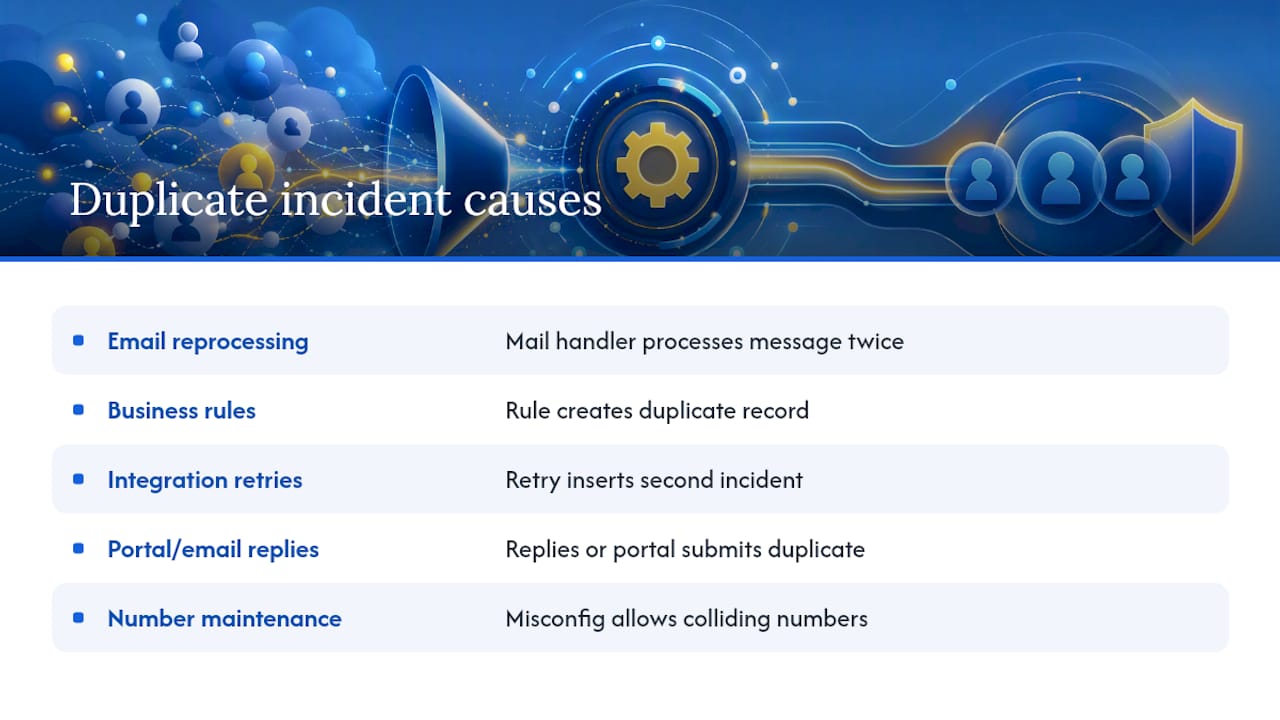
Five patterns account for most duplicate incident management headaches:
Inbound email reprocessing. Mail handlers sometimes process the same message twice, especially when an email security appliance rescans and re-flags a message as unread after delivery. ServiceNow’s own support documentation covers cases where inbound email actions matching notification emails auto-create multiple duplicate incidents from a single source message.
Custom business rules. A script that fires on interaction close, or an “insert” business rule with a race condition, can generate a second incident record without anyone noticing until volume spikes. ServiceNow’s KB on business-rule-created duplicates walks through a specific case tied to interaction closure.
Integration retries. Webhooks and API calls that lack idempotency protection will happily insert a second incident if the first response times out or errors.
Portal and email reply behavior. Users replying to old notification threads without the ticket token, or submitting through the portal after already emailing support, create honest duplicates with no bug involved.
Number Maintenance misconfiguration can compound the problem by letting colliding numbers slip through unnoticed.
How Do I Link Two Incidents in ServiceNow?
Detection starts with a targeted query, not a manual scroll through the list view. Here’s the practical sequence:
- Filter incidents by a tight time window (same day, often same hour), then group by short description or configuration item to surface near-identical records.
- Cross-check caller and CI fields. Two tickets from the same caller about the same CI within minutes of each other are a strong duplicate signal.
- For email-originated tickets, pull the message headers. Matching Message-ID or In-Reply-To values across two incidents confirm the same email got processed twice.
- Open the older incident, use the related links to set “duplicates” pointing to the newer record (or “is duplicated by” from the original), and set the resolution code to Duplicate on the record you’re closing.
- If the second submission adds genuinely new information, such as a follow-up issue on the same CI, use Copy Incident to create a child incident instead of closing it as a straight duplicate. That preserves the new detail while keeping the parent-child relationship visible in reporting.
Why Do I Have Duplicate Incident Numbers in ServiceNow?
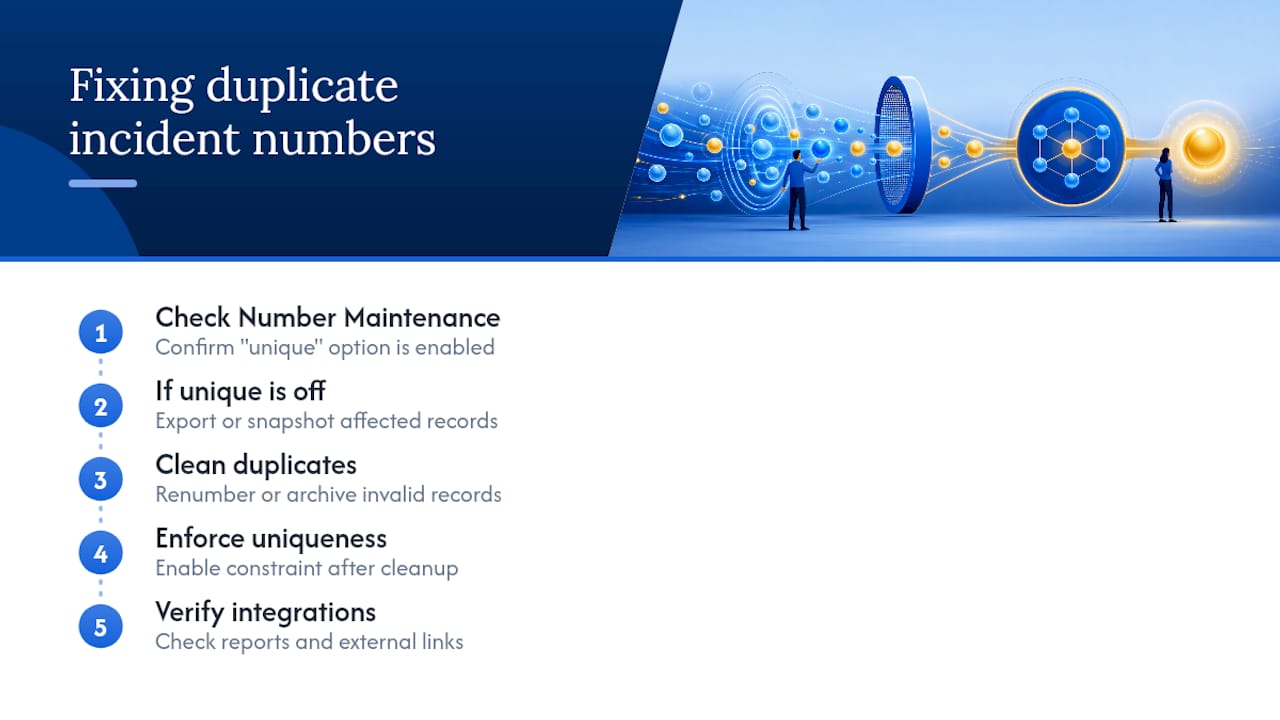
Duplicate numbers are a different, rarer problem from duplicate content. Two incidents sharing the same number usually means a race condition during a high-volume insert burst, or a custom script that bypasses the normal number generation and inserts directly into the table.
Start by checking the Number Maintenance record for the incident table and confirming the “unique” option is enabled on the number field. Community troubleshooting threads consistently point to this setting as the first thing to verify when duplicate numbers appear. If it’s already off, don’t just flip it on. Existing duplicate numbers will block the constraint from applying. Export or snapshot the affected records first, then renumber or archive the invalid ones, and only then enforce uniqueness going forward. Skipping the cleanup step is the single most common reason admins get stuck mid-fix. Once the field is clean, double check any integration or report that referenced the old numbers, since renumbering can silently break external links.
Preventing Duplicate Tickets Before They Reach the Queue
Configuration changes do more long-term work than manual detection ever will. A few patterns consistently reduce duplicate incident creation:
- Deduplicate inbound email by Message-ID in your mail handler logic, not just by subject line or sender.
- Stagger polling intervals so they don’t collide with your email security scanner’s rescan cycle, which is exactly the mechanism Atlassian documented causing duplicate ticket creation in Jira Service Management when Microsoft ATP’s Dynamic Delivery mode marks scanned mail as unread.
- Add debounce logic or transaction-level locks to business rules that insert records, so a rapid double-fire can’t slip through.
- Require idempotency keys on inbound API integrations so a retried request updates the existing record instead of creating a new one.
Pro Tip: Never flip on strict uniqueness or aggressive dedupe rules before you’ve cleaned up the duplicates already sitting in your instance. Rules built for a clean state will misfire against a messy one, and you’ll spend more time debugging the rule than you saved by adding it.
Automation and Now Assist: How ServiceNow Marks Duplicates
Now Assist’s incident resolution workflow can generate resolution notes, suggest a resolution code, and update the duplicate incident information field automatically once “Duplicate” is selected as the resolution code. This is documented in ServiceNow’s own wrap-up and resolve incident agentic workflow, and it extends the broader resolution notes generation feature that also recommends knowledge base attachments.
That’s genuinely useful for standardizing how agents document duplicates, but it isn’t a reason to auto-resolve without review. AI-suggested resolution notes still need a human glance before they close a record, especially early in rollout. Test the workflow against a batch of known duplicates first, confirm the suggested resolution code and notes match reality, then expand scope gradually rather than turning it loose across the whole queue on day one.
Runbook: What to Do When Duplicate Incidents Spike
When duplicate volume spikes suddenly, work the problem in this order:
- Contain it. Pause inbound email processing if it’s safe to do so, or throttle the mail handler’s polling frequency to slow the bleeding.
- Diagnose it. Compare timestamps across the suspect records, pull Message-ID headers from the affected emails, and check whether a business rule or integration was deployed recently.
- Remediate it. Link and resolve the duplicates, archive or renumber any invalid records, and fix the specific rule or connector causing the repeat inserts.
- Prevent recurrence. Turn on uniqueness enforcement now that the table is clean, add monitoring that flags near-identical incidents within a short window, and write down what happened so the next admin doesn’t relearn it the hard way.
Pro Tip: Keep a running log of every duplicate-incident root cause you’ve fixed. After a year, that log becomes the fastest diagnostic tool you own, because most repeat spikes trace back to a pattern you’ve already seen once.
When Should You Automate Duplicate Cleanup vs. Require Human Review?
Auto-resolve is tempting because it’s fast, but speed and accuracy trade off directly here — understanding the AI-to-Human handoff best practices for support teams helps strike the right balance. A false positive that closes a real, distinct incident as a duplicate erodes trust in your queue faster than a slow manual review ever will.
The better path is staged: run Now Assist’s suggestions in shadow mode first, measure how often a human would have overridden the AI’s call, and only expand auto-resolve once that override rate drops below a threshold you’re comfortable defending to your service desk manager. Whatever threshold you pick, keep an audit trail. If someone asks why a ticket got closed as a duplicate six weeks ago, “the AI decided” is not an answer that survives a postmortem.
— Marketing
Another Way to Stop Duplicates Before They Ever Hit ServiceNow
Everything above assumes the duplicate has already landed in your incident table. Some solutions address that problem upstream entirely. Instead of fixing duplicates after they’re created, they use screen recording and real-time AI transcription during user acceptance testing to catch duplicate reports before they become tickets, flagging matches before they reach your backlog.

That distinction matters if a meaningful share of your duplicate incident volume originates from testers or business users independently reporting the same bug in slightly different words. No mail handler tweak or business rule fix touches that source, because the duplication happens at the human reporting stage, not in ServiceNow’s processing layer. Teams running structured UAT cycles alongside production support are the ones who benefit most from adding this kind of intake step. If your duplicates trace mostly to email or integration issues, the fixes above are still your first move. If you’re seeing repeat reports from testers describing the same defect five different ways, take a look at how AI-powered duplicate detection works before your next UAT cycle, or check the Jira integration guide to see how it feeds a backlog you’re already using.
Where to Verify These Fixes Yourself
For hands-on troubleshooting, start with ServiceNow’s own KBs on email-triggered duplicate incidents and business-rule-triggered duplicates, plus the Now Assist resolution notes documentation. If your root cause looks like a rescanning email gateway rather than a ServiceNow configuration issue, Atlassian’s writeup on Microsoft ATP triggering duplicate tickets maps the same failure pattern in a different platform.
Sources
- IT Service Management AI agent collection Wrap-up and resolve incident agentic workflow
- Duplicate ticket creation in Jira Service Management caused by Microsoft’s ATP in Dynamic Delivery mode | Jira and Jira Service Management | Atlassian Support
FAQ
How Do I Avoid Duplicate Records in a CMDB?
Enforce unique identification rules on configuration items (serial number, asset tag, or a combination of attributes) and run regular reconciliation against discovery data, since most CMDB duplicates come from manual entry bypassing automated discovery matching.
How Do I Link Two Incidents in ServiceNow?
Open the related links on the older incident, add a “duplicates” relationship pointing to the newer record (or “is duplicated by” from the original), and set the resolution code to Duplicate before closing.
How Can I Remediate Duplicate CIs in ServiceNow?
Identify the duplicate pair through reconciliation reports, merge relationships and history onto the surviving CI, then retire or delete the redundant record after confirming no active incidents still reference it.
How Do I Get a List of Incidents from ServiceNow?
Use the incident list view with filters for time window, caller, or configuration item, or query the Table API for programmatic access when you need the data outside the platform.
Can Now Assist Automatically Resolve Duplicate Incidents?
Now Assist can generate resolution notes and update duplicate incident information once you select the Duplicate resolution code, but it works best reviewed by a human, especially during initial rollout.