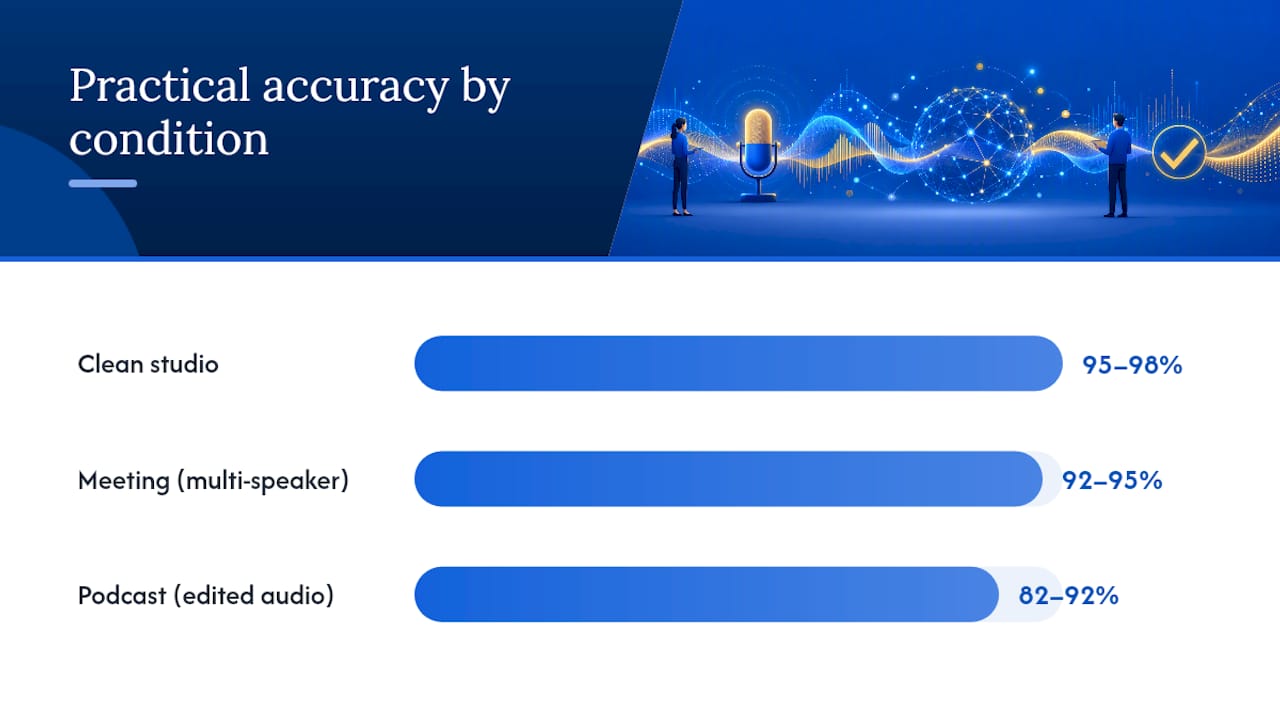
On clean, single-speaker English audio, top AI transcription models now land in the 95% to 98% accuracy range. Drop into a real meeting with crosstalk, accents, or phone audio, and accuracy can fall into the 82% to 92% range. If your use case tolerates minor errors (notes, drafts, searchable archives), AI alone works. If it doesn’t (legal, medical, compliance), budget a human review pass.
TL;DR:
- AI transcription accuracy drops significantly in noisy, multi-speaker, or phone audio environments, with WER increasing to double digits in degraded conditions.
- Diarization errors, especially with overlapping speech or misattributed speakers, often cause more issues than small WER increases in multi-speaker recordings.
- Recording at 16 kHz or higher, using a good microphone, and limiting background noise can improve WER from over 20% to under 10% for real-world audio.
- Human review remains necessary for legal, medical, or compliance transcripts, where a single error can have serious consequences, regardless of overall WER.
- Vendor accuracy claims should be tested on your actual audio with your conditions, as lab results and benchmarks often overstate performance in practical scenarios.
Table of Contents
- What Does “AI Transcription Accuracy” Actually Measure?
- How Accurate Is AI Transcription by Condition?
- What Factors Most Commonly Wreck Transcription Accuracy?
- How Can You Improve AI Transcription Accuracy?
- When Do You Need Human Review Instead of AI Alone?
- How Do You Test a Transcription Vendor Before Committing?
- Why Accurate Transcription Changes How Bug Reports Get Written
- Where ASR Accuracy Is Headed Next
- Get More Reliable Bug Reports With Wezard
- Sources
- FAQ
What Does “AI Transcription Accuracy” Actually Measure?
Every accuracy claim you see from a vendor traces back to one core metric: Word Error Rate (WER). WER counts three types of mistakes: substitutions (the model heard “affect” instead of “effect”), deletions (a word got dropped entirely), and insertions (a word that was never spoken shows up in the transcript). You add those three error counts, divide by the total number of words in the reference transcript, and multiply by 100. A 5% WER means, on average, 5 words out of every 100 are wrong. For languages that don’t split cleanly into words, such as Mandarin or Japanese, researchers often switch to Character Error Rate (CER), which runs the same math at the character level and gives a fairer read.
WER tells you nothing about who said what. That’s where diarization accuracy comes in, measuring how correctly a system assigns each word to the right speaker. A transcript can have a low WER and still be functionally useless if it labels the CEO’s comments as the intern’s. In multi-speaker recordings, diarization errors often matter more than small WER gains. A model with slightly higher WER but correct speaker attribution beats a model with a marginally lower WER and garbled speaker turns, according to controlled testing across eight transcription providers.
Latency is the third variable, and it trades directly against accuracy. Streaming transcription (live captions, real-time meeting notes) processes audio in small chunks as it arrives, which means the model can’t “look ahead” to resolve ambiguity. Batch transcription processes the full file after recording ends, giving the model more context to work with. That gap typically costs streaming systems 1 to 3 percentage points of WER compared to the same model run in batch mode. If you need captions live, you accept the penalty. If you need the cleanest possible transcript, wait for batch processing.
Reading a vendor’s accuracy claim requires some skepticism. Watch for these red flags:
- Cherry-picked test sets. A “98% accurate” claim tested only on clean, scripted, single-speaker audio tells you nothing about how the tool handles your actual meetings.
- Undisclosed post-processing. Some vendors report WER after a human or secondary model cleaned up the output, not the raw ASR result.
- No mention of language or accent. A headline number without a language tag is almost always the easiest-case English figure.
- No sample size or audio duration. A benchmark run on three minutes of audio doesn’t generalize.
Academic reviews of automatic speech recognition performance consistently find that lab-condition results run far better than conversational, real-world outcomes, and that the testing methodology itself changes the reported number more than most vendors admit (PMC review of ASR performance).
How Accurate Is AI Transcription by Condition?
Accuracy isn’t one number. It’s a range that shifts hard depending on the recording environment, and the gap between best case and worst case is bigger than most buyers expect.
The gap between conditions is the real story. A model that hits 96% accuracy on studio audio can drop to 85% or lower on the same content recorded over a phone line. If you’re budgeting a transcription workflow, the environment matters more than which model you pick.
Clean, single-speaker English audio recorded on a decent microphone is the best-case scenario. Industry benchmarks put leading models at low single-digit WER under best-case conditions, which translates to a high “readable draft” accuracy where most sentences need zero edits (speech-to-text benchmark data by language). Google’s Gemini 3.5 Transcribe reports 2.6% WER in non-streaming mode and 4.0% in streaming mode on Artificial Analysis benchmarks, with notably better handling of noisy conditions than earlier model generations (Gemini 3.5 Transcribe announcement).
Meetings and podcasts introduce overlapping speech, room echo, and inconsistent mic distances. A controlled test across eight commercial providers found average WER on meeting-style audio ranged meaningfully, with the best providers scoring notably lower than the weakest. Crosstalk and accented speakers drove the largest jumps in error rate for every provider tested (meeting transcription accuracy comparison). Podcasts with edited audio and consistent single-speaker segments tend to land closer to the clean-studio end of that range.
Phone and telephony audio is the hardest common case. Standard telephony compresses audio to an 8 kHz sample rate, which strips out the higher-frequency detail that ASR models rely on to distinguish similar-sounding consonants. That compression alone pushes WER up significantly, often into doubledigit percentage ranges even with strong models, according to industry QA benchmarking on degraded audio channels (transcription benchmark data).
Language and accent create a separate axis of variance entirely. Open benchmarking of Whisper large-v3 shows English WER near 4%, competitive with top commercial models, but performance on lower-resource languages like Hindi or Egyptian Arabic can be much worse, reaching substantially higher error rates on the same architecture (Whisper benchmark across 12 languages). Regional accents within English show a similar, smaller pattern: heavily accented speech consistently produces more substitution errors than standard broadcast-style pronunciation.
| Condition | Typical WER | Practical accuracy |
|---|---|---|
| Clean studio, single speaker | 3% to 5% | 95% to 98% |
| Podcast, edited audio | 4% to 6% | 82% to 92% |
| Meeting, multiple speakers | 2.6% to 4.0% | 92% to 95% |
| Phone/telephony (8 kHz) | double-digit percentages | 82% to 90% |
| Lower-resource language | 10% to 15%+ | 85% to 90% |
What Factors Most Commonly Wreck Transcription Accuracy?
Most transcription failures trace back to a short list of repeat offenders, and knowing which one you’re dealing with tells you exactly what to fix.
Overlapping speech is the single biggest diarization killer. When two people talk over each other, the model has to guess who owns each word, and guessing wrong doesn’t just create one error. It can misattribute an entire sentence to the wrong speaker, which cascades into a transcript that reads like a different conversation than the one that happened.
Silence and low-volume segments cause a stranger problem: hallucination. Some ASR models, when fed near-silent audio, will confidently generate text that was never spoken, sometimes looping the same phrase repeatedly. Practitioners handle this by thresholding out segments below roughly negative 50 decibels and scanning outputs for repeated-token patterns before trusting the transcript (practitioner heuristics on hallucination mitigation).
Accents and code-switching (speakers moving between languages mid-sentence) push error rates up for the same reason low-resource languages struggle: the model has seen less training data that matches that specific pattern. A bilingual speaker switching from English to Spanish mid-thought will often confuse a model trained predominantly on monolingual audio.
Compression and sample rate set a hard ceiling on possible accuracy no matter how good the model is. Audio sampled below 16 kHz, common in older phone systems and some video conferencing codecs, throws away frequency information the model needs. Pair that with a low signal-to-noise ratio (background hum, HVAC noise, open-office chatter) and even top-tier models start making basic substitution errors on words that would be trivial in a quiet room.
Common real-world failure patterns include:
- A construction site walkthrough where wind noise pushes WER past 20%, even on a model that scores 4% in the studio.
- A support call where the customer and agent talk over each other in the first ten seconds, corrupting the diarization for the entire segment.
- A bilingual product demo where the model silently drops every phrase spoken in the secondary language.
- A long silent pause during screen sharing that generates three lines of hallucinated dialogue.
Pro Tip: Before trusting any transcript for something that matters, scan the first and last 30 seconds for hallucinated text. Models are more likely to fill dead air at the start and end of a recording than in the middle, where speech context anchors the output.
How Can You Improve AI Transcription Accuracy?
You don’t need a different vendor to get a better transcript. Most accuracy problems get solved before, during, or shortly after the recording, not by switching models.
- Record at 16 kHz or higher. Most modern ASR models are trained on 16 kHz audio as a floor. Recording at 8 kHz (standard phone quality) caps your accuracy regardless of which model processes it afterward.
- Target a signal-to-noise ratio of 20 dB or better. Use a dedicated microphone instead of a laptop’s built-in mic, and record in a room with soft surfaces (carpet, curtains, furniture) to cut echo. A $50 USB condenser microphone outperforms most built-in laptop mics by a wide margin on this metric alone.
- Choose streaming or batch based on your actual need. If you need live captions or real-time notes, accept the 1 to 3 point WER penalty streaming carries. If the transcript feeds a legal record or a published article, run batch processing and take the accuracy gain.
- Feed the model custom vocabulary. Most production-grade transcription platforms accept a glossary of proper nouns, acronyms, and domain jargon. A QA team transcribing bug reports should load terms like “regression,” “sprint,” or specific product feature names so the model stops guessing at unfamiliar words.
- Run diarization separately if your primary model’s speaker labels feel unreliable. Some platforms let you re-run diarization with a dedicated model even after transcription completes, which fixes speaker attribution without touching the word-level transcript.
- Set a confidence threshold for human review. Most ASR outputs include per-word or per-segment confidence scores. Flag anything below roughly 80% confidence for manual review instead of trusting the full transcript blindly.
- Layer a fallback model for critical audio. Production transcription pipelines increasingly pair a primary ASR model with a lightweight fallback and confidence scoring layer, since single-model deployments are more fragile when they hit an edge case (production transcription pipeline analysis).
To measure whether any of this actually worked, build a small reproducible test: record the same 10-minute conversation twice, once with your old setup and once with the changes above, run both through the same model, and compare WER side by side. Without that baseline, you’re guessing whether a fix helped.
Pro Tip: Keep a “golden” 5 minute test file with known correct text. Every time you change a microphone, model, or vendor, run it through and compare WER against your baseline before rolling the change out to your whole workflow.
When Do You Need Human Review Instead of AI Alone?
The right accuracy target depends entirely on what the transcript is for, not on chasing the lowest possible WER across the board.
Quick internal notes or searchable meeting archives can tolerate a 5% to 8% WER without much consequence. A reader skims past the occasional wrong word without losing the meaning. Captions for public video content need tighter accuracy, since viewers notice errors and they reflect on your brand, so aim for WER under 5%. Legal transcripts, medical dictation, and compliance records need a human editing pass regardless of the reported WER, because a single wrong word (a dosage, a date, a contractual term) carries outsized risk even at low overall error rates.
A useful rule of thumb: each WER percentage point roughly corresponds to one error per 100 words, and each error takes a human editor 5 to 15 seconds to locate, verify, and correct depending on context. That math changes your staffing plan fast once transcript volume scales past a handful of files a week.
Hybrid workflows split the difference without requiring a full manual pass on everything:
- Sample 10% to 20% of transcripts for spot-check QC instead of reviewing every file.
- Route anything with per-segment confidence below your threshold straight to a human editor.
- Flag files touching regulated information (health records, financial details, legal statements) for mandatory review regardless of confidence score.
- Track editing time per file over a month to build a real cost-per-transcript number instead of estimating.
Turnaround and cost scale together here. Pure AI transcription runs in near real time and costs pennies per minute. Adding a human review pass adds hours and a per-minute labor cost, so the decision usually comes down to how expensive a wrong word actually is in your specific use case.
How Do You Test a Transcription Vendor Before Committing?
Vendor accuracy claims are marketing copy until you test them on your own audio. Here’s a reproducible plan that takes an afternoon and gives you a real answer.
- Prepare four sample files representing your actual conditions: one clean single-speaker recording, one multi-speaker meeting with some crosstalk, one noisy or low-quality recording, and one with a non-standard accent relevant to your audience.
- Transcribe each file manually first, or use an existing verified transcript as your reference. You can’t calculate WER without a trusted baseline.
- Run all four files through every vendor you’re evaluating using identical settings (same streaming/batch mode, same language setting).
- Calculate WER, diarization accuracy, and latency separately for each file and each vendor, rather than accepting a single blended number.
- Ask each vendor directly what dataset their published benchmark used, whether the number includes post-processing, and whether diarization is built in or requires a separate tool.
- Request raw output, not a cleaned demo transcript, and check per-segment confidence scores if the vendor exposes them. Low confidence on a segment is your signal to spot-check it manually before trusting the file.
No single tool wins on every axis. Some lead on clean-audio WER, others on streaming latency, others on language coverage, so weigh the metrics by which one actually matters for your workflow (tool comparison across accuracy dimensions). The goal isn’t finding a perfect vendor. It’s finding the one whose weaknesses don’t hit your specific use case.
Why Accurate Transcription Changes How Bug Reports Get Written
A tester who has to stop, remember what happened, and type it up later loses detail every single time. Screen-recorded, transcribed issue capture solves that by turning a spoken walkthrough into a written report while the context is still fresh, which cuts down on the vague, incomplete bug tickets that QA teams and developers both hate triaging.
Per-segment confidence and accurate timestamps matter more here than in most transcription use cases, because a bug report often gets parsed into discrete steps automatically. A timestamp that’s off by even a few seconds can attach the wrong screen state to the wrong sentence, turning “the button didn’t respond” into a step that points at the wrong screenshot entirely.
Run your own comparison: have one tester write a manual bug report from memory after finding an issue, and have another describe the same class of issue out loud while screen recording. Compare which report a developer can act on faster, without follow-up questions. The transcription-driven report usually wins on specificity alone. Teams using Jira integration or Azure DevOps feedback sync see this most clearly once tickets start arriving with full context attached automatically instead of a one-line summary.
Where ASR Accuracy Is Headed Next
Model improvements over the last two years have narrowed the gap between clean-audio and real-world performance faster than most people tracking this space expected. Multilingual coverage is the area with the most room left to close. The double-digit WER gap between English and lower-resource languages on models like Whisper large-v3 won’t disappear with one model generation, but it’s shrinking with each release cycle.
Be skeptical of any single-number accuracy claim a vendor puts on a landing page. It almost certainly reflects the easiest test condition they could find, not your meeting room or your phone line. Test on your own audio, measure WER and diarization separately, and build a hybrid workflow wherever a wrong word actually costs something. That approach beats chasing whichever vendor claims the highest number this quarter.
— Marketing
Get More Reliable Bug Reports With Wezard
Wezard is the only UAT platform that pairs screen recording with real-time transcription and AI duplicate detection before tickets ever reach your backlog. Instead of a tester typing a rushed summary after the fact, they narrate what’s happening while it happens, and Wezard turns that into a structured, timestamped report your developers can act on immediately.

The practical payoff shows up in your backlog, not just your transcripts. Duplicate tickets, the kind that eat up a triage lead’s whole morning, get flagged automatically before they clutter Jira or Azure DevOps. Pair that with voice-based bug reporting and you cut the lag between “I found something” and “the dev team has everything they need.”
If richer, faster bug reports would change how your QA cycle runs, check the Wezard pricing page for current details on available plans. Teams pairing AI-driven feedback tools with structured QA processes have also reported measurable productivity gains, a pattern documented broadly across AI adoption in agency and operations work.
Sources
The accuracy figures and methodology notes throughout this piece draw from a mix of vendor benchmarks, independent multi-provider testing, and peer-reviewed evaluation research:
- Transcription Accuracy Tested Across 8 Providers | meetingstack
- Evaluating the performance of artificial intelligence-based …
FAQ
Is AI Transcription 90% Accurate?
It depends entirely on the audio. Ninety percent isn’t a universal number. It’s roughly where meeting and telephony audio tend to land.
What Is the 30% Rule in AI?
If you’ve seen that figure elsewhere, it likely refers to a different AI context; for transcription specifically, the reliable comparison points are WER bands by condition, not a fixed percentage rule.
Can I Use ChatGPT for Transcription?
ChatGPT itself isn’t built as a dedicated transcription engine, though OpenAI’s separate Whisper model is widely used for speech-to-text and performs competitively on English audio, hitting roughly 4% WER on clean speech in independent benchmark testing. For production bug reporting or UAT workflows, a purpose-built platform with diarization and integrations handles the job more reliably than a general-purpose chat model.
Will Transcriptionists Be Replaced by AI?
Legal, medical, and compliance transcription still lean on human review because a single missed word carries real risk, so expect a hybrid model rather than full replacement for the foreseeable future.
How Much Does Wezard Cost?
Wezard’s Starter plan is $25 per month, Team is $70 per month, and Business is $160 per month, with Enterprise pricing available on request through the pricing page.