Voice bug reporting is the capture of a short user audio message paired with contextual technical metadata so developers can reproduce and fix issues faster. The recommended baseline bundle is: recorded audio, auto-generated transcript, screenshot, console logs, network trace, DOM replay (rrweb or equivalent), and device/OS version.
Why bother with the full bundle? Three reasons that come up consistently:
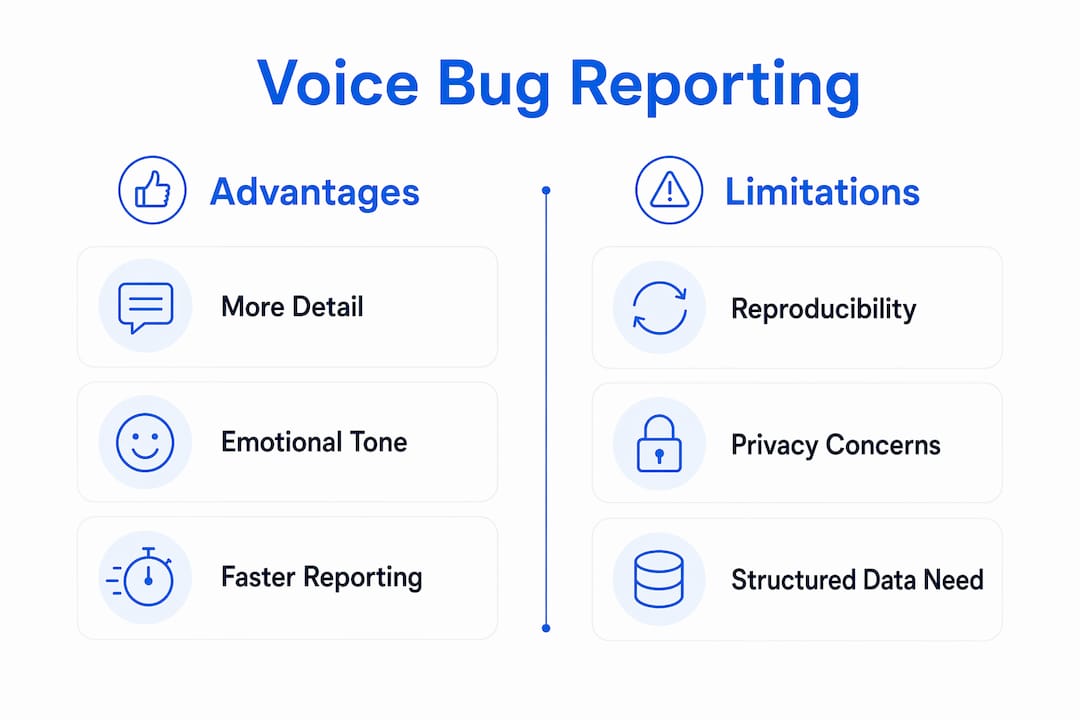
- Richer context. Audio captures hesitation, urgency, and emotional tone that typed text strips out entirely.
- Accessibility. Users who struggle with forms, keyboards, or written language can still file a report.
- Higher report volume. Lowering the friction of reporting means more issues surface before they hit production.
Tools like Wezardapp automate the capture-to-ticket flow, and a preliminary arXiv study on audio bug reports confirms the volume gain while flagging a real trade-off: spontaneous speech often lacks the structured reproduction steps developers need. Industry research from INBO reinforces the accessibility case. Both findings shape the guidance throughout this article.
Table of Contents
- What is voice bug reporting, and how does it differ from crash reports?
- Why do teams adopt audio issue logging?
- What are the key limitations of speech-based bug reporting?
- How should you design the technical architecture for voice capture?
- What technical metadata should you attach to make reports reproducible?
- How do you process and triage audio reports at scale?
- How do you integrate voice reports into Jira, Azure DevOps, and team workflows?
- What does the research actually show about voice-driven issue reporting?
- What does a practical rollout checklist look like?
- Key Takeaways
- The case for voice reporting is stronger than most teams realize
- Wezardapp turns voice capture into a structured ticket automatically
- Useful sources and further reading
What is voice bug reporting, and how does it differ from crash reports?
The operational definition is straightforward: a user presses a button (or speaks a command), records a short message describing what went wrong, and the system automatically bundles that audio with page context before uploading it for triage. The developer receives a ticket that already contains the audio, a transcript, a screenshot, and the technical artifacts needed to reproduce the issue.
That flow contrasts sharply with crash reporting and traditional text forms. Crash reporters fire automatically when an exception occurs, but they capture no user intent and no description of what the user was trying to do. Text forms capture intent but require the user to write clearly, remember steps in order, and tolerate a slow, high-effort process. Voice sits between the two: it captures intent and emotional context with low effort but does not automatically structure reproduction steps the way a crash dump does.
Typical capture entry points:
- An in-app floating button (the most common pattern)
- A QR code on a physical device or printed test plan
- A voice command trigger (“Hey, report a bug”)
- A browser extension that injects a recording widget into any page
The core flow:
- Record — user speaks; the client captures audio via Web Speech API or a native SDK
- Attach context — screenshot, DOM snapshot, console buffer, network trace, device metadata collected automatically
- Redact/mask — tokens, API keys, and PII scrubbed client-side before anything leaves the device
- Upload — audio and context bundle sent to the backend (or queued for retry if offline)
- Transcribe — on-device or cloud ASR converts audio to text
- Triage — NLP extracts steps, sentiment, and urgency; duplicate detection runs; ticket is drafted
Pro Tip: Set the recording widget to auto-stop after 90 seconds. Longer recordings rarely add useful signal and dramatically increase storage and transcription costs.
Why do teams adopt audio issue logging?
The clearest argument for voice is what it captures that text cannot. Voice messages yield more detail than typed feedback, according to vendor research, and they carry acoustic signals — hesitation before a crash, rising urgency when a payment fails — that no form field can encode. That behavioral truth is genuinely useful for prioritization: a user who sounds panicked about a checkout error probably deserves a higher-severity ticket than one who calmly notes a UI misalignment.
Accessibility is the second major driver. Voice capture removes barriers for users with limited literacy, visual impairments, or motor difficulties who find typed forms genuinely hard to complete. INBO’s industry research documents higher response rates and greater diversity of respondents when voice is offered as an alternative. For teams building products used by elderly populations or users in markets with lower average literacy rates, this is not a nice-to-have feature.
The volume effect is real too. When reporting takes 15 seconds instead of 5 minutes, more users actually do it. That means QA teams and product managers see a broader cross-section of issues, not just the ones that frustrated someone enough to type a paragraph.
Stat callout: Vendor research from VoiceZero.AI reports that voice messages contain 3× more detail than typed feedback, with urgency detectable from acoustic features alone.
Quick summary of the value case:
- Emotional tone and hesitation signal severity in ways text cannot
- Accessibility gains increase report diversity and volume
- Lower capture friction means issues surface earlier in the cycle
- Urgency scoring from acoustic features can automate triage prioritization
What are the key limitations of speech-based bug reporting?
The biggest problem is reproducibility. A user who says “it just broke when I clicked that thing” has given you almost nothing to work with. Academic research confirms that audio bug reports, while more spontaneous and emotionally rich, contain fewer multi-step reproduction sequences than written GitHub issues. That gap is not a reason to abandon voice reporting, but it is a reason to design around it from day one.
Transcription accuracy is the second failure mode. Accents, background noise, and domain-specific terminology (API names, error codes, version strings) all degrade ASR quality. When the transcript is wrong, any downstream NLP extraction — steps, error messages, urgency scoring — inherits that error. A transcript that reads “the log in button” instead of “the login button” is harmless; one that drops an error code entirely can send a developer in the wrong direction.
Other risks to plan for:
- Privacy and consent. Audio recordings can contain PII — names, account numbers, addresses spoken aloud. You need explicit recording consent in the UI and a clear data retention policy. For US-based teams, state wiretapping laws vary; a one-party consent disclosure in the recording widget is the minimum baseline.
- Data quality noise. Filler words (“um,” “like,” “you know”), false starts, and emotional venting must be normalized before NLP runs. Raw transcripts fed directly into ticket titles produce garbage.
- Storage and moderation costs. Audio files are large relative to text. A team with 500 daily reporters generates significant storage volume quickly, and some recordings will require human review for content moderation.
- Retention policy gaps. Audio stored indefinitely creates compliance exposure. Define a maximum retention window (30–90 days is common) and automate deletion.
Pro Tip: Design the capture UX to prompt for one structured field after recording — something like “What did you expect to happen?” That single answer dramatically improves reproducibility without adding friction.
How should you design the technical architecture for voice capture?
The architecture decision that matters most is where transcription happens: on the device or in the cloud. Everything else flows from that choice.
Capture options range from the Web Speech API (zero dependencies, works in Chrome and Edge, requires internet) to mobile SDK recording (works offline, higher fidelity) to browser extension hooks that inject a recording widget into any page. For QR-code-triggered flows — common in hardware testing or printed test plans — a lightweight landing page with Web Speech API handles most cases. Speqify demonstrates the full in-browser pattern: it captures screenshots, screen recordings, DOM elements, and transcribes voice on-device before pushing structured issues to trackers.
Context capture should happen automatically, without user action:
- Screenshot at the moment the recording starts
- Last 30 seconds of screen recording or rrweb DOM replay
- Console log buffer (errors and warnings, not the full verbose log)
- Network trace (failed requests, slow responses)
- Web Vitals snapshot (LCP, CLS, FID at time of report)
- App version, OS version, browser version, device model
Upload strategies depend on connectivity. For web apps, an immediate upload with a progress indicator works fine on reliable connections. For mobile or field-testing scenarios, background upload with offline queuing and exponential-backoff retry logic is worth the extra implementation effort. Losing a report because the user was on a spotty connection is a frustrating failure mode that is entirely preventable.
Privacy and masking must happen client-side, before the bundle leaves the device. Tools like BugEzy implement this by default, masking JWTs, API keys, and payment data before upload. Apply the same principle to audio: if your app handles financial or health data, consider whether voice recording should be disabled on specific screens entirely.
On-device vs. cloud transcription trade-offs:
| Dimension | On-device (Whisper / Transformers.js / WebGPU) | Cloud ASR (Google, AWS, Azure) |
|---|---|---|
| Latency | Higher (model load time) | Lower (streaming) |
| Cost | Zero per-call | Per-minute billing |
| Privacy | Audio never leaves device | Audio sent to third party |
| Accuracy | Good for English; degrades on accents | Generally higher, tunable |
| Offline support | Yes | No |
On-device transcription using Whisper variants via Transformers.js or WebGPU is feasible today and eliminates the cloud API key exposure risk. For teams with strict data residency requirements, it is the only viable path.
Security checklist:
- Transport encryption (TLS 1.2 minimum, prefer 1.3)
- Client-side redaction of tokens and sensitive field values
- Access controls on stored audio (role-based, not open to all engineers)
- Audit logs for who accessed or deleted a recording
- Defined retention window with automated deletion
Pro Tip: Prefer client-side scrubbing of tokens and offer opt-in anonymous capture for sensitive flows. A user testing a payment screen should be able to report without their session token leaving their browser.
Stat callout: A practical implementation captures a time-aligned timeline of audio timestamps, DOM events (rrweb), console errors, and network traces — so the developer can jump to the exact moment the user reported the issue.
What technical metadata should you attach to make reports reproducible?
Audio alone is almost never enough. The artifact bundle that makes a voice report genuinely actionable requires several layers of context, each serving a different purpose in the reproduction workflow. Pairing audio with backend logs and traces is a practice well-documented in audio debugging workflows for developers.
| Artifact | Why it matters | Capture constraint |
|---|---|---|
| Audio recording | Captures intent, urgency, and context the user experienced | Max 90 seconds; compress to Opus or AAC |
| Auto-transcript | Makes audio searchable and feeds NLP extraction | Generated on-device or cloud; store alongside audio |
| Screenshot | Shows exact UI state at report time | PNG, full viewport; redact sensitive fields |
| Screen recording / DOM replay | Reveals the sequence of actions leading to the issue | Last 30 seconds or rrweb session summary |
| Console logs | Surfaces JS errors, warnings, and stack traces | Console buffer; filter to errors/warnings |
| Network trace | Identifies failed or slow API calls | Last 20 requests; mask auth headers |
| App and OS versions | Enables reproduction on the correct build | Captured automatically from user agent and build metadata |
Sequencing the bundle for fast reproduction: attach artifacts in timeline order. The developer should be able to open the ticket and read: device context → what the user was doing (screen recording) → what went wrong (console + network) → what the user said (audio + transcript). That sequence mirrors how a developer would investigate manually, which means less cognitive overhead.
What NOT to capture:
- Full recordings of user conversations (only the bug report segment)
- Sensitive form field values (passwords, card numbers, SSNs)
- Audio from screens explicitly marked as sensitive in your app manifest
- Unfiltered network payloads containing auth tokens or session cookies
Structured bug reports that include this artifact bundle consistently reproduce faster than those relying on text description alone.
How do you process and triage audio reports at scale?
Transcription is the first step, and the choice of approach shapes everything downstream. On-device ASR (Whisper small or medium, running via Transformers.js) works well for English-language reports on modern hardware, costs nothing per call, and keeps audio off third-party servers. Cloud ASR from providers like Google Speech-to-Text or AWS Transcribe offers higher accuracy and streaming support but introduces per-minute costs and data-sharing considerations. A hybrid approach — on-device for the initial draft, cloud for a quality pass on low-confidence segments — balances the trade-offs for most teams.
Post-processing steps before NLP runs:
- Filler word removal (“um,” “uh,” “like,” “you know”)
- Punctuation recovery (most ASR output is unpunctuated)
- Speaker tagging (relevant for multi-user testing sessions)
- Timestamp alignment with DOM events and console errors
Once the transcript is clean, NLP extraction pulls the signals that matter: expected behavior (“I expected the form to submit”), actual behavior (“instead it just refreshed”), error messages quoted by the user, and sentiment/urgency scores. Urgency scoring from acoustic features — speaking rate, pitch variance, volume — can flag high-priority reports before a human reads them.
Duplicate detection runs on a fingerprint combining the audio embedding, extracted steps, affected component (from DOM context), and app version. Reports that match an existing open ticket get collapsed automatically rather than creating a new entry. YAP’s platform demonstrates this pattern at scale: real-time transcription, sentiment scoring, theme clustering, and export-ready reports for product teams.
Automation flow for a mature implementation:
- Audio uploaded → transcription triggered (on-device or cloud)
- Post-processing cleans transcript
- NLP extracts steps, error messages, affected component, urgency score
- Duplicate check runs against open tickets
- If duplicate: link to existing ticket, increment occurrence count
- If new: auto-draft ticket title and description, attach all artifacts, assign priority
- High-urgency items trigger an immediate notification to the duty channel
Operational scale concerns: batch transcription for overnight processing of low-priority reports reduces cloud costs significantly. Build retry logic for failed transcriptions (network timeouts, model errors) and maintain an audit trail of any AI edits to the drafted ticket so reviewers know what was generated vs. what a human wrote.
For offline transcription options, several private and local tools exist that teams can evaluate based on accuracy, language support, and hardware requirements.
How do you integrate voice reports into Jira, Azure DevOps, and team workflows?
Integration is where voice reporting either sticks or dies. The most common failure mode is a well-built capture system that dumps audio files into a Slack channel with no structure, forcing a human to manually create tickets. That is not an improvement over the status quo.
Integration patterns that work:
- Auto-create a ticket in Jira or Azure DevOps the moment the report uploads, with AI-drafted title and description pre-populated
- Attach all artifacts (audio, transcript, screenshot, logs) directly to the ticket as attachments or linked resources
- Tag the ticket with the affected component, OS/browser, and app version automatically
- Link the ticket to any related test cases in your test management system
Triage rules to configure from day one:
- Urgency score above threshold → immediate notification to the duty engineer channel
- Duplicate detected → link to parent ticket, skip queue
- Low-urgency, no reproduction steps → route to insights queue for weekly review
- Accessibility-related keyword in transcript → tag and route to accessibility backlog
Mapping to specific trackers follows the same pattern regardless of platform. For Jira, the auto-draft flow uses the Jira REST API to create an issue, attach files, and set field values from the NLP output. For Azure DevOps, the same logic maps to work item creation via the Azure DevOps REST API. For GitHub Issues, the GitHub API handles attachment via comments (GitHub Issues does not support native file attachments on creation). Wezardapp’s Azure DevOps integration handles this sync automatically, including duplicate detection before the ticket reaches the backlog.
Operational tips for product leads:
- Set a triage SLA for voice reports (24 hours for standard, 2 hours for high-urgency)
- Define a tagging convention before launch (component, severity, source: voice)
- Review the insights queue weekly for themes that do not rise to individual ticket level
- Escalation windows for unacknowledged high-urgency reports should be automated, not manual
What does the research actually show about voice-driven issue reporting?
The most directly relevant academic work is the Bug Whispering arXiv study, which examined audio bug reports against written GitHub issues. The findings are preliminary but consistent with what practitioners observe: audio reports are more spontaneous, include emotional cues and urgency signals, and generate higher volume. The trade-off is that they contain fewer multi-step reproduction sequences. The study characterizes audio reports as easier to submit but harder to act on without specialized analysis techniques.
That finding has a direct engineering implication: voice reporting without automated metadata capture and NLP extraction does not solve the reproducibility problem, it just moves it. The audio is richer, but the developer still cannot reproduce the issue without the console logs, DOM replay, and network trace that the capture system should be attaching automatically.
Accessibility evidence from INBO and industry vendors is consistent: voice capture raises response rates and increases diversity of respondents, particularly among elderly users and those with limited literacy. This is not a marginal effect. For products with broad consumer audiences, the difference between a text-only feedback form and a voice option can determine whether a whole segment of users is heard at all.
Open questions the research has not yet answered:
- Best methods for extracting ordered step sequences from spontaneous, non-linear speech
- Benchmarking ASR accuracy specifically for software troubleshooting vocabulary (error codes, component names, version strings)
- Standard signal formats for voice bug bundles that would allow cross-tool interoperability
- Whether acoustic urgency signals correlate with actual issue severity after controlling for user personality
Teams that want to contribute to this space can run controlled experiments comparing time-to-reproduce for voice-reported vs. text-reported issues, tracking duplicate rate and false-positive rate for AI-drafted tickets as baseline metrics.
Stat callout: The arXiv preliminary experiment found audio reports were more spontaneous and included emotional cues, but contained fewer multi-step reproduction sequences compared to written GitHub issues.
What does a practical rollout checklist look like?
Implementation works best in phases. Trying to build duplicate detection and urgency scoring before you have a working capture widget is a reliable way to ship nothing.
30-day MVP:
- Build or integrate a floating capture button in your app or test environment
- Implement audio recording via Web Speech API (web) or native SDK (mobile)
- Auto-capture screenshot and console log buffer at report time
- Generate a transcript (on-device Whisper or cloud ASR)
- Attach all artifacts and create a draft ticket in your tracker
- Add a one-sentence consent disclosure and recording indicator in the UI
- Implement client-side masking of tokens and sensitive field values
60-day additions:
- Integrate rrweb or native screen recording for the last 30 seconds of session
- Add network trace capture (failed requests, slow responses)
- Build or configure on-device transcription as a privacy-first option
- Implement the auto-draft ticket flow with NLP-extracted title and description
- Set up triage rules: urgency routing, insights queue, duplicate linking
90-day and beyond:
- Duplicate detection using audio embedding + metadata fingerprinting
- Urgency scoring from acoustic features and NLP sentiment
- Analytics dashboard: report volume, duplicate rate, time-to-reproduce, false-positive rate
- Retention policy automation: delete audio after defined window, keep transcript and metadata
- Compliance review: consent language, data residency, access controls, audit logs
Concrete acceptance criteria per phase:
- MVP: a tester can submit a voice report in under 30 seconds and a ticket appears in the tracker within 2 minutes
- 60 days: the auto-drafted ticket title matches the actual issue for at least 70% of reports without human editing
- 90 days: duplicate detection collapses at least 20% of incoming reports to existing tickets
Pro Tip: Run the MVP pilot with a small, specific cohort — support power users or your accessibility testing group — rather than rolling out to all users at once. Signal quality from a focused group is far easier to evaluate and iterate on.
Stat callout: Structured bug reports with contextual artifacts attached consistently reduce time-to-reproduce compared to text-only descriptions, making the artifact bundle a core part of the MVP, not an optional enhancement.
Key Takeaways
Voice bug reporting works best when audio is paired with automated technical metadata — transcript, screenshot, console logs, network trace, and DOM replay — because audio alone rarely provides enough structure for reliable reproduction.
| Point | Details |
|---|---|
| Baseline bundle is non-negotiable | Audio without console logs, screenshot, and DOM replay rarely gives developers enough to reproduce the issue. |
| Reproducibility gap is real | Academic research confirms audio reports contain fewer structured steps than written issues; NLP extraction and metadata capture close that gap. |
| Privacy must be client-side first | Mask tokens, API keys, and PII before upload; define a retention window of 30–90 days and automate deletion. |
| Phase the rollout | Ship a working capture-to-ticket MVP in 30 days before building duplicate detection or urgency scoring. |
| Wezardapp automates the full flow | Wezardapp records the screen, transcribes in real time, and detects duplicates before reports reach Jira or Azure DevOps. |
The case for voice reporting is stronger than most teams realize
The conventional framing treats voice bug reporting as an accessibility feature or a convenience add-on. That framing undersells it and, more importantly, leads teams to implement it wrong.
The real value is not that users can speak instead of type. It is that speaking is harder to censor. When someone types a bug report, they edit themselves. They cut the part where they say “this is really confusing” because it feels unprofessional. They omit the three failed attempts before the one that broke because they do not want to seem incompetent. They compress a 90-second experience into two sentences because typing is slow.
Voice does not give them time to self-edit. The hesitation before a crash, the audible frustration when a payment fails, the “wait, that’s weird” before a UI glitch — those signals are diagnostic. They tell you not just what broke, but how badly it broke from the user’s perspective. That is prioritization data you cannot get from a form.
The teams that get the most out of voice reporting are not the ones who treat it as a microphone attached to a text field. They are the ones who build the full pipeline: capture, metadata, transcription, NLP, duplicate detection, urgency scoring. The audio is the input. The structured, reproducible, prioritized ticket is the output. Everything in between is engineering.
The arXiv research is preliminary, but its core finding is not surprising to anyone who has watched users fill out bug forms. People do not naturally speak in ordered numbered steps. They tell stories. The engineering challenge is extracting the steps from the story, and that is a solvable problem with the right pipeline.
Wezardapp turns voice capture into a structured ticket automatically
Most teams that implement voice bug reporting spend months building the capture-to-ticket pipeline from scratch. Wezardapp ships that pipeline out of the box: screen recording, real-time transcription, AI-drafted ticket titles and descriptions, and duplicate detection that runs before anything reaches your Jira or Azure DevOps backlog.

The duplicate detection piece is where the real time savings show up. Without it, a single widespread bug can generate dozens of separate tickets, each requiring a human to recognize the pattern and collapse them. Wezardapp’s AI catches that before the ticket is created. For QA teams running user acceptance testing at scale, that reduction in triage overhead is significant. The Azure DevOps integration handles the full sync automatically, including artifact attachment and priority assignment. If your team is ready to move from manual voice capture to a fully automated reporting flow, start a pilot at wezardapp.com.
Useful sources and further reading
- Bug Whispering: Towards Audio Bug Reporting (arXiv) — The primary academic study on audio bug reports. Read this for empirical evidence on volume gains and reproducibility trade-offs.
- BugEzy (GitHub) — Open-source implementation reference for privacy-conscious capture: masking, artifact bundling, and time-aligned timeline construction.
- Speqify (GitHub) — In-browser capture tool demonstrating on-device transcription, DOM capture, and tracker integration. Useful for teams evaluating browser extension approaches.
- INBO — voice feedback software — Industry research on accessibility gains and response rate improvements from voice-first feedback.
- VoiceZero.AI — Vendor platform with claims on detail richness and urgency detection from acoustic features; useful for understanding the commercial state of the art.
- YAP — voice-first user feedback — Platform demonstrating real-time transcription, sentiment scoring, and theme clustering at scale.
- Audio Software Testing Debugging Workflow for Developers — Vector DSP — Practical guidance on pairing audio inputs with backend logs and tracing pipelines.
- Private and Offline Transcription Apps Compared — Comparison of on-device transcription tools for teams with strict data residency requirements.
- bugkit (GitHub) — Lightweight tool for AI-friendly bug reports with voice transcript support and standardized context format for AI agents.