QA analysts review test reports to convert raw testing data into clear, business-ready risk assessments that drive informed release decisions and reduce post-release defects. This practice, formally known as Test Summary Report (TSR) review in IEEE 829 standards, is the difference between shipping with confidence and shipping blind. 67% of software release decisions are made without adequate quality data, relying on gut feel instead of objective test summaries. That statistic explains why QA analysts review test reports with rigor: someone has to own the translation from metrics to meaning. Tools like Wezardapp, Jira, and Azure DevOps make that translation faster, but the analyst’s judgment remains the core of the process.
Why QA analysts review test reports: the core purpose
Test report reviews are not a formality. They are the mechanism by which QA analysts determine whether a product is ready to ship, where the remaining risks sit, and what the development team needs to fix before release. Without a structured review, a passing test suite can still mask serious production risk. Cross-referencing coverage with business risk is critical because tests can pass while business-critical workflows remain untested or misaligned with actual user behavior.
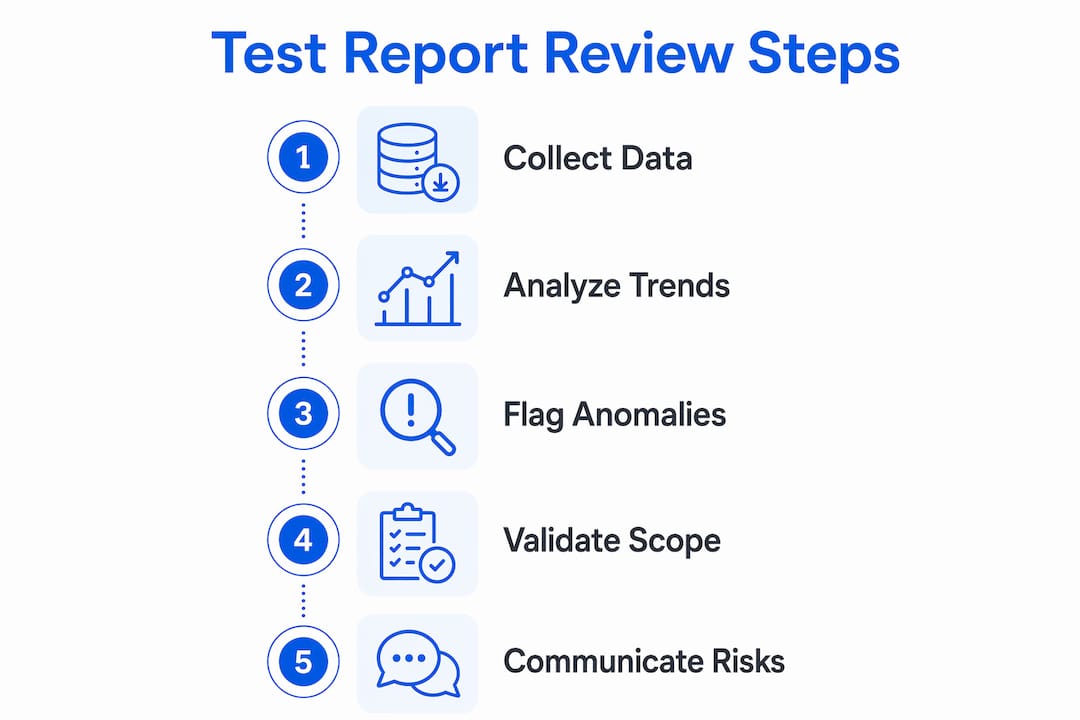
The role of QA analysts in this process goes beyond reading numbers. They interpret trends, flag anomalies, and translate technical findings into language that project managers and executives can act on. A defect severity distribution chart means nothing to a product owner unless the analyst explains which failures block a release and which can ship with a workaround. That interpretive layer is what makes the review valuable.

QA analyst responsibilities during a report review also include validating that the test scope covered what was agreed upon. A 95% pass rate sounds strong until you discover that 30% of the agreed test cases were never executed. The review catches that gap before it becomes a production incident.
What key information do QA analysts extract from test reports?
QA analysts focus on a specific set of metrics and signals during each review. The goal is not to read every line of a 200-page test log. The goal is to extract the signals that matter for the release decision.
The primary metrics analysts examine include:
- Pass/fail rates by feature area, not just overall. A 90% pass rate with all failures concentrated in the payment module is a release blocker, not a green light.
- Defect severity and priority distribution. Critical and high-severity defects require immediate attention; low-severity defects inform the risk register.
- Test coverage against requirements. Every requirement should map to at least one executed test case. Gaps here represent untested risk.
- Defect trend over time. A rising defect count late in the cycle signals instability. A declining count signals stabilization.
- Blocked or skipped tests. These represent unknown risk, not passing risk, and must be called out explicitly.
Beyond metrics, analysts assess business impact. A defect in a rarely used admin panel carries different weight than a defect in the checkout flow. Tailoring test report reviews to specific stakeholder groups avoids confusion and sharpens the decision-making process. Executives need a one-page summary with a clear go/no-go recommendation. Developers need defect details and reproduction steps. Writing one report that tries to serve both audiences serves neither.
Pro Tip: Build a layered report structure: a single-page executive summary on top, with detailed defect logs and coverage matrices as appendices. Stakeholders self-select the depth they need.
How reviewing test reports improves software quality and release outcomes
The benefits of reviewing test results extend well beyond catching bugs. Structured reviews create a feedback loop that improves both the product and the testing process over time.
Teams that use formal, structured Test Summary Reports resolve stakeholder concerns 2.8x faster and experience 43% fewer post-release critical defects. That is not a marginal improvement. It means fewer emergency patches, fewer customer escalations, and fewer late-night incident calls. The review process is where that improvement originates, because it forces the team to confront risk explicitly before the release decision is made.
“A report without a clear recommendation forces stakeholders to interpret data themselves, leading to misaligned release decisions.” — ARDURA Consulting
Objective, data-driven release decisions replace gut feel when analysts own the go/no-go recommendation. This matters most under deadline pressure, when the instinct is to ship and hope. A well-reviewed test report gives the project manager the evidence to push back on that instinct or to confirm that shipping is the right call.
Reviewing test reports also surfaces coverage gaps that automated test runs cannot self-report. Missing tests and coverage gaps must be proactively identified to prevent defects from escaping into production despite a passing test report. An analyst who spots that integration testing skipped the third-party payment gateway has just prevented a production outage. That is the importance of test report reviews in concrete terms.
Trend analysis across multiple releases adds another layer of value. If the same module generates critical defects in three consecutive releases, the review record documents that pattern. The team can then invest in refactoring or additional test coverage before the fourth release, rather than reacting after the fact.
Best practices and common challenges when reviewing test reports
Effective reviews do not happen by accident. They require structure, clear roles, and a culture that treats the review as a quality investment rather than a bureaucratic checkpoint.
- Define the review objective before you start. Are you assessing release readiness, validating coverage, or identifying process improvements? Each objective changes what you look for and what you report.
- Assign defined roles. One analyst owns the coverage assessment. Another owns the defect severity triage. A third owns the stakeholder summary. Overlapping responsibilities produce gaps and duplicated effort.
- Prepare adequately. Distribute the test report at least 24 hours before the review meeting. Reviewers who read the report in the meeting contribute half as much as those who arrive prepared.
- Own the recommendation. A report without a clear recommendation forces stakeholders to interpret data themselves, which leads to misaligned release decisions. State the go/no-go explicitly, with the conditions that would change it.
- Build a constructive review culture. A collaborative, non-defensive culture focused on improving processes drives better outcomes than blame-oriented approaches. Defects are process failures, not personal failures.
The most common challenge is information overload. QA reports typically fail due to too much data without insight, wrong audience targeting, and a reactive rather than proactive stance. An analyst who pastes 500 test case results into a spreadsheet and calls it a report has not done the review work. The review work is the interpretation, the prioritization, and the recommendation.
Pro Tip: Apply the “so what” test to every metric you include. If you cannot complete the sentence “This metric matters because…” in one sentence, cut it from the executive summary.
Transparency about hidden risks is non-negotiable. If a test environment did not match production, that caveat belongs in the report. If a critical test was skipped due to a dependency issue, that belongs in the report. Concealing risk to make the report look cleaner is the fastest way to lose credibility when production fails.
How is AI changing the way QA analysts review test reports?
88% of organizations use AI in their testing processes, but many lack the reporting infrastructure to turn AI-generated test insights into release decisions. The data volume that AI-assisted testing produces makes manual report compilation increasingly impractical. AI-powered dashboards address this by aggregating test results in real time and surfacing anomalies automatically.
The practical shift looks like this:
| Traditional reporting | AI-assisted reporting |
|---|---|
| Manual data aggregation from multiple tools | Automated aggregation across test suites and environments |
| Static pass/fail summaries | Real-time dashboards with trend detection |
| Analyst identifies coverage gaps manually | AI flags untested paths and missing requirements |
| Defect reports created after test runs | Predictive analytics surface risk areas before testing completes |
| One report format for all stakeholders | Dynamic views tailored to role and decision context |
AI-powered dashboards and predictive analytics enhance test reporting by offering real-time, actionable quality insights that reduce defect leakage and speed releases. The analyst’s role shifts from data gatherer to data interpreter. Instead of spending three hours compiling a test summary, the analyst spends three hours analyzing what the summary means for the release.
The gap that remains is the translation from AI data outputs to business-ready risk assessments. AI can tell you that 12 tests failed in the authentication module. It cannot tell you whether that failure blocks the release given the current business context, the customer commitments in flight, and the risk tolerance of the product team. That judgment belongs to the QA analyst. Teams that adopt AI tools without using them effectively still face the same reporting gaps as teams without AI at all.
Key takeaways
QA analysts review test reports because structured reviews are the only reliable mechanism for converting test data into release decisions that reduce production defects and align stakeholders.
| Point | Details |
|---|---|
| Reviews prevent production risk | Analysts catch coverage gaps and false positives that automated runs cannot self-report. |
| Structured reports cut defects | Formal Test Summary Reports produce 43% fewer post-release critical defects and 2.8x faster issue resolution. |
| Recommendations are non-negotiable | Every review must end with a clear go/no-go recommendation to prevent misaligned release decisions. |
| Audience targeting matters | Executive summaries and developer defect logs serve different needs and must be written separately. |
| AI assists but does not replace judgment | AI dashboards automate aggregation; analysts provide the business context that turns data into decisions. |
The part most QA teams get wrong about report reviews
After working closely with QA teams across multiple product cycles, the pattern I see most often is this: analysts spend 80% of their review time on the data and 20% on the recommendation. It should be the reverse. Stakeholders do not need more data. They need a clear answer to one question: “Is this safe to ship?”
The second mistake is treating the review as a solo activity. The best reviews I have seen involve the QA lead, a developer representative, and the product manager in the same room, working through the report together. That format surfaces context the analyst does not have, like a known infrastructure change that explains a spike in environment-related failures, and it builds shared ownership of the release decision.
I am also skeptical of teams that use AI reporting tools as a substitute for analytical thinking. The tools are genuinely useful for aggregation and trend detection. But I have seen teams ship with confidence because their AI dashboard showed green, only to discover that the dashboard was not connected to the right test suite. Human verification of the data sources is still required. The analyst who submits clear bug reports and owns the review narrative is the one who catches that disconnect.
The QA analyst is a business enabler, not a gatekeeper. The review is not about blocking releases. It is about giving the team the information they need to make the right call, fast.
How Wezardapp supports smarter test report reviews
QA teams that want to reduce the manual burden of test report compilation and defect tracking have a direct path forward with Wezardapp.
Wezardapp is the only UAT testing tool that records your screen, transcribes issues in real time, and uses AI to detect duplicate tickets before they reach your Jira or Azure DevOps backlog. That means your test report reviews start with cleaner data, fewer duplicate defects, and a backlog that reflects actual risk rather than noise. For teams navigating the difference between UAT and system testing, Wezardapp’s AI bug tracking connects test findings directly to actionable tickets, cutting the time between defect identification and developer assignment.
FAQ
Why do QA analysts review test reports after every test cycle?
QA analysts review test reports after every cycle to assess release readiness, identify coverage gaps, and provide a go/no-go recommendation grounded in data. Skipping the review leaves release decisions to gut feel, which 67% of teams already rely on too heavily.
What is a Test Summary Report in software testing?
A Test Summary Report (TSR) is a formal document, defined under IEEE 829 standards, that consolidates test results, defect data, coverage metrics, and a release recommendation into a structured format for stakeholders.
How do QA reviews improve software quality over time?
Repeated structured reviews create a trend record that identifies recurring defect patterns by module or feature. Teams use that record to prioritize refactoring and additional test coverage before problems repeat in production.
What makes a test report review ineffective?
Common failure modes include too much raw data without interpretation, reports written for the wrong audience, and the absence of a clear release recommendation. Any one of these failures reduces the review’s impact on the release decision.
How does AI change the QA analyst’s role in report reviews?
AI automates data aggregation and flags anomalies in real time, shifting the analyst’s focus from compilation to interpretation. The analyst still owns the business context and the final release recommendation, which AI cannot provide.