Exploratory testing in UAT is defined as a simultaneous learning, design, and execution process where testers investigate software behavior without relying solely on predefined scripts. Unlike scripted testing, this approach lets QA professionals adapt their test paths in real time based on what they discover. Teams that combine Session-Based Test Management (SBTM) with structured heuristics find 30 to 60% more defects than scripted testing alone. That gap exists because scripted tests only verify what developers expected to build, while exploratory testing surfaces what they never anticipated.
How to perform exploratory testing in UAT: prerequisites and setup
Before running a single session, you need the right environment and the right materials. Skipping this step is the most common reason exploratory testing produces inconsistent results across UAT cycles.
What to prepare before your first session:
- Test charters: Each charter is the mission statement for one session. It defines the area under test, the goal, and the approach. A good charter reads like this: “Explore the checkout flow using a guest account to identify payment validation gaps.”
- Testing environment: The UAT environment must mirror production as closely as possible. Mismatched configurations produce false positives that waste triage time.
- Test data: Prepare realistic data sets covering edge cases such as maximum field lengths, special characters, and expired credentials. Generic placeholder data misses entire defect categories.
- Access rights: Confirm that testers have the correct user roles and permissions before the session starts. Discovering a permissions gap mid-session breaks focus and wastes the time box.
- Documentation tools: You need a way to capture screenshots, record screen activity, and log bugs in real time. Tools like Wezardapp record your screen and transcribe issues automatically, which removes the manual note-taking burden during active exploration.
- Bug tracking integration: Connect your session output directly to Jira or Azure DevOps so findings move into the development backlog without a manual handoff step.
| Setup item | Why it matters |
|---|---|
| Test charter | Focuses the session without restricting tester judgment |
| Realistic test data | Surfaces edge case defects that placeholder data misses |
| Stable UAT environment | Prevents false positives from configuration mismatches |
| Screen recording tool | Captures reproduction evidence in real time |
| Bug tracker integration | Eliminates manual handoff between testers and developers |
Pro Tip: Schedule exploratory sessions as dedicated, uninterrupted blocks. Closing Slack and email during a session is not optional. Interruptions break the cognitive thread that makes exploratory testing effective.

What does an effective exploratory testing session look like?
The session itself follows a repeatable structure. Improvisation happens within the session, not in how you organize it.
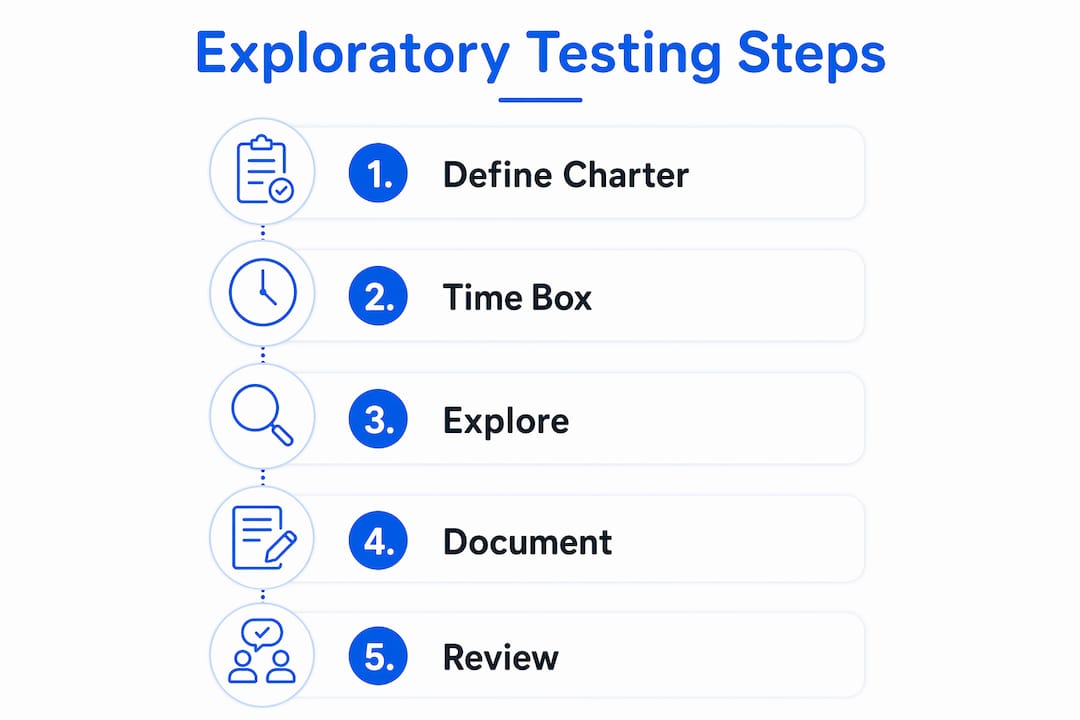
- Write and share the charter. Before the session starts, distribute the charter to all participants. Everyone needs to know the focus area, the goal, and any constraints such as “do not test payment processing, that is covered in a separate charter.”
- Time-box the session. Sessions run between 60 and 90 minutes. Shorter sessions lack depth. Longer sessions produce diminishing returns as tester concentration drops. Set a timer and treat it as a hard stop.
- Apply heuristics to guide exploration. Do not wander. Use mental frameworks to direct your test paths. SFDIPOT (Structure, Function, Data, Interface, Platform, Operations, Time) gives you seven distinct angles for any feature. Heuristics like SFDIPOT and tours such as the Money Tour (focus on any path involving financial transactions) and the Saboteur Tour (deliberately try to break the system) prevent random ad-hoc testing and increase coverage systematically.
- Document observations in real time. Log every anomaly, question, and defect as you encounter it. Do not rely on memory. Note the exact steps you took, the data you used, the environment details, and the expected versus actual result. This is the difference between a reproducible bug report and a rejected one.
- Flag new investigation threads. When you discover something unexpected that falls outside your current charter, note it as a candidate for a future charter rather than chasing it immediately. Chasing tangents mid-session is how testers lose focus and miss the original goal.
- Run a post-session debrief. Spend 10 to 15 minutes after the session reviewing what you found, what you covered, and what questions remain open. This debrief produces the input for your next set of charters and keeps the overall UAT cycle moving forward.
Pro Tip: Pair testing, where one tester drives and another observes and documents, boosts defect discovery by combining two perspectives simultaneously. Use it on your highest-risk charters.
How do risk-based strategies improve exploratory testing coverage?
Not every feature in a UAT cycle deserves the same depth of exploration. Risk-based prioritization is what separates efficient UAT from exhaustive but unfocused testing.
Start by mapping features to risk levels before you write any charters. High-risk features are those tied to revenue, compliance, data integrity, or core user workflows. These get the most exploratory sessions, the most experienced testers, and the most diverse heuristics. Low-risk areas such as dropdown filters, cosmetic tweaks, and legacy functions with no recent changes benefit from exploratory or sanity checks rather than full scripted coverage. This reallocation of effort is where risk-based UAT strategies deliver real efficiency gains.
Heuristics that diversify your test paths:
- CRUD (Create, Read, Update, Delete): Apply all four operations to every data entity in the feature. Most defects cluster around Update and Delete because developers test Create and Read more thoroughly during development.
- Goldilocks: Test values that are too small, too large, and just right for every input field. This catches boundary validation gaps that scripted tests often miss because they only test the happy path.
- Boundary analysis: Push inputs to their exact limits and one step beyond. A field that accepts 255 characters should be tested at 254, 255, and 256.
The balance between exploratory testing and scripted or automated testing is also a risk decision. Exploratory testing complements automation rather than replacing it. Automated regression suites cover known paths efficiently. Exploratory testing covers the unknown. Combining both gives you the coverage that neither approach achieves alone. For guidance on how UAT fits into the broader testing picture, the comparison of UAT vs system testing clarifies where each method applies.
What are the most common exploratory testing pitfalls in UAT?
The biggest mistake QA teams make is treating exploratory testing as unstructured free-form testing. That perception leads to sessions with no clear goal, no documentation, and no repeatable output.
Pitfalls to avoid and how to fix them:
- No charter: Sessions without a defined mission produce scattered findings that are hard to triage. Write a charter for every session, even a one-line version.
- Sessions that run too long: A 3-hour exploratory session is not three times as productive as a 60-minute one. Tester fatigue degrades observation quality significantly after 90 minutes. Hard time-boxing is non-negotiable.
- Incomplete bug reports: Poor defect reporting is the primary reason valid bugs get rejected. Every bug report needs exact reproduction steps, environment details, test data used, and evidence such as a screenshot or video. A bug report that says “checkout sometimes fails” will not get fixed.
- Testing in isolation: Solo exploratory testing misses defects that a second perspective would catch. Build pair testing into your highest-priority charters and rotate partners across the UAT cycle.
- Squeezing sessions into gaps: Scheduling exploratory testing into leftover calendar time produces subpar results. Treat each session as a protected block with the same priority as a stakeholder meeting.
Pro Tip: Use a testing project setup guide to establish session norms before UAT begins. Teams that define documentation standards upfront reject far fewer bug reports during triage.
How should you document and report exploratory testing findings?
Documentation is where most exploratory testing value is either captured or lost. Real-time logging during the session is the standard. Post-session reconstruction from memory is not.
What to capture during each session:
- Charter reference, tester name, session start and end time
- Features and workflows covered
- Defects found with full reproduction steps, environment details, and attached evidence
- Observations that are not defects but indicate potential risk
- Open questions that need answers before the next session
- Candidate charters for follow-up investigation
| Documentation element | Purpose |
|---|---|
| Session sheet | Provides accountability and traceability for each time-boxed session |
| Screenshots and video | Gives developers reproducible evidence without ambiguity |
| Reproduction steps | Prevents bug rejection due to insufficient context |
| Coverage summary | Shows stakeholders what was tested and what remains |
| New charter candidates | Feeds the next cycle with targeted investigation goals |
After the session, integrate all findings directly into your UAT bug tracking system. Findings that live in personal notes or spreadsheets outside the main tracker become invisible to developers and project managers. Real-time documentation with screenshots and videos dramatically improves defect reproducibility and triage speed. For teams managing acceptance criteria alongside exploratory findings, linking defects back to specific criteria makes prioritization faster and more defensible.
Key takeaways
Exploratory testing in UAT delivers its highest value when sessions are structured with clear charters, time-boxed to 60 to 90 minutes, guided by heuristics, and documented in real time.
| Point | Details |
|---|---|
| Structure every session | Write a charter before each session to define focus, goal, and approach. |
| Time-box without exception | Sessions between 60 and 90 minutes maintain tester focus and produce consistent output. |
| Use heuristics deliberately | SFDIPOT, CRUD, and Goldilocks diversify test paths and prevent random exploration. |
| Document in real time | Screenshots, video, and reproduction steps prevent valid bugs from being rejected. |
| Align effort to risk | Assign the most exploratory sessions to high-risk features and use sanity checks for low-risk areas. |
Why discipline is what separates good exploratory testing from great UAT
I have reviewed dozens of UAT cycles where exploratory testing was listed as part of the strategy but delivered almost no unique defects. The pattern is always the same. Sessions had no charters, documentation was an afterthought, and testers were interrupted constantly. The method got the blame. The execution was the actual problem.
Exploratory testing is a cognitive process. It requires sustained attention, a clear mental model of the system under test, and the discipline to document while you think. SBTM gives teams the scaffolding to make that process repeatable and scalable. Without it, exploratory testing degrades into ad-hoc clicking that produces anecdotes instead of evidence.
The teams I have seen get the most out of exploratory testing in UAT share three traits. They protect session time aggressively. They treat charters as mandatory, not optional. And they debrief after every session, which means each cycle builds on the last rather than starting from scratch. Pairing exploratory testing with automation is also worth emphasizing. Risk-proofing your development process requires both human judgment and automated coverage. Neither alone is sufficient for complex UAT environments.
The 42% of teams that use exploratory testing as their primary defect-finding method are not doing something exotic. They are applying a structured process with the same rigor they bring to scripted testing. That is the shift worth making.
How Wezardapp makes exploratory UAT testing faster and more reliable
Running structured exploratory sessions is significantly easier when your tooling handles documentation automatically. Wezardapp is built specifically for UAT teams that need to capture, track, and report bugs without breaking their testing flow.
Wezardapp records your screen and transcribes issues in real time, so you capture full reproduction evidence without stopping to write notes mid-session. Its AI detects duplicate tickets before they reach your Jira or Azure DevOps backlog, which means your developers spend time fixing bugs rather than triaging duplicates. For teams running multiple exploratory sessions across a UAT cycle, the UAT bug tracking tool centralizes all findings in one place with direct integration into your existing workflow. Explore the Wezardapp use cases to see how other QA teams have applied it to their exploratory testing cycles.
FAQ
What is exploratory testing in UAT?
Exploratory testing in UAT is a structured, simultaneous learning and execution process where testers investigate software behavior without relying on predefined scripts. It uses charters, heuristics, and time-boxed sessions to uncover defects that scripted tests miss.
How long should an exploratory testing session last?
Sessions should run between 60 and 90 minutes. This range maintains tester focus and produces consistent, high-quality output without the diminishing returns that come from longer, unstructured sessions.
What heuristics work best for exploratory testing in UAT?
SFDIPOT, CRUD, and Goldilocks are the most widely used heuristics for UAT exploratory testing. Each one provides a systematic angle for exploring features, which prevents random ad-hoc testing and increases defect coverage.
How do you document exploratory testing findings?
Capture session details, reproduction steps, screenshots, and video evidence in real time during the session. Integrate all findings directly into your UAT bug tracking system immediately after the session to prevent loss of context.
How does exploratory testing relate to scripted and automated testing?
Exploratory testing complements scripted and automated testing rather than replacing either. Automated suites cover known regression paths efficiently, while exploratory testing surfaces unexpected defects and usability issues that scripts cannot anticipate.