Backlogs don’t grow because your team is slow. They grow because intake lets in too much unfiltered, uncategorized, and duplicate work, and triage fails to route it correctly the first time. Fix intake and triage, and the backlog stops rebuilding itself. Your next move: run an intake and backlog audit over about one to two weeks, segment what’s actually sitting in the queue, and use that data to drive the clearing sprint and automation choices covered below.
TL;DR:
- Most backlog growth stems from unfiltered intake, misrouted tickets, duplicate requests, and stale issues, not from team speed.
- Auditing and segmenting your backlog over two weeks reveal hidden non-backlog tickets and specific bottlenecks like reroutes and aging.
- Implementing process improvements such as smarter intake forms, clear ownership, and regular backlog reviews prevents backlog reaccumulation.
- Automation should target structured intake, routing, SLA enforcement, and deflection first, with pilots measuring improvements before wider rollout.
- Using real-time screen recording and AI duplicate detection reduces false requests, reroutes, and helps sustain backlog health long-term.
Table of Contents
- Service Desk Vs. Backlog Intake: What’s the Real Difference?
- Why Ticket Backlogs Form: Common Root Causes
- How to Audit Your Backlog and Intake in the First 7 to 14 Days
- Step-by-Step Backlog Clearing Plan (Timeboxed Sprints and Owners)
- Process Changes That Prevent the Backlog From Rebuilding
- Automation Priority Checklist: What to Automate First and Why
- Metrics, Dashboards, and Guardrails to Keep the Queue Healthy
- A Practical Intake-to-Backlog Workflow Worth Studying
- Sequencing the Fix: Process, Then Automation, Then People
- Where Wezard Fits Alongside a Backlog Cleanup
- Sources
Service Desk Vs. Backlog Intake: What’s the Real Difference?
Intake is the front door. It’s the moment a request or incident gets logged, categorized, and routed to someone who can act on it. Triage happens right after: someone (or something) decides priority, assigns ownership, and sets expectations. Done well, intake and triage take minutes.
The backlog is different. It’s the pile of work that has passed through intake but exceeds current capacity to resolve, according to standard backlog management guidance from IIBA. A healthy backlog holds real, prioritized work waiting its turn. An unhealthy one holds tickets that never should have made it that far: duplicates, missing information, requests that belonged in a knowledge base article instead of a queue.
Confusing the two leads teams to apply the wrong fix. Adding headcount to burn down a backlog full of duplicate password reset tickets doesn’t help; it just processes garbage faster. Automating ticket creation without fixing triage just accelerates how quickly bad tickets pile up.
Here’s a quick gut check for sorting intake-eligible fixes from genuine backlog work:
- Intake-eligible: a request missing required fields, a duplicate of an open ticket, a question already answered in your knowledge base, a request that should route to a different queue entirely.
- Genuine backlog work: a validated bug awaiting a scheduled fix, a feature request stacked against other priorities, an incident requiring a vendor’s involvement, a change that needs approval before it can proceed.
If a ticket can be resolved, deflected, or merged the moment it’s logged, it never should have reached the backlog. If it legitimately needs scheduled effort from a specific team, it belongs there. The Atlassian guide to product backlogs makes the same point from a different angle: a backlog stays useful only when it holds refined, prioritized work, not raw, unsorted requests waiting for someone to figure out what they even are.
Why Ticket Backlogs Form: Common Root Causes
Backlogs rarely balloon for one reason. Four causes tend to compound each other, and most service desks have all four running at once without realizing it.
- Volume outpaces capacity. Seasonal spikes, a bad release, a new tool rollout. Demand jumps and staffing doesn’t, so the gap gets stored as backlog instead of resolved in real time.
- Triage fails at the point of entry. Tickets get misrouted, bounce between teams, or land with someone who reassigns them without adding context. Every reroute adds latency without adding progress.
- Repeat incidents go unaddressed. The same issue gets logged over and over because nobody built a knowledge base article or fixed the underlying cause, so deflection never kicks in.
- Tickets go stale. No clear owner, an approval stuck in someone’s inbox, or a ticket waiting on a customer response that never triggered a follow-up. These “zombie tickets” sit for weeks without anyone noticing.
Reroutes deserve special attention because they’re the clearest signal of a triage breakdown. According to triage metrics research from SoftService, a high reroute rate combined with long queue aging points directly at classification or routing weakness, not a capacity problem. Teams often respond to that pattern by hiring more agents, when the actual fix is tightening the intake form so tickets land in the right queue the first time.
Pro Tip: Pull a sample of tickets that got rerouted more than once. If a common pattern shows up (same category, same missing field, same requester group), you’ve found a specific intake fix, not a vague “we need more training” problem.
Stale tickets often trace back to ownership gaps rather than laziness. When a ticket can sit in a shared queue with no assigned owner, it’s nobody’s job to notice it’s been idle for three weeks. Backlogs built this way don’t shrink with more hands; they shrink when every ticket has exactly one person accountable for its next move.
How to Audit Your Backlog and Intake in the First 7 to 14 Days
Before you touch a single ticket, spend a week and a half understanding what’s actually in the queue. This is diagnostic work, and it changes what you build next.
Start by segmenting the backlog along three axes:
- Age: how long each ticket has sat since creation, bucketed into ranges like 0 to 7 days, 8 to 30 days, 31 to 90 days, and 90-plus.
- Category or type: incident, service request, change, problem, and the specific subtype within each.
- Waiting-on status: waiting on requester, waiting on a vendor, waiting on approval, or actually assigned and in progress.
This segmentation alone usually reveals that a large share of “backlog” isn’t backlog at all. It’s tickets waiting on someone outside the service desk, tickets that could be closed for lack of response, or duplicates nobody merged.
While you segment, pull five specific metrics: reroute rate, queue aging distribution, first-response time, SLA breach rate, and reopen rate. The SoftService triage framework treats these as a diagnostic set rather than individual scores, because the combination tells you more than any single number. A high SLA breach rate paired with a low reroute rate points at a capacity shortfall. The same breach rate paired with a high reroute rate points at broken routing rules instead.
Run a sample review to validate your intake form and routing logic. Pull 50 to 100 recent tickets, and for each one, ask: did it land in the right queue on the first assignment? Did the intake form capture everything the resolver needed, or did they have to chase the requester for more detail? The Bitrix24 triage guidance recommends a minimal intake form of a small number of required fields with conditional logic. If your sample shows resolvers constantly requesting information your form should have captured, that’s your first fix, and it’s cheaper than any headcount request.
Finally, scan for duplicates and priority clusters. Grouping similar tickets by keyword or category often surfaces ten or twenty entries that are really the same underlying issue reported by different people. Merging those alone can shrink a backlog meaningfully before a single “real” ticket gets worked.
Step-by-Step Backlog Clearing Plan (Timeboxed Sprints and Owners)
Once the audit is done, run the clearing effort like a sprint, not an open-ended cleanup project. Open-ended cleanup projects never finish; sprints do.
- Set the sprint scope. Pull the top 10 to 15% of the backlog by a value-versus-effort score. Quick, high-value fixes go first; low-value, high-effort tickets go last or get cut entirely.
- Assign a triage team for the first pass. This team’s only job is sorting: close duplicates, merge similar tickets, and route anything intake-eligible back out of the backlog entirely.
- Stand up specialist lanes. Route technically complex tickets to the people who actually own that system, instead of leaving them in a general queue where nobody has clear authority to act.
- Create a “fast path” for simple fixes. One or two agents whose sole job during the sprint is knocking out anything resolvable in under 15 minutes. This keeps quick wins from getting buried behind complex work.
- Apply closure rules consistently. Define what “done” means before the sprint starts, and use it every time a ticket closes.
A few rules keep the sprint honest:
- Every ticket needs a Definition of Ready before it enters active work (enough information to start) and a Definition of Done before it closes (confirmed resolution, requester notified).
- Duplicate handling should follow one rule: the oldest ticket stays open, everything else merges into it with a note explaining why.
- Keep an audit trail of what got closed and why, especially for tickets closed due to inactivity rather than resolution. This protects you if a requester complains later.
Measuring the sprint’s impact means comparing backlog size, average ticket age, and SLA breach rate before and after. If the backlog shrank but queue aging on remaining tickets didn’t improve, you cleared volume without fixing the underlying flow. That’s a sign the next phase (process changes, covered next) needs more weight than another sprint.
Prioritizing by value against effort matters more than most managers assume. The IIBA’s backlog management framework treats regular review and reordering as core to keeping a backlog functional, not a one-time event. A sprint that clears the queue but skips setting up that review cadence will look identical to the pre-sprint backlog again within a quarter.
Process Changes That Prevent the Backlog From Rebuilding
Clearing a backlog without changing the process that created it is like bailing water out of a boat with a hole in it. The sprint buys time. It doesn’t fix the leak.
Start with the request catalog and intake form design. A well-built catalog gives requesters a specific option instead of a blank text box, which cuts down on vague or miscategorized tickets before they’re even submitted. Combine that with a minimal required fieldset and conditional logic that only asks follow-up questions relevant to the category selected. Fewer fields with smarter logic beat long forms that drive incomplete submissions, a pattern the Bitrix24 triage research documents directly.
Next, formalize the triage decision chain: intake, classify, prioritize, route, escalate. Writing this down as an actual sequence, rather than leaving it to individual judgment, is what makes triage repeatable across shifts and across new hires.
- Define ownership rules so every ticket has exactly one accountable person at every stage, never a shared queue with no name attached.
- Link escalation triggers to SLA thresholds, so a ticket automatically flags a manager before it breaches rather than after.
- Standardize onboarding and offboarding request templates, since these create predictable seasonal waves that overwhelm generic queues if not pre-built.
- Build a single approval workflow for changes and access requests instead of letting each team invent its own.
Pro Tip: Audit your approval chains specifically. A single approver who’s often out of office or buried in email is one of the most common, and most fixable, sources of stale tickets in any service desk.
Automation Priority Checklist: What to Automate First and Why
Not every automation delivers equal value, and sequencing matters more than most rollout plans account for.
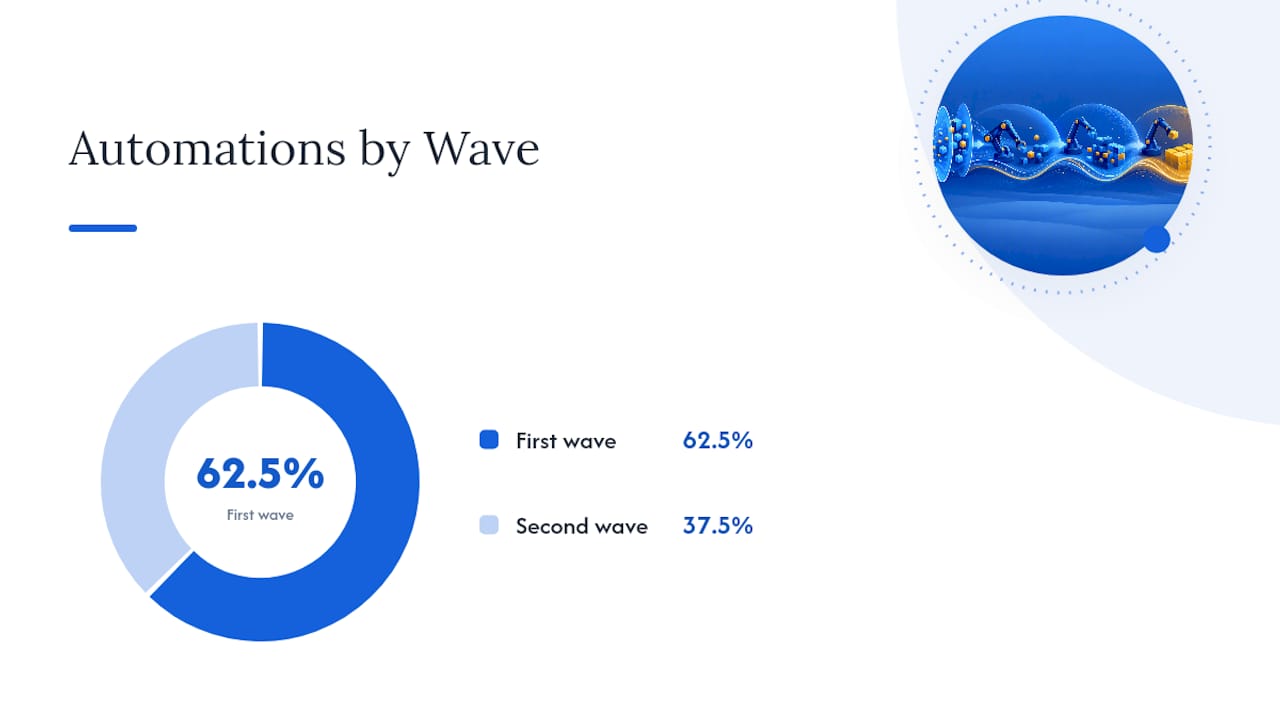
First-wave automation should focus on five things: structured intake through a request catalog or smart forms, routing auto-assignment based on category and skill, SLA enforcement with automatic escalation, automated status updates so requesters stop pinging agents for progress checks, and knowledge-base deflection for repeat questions. Research on service desk automation from Aramis Solutions identifies structured intake and routing automation as the pair that delivers the fastest measurable backlog reduction, because together they eliminate the waiting time before real work even begins.
That pairing matters because intake and routing are sequential. Fixing one without the other leaves half the delay in place. A perfectly structured intake form still stalls if a human has to manually reassign every ticket afterward, and automated routing is useless if the intake form didn’t capture enough to route correctly in the first place.
Second-wave automation targets the structural causes behind recurring backlog growth: approval workflow automation, standardized onboarding and offboarding automation, asset and CMDB synchronization so agents aren’t hunting for device history, and pattern detection that flags recurring incidents for problem management before they generate dozens of duplicate tickets.
| Automation | Wave | Primary impact |
|---|---|---|
| Structured intake forms | First | Fewer incomplete or miscategorized tickets |
| Routing auto-assignment | First | Cuts reroute rate and time-to-first-response |
| SLA enforcement and alerts | First | Reduces breach rate, flags risk early |
| Automated status updates | First | Cuts follow-up pings, frees agent time |
| Knowledge-base deflection | First | Prevents repeat tickets from reaching a queue |
| Approval workflow automation | Second | Removes single-approver bottlenecks |
| Onboarding/offboarding templates | Second | Smooths predictable seasonal spikes |
| Pattern detection for problem management | Second | Catches recurring incidents before duplication |
Roll out in a pilot, not a full deployment. Pick one category, one team, and one automation, measure the before-and-after numbers for two to four weeks, then expand. A pilot that fails to move the needle tells you something about your process before you’ve spent months building it company-wide.
Metrics, Dashboards, and Guardrails to Keep the Queue Healthy
Five metrics tell you almost everything about queue health: backlog size, queue aging distribution, reroute rate, SLA breach rate, and reopen rate. Individually, each one is a clue. Combined, they diagnose the actual problem.
| Metric | What it reveals |
|---|---|
| Backlog size | Overall volume trend, whether it’s growing or shrinking |
| Queue aging distribution | How long tickets sit, and where age concentrates |
| Reroute rate | Whether intake and classification are routing correctly |
| SLA breach rate | Whether capacity or process is failing commitments |
| Reopen rate | Whether “resolved” tickets are actually resolved |
The diagnostic power comes from reading them together. High first-response time with a low reroute rate usually means a genuine staffing or capacity gap. The same first-response number combined with a high reroute rate, according to the SoftService triage metrics framework, points instead at a broken routing rule sending tickets to the wrong team before they ever reach a human who can help.
Build three dashboard views instead of one generic report. A manager view tracks aging and breach rate by category. An agent view surfaces individual ticket load and stale items assigned to them specifically. An executive view rolls up trend lines over 30, 60, and 90 days without the noise of individual ticket detail.
Set a review cadence and stick to it: weekly for the manager view, daily standup glance for agents, monthly for executives. Backlogs that get reviewed only during a crisis grow quietly in between crises, which is exactly how they get large enough to require a sprint in the first place.
A Practical Intake-to-Backlog Workflow Worth Studying
Most backlog noise starts with reports missing context: no screenshot, no steps to reproduce, no clear description of what the requester actually saw. Resolvers spend as much time chasing clarification as they do fixing the underlying issue, and every round trip adds age to a ticket that should have closed in a day.
A UAT and feedback tool that captures screen recordings and transcribes the issue as it happens inserts structured, context-rich reports directly into intake, which removes most of that back-and-forth before a ticket ever reaches triage. Instead of a one-line description, a resolver gets a recording showing exactly what happened and a text transcript explaining it.

The duplicate problem gets solved separately but works the same direction. AI-based duplicate detection compares incoming reports against what’s already open and flags matches before they multiply into five near-identical tickets about the same bug. Fewer duplicates means less time spent triaging noise, and it means the backlog audit described earlier surfaces real work instead of five copies of the same complaint.
Practical rollout points worth knowing:
- Integrations with Jira and Azure DevOps let structured reports sync straight into existing backlogs instead of creating a parallel system agents have to check separately.
- A narrow pilot on a single high-volume category, such as onboarding issues or a specific application’s bug reports, lets you measure reroute rate and duplicate reduction before expanding further.
- Voice and video-based ticket creation tends to capture more usable detail from non-technical requesters than a text-only form, which cuts the clarification loop specifically for those tickets.
Teams running structured intake with duplicate detection on a pilot category typically see the effect in reroute rate first, since fewer malformed tickets means fewer misroutes, and in reopen rate second, since resolvers have enough context to fix the issue correctly the first time.
Sequencing the Fix: Process, Then Automation, Then People
Most service desks reach for headcount first because it’s the fastest thing to approve and the slowest thing to actually fix a broken process. Process and intake fixes should come before broad automation, and automation should come before adding people, because automating a broken intake process just breaks things faster and at greater scale.
Expect friction. A tighter intake form will draw complaints from requesters used to submitting a two-word ticket and walking away. A pilot on one category, not a company-wide rollout on day one, absorbs that friction without risking a full-scale rebellion against the new process.
Here’s a rough decision rule worth keeping on hand: automate when the fix removes a repeatable, well-defined step (routing, status updates, deflection). Hire when the gap is judgment, specialized technical depth, or relationship management that no rule set can replicate. Most managers get this backwards, hiring for volume problems that automation would solve faster and cheaper, then automating judgment calls that need a human’s context.
— Marketing
Where Wezard Fits Alongside a Backlog Cleanup
Everything above focuses on process and automation inside your existing service desk stack. Wezard takes a different route into the same problem: it targets the report itself, before it ever becomes a malformed ticket.

Wezard records the screen and transcribes the issue in real time as a tester or business user reports a problem, so the ticket that lands in your queue already has the context a resolver needs instead of a vague one-liner requiring three follow-up emails. Its AI duplicate detection compares new reports against what’s already open in Jira, Azure DevOps, or ServiceNow, catching matches before they multiply into a cluster of near-identical tickets your triage team has to untangle manually.
If you’re running a UAT program or a heavy feedback cycle, a two-week pilot on one high-volume category, password resets, a specific app’s bug reports, or onboarding issues, gives you a clean before-and-after comparison on reroute rate and duplicate count without committing to a full rollout. Wezard integrates directly with Jira and Azure DevOps, so context-rich reports sync straight into the backlog you already manage rather than creating a parallel system to check. Start with a pilot on your product overview page and see whether the numbers move where it matters.
Sources
The guidance above draws on established backlog and triage frameworks rather than a single vendor’s opinion. For deeper reading:
- 10.2 Backlog Management | IIBA®
- What to Automate First in IT Service Desk to Cut Backlogs | Aramis Solutions
- Help desk triage scales & rules | Bitrix24
- Product backlog: Tips for creation & prioritization | Atlassian
- Help desk triage: Methods & metrics | SoftService