The safest way to handle Jira permissions for external testers is to skip Jira accounts entirely. Route bug reports through an external intake or UAT tool that creates Jira issues on the tester’s behalf, and you get full context (screens, logs, transcripts) without ever touching your permission scheme.
This works because the tester never logs into Jira. No license to buy, no group to babysit, no risk that someone’s guest account leaks a sprint board they shouldn’t see. Three common paths get you there:
- An embed form or feedback widget that files an issue directly
- Email-to-ticket intake with basic validation
- API middleware or a UAT platform that syncs rich reports into your backlog
Key Takeaways
External testers file better bug reports, and your Jira stays cleaner, when intake happens through a dedicated tool instead of a shared account.
| Point | Details |
|---|---|
| Skip external Jira accounts | Use an intake tool or API pipeline so testers never need a license or group membership. |
| Test in staging first | Create internal and external test accounts to confirm visibility before going live. |
| Isolate external groups | Dedicated groups and project roles limit exposure better than reused internal permissions. |
| Automate deduplication | Tools like Wezard run AI duplicate checks and attach screen recordings before tickets reach Jira. |
Table of Contents
- Why You Shouldn’t Give External Testers Full Jira Access
- What Are Your Options for Collecting External Bug Reports?
- How Do You Build an Intake to Jira Workflow?
- What Security and Privacy Checks Should You Run First?
- Operational Tips for Triage and Backlog Hygiene
- How Do You Test and Troubleshoot the Intake Pipeline?
- A Practical Way to Put This Into Practice
- Sources
Why You Shouldn’t Give External Testers Full Jira Access
Every external account you create is a small, permanent liability. Client testers, contractors, and agency QA staff often need access for a few weeks, but the account, its group memberships, and its visibility into your roadmap tend to outlive the project.
The real risks stack up fast:
- Intellectual property exposure: external users assigned to the wrong group can see unrelated projects, comments, and attachments.
- License costs: most Jira pricing tiers charge per active user, so temporary testers quietly inflate your bill.
- Operational drift: when a client runs its own Jira instance and copies issues over manually, versions fall out of sync within days.
- Admin overhead: treating external testers like employees means someone has to remember to revoke access later, and that step gets skipped more often than teams admit.
Pro Tip: If you’ve ever discovered a former contractor still had project access six months after their contract ended, that’s the exact failure mode an external intake tool eliminates by design.
What Are Your Options for Collecting External Bug Reports?
You have four realistic ways to get bug reports from people who shouldn’t be in Jira, and each one trades context for setup effort.
An embed feedback widget sits on your staging site and lets testers click, describe, and submit. It’s fast to deploy but usually captures a screenshot and a short text field, nothing more. Email-to-ticket intake is even simpler: testers send an email, a rule turns it into an issue. The problem is noise. Without structured fields, you get vague subject lines and missing reproduction steps, and someone on your team spends the morning chasing down “it’s broken” reports.
API intake or custom middleware gives you the most control. You define the fields, the destination project, and the validation logic. It’s flexible, but it’s also an engineering project, not a weekend task, and someone has to maintain it as Jira’s API evolves.
Dedicated UAT tools that record the tester’s screen, transcribe what they were saying, and push a structured ticket into Jira sit at the other end of the spectrum. They cost more to license than a free-form email rule, but they solve the context problem outright: a developer watching a 40-second recording usually understands the bug faster than reading three paragraphs of description.
| Approach | Context Quality | Setup Time | Security Exposure |
|---|---|---|---|
| Embed widget/form | Low to moderate | Hours | Low |
| Email-to-ticket | Low | Hours | Low to moderate |
| API middleware | Moderate to high | Weeks | Depends on build |
| UAT tool with recording | High | Hours to days | Low |
How Do You Build an Intake to Jira Workflow?
Getting this right is less about picking a tool and more about deciding what a ticket needs to contain before it ever hits your backlog.
- Pick your destination. Decide whether reports land directly in your main project, a quarantined intake project, or middleware that filters before syncing.
- Define required fields. Environment, browser or device, reproduction steps, screen recording, and transcript should be non-negotiable, not optional.
- Stand up a staging instance. Create test accounts, both internal and external, and confirm what each one can actually see before you touch production. This mirrors the approach Atlassian recommends when teams share Jira with external partners.
- Configure field mapping and sync rules. Selective synchronization keeps sensitive internal fields out of what gets shared, which matters most when internal and external Jira environments run separately.
- Pilot with a small group. Run five to ten testers through the flow for a week before rolling it out to your full external roster.
Pro Tip: Run your staging test with a genuinely non-technical account. If a client’s marketing lead can file a clean bug report without a training call, your workflow is ready.
What Security and Privacy Checks Should You Run First?
A handful of checklist items catch most of the mistakes that cause real exposure.
- Create dedicated external groups and project roles instead of reusing internal ones.
- Use organization-managed external email addresses rather than personal inboxes for anything tied to intake.
- Restrict shared filters and dashboards so external activity can’t surface internal query results.
- Encrypt data in transit and turn on audit logging for anything that touches the pipeline.
- Set a retention window and a documented revocation step for when a tester’s engagement ends.
- Run a staged test confirming internal-only fields stay hidden from the external view.
Admin mistakes, like adding an external user to the wrong group or granting the wrong product access, are a leading cause of accidental data leaks in shared Jira environments. A dedicated external group with a narrow permission scheme closes that gap without slowing testers down. Teams handling sensitive attachments should also look at security and trust practices for encrypting transfers and managing access logs.
Operational Tips for Triage and Backlog Hygiene
External reports only stay useful if someone owns triage from day one. Without a clear SLA, bugs from client testers sit unread while internal tickets get worked first, which is exactly backward if you’re paying for UAT.
- Assign a triage owner and a response window (24 to 48 hours works for most teams) for every incoming external report.
- Use guided, structured submission forms instead of free text so reproduction steps show up consistently.
- Automate duplicate detection wherever possible. Wezard, for example, runs AI-based duplicate checks before a ticket ever reaches your backlog, which cuts down the manual triage that usually eats a QA lead’s Monday morning.
- Tag and auto-route reports by module or severity so the right engineer sees them first.
- Schedule a monthly cleanup pass to close stale duplicates and archive resolved threads.
Pro Tip: Manually copying issues between a client’s Jira and yours creates far more reconciliation work than automated, selective sync ever will. If you’re still copy-pasting, that’s the first thing to fix.
How Do You Test and Troubleshoot the Intake Pipeline?
Before you trust the workflow with real client testers, run it end to end yourself.
- Log in as a test external account, submit an issue, and confirm what notifications fire and who can see the result.
- If large screen recordings fail to attach, check chunked upload settings and confirm your retention policy isn’t silently rejecting big files.
- When fields land in the wrong place after a sync, pull the mapping log first. Most mismatches trace back to a renamed custom field on one side.
- Watch your integration’s error logs weekly and confirm retry handling actually fires on failed syncs rather than silently dropping them.
Recommended default, and when direct access still makes sense
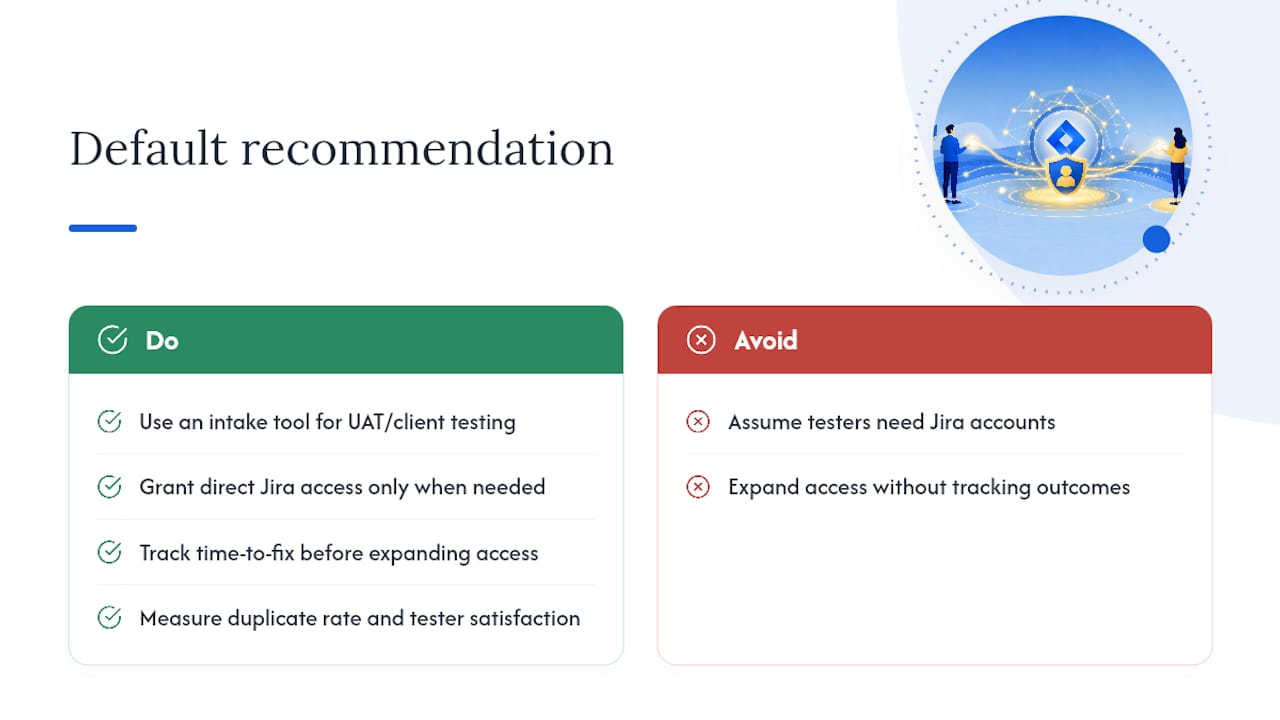
For most UAT and client-testing scenarios, an intake tool beats a Jira account every time. The exception is when testers need to edit workflows, manage sprints, or touch internal-only artifacts directly. Track time-to-fix, duplicate rate, and tester satisfaction before deciding you need to expand access rather than assuming you do.
A Practical Way to Put This Into Practice
Wezard was built around the exact problem this article walks through: external testers who need to report bugs clearly, without anyone handing out a Jira seat. Testers record their screen, narrate what’s going wrong, and Wezard transcribes it in real time, so the ticket that lands in your backlog already has the context a developer needs.

Before that ticket even gets created, Wezard checks it against your existing backlog and flags likely duplicates, which solves the deduplication problem most teams try to bolt on manually. The Jira integration works without installing anything on your internal Jira instance, matching the plugin-free approach this article recommends throughout. If you’re weighing this against building your own middleware, it’s worth comparing the setup cost against what a UAT feedback tool already handles out of the box. Start a pilot with a small group of external testers this week and see how quickly reports go from “vague email” to “actionable ticket.”
Sources
For deeper detail on managing cross-instance sync, see Atlassian’s community write-up on why internal and external Jira integration matters, plus the ReportaBug Marketplace listing for a look at widget-based intake. To pilot a UAT-first approach, visit Wezard’s UAT testing page.
- Why external and internal Jira integration matters for
- Worst Jira Admin Contest: External User Access – Atlassian Community
- Share Jira with external partners – Inside Atlassian