User acceptance testing (UAT) is defined as the final validation phase where real users confirm that software meets agreed business requirements before release. Preparing for UAT sessions means organizing people, environments, and test plans so that every session produces clear, actionable results. Project managers and business analysts who skip structured preparation risk shallow feedback, delayed sign-offs, and defects that reach production. This guide walks you through every step, from prerequisites to exit criteria, so your next UAT cycle runs without last-minute chaos.
What do you need before starting UAT preparation?
The foundation of any UAT cycle is a complete set of business requirements mapped directly to acceptance criteria. Without that mapping, testers have no objective standard to measure against, and sign-off becomes a matter of opinion rather than evidence. Getting this mapping done early is the single most time-saving step in the entire process.
Before a single test script is written, confirm these prerequisites are in place:
- Business requirements document: Every requirement must have a corresponding acceptance criterion that defines pass or fail conditions.
- Stable UAT environment: The environment must mirror production configuration, including integrations, permissions, and data volumes.
- Participant list: Select testers with direct domain knowledge of the business processes under test, not just technical staff.
- Issue tracking setup: Decide whether you will use Jira, Azure DevOps, or another tracker, and configure it before sessions begin.
- Entry criteria checklist: Confirm that system testing is complete and critical defects are resolved before UAT starts.
The table below shows which role owns each prerequisite:
| Prerequisite | Owner |
|---|---|
| Requirements to criteria mapping | Business analyst |
| UAT environment configuration | DevOps or IT |
| Participant selection and scheduling | Project manager |
| Issue tracker configuration | QA lead |
| Entry criteria sign-off | Project manager and QA lead |
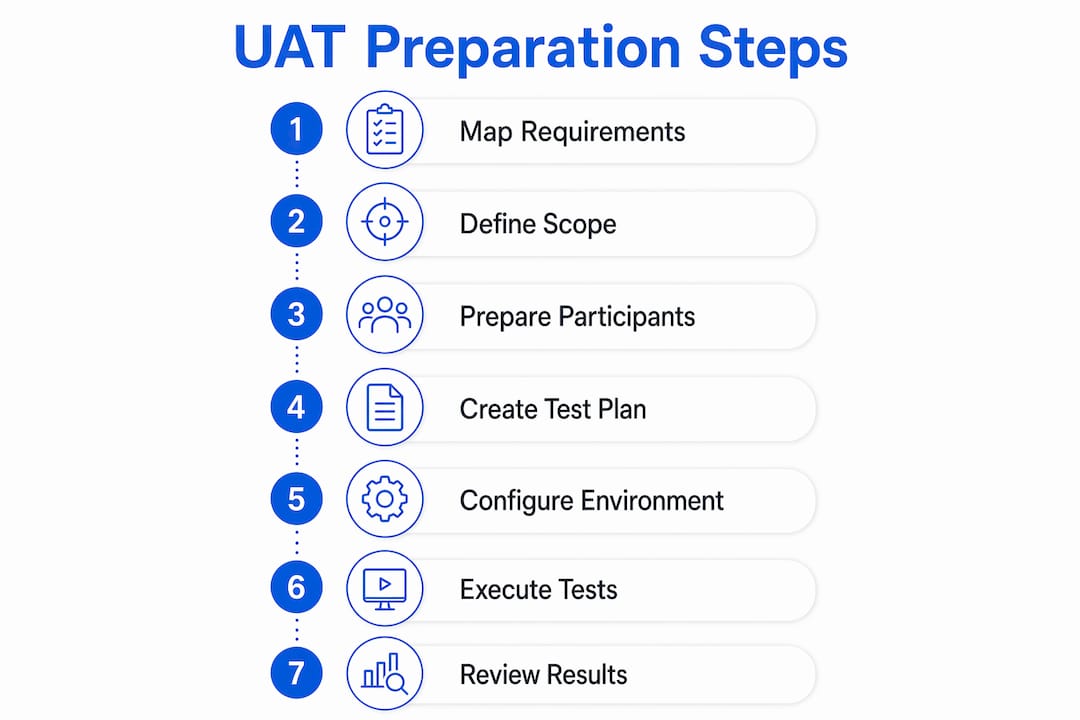
A 7-step UAT process covers requirements mapping, scope definition, participant preparation, test plan creation, environment setup, execution with logging, and formal sign-off. Completing prerequisites maps directly to the first three steps, which means skipping them compresses the entire cycle into a reactive scramble.
How to create effective UAT test plans and scenarios
A UAT test plan organized by business process, not by software module, produces far more useful feedback. When testers follow a workflow like “order to cash” or “employee onboarding,” they catch gaps that module-by-module testing misses entirely. Good UAT test plans group cases by process and include traceability matrices that link each scenario back to a specific business requirement.
Build your test plan using this sequence:
- Define scope: List the business processes included in UAT and explicitly state what is out of scope. Ambiguity here causes testers to waste time on areas that are not ready.
- Write test cases with acceptance criteria: Each case needs a clear expected outcome tied to a business requirement. Vague expected results produce vague feedback.
- Add scripted and exploratory scenarios: Scripted scenarios cover known workflows. Exploratory scenarios give experienced users room to find edge cases that scripts miss.
- Include reproduction steps: Every scenario must list the exact data inputs, navigation path, and starting conditions so any defect can be reproduced by engineering.
- Standardize bug report format: Require testers to log scenario ID, steps taken, data used, and expected versus actual outcome for every reported issue.
The comparison below shows the difference between a weak and a strong test case:
| Element | Weak test case | Strong test case |
|---|---|---|
| Expected outcome | “System works correctly” | “Invoice total matches purchase order within $0.01” |
| Reproduction steps | “Click submit” | “Log in as user role X, navigate to invoices, enter PO #1234, click submit” |
| Traceability | None | Linked to requirement REQ-045 |
| Bug format | Free text email | Structured template with scenario ID and data used |
Pro Tip: Write test cases against UAT best practices before development finishes. Waiting until the build is ready means you write under pressure and miss coverage.
How to prepare and train UAT participants for smooth sessions
Unprepared participants are the most common reason UAT sessions produce shallow, unusable feedback. A tester who does not understand the objective, the environment, or the reporting format will log vague comments instead of reproducible defects. Participant preparation directly determines the quality of every issue that reaches your backlog.
Prepare participants with these steps before the first session:
- Send written briefs: Distribute a one-page document covering session objectives, their role, the scope of testing, and what good feedback looks like.
- Run an environment walkthrough: Walk every participant through the UAT environment at least one day before testing. Show them how to log in, navigate to their starting point, and access the issue tracker.
- Distribute structured test scripts: Give participants step-by-step scripts for scripted scenarios. Leave clearly marked sections for exploratory notes.
- Train on the bug reporting template: A five-minute live demo of how to fill out a bug report saves hours of follow-up clarification later.
- Assign a facilitator: One person should be available during every session to answer questions, capture context, and prevent participants from getting stuck and giving up.
Facilitated UAT sessions that include a kick-off overview, supported execution, and a group debrief consistently capture higher quality feedback. The debrief is especially valuable because participants often surface patterns and frustrations verbally that they never wrote down.
Pro Tip: Record sessions where possible. Screen recordings paired with real-time transcription let you revisit exactly what a participant did when a bug report lacks detail.

How to ensure environment and data readiness for UAT
A UAT environment that behaves differently from production invalidates test results. If an integration works in UAT but fails in production, or vice versa, the entire sign-off process loses credibility. Common causes of UAT delays include missing data, unstable environments, unclear access rights, and participants who are unaware of what is expected of them.
Follow these steps to lock down environment and data readiness:
- Mirror production configuration: Match server settings, third-party integrations, user roles, and permission levels exactly.
- Use synthetic or masked test data: Staging data generated from schema preserves data relationships and compliance without exposing real customer records.
- Verify access rights early: Confirm every participant can log in and reach their starting workflow at least 48 hours before the first session.
- Run a dry run: Execute one full test scenario end-to-end before the official UAT start date. This catches broken integrations and missing data before participants arrive.
- Document known environment limitations: If a third-party service is stubbed out or a feature is intentionally excluded, tell participants in advance so they do not log false defects.
Test data must maintain referential integrity and support complete business journeys. Anonymized data with broken relationships between records will produce test failures that do not reflect real system behavior, which wastes engineering time on non-issues.
What entry and exit criteria should you define for UAT sessions?
Clear, measurable entry and exit criteria prevent sign-off disputes and create objective go/no-go gates. Without them, stakeholders argue about whether the system is “good enough,” and release decisions become political rather than factual. Entry criteria for UAT should include completed system testing, resolved critical defects, a configured environment, trained users, and finalized test scripts.
The table below shows standard criteria for both gates:
| Gate | Criteria | Owner |
|---|---|---|
| Entry | System testing complete with fewer than 5% open defects | QA lead |
| Entry | UAT environment configured and verified | DevOps |
| Entry | All participants trained and test scripts distributed | Project manager |
| Exit | 95% or higher pass rate on planned scenarios | QA lead |
| Exit | Zero open critical defects | Engineering lead |
| Exit | Formal stakeholder sign-off documented | Project manager |
Define exit criteria using this sequence:
- Agree on pass rate thresholds with stakeholders before UAT begins, not after results come in.
- Classify defects by severity so “critical” has a shared definition across the team.
- Schedule a checkpoint meeting at the midpoint of UAT to review criteria status and flag risks early.
- Document any agreed exceptions in writing. If a known defect is accepted with a workaround, record who approved it and why.
- Require written sign-off from business stakeholders, not just a verbal confirmation. A documented UAT sign-off protects the project manager when questions arise post-release.
Review your acceptance testing entry criteria definitions with the full project team before locking them in. Criteria that one stakeholder interprets differently from another will cause the same disputes they were meant to prevent.
Key Takeaways
Structured UAT preparation is the difference between a sign-off that sticks and a release that generates immediate production defects.
| Point | Details |
|---|---|
| Map requirements to criteria first | Every test case needs a traceable acceptance criterion before any scenario is written. |
| Prepare participants before sessions | Written briefs, environment walkthroughs, and bug report training prevent shallow, unusable feedback. |
| Mirror production in your UAT environment | Synthetic or masked data and matched configurations keep test results valid and compliant. |
| Set entry and exit criteria early | Agree on pass rate thresholds and defect classifications with stakeholders before UAT begins. |
| Facilitate every session | A dedicated facilitator captures context and keeps participants from abandoning difficult scenarios. |
The part of UAT preparation most teams get wrong
Most teams treat UAT preparation as something that starts when the build is handed over. That is the wrong mental model, and it costs real time every single cycle.
The test plan, participant list, and environment configuration should all be in progress while development is still running. By the time the build is ready, your scripts should be written, your testers should know the environment, and your entry criteria should already be signed off. Many teams underestimate how much preparation work exists outside of execution, and they pay for it with compressed timelines and shallow testing.
The other mistake I see consistently is treating UAT as a bug hunt. UAT is a final quality gate focused on validating that the system produces the right business outcomes, not just that it does not crash. That distinction changes how you write scenarios, how you brief participants, and how you interpret results. A system can pass every scripted test and still fail the business if the scenarios were not grounded in real workflows.
Facilitation is the third undervalued element. A facilitator who captures verbal context during a session turns a vague comment into a reproducible defect report. Without that role, you lose half the signal that experienced users generate.
— Marketing
How Wezardapp supports UAT preparation and execution
Wezardapp is the only UAT software that records your screen, transcribes the issue in real time, and uses AI to detect duplicate tickets before they reach your Jira or Azure DevOps backlog. That combination removes the two biggest friction points in UAT execution: incomplete bug reports and duplicate issues clogging the backlog.

Project managers and business analysts who use Wezardapp spend less time chasing testers for reproduction steps and more time reviewing real defects. The platform integrates directly with Jira bug tracking and Azure DevOps, so issues logged during UAT sessions flow into your existing workflow without manual re-entry. For teams building out their quality gates, the UAT feedback tool also supports structured test case management and real-time status tracking across all active sessions.
FAQ
What is the first step to prepare for UAT sessions?
Map every business requirement to a measurable acceptance criterion before writing any test cases. This traceability is the foundation that makes every subsequent step, from scenario design to sign-off, objective and defensible.
How do you write UAT entry criteria?
Entry criteria for UAT should confirm that system testing is complete with fewer than 5% open defects, critical defects are resolved, the UAT environment is configured, participants are trained, and test scripts are finalized and distributed.
What is the difference between UAT and system testing?
UAT vs system testing differs in who tests and what they validate. System testing is performed by QA engineers to verify technical functionality, while UAT is performed by business users to confirm the system meets real-world business requirements.
How should UAT participants log bugs?
Every bug report should include the scenario ID, exact reproduction steps, the data used, and the expected versus actual outcome. Reports that omit any of these fields require follow-up and slow down engineering response time.
What exit criteria close a UAT cycle?
A UAT cycle closes when all planned scenarios are executed, the pass rate reaches 95% or higher on key tests, no critical defects remain open, and formal written sign-off is obtained from business stakeholders.