
The fastest reliable way to automate ticket creation from screen recordings is to capture the recording alongside structured metadata, run automated moment detection and AI transcription, enrich with console logs and device info, deduplicate against existing tickets, and push a templated ticket via your helpdesk API. Tools like Wezardapp handle the transcription and deduplication natively, then sync directly to Jira, Azure DevOps, or Zendesk. The whole pipeline, from a tester hitting “record” to a structured ticket appearing in your backlog, can run in under two minutes.
Quick steps to get started:
- Capture: Trigger a screen recording with metadata collection (browser, OS, session ID, console logs).
- Enrich: Run moment detection and AI transcription to extract bug timestamps and reproduction steps.
- Deduplicate: Compare the enriched ticket draft against existing open issues before creation.
- Create: Push a structured ticket via API or webhook to Jira, Zendesk, Intercom, Azure DevOps, or ServiceNow.
- Route: Apply SLA rules, assign to the right queue, and notify stakeholders.
Recommended pilot: Start with Wezardapp connected to Jira or Azure DevOps, one support queue, and a small pilot scope. That scale is sufficient to validate over a few weeks and produce meaningful deduplication data.
Key Takeaways
Automating ticket creation from screen recordings requires a six-stage pipeline: capture with metadata, transcribe, detect moments, enrich with logs, deduplicate, and push via API to your helpdesk.
| Point | Details |
|---|---|
| Capture the full data contract | Collect video, transcript, console logs, HAR files, and device info — video alone produces tickets developers cannot reproduce. |
| Deduplicate after enrichment | Run duplicate detection on the full enriched draft, not the raw recording, to catch near-duplicates that share a root cause. |
| Start with a focused pilot | 100 recordings, one queue, one helpdesk target — enough to calibrate the model without over-investing before validation. |
| Measure triage time and duplicate rate | Target reasonable triage times per ticket and a low duplicate rate after model tuning. |
| Wezardapp for Jira and Azure DevOps | Wezardapp handles real-time transcription, AI moment detection, and duplicate suppression before tickets reach your backlog. |
Table of Contents
- How does the end-to-end automation pipeline work?
- What data should each recording capture to make tickets actionable?
- Which integration patterns fit your team’s constraints?
- Step-by-step implementation checklist
- How do you test the automation and measure success?
- Security, privacy, and compliance when ingesting recordings
- How does Wezardapp implement this pipeline?
- Common pitfalls and how to fix them
- Architecture patterns for scalability and fault tolerance
- Why a focused pilot beats a big-bang rollout
- Wezardapp cuts triage time from the first recording
- Sources
How does the end-to-end automation pipeline work?
The pipeline has six logical stages, each with a clear system boundary. Understanding where each component runs helps you assign ownership and plan for failure modes.
- Recording request: A support agent or UAT session triggers a recording link. The tester records in-browser with no download required.
- Ingest: The video file and a metadata payload (session ID, user ID, browser, OS, locale, timestamp) are uploaded to an ingestion service via webhook or direct API call.
- Transcribe and index: A speech-to-text model converts audio to a timestamped transcript. The transcript is indexed for keyword search and moment scoring.
- Extract moments: A moment detection model scans the transcript and video frames to identify likely bug timestamps, error messages, and user frustration signals. Community engineering examples show this pattern clearly: a specialized moment detection API finds candidate timestamps, then an LLM generates a structured ticket draft with summary, priority, and reproduction steps. In one documented implementation, that combination cut manual ticket creation time from several minutes to under two minutes per submission.
- Enrich: Console logs, network traces (HAR files), and device metadata are attached to the ticket draft. Without these, developers frequently cannot reproduce issues from video alone.
- Deduplicate and triage: The enriched draft is compared against open tickets using semantic similarity. Freshdesk recommends running this step after core ticketing rules process initial intake, so automated triage does not overwrite system routing metadata or generate redundant notifications.
- Create ticket: A templated ticket is pushed via API or webhook to the target helpdesk. Zendesk’s agentic AI model goes further, detecting intent, retrieving context, applying business policies, and either resolving autonomously or preparing a high-quality draft for human review.
- Post-processing: SLA rules fire, the ticket is assigned to the correct queue, and stakeholders receive a single notification.
Pro Tip: Run deduplication after enrichment, not before. Duplicate logic that operates on a raw video URL alone will miss near-duplicates that share the same root cause but differ in wording. Use the full transcript plus metadata as your signal set, and set a confidence threshold of 0.85 or higher before suppressing a ticket entirely. Below that threshold, flag for human review rather than auto-reject.
What data should each recording capture to make tickets actionable?
Video alone is not enough. Developers routinely mark tickets “cannot reproduce” when the recording lacks the supporting context that explains what the application was doing underneath. Here is the full data contract.
Required artifacts:
- Video file or URL with a stable, accessible link
- Timestamped transcript with speaker separation
- Top bug timestamp(s) identified by moment detection
- Reproduction steps extracted from transcript and user actions
- Browser name and version, OS and version
- Console logs captured during the session
- Network traces (HAR file) for the session window
- User ID and session ID for traceability
- Locale and timezone
Optional but high-value:
- Voice notes or verbal description from the tester
- Annotated screenshots or file attachments
- Custom metadata fields (feature flag state, build version, environment)
These fields map directly to standard ticket fields:
| Captured artifact | Ticket field |
|---|---|
| AI-generated summary | Summary / title |
| Transcript + reproduction steps | Description / steps to reproduce |
| Top bug timestamp | Timestamp label in description |
| Browser, OS, version | Environment / device info |
| Console logs, HAR file | Attachments |
| User ID, session ID | Reporter / linked session |
| Moment detection priority score | Priority |
| Video URL | Attachment or embedded link |
A minimal JSON ticket payload looks like this:
{
  "summary": "Checkout button unresponsive on Safari 17 / macOS Sonoma",
  "description": "User clicked 'Place Order' at 00:02:14. No network request fired. Console shows TypeError: Cannot read properties of undefined.",
  "steps_to_reproduce": ["1. Add item to cart", "2. Proceed to checkout", "3. Click 'Place Order'"],
  "environment": { "browser": "Safari 17", "os": "macOS 14.4", "locale": "en-US" },
  "priority": "high",
  "attachments": ["session_console.log", "session_network.har", "recording_url"],
  "labels": ["auto-generated", "uat", "checkout"]
}
Intercom’s guidance on automated ticketing reinforces this: collecting customer information upfront and mapping it to structured fields is what separates a ticket that gets resolved in one pass from one that bounces between teams.
Pro Tip: Transcript quality depends heavily on audio capture settings. Use a sample rate of at least 16kHz, enable noise suppression, and request punctuated output with speaker diarization turned on. A transcript without punctuation produces poor moment detection scores because the model cannot identify sentence boundaries where errors are typically described.
Which integration patterns fit your team’s constraints?
The right integration pattern depends on your existing helpdesk, security posture, and how much engineering time you can commit. There is no single answer, but the tradeoffs are clear.
Embedded widget (SDK): A JavaScript recorder is embedded directly in your application or support portal. The tester records without leaving the page, and the SDK packages the video plus metadata automatically. Lowest friction for the end user; requires a front-end deployment.
Direct upload webhook: The recorder posts the video and metadata payload to an ingestion endpoint when the session ends. The ingestion service processes asynchronously and calls back to the helpdesk API. Good for teams that already have a webhook infrastructure.
Polling ingestion service: The recorder uploads to cloud storage, and a scheduled job polls for new files. Simpler to implement but adds latency and requires careful retry logic to avoid infinite loops on invalid URLs.
Email-to-ticket fallback: The recorder sends a formatted email with the video link and metadata in the body. The helpdesk parses the email and creates a ticket. Zero engineering required; useful for a quick proof of concept, but field mapping is limited and PII control is weaker.
No-code connectors (Zapier, Workato, n8n): Connect a recorder trigger to a helpdesk action with a visual workflow builder. Fast to pilot, no custom code. Latency and rate limits can become issues at scale.
| Pattern | Latency | Security control | Engineering effort | Best for |
|---|---|---|---|---|
| Embedded widget (SDK) | Low | High | Medium | Production UAT, enterprise |
| Direct webhook | Low | High | Medium | Teams with existing webhook infra |
| Polling service | Medium | High | Low-Medium | Async batch processing |
| Email-to-ticket | High | Low | Very low | Proof of concept only |
| No-code connector | Medium | Medium | Very low | Quick pilots, non-technical teams |
For Zendesk and Intercom deployments, the embedded widget or direct webhook pattern gives the best combination of data fidelity and security. For Jira and Azure DevOps, a direct API connector with OAuth 2.0 authentication is standard. ServiceNow typically requires a REST API integration with a service account and field mapping configured in the ServiceNow Flow Designer.
Step-by-step implementation checklist
A pilot from kickoff to first validated ticket typically runs several weeks. Here is the full checklist with owners and time estimates.
- Project kickoff (Support lead + Engineering lead, 1 day): Define pilot scope — one queue, one helpdesk target, 100 recordings minimum. Agree on KPIs and acceptance criteria.
- Privacy and consent review (Security + Legal, 3–5 days): Draft consent language, confirm data residency requirements, and decide on retention period. Cost driver: legal review time.
- Recorder integration (Engineering, 3–5 days): Embed the SDK or configure the webhook endpoint. Test with synthetic recordings. Cost driver: front-end engineering hours.
- Ingestion pipeline setup (Engineering, 3–5 days): Stand up the ingestion service, configure cloud storage, and validate the metadata payload schema.
- Transcription and moment detection (Engineering + AI/ML, 5–7 days): Integrate the speech-to-text model and moment detection API. Cost driver: API usage fees per minute of audio processed.
- Enrichment configuration (Engineering, 2–3 days): Wire console log capture and HAR file collection into the metadata payload.
- Deduplication model config (Engineering + Support lead, 2–3 days): Set similarity thresholds, define the suppression vs. flag-for-review boundary, and seed the model with a sample of existing tickets.
- Helpdesk connector (Engineering, 3–5 days): Configure the API connector for Jira, Zendesk, Azure DevOps, or ServiceNow. Map fields, authenticate with OAuth or API key, and test with a sandbox environment.
- Test plan execution (QA, 3–5 days): Run the test cases defined in the validation section. Cost driver: QA engineer time.
- Pilot run (All, 2–4 weeks): Process 100 real recordings. Monitor deduplication rate, ticket quality, and routing accuracy.
- Production rollout (Engineering + Support lead, 1–2 weeks): Expand to additional queues, configure SLA rules, and enable stakeholder notifications.
Minimum viable pilot scope: 100 recordings, one Jira project or Azure DevOps board, one support queue, two engineers, one support lead. That is enough to measure deduplication effectiveness and ticket quality without over-investing before the model is tuned.
Pro Tip: Before going to production, implement retry counters on your polling logic. Engineering posts on n8n workflows flag this explicitly: an invalid recording URL can send a polling job into an infinite loop. Set a maximum of three retries, then route failures to an error handler that creates a minimal manual ticket with the raw URL attached.
How do you test the automation and measure success?
Testing screen-to-ticket automation requires more than checking whether a ticket appears. You need to validate the full data contract, the deduplication logic, and the routing rules under realistic conditions.
Test cases to run:
- Valid public recording URL with complete metadata: ticket should be created with all fields populated.
- Private or permission-denied URL: pipeline should fail gracefully and create a fallback ticket with an error note.
- Malformed or corrupted video file: ingestion should reject and route to error handler.
- Recording longer than 10 minutes: verify moment detection still identifies the correct timestamps and does not time out.
- Recording with multiple distinct bug moments: verify separate tickets are created or a single ticket with multiple timestamps is created per your configured behavior.
- Near-duplicate recording (same issue, different wording): deduplication should flag or suppress, not create a second ticket.
- Timezone and date handling: verify timestamps in ticket descriptions reflect the tester’s local time, not the server timezone.
KPIs and target thresholds:
| KPI | Description | Target threshold |
|---|---|---|
| Mean time to resolution (MTTR) | Average time from ticket creation to resolution | Reduce over time vs. baseline after 30 days |
| Triage time saved | Time from recording submission to ticket appearing in queue | Under 3 minutes per ticket |
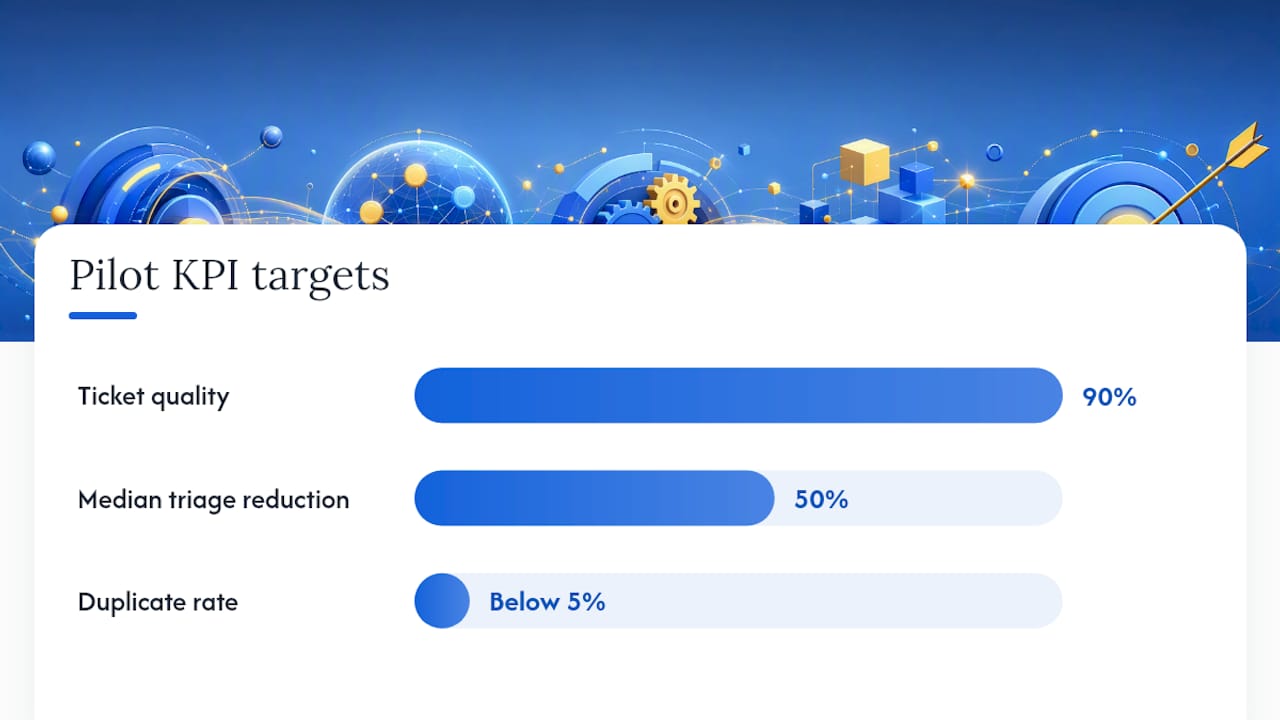
| Ticket quality score | Completeness of required fields (summary, steps, env, attachments) | 90% of tickets score 4/5 or higher |
| Duplicate rate | Percentage of auto-created tickets flagged as duplicates | Below 5% after model tuning |
| Auto-drafted vs. auto-sent ratio | Tickets sent without human review vs. those queued for review | Start evenly split; adjust ratio after validation |
Pilot acceptance criteria:
- Duplicate rate below 5% after the first 100 recordings.
- Median triage time reduced by at least 50% compared to manual ticket creation.
- 90% of tickets contain all required fields without manual editing.
- Zero tickets created from permission-denied or malformed recordings.
Security, privacy, and compliance when ingesting recordings
Screen recordings contain PII by definition. A tester recording a checkout flow may capture a name, email address, or partial payment information. Your pipeline needs controls at every layer.
Consent and data minimization:
- Display explicit opt-in consent before the recorder activates. The consent notice must name what is recorded (screen, audio, console logs, network requests), who can access it, and how long it is retained.
- Collect only the metadata fields your ticket template actually uses. Do not capture network request bodies unless your security team has reviewed the redaction logic.
- Apply automatic PII redaction to transcripts before they are stored or indexed. Credit card patterns, email addresses, and phone numbers should be masked at ingestion.
Transport and storage:
- Enforce TLS 1.2 or higher for all data in transit.
- Encrypt recordings and metadata at rest using AES-256 or equivalent.
- Use token-based, time-limited URLs for accessing private recordings. Never store raw API keys in client-side code.
- Rotate API keys and service account credentials on a 90-day schedule.
- Maintain audit logs of who accessed a recording and when.
Retention policy:
Role-based access: Only the assigned support agent, the ticket reporter, and engineering leads with a legitimate need should be able to play back a recording. Implement role-based access control at the recording storage layer, not just at the helpdesk UI.
How does Wezardapp implement this pipeline?
Wezardapp is built specifically for this workflow. Here is how a standard session runs.
- A support agent or UAT coordinator sends a recording request link to the tester.
- The tester opens the link in-browser, no download required, and records the session. Wezardapp captures the screen, optional voice narration, and automatically collects browser, OS, and session metadata.
- The recording is uploaded and transcribed in real time. Wezardapp’s AI identifies the top bug moments and generates a suggested ticket summary with reproduction steps.
- Before any ticket is created, Wezardapp checks the draft against your existing Jira or Azure DevOps backlog for duplicates. Confirmed duplicates are suppressed; near-matches are flagged for human review.
- The structured ticket, including the video link, transcript excerpt, console logs, and device info, is pushed directly to your backlog via the native connector.
Jira integration notes: Wezardapp’s Jira connector maps the AI-generated summary to the Jira issue summary field, the transcript and reproduction steps to the description, and attachments (video, logs, HAR) to the Jira attachment field. Authentication uses OAuth 2.0 with your Atlassian account. A common gotcha: if your Jira project uses a custom required field (like a “component” or “fix version”), configure that field’s default value in Wezardapp’s field mapping settings before running the pilot, or ticket creation will fail silently.
Azure DevOps integration notes: The Azure DevOps connector creates work items of type “Bug” by default, with the AI summary in the title, reproduction steps in the repro steps field, and system info in the system information field. Authentication uses a personal access token (PAT) scoped to “Work Items: Read & Write.” Watch for area path mismatches: if the area path in Wezardapp’s config does not exactly match the Azure DevOps project structure, work items land in the root area and bypass your routing rules.
Pilot checklist for Wezardapp:
- Connect Wezardapp to your Jira project or Azure DevOps board and validate field mappings with three synthetic recordings.
- Set an appropriate deduplication confidence threshold starting at a high value.
- Configure consent language in the recording request template.
- Run a realistic number of real UAT recordings across one support queue.
- Review the duplicate detection report during the pilot and adjust the threshold if needed.
- Get stakeholder sign-off on ticket quality before expanding to additional queues.
Wezardapp’s UAT testing features and use case library provide additional configuration guidance for common enterprise setups.
Common pitfalls and how to fix them
Recordings not appearing in the ticket. Check that the webhook payload includes the ticket ID and that the ingestion service is reading the correct header field. A mismatch between the header key the recorder sends and the key the ingestion service expects is the most common cause.
Poor transcription quality. Usually an audio capture problem, not a model problem. Verify the recorder is capturing the system audio channel, not just the microphone. Check the sample rate setting; anything below 16kHz degrades accuracy noticeably. Enable diarization if multiple speakers are present.
Deduplication flagging too many tickets. Lower the similarity threshold or narrow the comparison window to tickets created in the last 30 days. A threshold set too high against a large backlog will suppress legitimate new issues.
Helpdesk API rate limits blocking ticket creation. Implement exponential backoff with jitter on your API client. For Jira Cloud, the rate limit is enforced per user token, so distribute load across multiple service accounts if your volume is high.
Enrichment failures (missing logs or HAR). Console log capture requires the recorder to be initialized before the page load that triggers the bug. If testers start recording after the error occurs, the relevant log entries are already gone. Document this in your tester onboarding guide.
Pro Tip: Never store API keys or PATs in environment variables that are accessible to client-side JavaScript. Use a server-side proxy to make helpdesk API calls, and rotate credentials on a fixed schedule. A leaked Jira PAT can expose your entire backlog.
Pro Tip: For private recording URLs, generate a time-limited signed URL at the moment the ingestion service requests the file, not at upload time. This prevents the URL from being valid indefinitely if it leaks from a log file.
Architecture patterns for scalability and fault tolerance
A pipeline that works for 100 recordings a week will break at 10,000 without deliberate architectural choices.
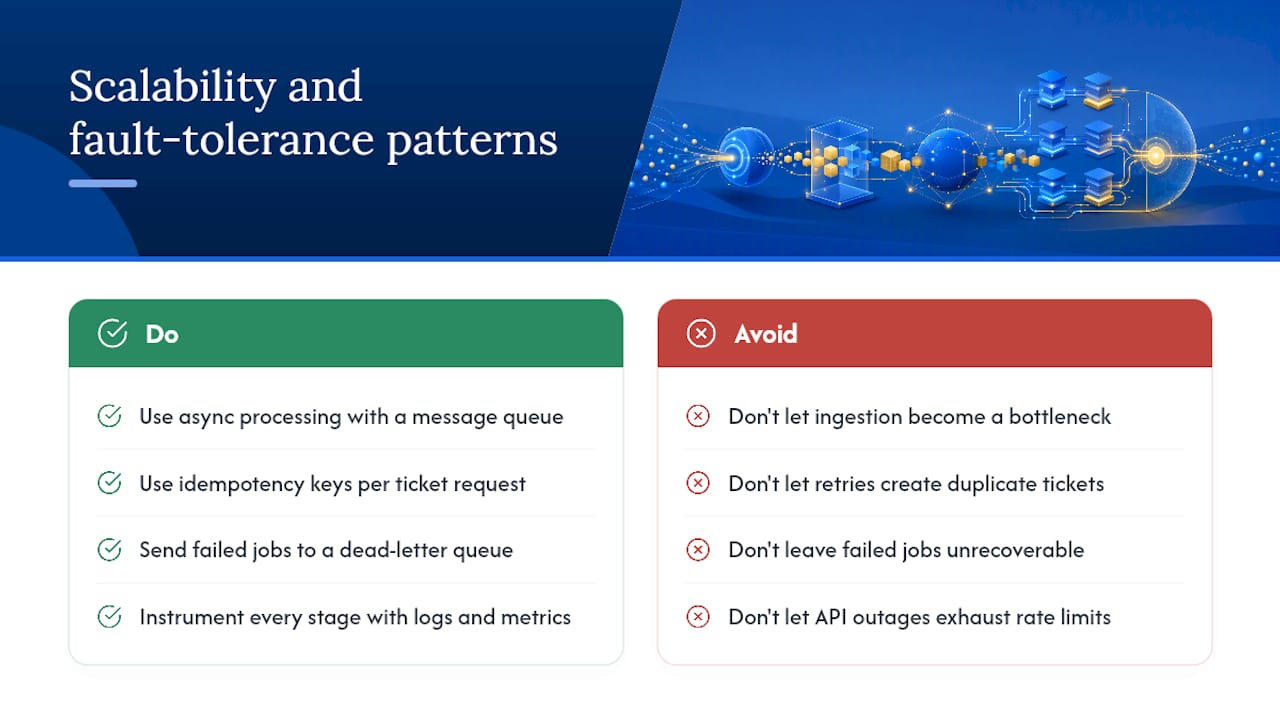
Async processing with a message queue. Place a message queue (such as Amazon SQS or RabbitMQ) between the ingestion endpoint and the processing workers. The recorder posts to the endpoint and gets an immediate acknowledgment. Workers pull jobs from the queue at their own pace. This decouples recording submission from processing latency and prevents the ingestion endpoint from becoming a bottleneck.
Idempotent ticket creation. Every ticket creation request should carry a unique idempotency key derived from the session ID and the top bug timestamp. If the helpdesk API call fails and retries, the same key prevents a duplicate ticket from being created. This is especially important for Jira and ServiceNow, where retry storms during an outage can flood a backlog.
Dead-letter queues for failed jobs. Any job that fails after the maximum retry count should land in a dead-letter queue with the full payload and error context attached. A support engineer can inspect and reprocess it manually without losing the original recording data.
Horizontal scaling for transcription workers. Transcription is CPU and memory intensive. Run transcription workers as stateless containers that scale horizontally based on queue depth. A spike in recording submissions should trigger new worker instances, not queue backpressure that delays ticket creation by hours.
Circuit breakers on helpdesk API calls. If the Jira or Zendesk API returns repeated 5xx errors, a circuit breaker should open and stop sending requests for a cooldown period. Without one, a brief API outage can exhaust your rate limit budget and block ticket creation for the rest of the day.
Observability from day one. Instrument every stage with structured logs and emit a metric for each pipeline transition: recordings ingested, transcriptions completed, moments detected, duplicates suppressed, tickets created, tickets failed. A dashboard showing these counters in real time lets you catch a broken enrichment step before your support queue notices.
Why a focused pilot beats a big-bang rollout
The teams that struggle with screen-to-ticket automation almost always share one mistake: they try to automate everything at once. They connect every queue, configure every helpdesk, and tune the deduplication model against a backlog of thousands of tickets before they have validated a single end-to-end flow.
A focused pilot with 100 recordings and one queue gives you something more valuable than coverage: it gives you a calibrated model. Deduplication thresholds that work for your specific product and your specific users are not the same as the defaults. Transcript quality varies by product area. Bug moment detection scores differently for a checkout flow than for an admin dashboard. None of that is knowable from a vendor demo. It only becomes clear when you run real recordings from real testers through the actual pipeline.
The other thing a focused pilot reveals is where your data contract breaks down. Teams routinely discover that their console log capture is missing the most relevant errors, or that their HAR files are too large for the helpdesk API’s attachment limit, or that their consent language does not meet their legal team’s requirements. Finding those gaps at 100 recordings costs an afternoon. Finding them at 10,000 recordings costs a sprint.
Start narrow. Validate the data contract. Tune the model. Then expand.
Wezardapp cuts triage time from the first recording
Wezardapp is the only UAT bug tracking tool that records your screen, transcribes the issue in real time, and checks for duplicates before a single ticket reaches your Jira or Azure DevOps backlog. Support teams that run a pilot typically see triage time drop within the first two weeks, because every ticket arrives pre-structured with reproduction steps, device info, and the relevant log files already attached.

Request a demo or start a trial at Wezardapp to see the Jira connector in action, or explore the Azure DevOps integration if your team works in Azure Boards. Setup takes less than a day for a standard pilot configuration.
Sources
- Automated ticketing system — Intercom Learning Center
- I Built a Workflow That Automatically Creates Bug Tickets From Customer Screen Recordings – Built with n8n – n8n Community
- Automate ticket handling with auto-triage — Freshdesk Support


