Use a narrated screen recording processed through an STT → LLM → VLM pipeline, and you’ll produce a tracker-ready bug report before you’ve even finished watching the clip back. That’s the verdict. Speech-to-text turns your narration into a timestamped transcript, a large language model reads that transcript to find the actionable moments, and a vision-language model checks those moments against the actual frames and grabs the screenshots. What comes out the other end isn’t a video file someone has to scrub through. It’s a structured report.
For QA managers and enterprise UAT leads, that distinction is the whole game. Here’s what a complete artifact set looks like before you file anything:
-
A timestamped transcript synced to the recording
-
Key screenshots pulled from the exact frames that matter
-
A structured JSON or Markdown report with steps to reproduce and severity
-
A duplicate check against existing backlog items before the ticket gets created
Wezardapp builds this pipeline directly into UAT and bug-reporting workflows, running duplicate detection informed by research like SynapseAI’s clustering framework before anything reaches Jira or Azure DevOps.
Table of Contents
- Why Raw Screen Recordings Rarely Turn Into Actionable Tickets
- A Repeatable Workflow: Narrate, Preprocess, Analyze, Confirm, Export
- How the STT-LLM-VLM Pipeline Works, and Where It Breaks
- What Goes Into a Report Artifact That Engineers Trust
- Mapping Reports Into Jira, Azure DevOps, and ServiceNow
- Cutting Duplicate Tickets With Semantic Clustering
- Privacy, Security, and Compliance Before You Record Anything
- Running a Pilot and Measuring the Payoff
- When Automated Reports Still Need a Human Hand
- Don’t Record the Screen and Ignore Everything Else Happening Around It
- Keeping Recordings Organized and Actually Findable Later
- Adopting Voice-First, AI-Assisted Reporting for UAT
- Where Wezardapp Fits Into This Workflow
- What QA Managers Should Do This Week
- Frequently Asked Questions
- Sources
Why Raw Screen Recordings Rarely Turn Into Actionable Tickets
A short screen recording feels like proof. To an engineer who has to open it, scrub to the right moment, pause, squint at an error message, and then write up steps from memory, it’s homework. Video is opaque by default. There’s no searchable text, no index of what happened when, and no way to jump straight to the failure without watching the buildup.
The real cost shows up in the small, repeated tasks nobody budgets time for:
- Rewatching the same 20 seconds three or four times to catch a fast-moving error toast
- Manually retyping error text off a paused frame
- Matching a tester’s spoken complaint to the exact visual moment it describes
- Writing steps to reproduce from memory after the recording ends, often losing precision in the process
Structured capture formats that pair a voice transcript with an interaction timeline and console output exist specifically because static screenshots miss temporal bugs that only show up as a sequence of events. A bug that occurs across three seconds and two screens doesn’t live in any single frame. It lives in the transition, and a transcript with timestamps is often the only clean record of when that transition happened.
A Repeatable Workflow: Narrate, Preprocess, Analyze, Confirm, Export
The pipeline that turns a screen recording into an actual ticket runs in seven steps, and none of them require the tester to write anything by hand.
- Narrate and record. The tester describes what they expect, what they see, and where it breaks, out loud, while recording.
- Preprocess. The system extracts audio, pulls key frames at moments of visual change, and runs OCR against on-screen text.
- Transcribe. Speech-to-text converts the narration into a timestamped transcript.
- Detect findings. An LLM reads the transcript and flags the segments that describe an actual problem, extracting a step list and a severity estimate.
- Confirm visually. A VLM checks each flagged moment against the matching frame to confirm the claim is visible on screen, not just spoken.
- Export artifacts. The system generates JSON, Markdown, and an interactive HTML report with synced player and screenshots.
- File to tracker. The finished report maps into Jira, Azure DevOps, or ServiceNow as a structured issue.
This general shape (transcribe → find → screenshot → confirm → report) matches what a documented STT → LLM → VLM pipeline like screenscribe already does in practice, right down to emitting a _report.json, _report.md, and _report.html for each session.
Pro Tip: Narrate in short, declarative sentences tied to actions: “I’m clicking Submit. Nothing happens. I expected a confirmation modal.” Vague narration (“this is broken”) gives the LLM nothing to extract. And keep clips under two or three minutes where possible; long, meandering recordings force the summarization step to guess at what matters.
What comes out of each stage:
- Stage 3 produces a full timestamped transcript
- Stage 4 produces candidate findings with proposed steps and severity
- Stage 5 produces confirmed findings tied to specific frames
- Stage 6 produces the exportable report set
How the STT-LLM-VLM Pipeline Works, and Where It Breaks
Each stage of the pipeline has one job. Speech-to-text hands you a timestamped transcript, a searchable record of exactly what the tester said and when. The LLM reads that transcript looking for language that signals an actual defect (“this should have,” “instead it,” “expected X but got Y”) and drafts steps to reproduce along with a severity call. The VLM’s job is verification: it checks the frame at that timestamp to confirm the described problem is actually visible, then captures the matching screenshot.
Failure modes tend to cluster around a few predictable causes:
- Bad audio. Background noise or a muted mic produces a garbled transcript, which starves the LLM of usable input.
- Low-contrast UI. Dark-mode interfaces or subtle color-based error states can confuse OCR and make VLM confirmation less reliable.
- OCR failures. Small font sizes or unusual typefaces in error dialogs sometimes get misread entirely.
- Model hallucination. An LLM occasionally infers a bug from ambiguous narration that wasn’t actually confirmed on screen; VLM verification exists specifically to catch this.
Pro Tip: Build a short configuration checklist before rollout: confirm the narration language matches the transcription model, decide whether VLM confirmation is mandatory for high-severity tickets, and maintain a keyword hint dictionary for your product’s common error terms. It cuts false positives significantly during the first weeks of adoption.
What Goes Into a Report Artifact That Engineers Trust
An artifact that skips fields forces someone to reconstruct context by rewatching the video anyway, which defeats the entire point. Every report should carry the same core fields, regardless of format.
The minimum structure a tracker or an AI fixer agent needs is straightforward: an ID, the transcript excerpt, the extracted steps, expected versus actual behavior, a severity value, and a reference to the matching screenshot. Pairing a transcript with sequential screenshots and optional log capture gives an AI agent three independent evidence channels instead of one, which measurably improves how accurately it can draft a fix.
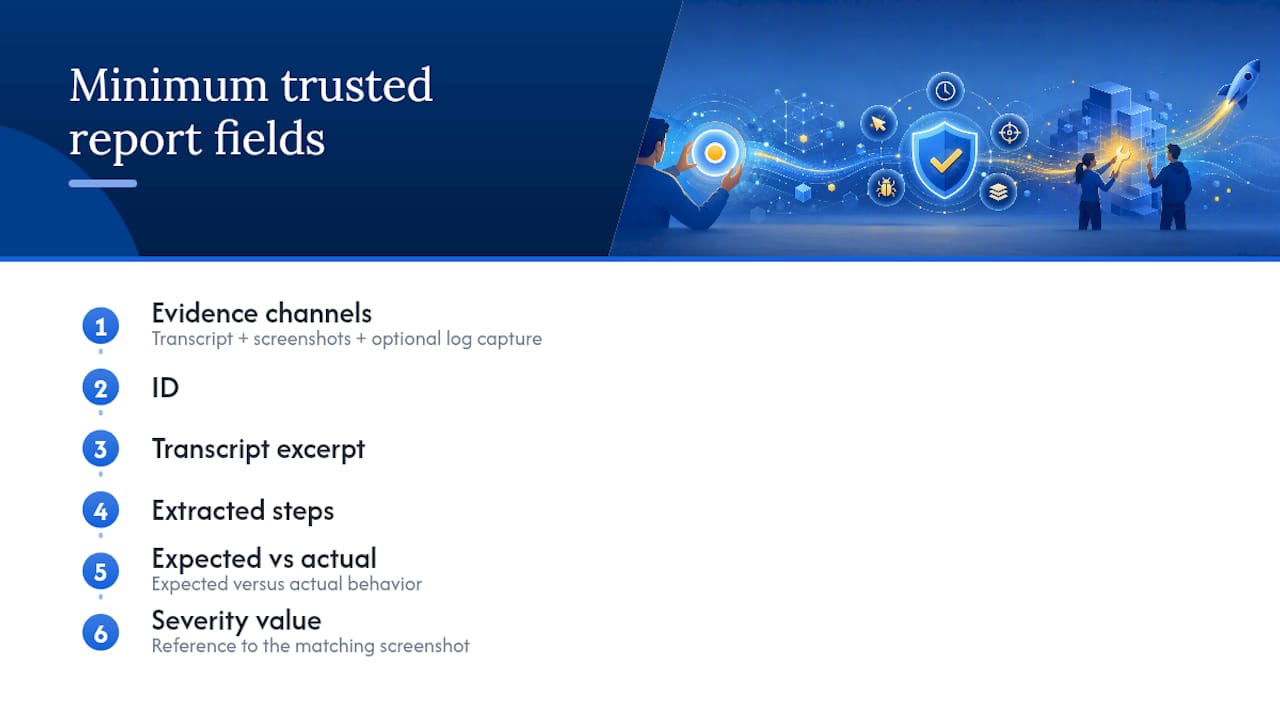
The interactive HTML report format earns its place here too. A synced player with subtitle sync and annotated screenshots lets a reviewer scrub directly to the flagged moment instead of hunting through raw footage, which turns the human review step from a 10-minute chore into a 30-second confirmation.
Mapping Reports Into Jira, Azure DevOps, and ServiceNow
Getting the artifact into the tracker is where a lot of otherwise good pipelines fall apart. The mapping needs to be explicit, not assumed.
- Transcript snippets and the steps-to-reproduce list map to the issue description field, not the summary. The summary should be the one-line defect statement the LLM extracted.
- Screenshots and the JSON report attach as file attachments, referenced by filename inside the description so reviewers can match evidence to claims.
- Severity maps to the tracker’s priority field, and this mapping needs to be defined once, explicitly, since “High” in your report and “High” in Jira’s priority scheme don’t always mean the same thing.
Common errors during sync tend to repeat across teams: missing field names that silently drop data, attachment encoding issues that break the file link, and status or tag mismatches between systems. Community reports of syncing Jira and Azure DevOps show recurring problems where missing attachments cause index or relation errors that are hard to trace after the fact.
Connecting the two platforms properly also requires mapping environment names and ensuring work item keys appear in commits or PRs, since that’s what lets Azure DevOps deployment data surface inside Jira work items. Before any of this goes to production, test the sync rules in a sandbox, specifically field mapping, authentication (token versus SSO), and environment name matching. A misconfigured environment mapping is one of the most common reasons deployment traceability breaks silently. Our Jira bug reporting guide walks through field-level formatting in more depth.
Cutting Duplicate Tickets With Semantic Clustering
Duplicate reports are the quiet tax on every backlog. The fix that scales is semantic, not manual: embed each report’s text with a transformer-based sentence encoder, run a nearest-neighbor search over the embedding space, and cluster reports that land close together.
The general pipeline looks like this in production systems: generate embeddings, reduce dimensionality (PCA or UMAP), and cluster with an algorithm like HDBSCAN that doesn’t require a fixed number of clusters up front. SynapseAI’s framework applies exactly this approach across roughly 500,000 reports, grouping tickets by root cause rather than by surface wording, which catches duplicates that share a cause but describe it in completely different language.
A duplicate-detection pipeline evaluated across 500,000 reports shows that root-cause clustering, not keyword matching, is what actually separates real duplicates from tickets that just sound similar.
Operationally, a few habits keep this reliable:
- Keep embeddings indexed per project, not globally, so unrelated products don’t get clustered together
- Retrain or fine-tune embeddings periodically on your own domain’s terminology
- Tune cluster thresholds deliberately; too loose and unrelated bugs merge, too tight and real duplicates slip through
- Re-cluster in batches on a regular cadence rather than continuously
Track duplicate-rate reduction, time-to-triage, and cluster purity as your core success metrics. Teams evaluating this problem more broadly can dig into why duplicate bug reports exist in more depth.
Privacy, Security, and Compliance Before You Record Anything
Screen recordings capture whatever’s on the screen, which sometimes includes customer data, internal credentials, or regulated information that has no business leaving the building. Build the checklist before the rollout, not after an incident.
- Offer local preprocessing so raw recordings never need to leave the device by default
- Run automatic OCR-based redaction on screen text before anything gets uploaded or stored
- Set a clear retention policy and stick to it
- Enforce role-based access controls and SSO for anyone who can view recordings or reports
- Encrypt data at rest and in transit
- Keep audit logs of who accessed which recording and when
Local-first pipelines that index video with transcripts and OCR without uploading to a cloud service exist for exactly this reason, and they can still produce timestamped issue drafts without ever sending raw footage off-device.
Pro Tip: Run OCR redaction automatically before any upload step, then give reviewers a manual redaction option inside the report UI for anything the automated pass misses. Never enable cloud-based transcription as a default setting without explicit, documented consent from whoever is being recorded.
One line worth stating plainly: build consent capture directly into the recording workflow itself, not as a separate policy document nobody reads.
Running a Pilot and Measuring the Payoff
Don’t roll this out org-wide on day one. Pick two or three test projects, define your baseline metrics before you start, and run the pipeline in parallel with your existing manual process for two to four weeks.
| Metric | Manual baseline | With narrated recording pipeline |
|---|---|---|
| Time-to-ticket | Minutes to hours after the bug is found | Minutes, generated during or right after the recording |
| Reproduction time for devs | Requires rewatching video or guessing from a text description | Steps and screenshots already extracted |
| Duplicate rate | Depends on manual triage diligence | Reduced through semantic clustering at intake |
| Ticket cycle time | Includes time lost to back-and-forth clarification | Shorter, since evidence is attached upfront |
Configure local processing for the pilot if data sensitivity is a concern, and track qualitative feedback from testers alongside the numbers. A short recording typically processes in well under the length of the recording itself, so throughput scales with your available compute rather than becoming a bottleneck for most teams. Our QA checklist for pre-launch sign-off offers a useful template for structuring this kind of pilot.
When Automated Reports Still Need a Human Hand
This pipeline isn’t a replacement for judgment in every case. A few situations still call for manual ticket writing:
- Noisy audio environments where transcription accuracy drops below a usable threshold
- Motion-heavy bugs that occur between captured frames and never get confirmed visually
- Screens containing regulated or highly sensitive data that shouldn’t be recorded at all
- Very long recordings that need heavy summarization and risk losing detail in the process
- Cases where the LLM flags a finding the VLM can’t confirm against any frame
The right escalation path is simple: any automated draft with unconfirmed findings, or ambiguous severity, should require a human reviewer’s sign-off before it hits the backlog. Most teams designate a QA lead as that gate. Factor in processing time and compute cost too. Running VLM confirmation on every single frame of a long recording is more expensive than running it selectively on flagged moments only.
Don’t Record the Screen and Ignore Everything Else Happening Around It
A screen recording shows what the user saw. It doesn’t show what the network was doing, what the console logged, or which environment the tester was actually running. Pairing a voice transcript with console output captured via OCR and an interaction timeline gives engineers the context that a video alone simply can’t carry.
At minimum, capture the environment name, browser or OS version, and network condition (throttled, offline, unstable) at the start of every narrated recording, out loud, as part of the narration itself. If your team has the option, attach a system log excerpt or console output alongside the report. Optional log capture paired with a transcript and screenshots gives AI agents a meaningfully stronger signal for root-cause diagnosis than either channel alone. A bug that only reproduces on a throttled connection is invisible in a transcript that never mentions network state.
Keeping Recordings Organized and Actually Findable Later
A recording nobody can find six months later isn’t documentation, it’s clutter. Structure storage around the same fields your report artifacts already use: project, ticket ID, date, and severity, so a recording and its corresponding ticket stay permanently linked.
Name files consistently (something like project_ticketID_date.mp4) rather than relying on default camera-roll filenames. Store the JSON or Markdown report alongside the recording, not in a separate system, so anyone auditing an issue later has both pieces in one place. Set a retention window matched to your compliance requirements, and archive resolved-ticket recordings separately from active ones so search results stay clean. The interactive HTML report format, since it embeds the player, transcript, and screenshots together, effectively solves half this problem on its own by keeping everything in a single retrievable file.
Adopting Voice-First, AI-Assisted Reporting for UAT
Start small. Require narrated recordings for UAT failure tickets on one or two projects before mandating it org-wide, and give testers a short template for what to say out loud: what they expected, what happened, and what environment they were in.
Change management matters more than the tooling here. Testers need brief training on narration style, mostly just “speak in complete sentences describing the problem, not just reacting to it.” Reviewers need clear responsibility for the sign-off gate on automated drafts, especially for high-severity findings the VLM couldn’t fully confirm.
Roll out based on metrics, not intuition. If your pilot shows time-to-ticket dropping but duplicate rate barely moving, that tells you the clustering thresholds need tuning before the reproduction-time gains matter. Treat the first month as a configuration exercise, not a finished rollout. The teams that get real value from this approach are the ones willing to adjust the pipeline based on what the pilot data actually shows, rather than assuming the default settings fit their backlog on day one.
Where Wezardapp Fits Into This Workflow
Wezardapp is built around exactly the pipeline this article describes: narrated screen recordings run through real-time transcription, LLM-based finding extraction, and VLM verification, with automatic duplicate detection before anything reaches your backlog.

What that means in practice for enterprise QA teams:
- Real-time transcription during the recording itself, not a separate upload-and-wait step
- VLM confirmation that ties findings to actual screenshots before a ticket gets created
- AI-powered duplicate detection that checks new reports against your existing backlog automatically
- Direct integration with Jira, Azure DevOps, and ServiceNow
- Local-processing options and SSO for teams with strict data-handling requirements
If you’re running UAT cycles where testers currently hand off raw video and hope for the best, the fastest way to see the difference is a direct comparison. Explore how teams use Wezardapp across UAT and bug-reporting use cases, or head straight to the UAT testing feedback tool to start a pilot on one project this week.
What QA Managers Should Do This Week
Narrated screen recordings processed through an STT → LLM → VLM pipeline turn scattered video evidence into structured, tracker-ready bug reports without manual transcription.
| Point | Details |
|---|---|
| Start narrating this week | QA lead should require narrated clips for all new UAT fail tickets on one pilot project. |
| Build the preprocessing step | Dev lead should confirm audio extraction, key-frame capture, and OCR run before transcription. |
| Map fields before syncing | QA lead and Dev lead should jointly define how transcript, severity, and screenshots map to Jira or Azure DevOps fields. |
| Lock in privacy controls first | Security lead should confirm local processing, redaction, and retention policy before any pilot recording happens. |
| Run a two-week pilot with baseline metrics | Compare time-to-ticket and duplicate rate against your current manual process, using a tool like Wezardapp to run the full pipeline end to end. |
Frequently Asked Questions
What’s the fastest way to document software issues with screen recording?
Narrate the bug as you record it, then run that recording through an STT → LLM → VLM pipeline to generate a timestamped transcript, confirmed screenshots, and a structured report automatically.
Do I still need to write steps to reproduce manually?
Usually not. The LLM stage extracts a step list directly from your narration, though a human reviewer should confirm it before the ticket reaches engineering, especially for high-severity findings.
How does duplicate detection work with screen-recorded reports?
Reports get converted into embeddings and clustered by semantic similarity, which groups tickets by root cause even when testers describe the same bug in different words.
Is it safe to record screens that show customer data?
Only with local preprocessing, OCR-based redaction, and a clear retention policy in place. Confirm consent capture is built into the workflow before recording anything sensitive.
Can this replace manual bug reports entirely?
No. Noisy audio, motion-heavy bugs between frames, and highly regulated screens still need manual review or a human-written ticket instead of a fully automated one.
Sources
- SynapseAI: A Framework for Duplicate Ticket Detection
- screenscribe (PyPI page)
- Connect Azure DevOps to Jira | Atlassian Support
- Jira to Azure DevOps integration (Exalate blog)
Internal case studies and customer proof points will be added to this reading list as they become available.