
Route Wezard reports into ServiceNow with per-customer OAuth credentials, a Table API POST to /api/now/v1/table/incident, and duplicate suppression handled at two layers: Wezard’s AI confidence score before creation, and a ServiceNow before-insert business rule as backup. Wrap every call in exponential-backoff retries and correlation-ID logging.
The architecture has three parts. Wezard captures the recording, transcript, and duplicate score. An integration layer holds per-customer auth tokens, a retry queue, and mapping logic. ServiceNow receives a clean, deduplicated incident through its Table API.
- Fewer duplicate tickets clogging the queue
- Faster developer triage because the recording and transcript travel with the ticket
- Safer credential handling through isolated, per-customer OAuth instead of one shared token
Key Takeaways
A reliable servicenow incident workflow depends on layered deduplication, per-customer OAuth isolation, and retry logic with correlation IDs, not just a working Table API call.
| Point | Details |
|---|---|
| Layer your dedupe checks | Combine Wezard’s AI confidence score with a before-insert business rule and a scheduled cleanup job. |
| Isolate customer credentials | Store per-customer OAuth tokens and instance URLs separately to avoid shared-token failure risk. |
| Build retries before polish | Handle 429/5xx errors with exponential backoff and correlation IDs before refining field mapping. |
| Tag and route by source | Mark UAT-origin incidents with a source field so triage and escalation rules can treat them distinctly. |
| Use Wezard for capture and context | Wezard’s screen recording, live transcription, and duplicate scoring feed directly into incident fields and reduce backlog noise. |
Table of Contents
- What Does a ServiceNow Incident Workflow Look Like for Wezard Integrations?
- How Should You Map Wezard Fields to ServiceNow Incident Fields?
- How Do You Route UAT Incidents to the Right Team?
- What’s the Best Way to Prevent Duplicate Incidents?
- How Do You Handle API Errors Without Losing Incidents?
- What Security Controls Does This Integration Need?
- Engineer Checklist and Sample Payloads for Production Rollout
- How Wezard’s Recording and AI Features Fit This Workflow
- How Do You Push UAT-Reported Issues from Wezard into ServiceNow?
- What Are the Trigger Events and Status Transitions in This Workflow?
- How Do You Handle Errors and Alerts Specific to This Integration?
- How Should Notifications and Escalations Work for Wezard-Origin Incidents?
- What Most Teams Get Wrong About This Integration
- Get Wezard Running on Your ServiceNow Pipeline
- Sources
What Does a ServiceNow Incident Workflow Look Like for Wezard Integrations?
A working servicenow incident workflow for UAT reporting breaks down into distinct responsibilities, and mixing them up is where most integrations go wrong.
- Instance and auth collection — capture each customer’s ServiceNow instance URL and issue per-customer OAuth credentials before any API call happens.
- Integration middleware — an auth store, a message queue, correlation ID generation, and structured logging live here, outside both Wezard and ServiceNow.
- Duplicate check — Wezard’s AI scores the incoming report against open tickets before anything gets created.
- Table API create — a POST request lands the incident in ServiceNow with mapped fields.
- Post-create verification — confirm the response, store the sys_id against Wezard’s report ID, and log the transaction.
For the create step itself, a direct Table API POST works for simple, single-tenant setups. Middleware or an Integration Hub spoke fits multi-customer deployments better because it centralizes retry logic and credential rotation. A ServiceNow community integration tutorial recommends Flow Designer and Integration Hub actions over custom scripts whenever the customer will be configuring their own instance. Reserve scripting for edge cases the out-of-the-box actions genuinely cannot handle.
How Should You Map Wezard Fields to ServiceNow Incident Fields?
The incident record should carry enough context that a developer never has to ask “wait, what broke?” That means mapping more than just a title.
At minimum, populate short_description with a concise summary generated from the transcript, caller_id with the reporting tester (or a service account if anonymized), and comments or work_notes with the full transcript excerpt. Attach the recording as a URL in the work notes rather than trying to upload video binaries through the Table API, since ServiceNow’s attachment endpoint is a separate call. This is the same pattern Wezard already uses for Jira and Azure DevOps tickets, so testers see consistent formatting no matter which backlog the report lands in.
| Wezard Field | ServiceNow Field | Notes |
|---|---|---|
| Report title | short_description | Truncate to ServiceNow’s character limit |
| Transcript text | work_notes | Full excerpt, timestamped |
| Recording URL | comments | Link only, not the binary |
| Duplicate confidence score | u_duplicate_score (custom field) | Feeds the before-insert business rule |
| Reporter | caller_id | Map to sys_user or fall back to integration account |
- Use
sysparm_fieldson the POST request to limit the returned payload to only what your integration needs, which keeps response parsing fast and avoids leaking unrelated incident data back to the caller. - Sample POST body:
{"short_description": "Login button unresponsive on checkout", "caller_id": "abc123", "work_notes": "Transcript: user clicked...", "u_wezard_recording_url": "https://...", "u_duplicate_confidence": 0.12}. The ServiceNow REST API explorer documents the full response shape, including the Location header you’ll want for confirming the created sys_id.
How Do You Route UAT Incidents to the Right Team?
Assignment logic decides whether a bug reaches the right engineer in five minutes or sits untriaged for two days.
Resolve the assignment group by mapping the Wezard project or component tag to a sys_user_group lookup, rather than hardcoding group names in your integration code. For domain-separated instances, resolve the group using the customer’s company sys_id first, then fall back to a default triage queue if no mapping exists.
- Tag every incident from this pipeline with a
u_source = wezardfield so triage dashboards can filter or bulk-escalate UAT-origin tickets separately from customer-reported ones. - Build a fallback assignment path: if the component-to-group mapping lookup returns nothing, route to a generic “UAT Triage” group instead of failing the create request.
- If you use record producers for manual submissions, mirror the same field defaults so tickets created through the API and through the UI stay consistent.
- Avoid one shared integration account resolving assignment across all customer domains. Query
sys_user_groupscoped to the caller’s company to respect domain separation.
What’s the Best Way to Prevent Duplicate Incidents?
Deduplication works best as three layers, not one. Relying on a single check anywhere in the chain guarantees you’ll eventually see either duplicate tickets or, worse, silently dropped real bugs.
- Integration-side (before the API call): Wezard’s duplicate confidence score gets checked first. Above your threshold, the integration attaches the new report as a comment on the existing incident instead of creating a new one.
- ServiceNow-side (before-insert business rule): as a safety net, a before-insert rule queries active incidents where
caller_id,cmdb_ci, and normalized keywords fromshort_descriptionoverlap. If a strong match exists, the rule redirects the insert to update the matched incident’s work notes instead. - Scheduled cleanup (Script Include job): a nightly job scans incidents created in the last 24 hours, flags near-duplicates that slipped through, and closes or merges them with a logged reason code for audit purposes.
Pro Tip: Start your duplicate confidence threshold conservative (say, only auto-suppressing above 0.90) and log every near-miss for two weeks before tightening it. False positives that silently merge two distinct bugs are far more expensive to unwind than a handful of duplicate tickets.
Roll this out progressively: run the before-insert rule in “log only” mode first, review a week of matches manually, then flip it to active. Watch for false positives on generic short descriptions like “app crashes” — normalize keywords aggressively enough to reduce noise but not so aggressively that unrelated bugs collapse into one ticket.
How Do You Handle API Errors Without Losing Incidents?
Transient failures are inevitable at any real volume, and how your integration responds determines whether a bug report disappears or just arrives a few seconds late.
- Retry on 429 and 5xx responses using exponential backoff, doubling the wait between attempts and capping at a fixed number of retries, per ServiceNow’s own cloud request retry guidance.
- Generate a correlation ID for every Wezard report and map it to the resulting incident sys_id, so a retried request can check “did this already succeed?” before creating a second ticket.
- After the retry cap is hit, stop and surface the failure to a monitoring dashboard rather than retrying indefinitely.
- Implement a circuit breaker: if you see sustained 429s across multiple requests, pause the queue for a cooldown period instead of hammering the instance.
Rate-limit errors tend to cluster during batch UAT sessions when many testers submit reports in a short window, which is exactly when a naive retry loop can make things worse instead of better. A manual retry path in your integration’s admin panel gives someone a way to replay failed creates once the instance recovers, without reprocessing the entire queue.
What Security Controls Does This Integration Need?
Treat identity and audit logging as first-class parts of the design, not an afterthought bolted onto the API call.
- Issue per-customer OAuth credentials and store each customer’s instance URL separately. A complete guide to ServiceNow API integration points to this per-customer isolation as the most common source of long-term support headaches when it’s skipped.
- Never use basic auth in production. OAuth 2.0 with short-lived tokens and a minimally privileged integration user, scoped only to the incident table and the specific fields it needs, keeps blast radius small if a token leaks.
- Log request and response metadata, including correlation IDs, and retain it long enough to investigate a disputed or missing ticket weeks later.
- Rotate tokens on a schedule and re-run the customer’s connection flow whenever a refresh fails outright rather than silently degrading to failed creates.
ServiceNow’s own integration security guidance frames this well: treat the integration as a flow of control, where identity and predictable failure behavior matter as much as the payload itself.
Engineer Checklist and Sample Payloads for Production Rollout
Use this sequence when building the integration, in order, rather than jumping straight to the POST call.
- Collect the customer’s ServiceNow instance URL and register per-customer OAuth credentials.
- Build the auth store with token refresh handling and rotation alerts.
- Implement the Wezard-side duplicate check and set an initial confidence threshold.
- Write the before-insert business rule in log-only mode and validate against real traffic for a week.
- Build the Table API create call with field mapping and
sysparm_fieldsrestrictions. - Add retry logic with exponential backoff and a correlation ID to sys_id mapping table.
- Configure assignment group resolution with a fallback default queue.
- Flip the business rule to active enforcement once false-positive rates look acceptable.
- Set up monitoring dashboards for retry counts, dedupe rates, and failed creates.
| Component | Example |
|---|---|
| POST endpoint | /api/now/v1/table/incident |
| Sample payload | {"short_description": "Checkout button unresponsive", "caller_id": "abc123", "work_notes": "Transcript excerpt...", "u_wezard_recording_url": "https://...", "u_duplicate_confidence": 0.12} |
| Before-insert pseudocode | if (existingIncident = findMatch(caller, ci, keywords)) { current.setAbortAction(true); addWorkNote(existingIncident); } |
| Scheduled dedupe job | GlideRecord query on sys_created_on last 24h → score similarity → merge or flag → log outcome |
Wezard’s own guide on automating ticket creation from screen recordings walks through the same payload logic applied to Jira, which is a useful reference if you’re building both integrations side by side.
How Wezard’s Recording and AI Features Fit This Workflow
Wezard doesn’t just hand you a bug title. It records the tester’s screen, transcribes the issue as it happens, and scores the report against existing tickets before your integration ever calls the Table API.
That changes what shows up in the ServiceNow incident itself. The recording URL and transcript excerpt map directly into work_notes and attachment fields, so a developer opens the ticket and sees exactly what the tester saw, in the tester’s own words, without a follow-up Slack thread asking “can you reproduce this?”
- The duplicate confidence score becomes the trigger for your integration-side dedupe check, not a rule you write from scratch.
- Screen recordings and transcripts reduce back-and-forth clarification, which is usually the slowest part of triage.
- Teams running high-volume UAT cycles see fewer near-identical tickets reach the backlog because Wezard catches the overlap before creation, not after. The same duplicate detection engine that feeds Jira and Azure DevOps integrations feeds this ServiceNow pipeline.
How Do You Push UAT-Reported Issues from Wezard into ServiceNow?
UAT reporting has a different rhythm than production incident reporting. Testers move fast, click through the same flows repeatedly, and often report the same failure five different ways. Your capture-to-push pipeline needs to account for that.
Wezard captures each report as a screen recording paired with a real-time transcript, timestamped and tied to the specific test session. Before anything gets pushed to ServiceNow, format the transcript into a structured summary rather than dumping raw speech-to-text into short_description. A short natural-language summary line works better for triage dashboards than a verbatim transcript fragment.
Batch timing matters too. If testers are running a scripted UAT session, you don’t want fifty API calls firing simultaneously the moment the session ends. Queue the reports and push them through the integration layer at a controlled rate, which also gives the duplicate-detection check enough breathing room to compare each new report against ones already queued in the same batch, not just against ServiceNow’s existing records.
Include session metadata in the payload: which test case triggered the report, which build or environment it ran against, and the tester’s identity. This context often determines routing (a checkout-flow failure in a payment sprint build routes differently than the same failure reported against a stale staging branch) and gives the eventual assignee a starting point for reproduction instead of a blank slate. Store this metadata in custom fields or structured work notes rather than burying it inside the description text where it’s hard to query later.
What Are the Trigger Events and Status Transitions in This Workflow?
The incident lifecycle in this pipeline follows a specific sequence, and knowing where each transition happens helps you decide what to automate versus what stays manual.
The triggering event is a UAT report submission in Wezard, followed immediately by the duplicate confidence check. If the score is low, the integration fires the Table API POST, creating the incident in New state. If a matching incident already exists, the report attaches as a work note instead, and no new incident enters the system.
Once created, the incident typically moves to In Progress when an assignee picks it up, either automatically through your assignment group logic or manually during triage review. From there, state transitions follow whatever your organization’s standard incident lifecycle already uses. What’s different here is the trigger: transitions on Wezard-origin incidents should reference back to the original recording, since a developer marking an incident Resolved often needs to re-watch the recording to confirm the fix actually addresses what the tester saw, not just what the ticket text describes.
Build a light feedback loop back to Wezard when an incident closes. This isn’t strictly required for the integration to function, but teams that skip it end up with two separate systems of record that drift out of sync. A closed incident should update the corresponding Wezard report’s status too, so QA managers running reports don’t have to cross-reference two dashboards.
How Do You Handle Errors and Alerts Specific to This Integration?
Generic API error handling gets you most of the way there, but incidents originating from Wezard need a few integration-specific alerting rules layered on top.
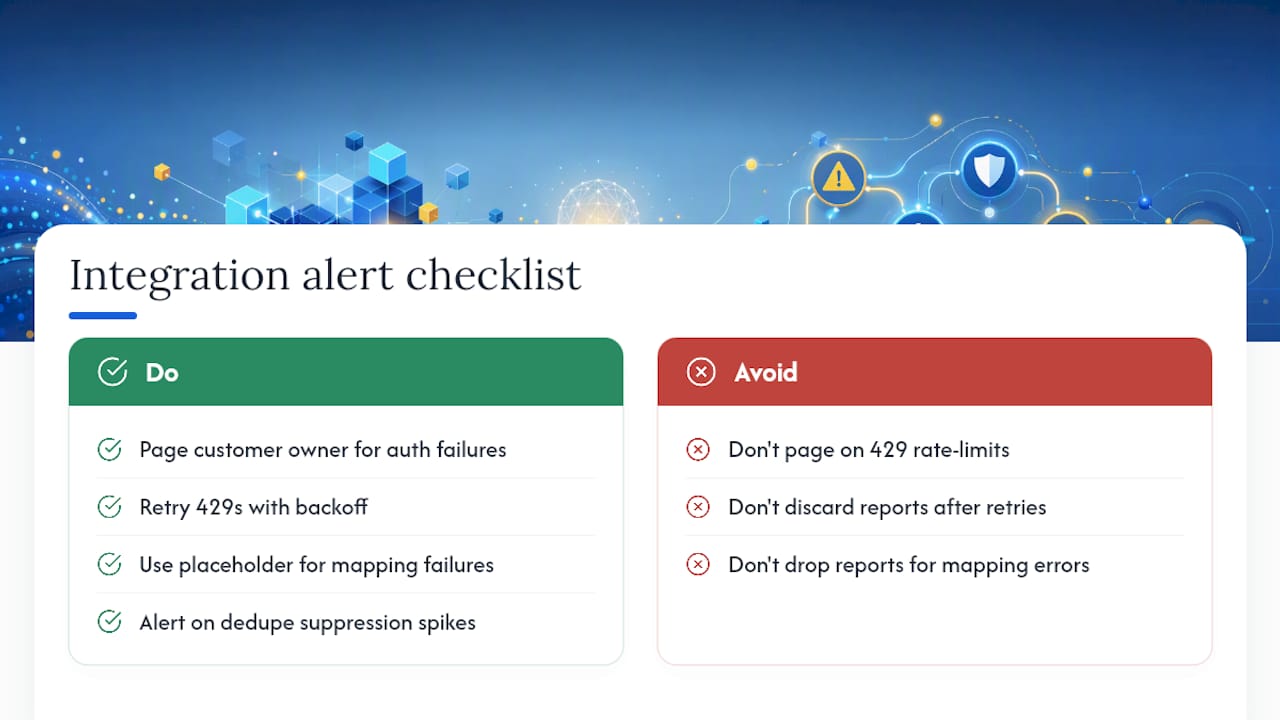
Distinguish between three failure categories in your monitoring: authentication failures (expired or revoked OAuth tokens), rate-limit failures (429s from sustained traffic), and mapping failures (a required field missing or malformed, usually from an incomplete transcript). Each deserves a different alert path. Authentication failures should page whoever owns the customer relationship, since they usually mean the customer changed something on their ServiceNow instance. Rate-limit failures belong in the retry queue with backoff, not an immediate page. Mapping failures need a fallback: if the transcript summary is empty, fall back to a generic placeholder description rather than failing the entire create request and dropping the report.
Build a dead-letter queue for reports that exhaust retries. Rather than silently discarding a failed Wezard report after the retry cap, park it with its correlation ID and payload intact, and expose it in an admin view so someone can manually replay it once the underlying issue clears. Losing a UAT report because ServiceNow was briefly unreachable defeats the entire point of automating this pipeline.
Set a threshold alert for dedupe suppression rates too. If the percentage of reports getting auto-suppressed as duplicates suddenly spikes, that’s often a sign your confidence threshold is too aggressive, not that testers suddenly started reporting the same bug fifty times in a row.
How Should Notifications and Escalations Work for Wezard-Origin Incidents?
Notification rules for this pipeline need to route around one specific problem: UAT-origin incidents can arrive in bursts, and standard notification rules built for one-off customer incidents will spam your team if applied unchanged.
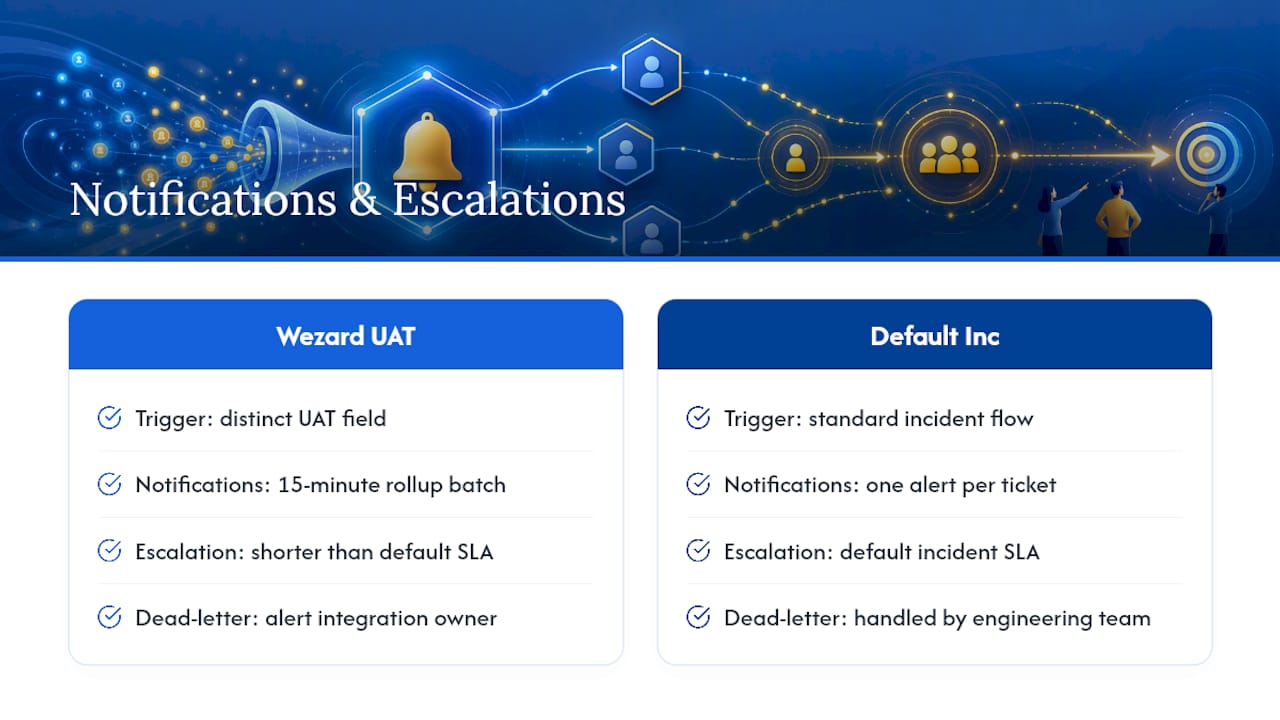
Configure notification triggers off the u_source = wezard field so you can apply distinct rules to this incident category rather than reusing the default incident notification flow. Batch notifications for incidents created within the same UAT session window (say, a 15-minute rollup) instead of firing one email or Slack alert per ticket, which quickly becomes noise during a heavy testing sprint.
Escalation policies should account for the duplicate-suppression layer already having filtered out redundant reports. That means an incident that does reach a human is more likely to be a genuine, unique issue, so escalation timers for this category can reasonably run shorter than your default SLA for miscellaneous incidents. A checkout-flow failure caught during UAT and confirmed unique deserves faster escalation than a random low-priority incident sitting in the general queue.
Set an explicit escalation path for the dead-letter queue mentioned earlier: if a report sits unretried for more than a defined window, that should trigger its own alert separate from the standard incident SLA clock, since the incident technically doesn’t exist in ServiceNow yet. Route these operational alerts to whoever owns the integration itself, not the engineering team who’d normally handle the incident once created.
What Most Teams Get Wrong About This Integration
Most advice on ServiceNow integrations treats the API POST as the finish line. Get the payload right, hit the endpoint, done. That framing misses where these integrations actually fail in production: not in the create call itself, but in everything wrapped around it.
The conventional wisdom undersells deduplication specifically. Teams build a single check, usually a keyword match in the before-insert rule, and call it solved. It isn’t. A single layer catches obvious duplicates and misses the semantic ones, like two testers describing the same broken button in completely different language. Wezard’s AI confidence scoring exists precisely because keyword matching alone can’t catch that, and pairing it with a ServiceNow-side rule as a backstop, rather than a replacement, is what actually holds up under real traffic.
The other underrated piece is auth architecture. Engineers often treat OAuth setup as a one-time task rather than an operational surface with its own failure modes. Per-customer credential isolation isn’t bureaucratic overhead. It’s the difference between a token expiring on one customer’s instance and a single revoked token taking down every customer’s incident pipeline at once.
If you’re prioritizing, build the dedupe layers and the retry queue before you polish field mapping. A perfectly mapped incident that never reaches ServiceNow because of an unhandled 429 helps nobody.
— Marketing
Get Wezard Running on Your ServiceNow Pipeline
Wezard is built to sit exactly where this guide says it should: capturing the screen recording, transcribing the issue in real time, and running its AI duplicate check before a single incident hits your ServiceNow instance. That’s the difference between an integration that just moves tickets and one that actually cuts the noise reaching your engineers.

Instead of your team manually reviewing every UAT report for overlap before filing it, Wezard’s duplicate detection does that work upfront, and the recording plus transcript travel with the ticket so developers spend less time asking testers to reproduce what they already showed. If you’re mapping out how UAT reports should flow into your backlog before committing to a build, Wezard’s UAT testing platform walks through how recordings, transcripts, and duplicate scoring work together end to end. Start there to see the capture side of this workflow before you finish wiring up the ServiceNow half.


