
A ticket submission wizard is a guided flow that records a tester’s screen, transcribes the issue in real time, and packages both into a structured ticket before it ever reaches your backlog. Done right, it produces a ticket engineers can act on immediately, no clarifying meeting required, because the reproduction steps, evidence, and traceability are already attached. The same flow should also flag likely duplicates before they clutter the queue.
TL;DR:
- Ensuring reproduction steps are timestamped and editable is crucial for clear bug isolation and reducing follow-up questions from engineers.
- A complete ticket must include explicit actual and expected results, environment details, and linkage to test cases for traceability.
- Confirm that integration permissions, size limits, and failure codes are tested beforehand to prevent evidence loss or duplication of tickets.
- Implement human review in duplicate detection using evidence similarity, timestamps, and visual matches rather than relying on auto-merge.
- Use a ticket wizard that captures screen recordings, real-time transcription, and AI-powered duplicate detection to streamline high-volume UAT testing.
Table of Contents
- What a Compliant Ticket Must Contain
- Making Sure the Ticket Actually Reaches Jira or Azure DevOps
- How Duplicate Detection and the Review Queue Should Work
- How to Roll Out a Ticket Submission Wizard Without Breaking Your Backlog
- Where Wezard’s Approach Fits This Checklist
- When to Trust the Wizard and When to Go Manual
- Try a Wizard That Was Built Around This Exact Checklist
- Where to Verify the Technical Details
- Sources
- FAQ
What a Compliant Ticket Must Contain
Most bug reports fail not because testers are careless, but because the tool they use captures a screenshot and a sentence, then leaves the reproduction work to whoever picks up the ticket. A ticket submission wizard exists to close that gap. Defect report guidance from ISTQB is blunt about the minimum bar: reproducibility, environment detail, and a clear separation between what actually happened and what should have happened.
A ticket that clears that bar, and is ready for an engineering backlog, needs these components:
- Reproducible steps that are timestamped and editable, not a tester’s paraphrase written after the fact
- Explicit actual versus expected results, stated separately so an engineer doesn’t have to infer intent
- Screen recording or verified frames, with optional OCR and file attachments for anything text-based on screen
- An audio transcript with speaker attribution and an editable summary layer that translates jargon into a business-readable line
- Environment and reporter metadata, including browser, OS, build version, and who filed it
- A test scenario or story ID, linking the bug back to the specific UAT session that produced it
- Direct linkage to the acceptance criterion and test case the bug violates
That last point is where most homegrown processes quietly fall apart. ISTQB’s acceptance-testing syllabus treats traceability between requirements, acceptance criteria, and test results as core to making a clean accept or reject decision, not an optional nicety. Without it, a product manager reviewing UAT results has no way to know which acceptance criterion actually failed, only that something did.
Making Sure the Ticket Actually Reaches Jira or Azure DevOps
A wizard can generate a perfect ticket and still fail the team if the integration drops evidence on the way to the backlog. This is the part most vendors gloss over, and it’s where pilots quietly break.
- Configure authentication and permissions first. Jira’s Cloud REST API documentation recommends OAuth for integrations handling sensitive data, and your service account needs explicit create-and-attach permissions, not just issue-creation rights.
- Confirm attachment size limits before you rely on video evidence. Atlassian’s attachment API documentation requires multipart/form-data uploads and enforces a configured size ceiling. A large screen recording that silently fails on upload is worse than no recording at all, because the ticket looks complete when it isn’t.
- Watch for the specific failure codes. 413 means the payload exceeded the limit. 401 means the token expired or was never valid. 403 usually means the account lacks attach permissions even though it can create issues. 404 typically points to a bad project key or issue type mapping.
- Verify the destination issue key mapping. Confirm the wizard correctly distinguishes “create new ticket” from “update existing ticket,” so a retry doesn’t create a duplicate or, worse, overwrite evidence on an existing one.
- Define your pass conditions explicitly. A returned issue key is not proof of success. Treat “ticket created,” “evidence accessible,” and “ticket links back to the UAT session” as three separate checks, not one.
Pro Tip: Run one deliberate failure test during setup, an oversized attachment or an expired token, before your first real pilot session. Watching how the wizard reports the failure back to the tester tells you more about the integration’s reliability than a dozen clean runs.
Also note that the Jira attachment endpoint currently has no option to rename or describe a file after upload, so evidence needs to be labeled correctly before it ever leaves the wizard.
How Duplicate Detection and the Review Queue Should Work
Duplicate tickets are the quiet tax on every UAT cycle. Ten testers hit the same broken checkout flow, and without a filtering layer, engineering gets ten nearly identical tickets with ten slightly different descriptions of the same root cause.
A well-built review queue catches this using a few concrete signals:
- Transcript similarity between what different testers said while narrating the same bug
- Quote timestamps that show two sessions describing the same failure in the same part of the flow
- Visual frame matching against screenshots or recorded frames from other open tickets
- Stack trace or console text matching, when that evidence is captured alongside the recording
None of this should be a black box that auto-merges tickets without a human in the loop. The suggested duplicates need to stay editable, and the output should preserve two layers: the raw technical evidence (frames, logs, stack traces) and a business-facing summary a product manager can scan without decoding jargon. One vendor example describes exactly this pattern, surfacing transcript-grounded bugs with editable severity in a review queue before anything pushes to Jira.
Someone still needs to own the approve, merge, and update decisions, with an audit trail showing who made each call. Track three numbers to know if the flow is working: duplicates avoided per cycle, first-pass reproducibility rate (tickets engineering can act on without asking a follow-up question), and average triage time from submission to backlog.
How to Roll Out a Ticket Submission Wizard Without Breaking Your Backlog
Most failed pilots aren’t a tooling problem. They’re a sequencing problem, teams turn on the integration and start testing before anyone has verified the plumbing.
- Set up and validate the integration in isolation first. Create a test ticket manually through the wizard, confirm it lands in the correct project with attachments intact, before a single real tester touches it.
- Map every UAT scenario ID to its acceptance criterion and user story. Do this in a spreadsheet before launch if your test management tool doesn’t do it automatically. Retrofitting traceability after tickets pile up is painful.
- Run transcription through deliberate edge cases. Test with accented speech, background noise, and mixed technical jargon. If the editable transcript can’t turn a mumbled bug report into clear steps, fix that before your pilot testers hit it.
- Simulate failure modes on purpose. Force an oversized attachment, let an auth token expire mid-session, and confirm the wizard retries gracefully or at minimum tells the tester clearly what failed.
- Set go/no-go criteria before the pilot starts, not after. A reasonable bar: 90% first-pass reproducibility and zero lost evidence across your first fifty tickets.
Pro Tip: Pilot with your noisiest UAT group first, distributed testers on inconsistent hardware, not your best QA engineer on a clean laptop. If the wizard holds up there, it will hold up everywhere.
Where Wezard’s Approach Fits This Checklist
Wezard’s UAT feedback tool is built around the same three pillars this checklist demands: screen recording, real-time transcription, and AI-driven duplicate detection before anything reaches your backlog.
- Screen recording and verified frames give engineers visual evidence without a tester manually taking screenshots mid-bug.
- Real-time transcription with an editable summary turns spoken narration into the two-layer output this article recommends, technical evidence plus a business-readable line.
- AI duplicate detection flags overlapping reports before they multiply in the queue, addressing the exact review-queue problem described above.
- Direct Jira and Azure DevOps sync handles the integration layer, so the acceptance criteria around permissions and attachment delivery are the vendor’s problem to solve, not yours to script.
If you’re evaluating this against your own checklist, start with the pricing page and the integration docs to confirm technical fit before committing a full team to a pilot.
When to Trust the Wizard and When to Go Manual
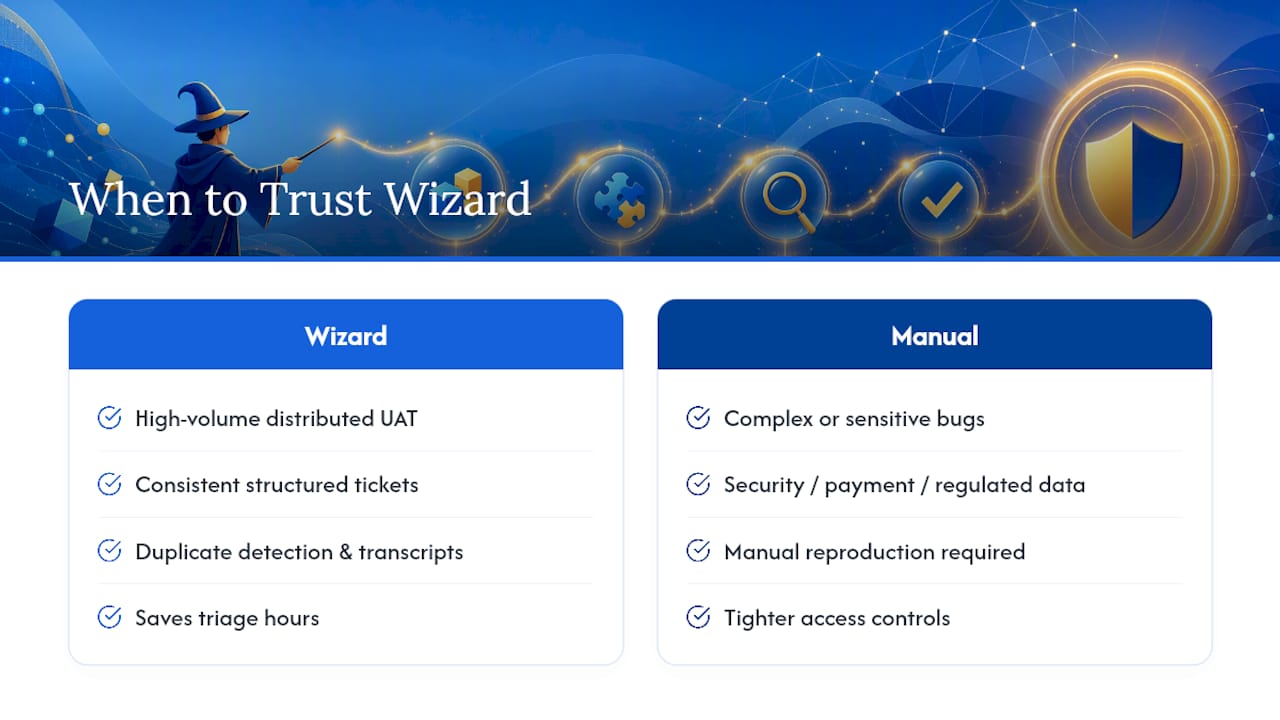
Automated wizards earn their keep on high-volume, distributed UAT: fifty remote testers hitting the same release candidate need consistent, structured tickets more than they need a human reviewing every submission by hand. That’s where duplicate detection and transcript-grounded evidence save real triage hours.
Complex or sensitive bugs are a different story. A security flaw, a payment discrepancy, or anything touching regulated data deserves manual reproduction and tighter access controls before it ever gets recorded. Governance matters here: someone should own edit approval on transcripts, set explicit data retention windows for recordings, and restrict who can view sessions containing customer data. The wizard accelerates the routine. It shouldn’t replace judgment on the exceptional.
— Marketing
Try a Wizard That Was Built Around This Exact Checklist
This ticket submission wizard is an alternative to stitching together a screen recorder, a transcription tool, and a manual duplicate check across three separate apps. It records the session, transcribes the issue as the tester talks, and runs AI duplicate detection before anything hits your Jira or Azure DevOps backlog.

If your current process still relies on testers writing up bugs after the fact from memory, that gap alone explains a good chunk of your triage backlog. Wezard’s UAT testing feedback tool is built to close it without adding a second tool to your stack. Check the pricing page for plan details across Starter, Team, and Business tiers, or explore the use cases page to see which workflow matches your team, then request a demo to pilot it against your own acceptance criteria.
Where to Verify the Technical Details
The integration and traceability claims in this article rest on public documentation, not vendor marketing. Atlassian’s attachment API guide and the Jira Cloud REST API reference cover authentication and upload behavior in full. For process standards, ISTQB’s acceptance-testing syllabus and its defect report guidance are worth bookmarking before you write your own acceptance criteria.
Sources
- How to add an attachment to a JIRA issue using REST API | Jira and Jira Service Management | Atlassian Support
- Defect Report in ISTQB: Software Engineering
FAQ
What Makes a Ticket “Reproducible” in UAT?
A reproducible ticket includes timestamped steps, explicit actual versus expected results, and environment metadata, so an engineer can recreate the failure without contacting the original tester. ISTQB’s defect report guidance treats this as the baseline for any usable bug report.
Why Do Jira Integrations Fail Even When the Ticket Looks Complete?
Most failures happen at the attachment layer, not the issue-creation layer. A ticket can generate a valid issue key while the screen recording fails to upload due to size limits or an expired token, which is why Atlassian’s own documentation treats attachment success as a separate concern from ticket creation.
How Should Duplicate Detection Handle Uncertain Matches?
Uncertain matches should route to a human review queue rather than auto-merge, using transcript similarity, timestamp overlap, and visual frame matching as supporting signals rather than automatic decisions. Someone on the team should own the final approve, merge, or reject call with a visible audit trail.
Does Wezard Support Both Jira and Azure DevOps?
Yes. Wezard pushes AI-enriched tickets, complete with screen recordings and transcripts, directly to both Jira and Azure DevOps, alongside ServiceNow.
What Does a Ticket Submission Wizard Cost?
Wezard’s plans start at $25 per month for the Starter tier, with Team at $70 per month and Business at $160 per month; Enterprise pricing is available on request through the pricing page.


