
End user testing is the process where real users evaluate software in realistic scenarios to identify usability and functionality issues before widespread release. Known formally as user acceptance testing (UAT), it sits at the final gate of the software testing lifecycle. Internal QA teams catch code defects, but they cannot replicate the unpredictable ways real people actually use a product. That gap is exactly why end users test software, and closing it determines whether a release succeeds or quietly fails.
Why end users test software: the core reasons
End user testing exists because internal testing cannot see what real users see. Developers and QA engineers know the system too well. They navigate menus correctly, interpret labels accurately, and never misread a workflow. Real users do all three of those things wrong, and that is precisely the data you need.
Three core reasons drive end user involvement in testing:
- Uncovering hidden usability issues. Real users find broken workflows, confusing labels, and inaccessible features that internal teams skip over. A QA engineer knows the intended path. A first-time user takes a completely different one.
- Validating feature necessity. 64% of software features are rarely or never used. That statistic means most development effort goes toward features users do not want. Testing with real users before launch reveals which features actually solve problems.
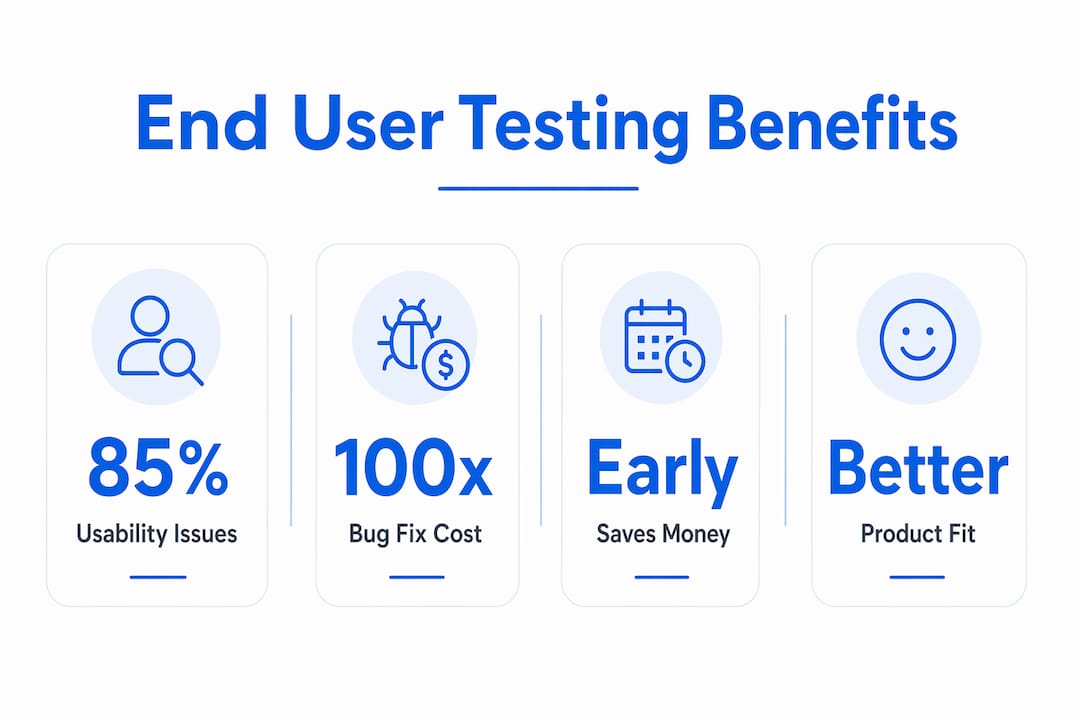
- Catching defects before they become expensive. The 1-10-100 cost rule states that fixing a bug during design costs one unit, during development ten units, and post-launch one hundred units. Early end user testing is not a quality exercise. It is a financial decision.
Pro Tip: Run a short end user session immediately after your first working prototype. You will surface navigation problems early enough to fix them at design cost, not development cost.
The difference between internal testing and real user behavior is not subtle. A developer testing a checkout flow will complete it in 30 seconds. A real user may abandon it entirely because one field label is ambiguous. That abandonment never appears in an automated test report.

How end user testing fits within the software testing lifecycle
End user testing does not replace unit testing, integration testing, or system testing. It completes them. Each earlier phase answers a different question. Unit tests ask whether individual functions work. Integration tests ask whether components connect correctly. UAT vs system testing clarifies that system testing checks whether the full application meets technical specifications, while UAT checks whether it meets human expectations.
The two primary forms of end user testing are user acceptance testing and usability testing. UAT confirms that software meets agreed business requirements. Usability testing evaluates how easily real users can complete tasks. Both are necessary. A product can pass UAT and still frustrate users because it meets requirements that were poorly defined in the first place.
The table below shows where each testing type operates and what it reveals:
| Testing type | Who runs it | What it finds |
|---|---|---|
| Unit testing | Developers | Code-level logic errors |
| Integration testing | QA engineers | Component connection failures |
| System testing | QA engineers | Technical specification gaps |
| Usability testing | Real users | Navigation friction, confusion |
| User acceptance testing | End users or clients | Business requirement gaps |
Automated testing is binary: a test either passes or fails. Real user testing reveals nuanced experiences, including frustration, unexpected workarounds, and confusion that no script can detect. That distinction explains why automated coverage alone is never sufficient for a product that real humans will use daily.
End user testing fits best at two points: after a working prototype exists and again before final release. Teams that wait until release to involve users consistently discover expensive problems at the worst possible moment.
Which techniques and tools work best for end user testing?
The most practical starting point is a moderated session with five real users. Testing with just 5 users uncovers approximately 85% of usability issues. That finding reframes the common objection that user testing requires large sample sizes and long timelines. A single afternoon of moderated sessions delivers the majority of the insight you need.
Moderated and unmoderated testing each serve different purposes:
- Moderated testing involves a facilitator who observes and asks follow-up questions in real time. It produces deep qualitative insight but costs more time and money.
- Unmoderated testing lets users complete tasks independently, often recorded remotely. It scales faster and costs less, but you lose the ability to probe unexpected behavior.
- Guerrilla testing is the fastest option. You recruit five to eight users from a coffee shop, a Slack community, or your own customer base and run short task-based sessions. It is informal but surprisingly effective for catching major usability problems early.
Tools like Userbrain and Loop11 support remote unmoderated testing at scale. Wezardapp goes further by recording the screen, transcribing the issue in real time, and using AI to detect duplicate tickets before they reach your Jira or Azure DevOps backlog. That combination eliminates the manual triage step that slows most UAT cycles.
Pro Tip: When selecting test participants, recruit users who match your actual customer profile, not internal employees. Employees know too much about the product to behave like real first-time users.
Choosing the right test scenario matters as much as choosing the right tool. Scenarios should reflect real tasks users perform, not feature demonstrations. Ask a user to complete a purchase, not to “explore the checkout page.” Task-based scenarios produce behavior data. Feature tours produce opinions.
What are the measurable benefits of end user testing?
The business case for end user testing is well documented. Enterprises that integrate structured user testing achieve a 415% ROI over three years, with payback in under six months. That return comes from reduced rework, fewer post-launch support tickets, and higher user retention.
Retention is where the numbers get stark. 32% of customers abandon a product after a single bad experience. More concerning, 91% of dissatisfied users leave without saying anything. They do not file a support ticket or send feedback. They simply stop using the product. End user testing catches the experience failures that drive silent churn before they reach production.
“User testing data serves as objective evidence to resolve stakeholder debates and prevent design debt by exposing real user struggles.” — What is User Testing?
That point about stakeholder debates is underappreciated. Product teams waste significant time arguing about design decisions based on personal preference. A recorded user session showing three participants failing to find the same button ends the debate in minutes. User test videos stop internal disputes and reduce design debt by replacing opinion with evidence.
End user testing also improves product-market fit. When you discover that users ignore a feature entirely, you stop investing in it. When you discover that users repeatedly attempt a task the product does not support, you build it. That feedback loop is the difference between a product that grows and one that stagnates.
What misconceptions surround end user testing?
The most common misconception is that end user testing exists solely to remove friction. That assumption leads teams to over-smooth interfaces until they become forgettable. User testing can calibrate the right amount of friction needed for engagement. A game that removes all difficulty loses its players. A security workflow that removes all confirmation steps creates risk. Testing reveals where friction helps and where it hurts.
Three other misconceptions slow adoption:
- “AI can replace real user testing.” Synthetic AI feedback is polished and fast, but it is hypothetical. Real users exhibit unpredictable behaviors, workarounds, and misinterpretations that AI-generated personas cannot replicate. AI analysis tools support testing. They do not substitute for it.
- “We only need testing before launch.” Testing is most valuable when done continuously. A single pre-launch session misses the behavior changes that occur as users grow familiar with a product over time.
- “More users means better data.” Five well-selected users in a focused session produce more useful insight than fifty users completing an unfocused survey. Quality of participant selection and task design matters far more than sample size.
The goal of end user testing is to observe real behavior, not to collect opinions. When teams confuse the two, they run surveys instead of task-based sessions and walk away with data that confirms what they already believed.
Key Takeaways
End user testing is the most cost-effective way to catch usability failures, validate features, and protect revenue before software reaches production.
| Point | Details |
|---|---|
| Early testing saves money | Fixing a bug post-launch costs 100x more than fixing it at the design stage. |
| Five users reveal most problems | Testing with just 5 users uncovers approximately 85% of usability issues. |
| Silent churn is the real risk | 91% of dissatisfied users leave without feedback, making pre-launch testing critical. |
| Friction is not always the enemy | User testing calibrates optimal friction levels, not just removes them. |
| AI supplements but cannot replace real users | Only real users reveal unpredictable behaviors, workarounds, and genuine confusion. |
What I have learned from watching teams skip user testing
Teams that skip end user testing almost always believe their internal QA process is thorough enough. I have seen this pattern repeatedly. A product ships, the support queue fills up with the same three complaints, and the team spends the next sprint fixing what a two-hour user session would have caught in week two.
The most avoidable failures I have observed share one trait: the team optimized for what the software does rather than how people use it. Those are different problems. A feature can work perfectly and still be unusable. Internal testing catches the first problem. Only real users reveal the second.
The teams that benefit most from user testing treat it as a continuous practice, not a pre-launch checkbox. They run short sessions after every major feature release. They use tools like Wezardapp to capture and triage feedback without slowing down the development cycle. They treat user behavior as data, not as criticism.
The uncomfortable truth about end user testing is that it works best when teams are willing to be wrong. The session where three users fail to complete your most important workflow is not a bad session. It is the most valuable hour you will spend that sprint. Teams that internalize that shift stop dreading user testing and start scheduling it.
— Marketing
See end user testing in action with Wezardapp
End user testing produces value only when feedback reaches your development team quickly and cleanly. Wezardapp records the screen, transcribes the issue in real time, and uses AI to detect duplicate tickets before they flood your backlog. That means your team spends time fixing real problems, not sorting through redundant reports.

Teams using Wezardapp connect directly to Jira or Azure DevOps, so every user-reported issue becomes a structured ticket automatically. Start by reviewing acceptance testing entry criteria to define what a successful UAT cycle looks like for your product. Then explore UAT test case best practices to build sessions that surface real issues fast. The UAT testing feedback tool from Wezardapp is built for teams that need reliable user feedback without the manual overhead.
FAQ
What is the main purpose of end user testing?
End user testing validates that software works the way real users expect it to work, not just the way developers designed it. It uncovers usability issues, missing features, and workflow failures that internal testing cannot detect.
When should end user testing happen in the development process?
End user testing is most valuable after a working prototype exists and again before final release. Teams that test continuously after each major feature release catch problems at the lowest possible cost.
How many users do you need for effective end user testing?
Testing with five users uncovers approximately 85% of usability issues, making small focused sessions both practical and effective. Larger sample sizes add diminishing returns unless you are testing across distinct user segments.
What is the difference between UAT and usability testing?
UAT confirms that software meets agreed business requirements, typically run by clients or business stakeholders. Usability testing evaluates how easily real users complete tasks and is focused on the quality of the user experience.
Can AI replace end user testing?
AI tools can analyze patterns and generate synthetic feedback, but they cannot replicate the unpredictable behaviors, workarounds, and genuine confusion that real users produce. AI supports end user testing. It does not replace it.


