
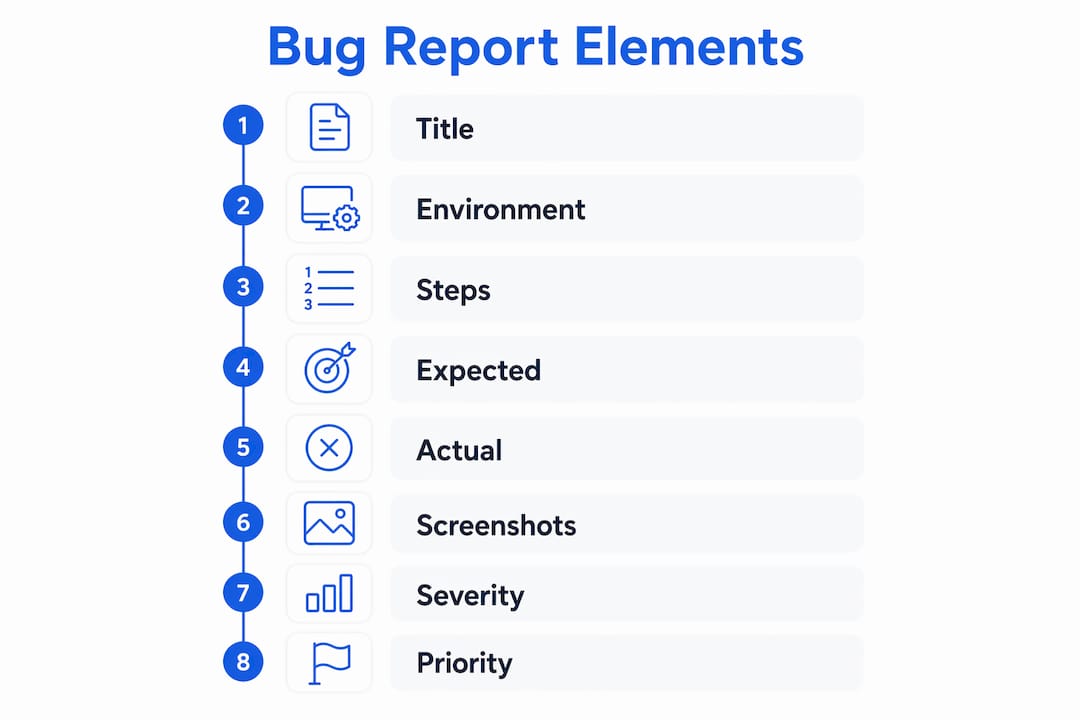
A bug report is a formal record of a software defect, written to help developers understand, reproduce, and fix the problem without guesswork. Every effective bug report contains eight core fields: a descriptive title, environment details, numbered reproduction steps, expected versus actual behavior, visual evidence, severity level, priority, and technical logs. Structured templates resolve bugs 40–60% faster than informal descriptions. That gap exists because developers spend less time asking follow-up questions and more time writing fixes.
What is a bug report and why does it matter?
A bug report is a structured communication document, not a complaint. Its job is to give a developer everything needed to reproduce a defect on their own machine, in their own environment, without contacting the reporter. When that goal is met, the fix happens faster. When it is not, the ticket stalls.
Bug reports filed by diverse roles — support representatives, QA engineers, product managers, and end users — improve product quality consistently. The key is standardization. A support rep and a QA engineer using the same template produce reports that feed the same triage workflow, reducing noise and duplication across the backlog.

The formal term used in software engineering is “defect report,” though “bug report” is the phrase most teams use day to day. Both refer to the same artifact: a ticket that documents what broke, where it broke, and how to make it break again.
What essential information should a bug report contain?
High-quality bug reports require eight essential fields to accelerate resolution. Missing even one field can cost a developer 10–30 minutes of guessing before they can begin reproducing the issue.
The eight fields are:
- Descriptive title. State what broke and where. “Checkout button unresponsive on mobile Safari 17” is useful. “Button not working” is not.
- Environment details. Include operating system, browser and version, device model, app version, and user role. A bug that appears only on iOS 17.4 with a guest account will never be reproduced on a Windows desktop with an admin login.
- Reproduction steps. Number each step. Start from a known state, such as “logged out on the homepage.” Include exact values, like the specific product SKU or form input used.
- Expected behavior. Describe what should happen when the steps are followed correctly.
- Actual behavior. Describe what actually happens. Be specific: “A 500 error appears” is better than “it crashes.”
- Visual evidence. Screenshots and screen recordings reduce ambiguity. Screenshots are helpful but insufficient alone; pair every image with a written description so screen readers and developers without visual context can follow along.
- Severity level. Rate the technical impact from critical to trivial (more on this distinction below).
- Technical logs. Console errors, stack traces, and network request logs give developers the raw data to diagnose root causes without reproducing the bug themselves.
Pro Tip: Before submitting, read your own reproduction steps as if you have never seen the product. If you need prior knowledge to follow them, add more detail.
| Field | Why it matters |
|---|---|
| Descriptive title | Lets developers scan backlogs and spot duplicates instantly |
| Environment details | Narrows the reproduction surface to the exact configuration |
| Reproduction steps | The single biggest factor in whether a bug gets fixed or ignored |
| Visual evidence + text | Covers accessibility and removes visual ambiguity simultaneously |
| Technical logs | Cuts diagnosis time by giving developers raw error data upfront |
How does severity differ from priority in bug reporting?
Severity and priority are two different measurements, and confusing them creates real problems during triage. Severity measures the technical or functional impact of a defect. Priority indicates how urgently the team should fix it, based on business context.
Severity levels run from critical to low. A critical bug crashes the application or causes data loss. A high severity bug breaks a major feature but leaves the app running. A medium severity bug degrades functionality without blocking users. A low severity bug is a cosmetic issue with no functional impact.
Priority is set during triage, not by the reporter. Here is why the distinction matters in practice:
- High severity, low priority: A crash occurs only when a user imports a file format that fewer than 1% of users ever touch. The technical impact is severe, but the business urgency is low.
- Low severity, high priority: A typo appears in the company name on the login screen. The functional impact is trivial, but the business visibility is high and the fix is fast.
Reporters should always classify severity accurately based on what they observed. Assigning priority is the product manager’s or engineering lead’s job during sprint planning or triage. When reporters inflate priority to get faster attention, they corrupt the triage process and slow down the whole team.
Pro Tip: When in doubt about severity, ask: “Does this prevent a user from completing a core task?” If yes, it is at least high severity.
What are best practices for writing clear and actionable bug reports?
Clear reproduction steps are the single most important factor in whether a bug gets fixed quickly or sits ignored. The following practices apply to every report, regardless of role or technical background.
- Write a specific title. Name the broken feature and the failure mode. “Password reset email not delivered on Gmail accounts” beats “email issue” every time.
- Number your reproduction steps. Start from a clean, known state. Include exact inputs: the email address format used, the browser zoom level, the specific page URL.
- Document frequency for intermittent bugs. Including frequency data like “occurs 3 out of 5 attempts” tells developers whether they need to run the steps once or ten times to trigger the defect.
- Pair visuals with text. Attach a screenshot or short screen recording, then write out what it shows. Never submit an image without a written description.
- Include all environment details. Do not assume the developer uses the same setup. List the OS version, browser version, screen resolution, and any active feature flags or user permissions.
- Add technical logs. Copy the console error, paste the stack trace, or attach the network log. This single step can cut diagnosis time significantly.
- Monitor the ticket after submission. Bug reports are living documents. Developers ask follow-up questions. Reporters who respond within a day keep tickets moving. Reporters who go silent cause “cannot reproduce” closures.
Pro Tip: If a bug is intermittent, record your screen while reproducing it. A video of the failure is worth more than any written description.
The most common reason a well-intentioned report fails is vague language. Phrases like “it doesn’t work” or “the page breaks” give developers nothing to act on. Poorly described bugs force developers to close tickets as “cannot reproduce,” which means the defect stays in the product and the reporter has to start over.
How do effective bug reports impact software development?
Quality bug reporting changes how fast software improves. The efficiency gains are concrete: structured reports reduce guessing time by 10–30 minutes per ticket and contribute to 40–60% faster resolution overall. Across a team handling dozens of tickets per sprint, that adds up to days of recovered engineering time.
The benefits extend beyond speed:
- Fewer duplicate tickets. Clear titles and consistent templates make it easy to spot when two reporters have filed the same defect.
- Better cross-team communication. QA, support, and product teams all read the same ticket. A well-structured report removes the need for a meeting to explain what happened.
- Higher software reliability. Bugs that get reproduced get fixed. Bugs that cannot be reproduced stay in production.
- Improved customer satisfaction. Faster fixes mean fewer users encounter the same defect twice.
“Bug reports enable diverse teams — from support to QA — to communicate defects efficiently when standardized properly.” — onout.org
Effective bug reporters monitor developer feedback and update their reports as new information surfaces. That behavior turns a passive ticket into a live collaboration between the person who found the problem and the person fixing it. Teams that build this habit into their workflow close bugs faster and reopen them less often.
Learning how to submit clear bug reports is a skill that pays off immediately, regardless of whether you are a QA engineer, a business analyst, or a product owner running UAT testing.
Key Takeaways
A bug report’s value is determined entirely by whether a developer can reproduce the defect from it, making reproduction steps the most critical field in any report.
| Point | Details |
|---|---|
| Eight fields are required | Title, environment, steps, expected/actual behavior, visuals, severity, priority, and logs all belong in every report. |
| Severity and priority differ | Reporters classify severity; product leads assign priority during triage to avoid corrupting the workflow. |
| Structured templates save time | Teams using templates resolve bugs 40–60% faster and cut per-ticket guessing time by 10–30 minutes. |
| Visuals need text | Pair every screenshot or recording with a written description for accessibility and clarity. |
| Reports need follow-up | Active monitoring and prompt replies to developer questions prevent “cannot reproduce” closures. |
What I’ve learned from watching good reports get ignored
The most frustrating pattern in software development is a real, reproducible bug that never gets fixed because the report was too vague to act on. I have watched engineering teams spend an entire sprint triage session debating whether a ticket described a known issue or a new one, simply because the reporter skipped the environment field.
The conventional wisdom is that developers should ask for more information when a report is unclear. In practice, they often do not. They mark the ticket as “cannot reproduce” and move on. That means the burden of quality sits entirely with the reporter, not the developer. Knowing this changes how you approach every report you write.
The shift that makes the biggest difference is treating a bug report like a recipe. A recipe that says “add some flour” is useless. A recipe that says “add 2 cups of all-purpose flour, sifted” is reproducible. The same logic applies to reproduction steps. Exact values, exact starting states, exact sequences.
Business users and non-technical testers often underestimate how much their environment details matter. A bug that appears only on a specific network configuration or with a specific user role will never be reproduced on a developer’s clean local build. Writing down those details is not bureaucracy. It is the difference between a fix and a closed ticket.
The 2026 standard for structured templates reflects years of teams learning this the hard way. If your team is still filing free-form reports, the template is the fastest improvement you can make today.
— Marketing
Wezardapp makes bug reporting faster and cleaner
Bug reporting works best when the process removes friction from the reporter and noise from the developer’s backlog.

Wezardapp is the only UAT bug tracking tool that records your screen, transcribes the issue in real time, and uses AI to detect duplicate tickets before they reach your Jira or Azure DevOps backlog. Every report Wezardapp generates includes the environment details, reproduction context, and visual evidence that developers need to act immediately. Teams using Wezardapp skip the back-and-forth entirely. If you want to see how structured reporting fits into a full acceptance testing workflow, the UAT test case best practices guide is a practical next step.
FAQ
What is a bug report in software testing?
A bug report is a formal document that records a software defect, including how to reproduce it, what the expected behavior is, and what actually happened. Its purpose is to give developers everything they need to fix the issue without additional back-and-forth.
What should a bug report include?
A complete bug report includes a descriptive title, environment details, numbered reproduction steps, expected and actual behavior, visual evidence paired with text, a severity level, and any relevant technical logs.
How does severity differ from priority in a bug report?
Severity measures the technical impact of the defect, such as a crash versus a cosmetic issue. Priority indicates how urgently the team should fix it, and is set by product leads during triage, not by the reporter.
Why do bug reports get closed as “cannot reproduce”?
Poorly described reproduction steps are the most common cause. When developers cannot follow the steps to trigger the defect, they close the ticket rather than guess. Including exact inputs, starting states, and frequency data prevents this outcome.
Who should write bug reports?
Support representatives, QA engineers, and end users should all file standardized reports. Any role that encounters a defect can contribute to product quality, as long as they follow a consistent template.


