Yes — teams can safely auto-generate engineering-ready tickets when they pair RAG grounding, routing rules, and a human-in-the-loop approval gate. Without those three elements, you get a backlog full of hallucinated diagnostics and duplicate noise. With them, you get tickets that arrive pre-filled with stack traces, affected endpoints, severity scores, and suggested remediation steps — ready for triage, not rewriting.
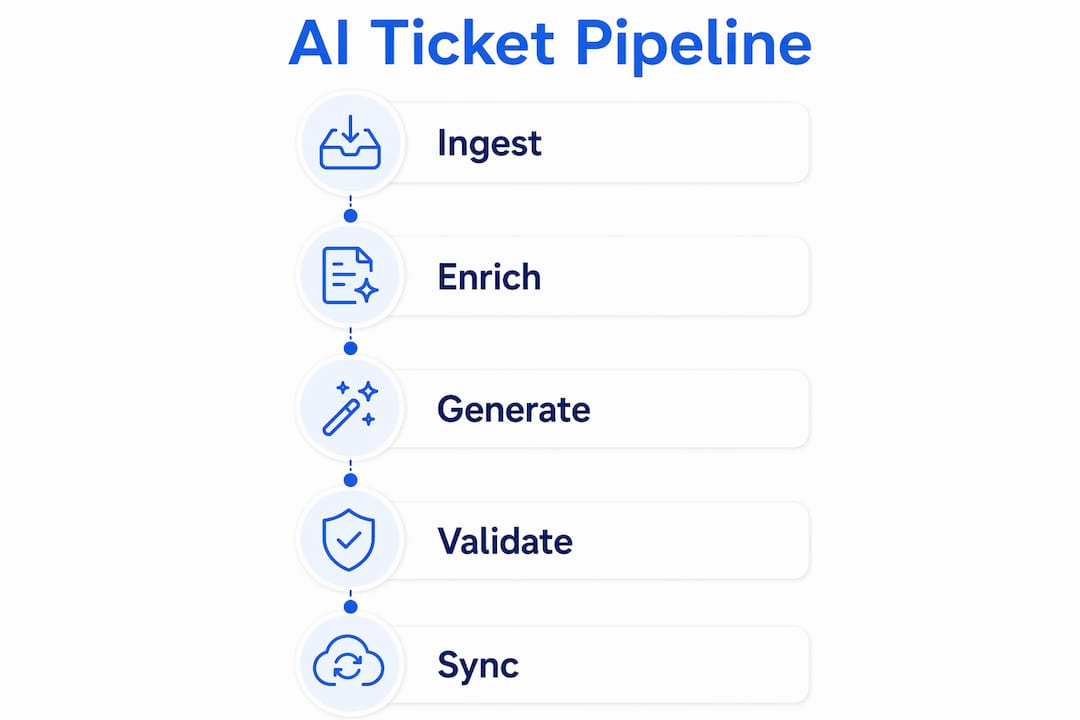
The recommended approach follows five stages: ingest → enrich → generate → validate → create/sync. Your ingestion layer pulls from webhooks, log streams, and UAT sessions. Enrichment adds code context, CVE references from the NVD, and historical ticket embeddings. The model layer drafts the ticket. Validation runs deduplication and confidence checks. Sync pushes approved tickets to Jira, GitHub Issues, Linear, or Azure DevOps via API.
Start your pilot on high-severity, reproducible issues. Track four metrics from day one: precision (are auto-created tickets actually actionable?), recall (are you missing real issues?), duplicate rate, and MTTR impact. Tools like Wezard, which records UAT sessions and detects duplicates before they hit your backlog, fit naturally at the ingest and validate stages.
Table of Contents
- What does a production AI ticket generation pipeline look like?
- How do you wire AI ticketing into Jira, GitHub, Linear, and Azure DevOps?
- How do you prevent hallucinations in generated tickets?
- What does a 90-day pilot plan look like?
- How do you handle PII and sensitive data in generated tickets?
- How does Wezard fit into an AI ticket generation pipeline?
- Key Takeaways
- The gap between what AI ticketing promises and what actually ships
- Wezard gives UAT teams a ready-built pipeline
- Authoritative references and next reads
What does a production AI ticket generation pipeline look like?
AI-native ticketing pipelines embed AI across every stage rather than bolting it onto an existing workflow. Here is the minimal architecture that holds up in production:
- Ingestion layer — webhooks from error monitors, log stream tailing, support channel listeners, and UAT session SDKs feed a lightweight event queue (SQS, Kafka, or a simple Redis stream).
- Enrichment layer — a RAG index over past resolved tickets and product docs retrieves relevant context. The enricher extracts stack traces, maps the error to a service owner, pulls the triggering commit hash, and queries NVD for any CVE matches.
- Model layer — the LLM receives the enriched context bundle and generates a structured ticket draft: title, description, reproduction steps, severity, affected endpoint, and suggested remediation.
- Validation and dedupe — a rules engine checks confidence scores and routes low-confidence drafts to a human reviewer. Fuzzy matching against open-ticket embeddings catches duplicate tickets before they reach the backlog; new occurrences append as comments on the existing ticket instead.
- Sync layer — approved tickets push to Jira, GitHub Issues, Linear, or Azure DevOps via their respective REST APIs, with custom fields and labels populated from the enrichment payload.
Keep state carefully: enrichment context is short-lived (discard after ticket creation), but ticket history and audit logs are persistent. Every automated action needs a log entry with timestamp, model version, and confidence score. For noisy sources, add backpressure — rate-limit ingestion rather than letting a spike flood the model endpoint.
Pro Tip: Maintain a single canonical service ownership map — a YAML file or a small DB table that maps error codes and service names to team owners. Black-box routing is the most common failure point in production pipelines; codifying these rules early prevents misrouted tickets from eroding developer trust.

How do you wire AI ticketing into Jira, GitHub, Linear, and Azure DevOps?
The integration pattern is consistent across trackers: your AI service calls the tracker’s REST API to create issues, populates custom fields with enriched content as the ticket body, and appends new occurrences as comments rather than creating duplicate issues.
- Jira — use the Jira REST API (
POST /rest/api/3/issue) with a project key mapping and custom field IDs for severity, service, and CVE reference. Wezardapp’s Jira connector handles this with 1-click sync, pre-filling the description from the AI-generated report. - GitHub Issues — the GitHub API (
POST /repos/{owner}/{repo}/issues) accepts labels, assignees, and a markdown body. Push enriched stack traces and reproduction steps directly into the body; use labels for severity and service tags. - Linear — Linear’s GraphQL API supports issue creation with team ID, priority, and label assignment. Useful for product teams running cycles alongside engineering.
- Azure DevOps — use the Work Items REST API with patch documents to set area path, iteration, and custom fields. Wezardapp’s Azure DevOps integration handles feedback capture and AI ticket synchronization out of the box.
The minimum input set for a useful ticket: title, reproducible steps or session replay, stack trace, affected endpoint or service, commit or deployment metadata, severity, and an optional screenshot or video clip.
Intelligent routing reduces backlog noise significantly. Auto-create only for high-value or reproducible issues and use bots for routine self-service — not every incoming signal warrants a new ticket. Classify first, then route, then create.
Routing inputs that matter: a service ownership map, error-code-to-team rules, severity thresholds, and signal source (automated monitor vs. human UAT report). For broader QA pipeline context, AI-driven code review pairs well with automated ticketing to catch issues before they reach production.
How do you prevent hallucinations in generated tickets?
Ground the model with historical tickets, specific code files, and CI log snippets. Never let it generate diagnostics from unconstrained general knowledge — that is where hallucinations live.
- RAG over resolved tickets — index past tickets with their resolutions. When a new error arrives, retrieve the top-k similar tickets and include them as context. Grounding with domain-specific data dramatically increases diagnostic precision and reduces false leads.
- Exact artifacts in context — pass the actual stack trace, the relevant code snippet, and the deployment diff. The model should reference these, not invent them.
- CVE lookups — for security-related signals, query the NVD and include the CVE entry as a read-only reference in the ticket. Never send full customer data to third-party services for this lookup.
- Confidence thresholds — set a minimum confidence score below which the ticket goes to human review rather than auto-creation. Human approval at defined pipeline stages prevents low-confidence drafts from polluting the backlog.
- Evidence-linked claims — every generated ticket should link to the source artifacts it used: the log line, the commit, the similar resolved ticket.
Pro Tip: Require the model to produce a short evidence list — two or three pointers — that a reviewer can scan in five to ten seconds. If the model cannot produce that list, the ticket should not auto-create.
Duplicate and noise control deserves its own attention. Fuzzy matching against open-ticket embeddings, frequency thresholds, and smart deduplication rules keep the backlog clean. When a pattern escalates — the same error appearing ten times in an hour — bump severity on the existing ticket rather than creating ten new ones.
What does a 90-day pilot plan look like?
Run four phases: sandbox simulation with offline replay → limited live pilot on one high-value channel → broader production with human-in-the-loop → graduated auto-creation for proven patterns only.
- Phase 1 (weeks 1–2): Replay historical incidents through the pipeline offline. Label outputs manually and calculate baseline precision and recall.
- Phase 2 (weeks 3–6): Go live on one channel (e.g., UAT sessions or a single error monitor). All tickets require human approval. Track every KPI daily.
- Phase 3 (weeks 7–10): Expand to two or three channels. Introduce auto-creation for ticket patterns that hit your precision threshold in Phase 2.
- Phase 4 (weeks 11–13): Evaluate go/no-go for full production. Retrain or re-index based on reviewer feedback and drift signals.
| KPI | Baseline (manual) | 90-day target |
|---|---|---|
| Ticket precision | Establish in Phase 1 | Improve measurably vs. baseline |
| Recall (missed events) | Establish in Phase 1 | Reduce missed actionable events |
| Duplicate rate | Establish in Phase 1 | Decrease vs. manual filing |
| Auto-created tickets approved | N/A | Track and increase over pilot |
| Avg. time-to-first-action | Establish in Phase 1 | Reduce vs. baseline |
| MTTR impact | Establish in Phase 1 | Reduce vs. baseline |
Only expand auto-creation when precision exceeds your configured threshold and the duplicate rate is trending down compared to manual filing.
How do you handle PII and sensitive data in generated tickets?
Scrub or redact PII and secrets before sending any logs or user recordings to an external model endpoint. This is non-negotiable for U.S. enterprise deployments.
- Tokenization at ingestion — replace email addresses, user IDs, API keys, and session tokens with opaque references before the payload reaches the enrichment layer.
- Policy-driven retention — define how long enrichment artifacts, ticket drafts, and audit logs are retained. Shorter is safer for sensitive data.
- Audit logs — every automated action (ticket created, ticket suppressed, confidence score, model version) gets a log entry. This is your compliance trail.
- Private model endpoints — prefer on-prem or VPC-hosted inference for sensitive codebases. Enterprise LLMs with contractual data handling guarantees are the next-best option.
- Encryption — enforce encryption at rest and in transit for all stored artifacts, including RAG indexes and ticket history.
Pro Tip: Maintain an “evidence-only” view in tickets that links to private artifacts rather than embedding raw secrets or full user transcripts. Reviewers get the context they need; sensitive data stays behind access controls.
CVE lookups via NVD are read-only external references — pass only the error signature or CVE ID, never customer data.
How does Wezard fit into an AI ticket generation pipeline?
Wezard maps cleanly to the pipeline stages most teams struggle to build from scratch: capture, enrich, deduplicate, and sync.
- Ingest — Wezard’s SDK records UAT sessions with screen capture, giving the pipeline a reproducible visual replay instead of a vague user report.
- Enrich — real-time transcription captures the tester’s narration alongside the recording, adding natural-language context that enriches the ticket description automatically.
- Generate and validate — AI-assisted report drafting produces a structured ticket draft; duplicate detection runs before anything reaches the backlog.
- Sync — approved tickets push directly to Jira or Azure DevOps with one click.
Wezard is the only user acceptance testing software that records your screen, transcribes the issue in real time, and uses AI to detect duplicate tickets before they reach your Jira or Azure DevOps backlog.
Wezard is a particularly strong fit for UAT sessions, product acceptance testing, and any workflow where visual reproduction context matters. When a tester finds a bug, the recording, transcript, and AI-generated description travel together into the ticket — no manual write-up required. For teams tracking how context improves bug reports, this is the practical implementation of that principle.
Key Takeaways
An AI-native ticketing pipeline only delivers clean, actionable tickets when grounding, deduplication, and human approval gates are built in from the start — not added later.
| Point | Details |
|---|---|
| Ground the model first | Index historical tickets and code files before generating; ungrounded models hallucinate diagnostics. |
| Gate creation with routing rules | Only auto-create tickets when AI-classified signals meet a defined severity or reproducibility threshold. |
| Measure four KPIs from day one | Track precision, recall, duplicate rate, and MTTR impact throughout the pilot. |
| Require human approval for low-confidence items | Auto-creation without approval gates pollutes backlogs and erodes developer trust. |
| Wezardapp for UAT pipelines | Wezard records, transcribes, deduplicates, and syncs to Jira or Azure DevOps — covering ingest through sync in one tool. |
The gap between what AI ticketing promises and what actually ships
The pitch for automated ticket creation is compelling: no more manually writing up bugs at 5 PM, no more duplicate issues clogging the sprint board. The reality is that most teams underestimate the routing problem. Getting the model to draft a coherent ticket is the easy part. Getting that ticket to land in the right team’s backlog, with the right severity, without duplicating three existing issues — that is where deployments stall.
The teams that ship this successfully treat the service ownership map as a first-class artifact, not an afterthought. They also set explicit SLAs for reviewer response during the human-in-the-loop phase. If reviewers take 48 hours to approve or reject a draft, developers stop trusting the system and route around it. Fast feedback loops in the pilot phase are what build the cultural buy-in that makes broader automation viable.
One more thing worth saying plainly: keep a rollback plan. If precision drops below your threshold after a model update or a data drift event, you need a one-command path back to manual filing. Teams that treat automation as irreversible end up with degraded backlogs and no clean way out. Automation should be a dial, not a switch.
Wezard gives UAT teams a ready-built pipeline
For teams that need UAT-focused capture combined with automated Jira or Azure DevOps sync, building the ingest-to-sync pipeline from scratch takes weeks. Wezardapp delivers screen recording, real-time transcription, AI duplicate detection, and 1-click Jira sync out of the box — covering the stages most teams spend the most time engineering.

The sharpest reason to evaluate Wezard over a custom build: your testers start generating structured, duplicate-free tickets on day one, without writing a line of integration code. When you run a trial, focus on three things: how accurately the AI transcribes and structures the ticket description, how the duplicate detection performs against your existing backlog, and how much time your testers save per session. Explore the full use case library to see how teams apply it across UAT and acceptance testing workflows, then run a session on a representative sample of your UAT scenarios and measure precision and time saved directly.
Authoritative references and next reads
Start with the integration docs if your next step is wiring the pipeline. Move to the grounding and quality resources if hallucination control is your immediate concern. Check the NVD for CVE reference standards.
- Wezard Jira Integration — connector docs and 1-click sync behavior; read first if you are setting up Jira sync.
- Wezard Azure DevOps Integration — feedback capture and AI ticket sync for Azure DevOps pipelines.
- Wezard AI Bug Tracking — product page covering auto-ticket creation and duplicate detection features.
- NVD — National Vulnerability Database — the authoritative reference for CVE lookups; use as a read-only source when flagging security issues in generated tickets.
- Software Testing Front — Insights — industry articles on testing practices and Jira integration patterns; useful background for pilot design.
- Acceptance Testing Entry Criteria — read before designing your pilot scope to align ticket capture with acceptance criteria.
The NVD is the standard reference for CVE lookups in automated ticketing pipelines. Query it by CVE ID for security-related signals; never send customer data to the lookup endpoint.