
Test automation complements UAT by handling routine technical verification so human testers can focus on business-critical judgment. User Acceptance Testing (UAT) is defined as the final validation phase where real users confirm software meets business requirements before release. The challenge is that UAT teams often spend too much time on repetitive checks that machines execute faster and more consistently. 40–60% of technical validation tasks within UAT can be automated. That shift frees business analysts and project managers to evaluate what automation cannot: workflow logic, usability, and real-world business fit.
Why test automation complements UAT: roles and responsibilities
UAT and test automation serve different but connected purposes in software validation. UAT focuses on business validation. It answers the question: “Does this software do what the business actually needs?” Test automation answers a different question: “Does this software behave consistently and correctly across all technical scenarios?”
These two roles do not compete. They divide the work.
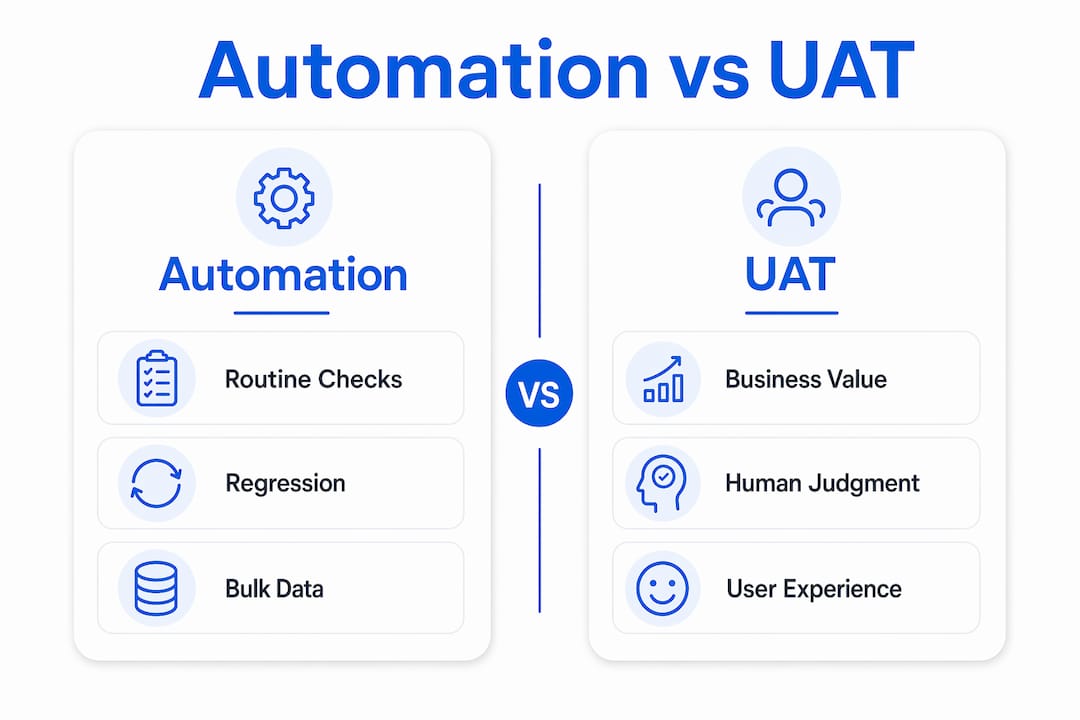
- UAT validates business workflows, user experience, and regulatory compliance through human judgment.
- Test automation verifies technical stability, regression coverage, and data integrity through repeatable scripts.
- System Integration Testing (SIT) sits between development and UAT. Automated SIT reduces data integrity issues, which is why integration testing precedes UAT. When SIT is automated, business users enter UAT with a stable, pre-validated build rather than a broken one.
- Regression testing within UAT confirms that new changes did not break existing features. Automation handles this far more efficiently than manual retesting. See real-world regression examples for how teams apply this in practice.
The division of labor is the key insight. Automation handles mechanical verification. Humans handle contextual validation. Neither replaces the other.
Pro Tip: Map your UAT test cases into two buckets before your next sprint: “repeatable technical checks” and “judgment-based business scenarios.” Automate the first bucket. Protect the second for your human testers.
How does automation improve UAT efficiency and coverage?
The efficiency gains from automation in UAT are concrete and measurable. Automation compresses test cycles from days or weeks down to hours by running tests in parallel, around the clock, without breaks or human error. That speed matters most when release windows are tight.

Test coverage also improves. Manual testers naturally focus on the most obvious paths through a system. Automated scripts cover edge cases, boundary conditions, and negative scenarios that humans skip under time pressure. This is why test coverage matters in UAT: gaps in coverage become production defects, and production defect fixes cost up to 100 times more than catching the same issue during acceptance testing.
The ROI case for automation in UAT builds further when you factor in reuse. A test written once runs in every sprint, every release, and every CI/CD pipeline trigger. Automated UAT reduces maintenance effort by around 80% and shortens go-live cycles from weeks to days. That is not a marginal improvement. It changes the economics of testing entirely.
Here is how the efficiency gains stack up in practice:
- Parallel execution runs hundreds of test cases simultaneously instead of sequentially.
- 24/7 availability means tests run overnight and results are ready for morning review.
- CI/CD integration creates immediate feedback loops so defects surface within minutes of a code commit.
- Consistent reproduction of test conditions eliminates the “I can’t reproduce it” problem.
- Reusable test assets compound value across every release cycle.
Pro Tip: Start automation with your 10–20 most critical business journeys. These are the flows that, if broken, would stop users from completing their core tasks. Automate those first and build outward.
What aspects of UAT require human judgment that automation cannot replace?
Automation is not a substitute for human testers in UAT. It is a preparation tool. The aspects of UAT that require human judgment are precisely the ones that determine whether software is actually ready for business use.
- Exploratory testing relies on curiosity and experience. A human tester notices when something “feels wrong” even when no test case covers it. Automated scripts only check what they were told to check.
- Usability evaluation requires a human perspective. Does the interface make sense to a first-time user? Is the error message clear? Automation cannot answer these questions.
- Business workflow validation demands context. A workflow may pass every automated check and still fail to support the actual business process. Only someone who understands the business can catch that gap.
- Regulatory and compliance judgment involves interpretation. Laws and policies are not always binary. Human testers assess whether the software’s behavior satisfies the intent of a requirement, not just its literal text.
- Ambiguous defect detection requires professional judgment. When a feature works technically but produces a result that is confusing or misleading, a human tester flags it. An automated script marks it as passed.
UAT pass does not mean release readiness. A system can satisfy every automated test criterion and still fail in production because the test criteria did not reflect real business and regulatory needs. Human testers are the safeguard against that failure mode.
How to integrate test automation strategically within the UAT lifecycle
Strategic integration means knowing what to automate, when to automate it, and how to keep humans in control of the decisions that matter. The goal is a hybrid approach where automation handles volume and humans handle judgment.
The table below shows how to divide testing responsibilities across the UAT lifecycle:
| Testing activity | Recommended approach | Rationale |
|---|---|---|
| Regression checks on existing features | Automate | High volume, repeatable, low judgment required |
| Data setup and environment teardown | Automate | Technical, time-consuming, error-prone manually |
| New feature business workflow validation | Human-led | Requires context, interpretation, and business knowledge |
| Usability and accessibility review | Human-led | Subjective evaluation that scripts cannot perform |
| Edge case and boundary condition testing | Automate | Scripts cover these consistently; humans miss them under pressure |
| Exploratory testing of new functionality | Human-led | Relies on curiosity and professional experience |
AI-native test platforms now allow business users to write acceptance tests in plain English, which removes the technical barrier that previously kept business analysts out of automation. This matters because the people who understand business requirements are often the same people who cannot write code. When they can author tests in natural language, test ownership broadens and coverage improves.
Automation also stabilizes builds before business users begin UAT. This prevents testers from spending their time finding basic functional defects that should have been caught earlier. It protects the quality of the UAT signal. Review UAT test case writing best practices to structure your test cases for both automated and manual execution from the start.
Common challenges and misconceptions about automating UAT
The most damaging misconception in UAT automation is that full automation is the goal. It is not. Automation handles verification; humans handle validation. Teams that chase 100% automation coverage in UAT end up with fast, consistent results that miss the business-critical issues that only humans can detect.
Misunderstanding a UAT pass as release readiness leads to failures in production. Test cases must properly reflect real business and regulatory needs, and only human testers can verify that alignment. Governance gaps between requirements and tests are the most common cause of UAT failures that automation cannot prevent.
A second challenge is the technical skill gap. Most business analysts and UAT testers are not developers. Traditional automation tools require scripting knowledge, which excludes the people who understand the business requirements best. AI-powered UAT platforms reduce this barrier by enabling test authoring in natural language with self-healing test capabilities.
A third challenge is tester burnout from unstable builds. When business users spend UAT sessions reporting basic bugs that automation should have caught, they lose confidence in the process and the product. Automated pre-validation of builds before UAT begins solves this directly.
Pro Tip: Before each UAT cycle, run your full automated regression suite and require a passing result as an entry criterion. Business users should never be the first line of defense against basic functional defects.
Key Takeaways
Test automation complements UAT by automating technical verification tasks, which frees human testers to focus on business validation, usability, and judgment-based scenarios that machines cannot replicate.
| Point | Details |
|---|---|
| Automation handles volume, humans handle judgment | Automate regression, data setup, and edge cases; keep humans on business workflows and usability. |
| Coverage gaps cost more later | Production defect fixes cost up to 100 times more than catching issues during acceptance testing. |
| UAT pass is not release readiness | Automated tests only validate what they were written to check; human testers validate business intent. |
| Start with 10–20 critical journeys | Focus automation on the business flows that matter most before expanding coverage. |
| AI platforms lower the skill barrier | Natural language test authoring lets business analysts own and maintain automated acceptance tests. |
The hybrid approach is the only approach that works
I have watched teams automate their way into a false sense of security. They hit 90% automated coverage in UAT, ship with confidence, and then field a wave of production issues that every automated test missed. The tests passed. The business failed.
The lesson is not that automation is wrong. It is that automation without human judgment is incomplete. The teams that get UAT right treat their automated test suite as a floor, not a ceiling. They use it to eliminate noise, stabilize builds, and compress regression cycles. Then they send their best testers into the remaining space to do the work that requires a brain: evaluating whether the software actually serves the people who will use it.
The other thing I have seen underestimated is the governance gap. Requirements that are vague or incomplete produce test cases that are vague or incomplete. Automation executes those test cases perfectly and tells you nothing useful. The fix is not better automation. It is better requirements alignment before a single test is written. Automation amplifies whatever quality exists in your test design. It does not compensate for weak design.
The teams that get the most from automation in UAT are the ones who treat their test suite as a living product. They review it after every release, retire tests that no longer reflect the system, and add coverage as the product evolves. That discipline is what separates teams that benefit from automation from teams that just have a lot of scripts.
— Marketing
Wezardapp makes UAT feedback faster and cleaner
When automation surfaces a defect during UAT, the next bottleneck is reporting it accurately and without duplication. Wezardapp solves that problem directly. It records your screen, transcribes the issue in real time, and uses AI to detect duplicate tickets before they reach your Jira or Azure DevOps backlog.

For project managers and UAT testers running hybrid automation and manual testing cycles, Wezardapp keeps the feedback loop clean. Business analysts report issues in plain language. Wezardapp handles the structured ticket creation automatically. Explore acceptance testing entry criteria to set the right quality gates before your next UAT cycle, or visit the UAT testing tool to see how Wezardapp fits into your workflow.
FAQ
Why does test automation complement UAT rather than replace it?
Automation handles repeatable technical verification, but UAT requires human judgment to validate business workflows, usability, and regulatory intent. The two approaches cover different types of testing risk.
What percentage of UAT tasks can be automated?
40–60% of technical validation tasks within UAT can be automated, including regression checks, data setup, and environment teardown. The remaining tasks require human evaluation.
Why does integration testing precede UAT?
Automated SIT validates data integrity and system connections before business users begin UAT. This prevents testers from encountering basic technical failures during acceptance testing, which protects the quality of the UAT signal.
Does a UAT pass mean the software is ready to release?
No. A UAT pass confirms that the software meets the written test criteria. It does not confirm that those criteria fully reflect business needs or regulatory requirements. Human testers must verify that alignment before release.
How do AI-native platforms help business analysts automate UAT?
AI-native platforms allow business analysts to write acceptance tests in plain English, removing the scripting knowledge barrier. This broadens test ownership and keeps automation aligned with actual business requirements.


