Azure DevOps is a cloud-based platform that gives project managers a single environment to plan, track, build, test, and ship software. If you’re a PM working inside an Agile software team, it’s the closest thing to a unified command center you’ll find: one place where your sprint backlog, your CI/CD pipeline status, your test results, and your code history all connect. The platform groups its capabilities into five core services, each relevant to a different slice of your job:
- Azure Boards — work item tracking, backlogs, sprint and Kanban boards, delivery plans
- Azure Pipelines — automated build, test, and deployment workflows
- Azure Repos — Git-based version control linked directly to your work items
- Azure Test Plans — manual and exploratory test management tied to user stories
- Azure Artifacts — package management for libraries and dependencies moving through your pipeline
For PMs, the practical payoff is visibility. Instead of chasing engineers for status updates, you read delivery health directly from code commits, build results, and test pass rates. Azure DevOps excels when teams adopt Agile or iterative delivery, integrating project management into the delivery process rather than layering it on top as a separate reporting exercise.
What are the core Azure DevOps services for project management?
Azure DevOps is not one tool. It’s five services that work independently or together, and understanding what each one does for you as a PM is the fastest way to get value from the platform.
Azure Boards
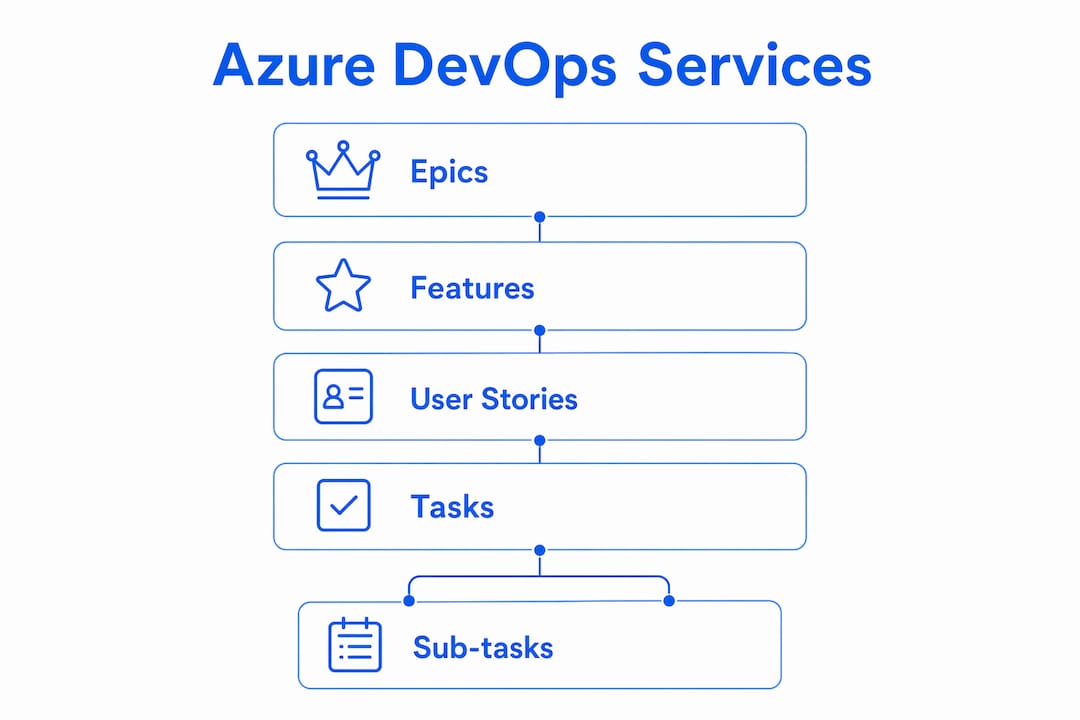
Azure Boards is the service PMs spend the most time in. It’s a web-based work tracking system built around Agile methodologies, supporting Scrum, Kanban, and the Agile process template out of the box. You manage epics, features, user stories, tasks, and bugs through a hierarchy that maps directly to how Agile teams organize work. Backlogs, sprint boards, and Delivery Plans all live here.

Azure Pipelines
Azure Pipelines automates the build and release process, turning deployment from a manual handoff into a continuous, automated sequence. For PMs, this matters because it makes delivery cadence visible and predictable. When a build fails or a deployment gate blocks a release, you see it in real time rather than hearing about it after a missed deadline.
Azure Repos
Azure Repos provides Git-based version control. As a PM, you won’t be writing code, but you will link pull requests and commits to work items in Azure Boards. That link is what lets you trace a user story from “In Progress” all the way through code review and into a deployed release, without asking anyone for a manual update.
Azure Test Plans
Azure Test Plans handles manual and exploratory testing. PMs use it to track test coverage against user stories, monitor pass and fail rates, and confirm that acceptance criteria are met before a feature ships. It connects test results directly to the work items they validate, so your sprint board reflects actual quality status, not just task completion.
Azure Artifacts
Azure Artifacts manages packages, libraries, and dependencies that flow through your pipeline. For most PMs, this service operates in the background, but it matters when a dependency version causes a build failure or a security vulnerability surfaces in a shared library. Having it inside the same platform means those issues surface in your dashboards rather than in a separate system.
How these services connect
The real power of Azure DevOps for project managers is how these five services link development activities directly to PM tracking. A developer commits code referencing a user story ID, that commit triggers a pipeline build, the build runs tests from Azure Test Plans, and the result updates the work item status in Azure Boards. You see the full chain without touching any of it manually.
How Azure Boards supports Agile project planning and tracking
Azure Boards is where most of your day-to-day project management happens. It’s built around a work item hierarchy that mirrors how Agile teams think about scope, and once you understand that hierarchy, the rest of the tool clicks into place.
The work item hierarchy
The structure runs from large to small: Epics sit at the top, representing major business objectives or themes. Features break epics into deliverable chunks, typically spanning one or more sprints. User stories (or backlog items in Scrum) represent individual pieces of user-facing functionality. Tasks are the smallest unit, assigned to individual developers for a specific sprint.
| Work Item Type | Typical Owner | PM Activity |
|---|---|---|
| Epic | PM / Product Owner | Define business objectives, set priority |
| Feature | PM / Tech Lead | Map to roadmap, track cross-team dependencies |
| User Story | Development Team | Refine acceptance criteria, confirm scope |
| Task | Individual Developer | Monitor sprint capacity and progress |
| Bug | QA / Developer | Track defect rate, assess sprint impact |
This hierarchy is not just organizational. It’s how you plan and track work across multiple sprints and teams without losing sight of the strategic goal behind each piece of work.
Backlog management and prioritization
The product backlog in Azure Boards is a living, ordered list. You drag items to reorder priority, add acceptance criteria directly to user stories, and tag items by area or iteration path to route them to the right team. The backlog view also shows you parent-child relationships, so you can see at a glance how many user stories remain under a feature and whether that feature is on track.
Delivery Plans for multi-team visibility
Delivery Plans is one of the most underused features for PMs managing multiple teams. It renders a calendar-style view of each team’s sprint schedule side by side, showing which features land in which sprint and flagging dependencies between teams. If Team A’s feature depends on an API that Team B is building two sprints later, Delivery Plans makes that conflict visible before it becomes a delay.
Pro Tip: When configuring a Delivery Plan, add field criteria to filter by a specific tag or area path rather than showing every work item. A plan that shows only Features (not user stories) gives stakeholders a clean roadmap view without the noise of individual tasks.
Sprint and Kanban boards
Sprint boards show the current iteration’s user stories and tasks, with columns that map to your workflow states: To Do, In Progress, Done (or whatever states your process template defines). Kanban boards work differently: they show continuous flow rather than time-boxed iterations, which suits teams running a Kanban process or managing support and maintenance work alongside feature delivery.
Built-in reports and dashboards
Azure Boards ships with velocity charts, burndown charts, and cumulative flow diagrams out of the box. Velocity tells you how much work a team completes per sprint, which feeds directly into release forecasting. Burndown shows whether the current sprint is on track to complete. Cumulative flow reveals where work is piling up in your process, often exposing a bottleneck in code review or testing before it derails the sprint.
How Azure DevOps supports collaboration and workflow integration
Project management is a coordination job, and Azure DevOps builds coordination into the platform rather than treating it as an add-on.
Role-based access and team configuration
Azure DevOps uses a permission model built around organizations, projects, and teams. As a PM, you typically hold Contributor or Project Administrator access, which lets you manage backlogs, configure boards, and set area and iteration paths. Developers get Contributor access scoped to their repos and pipelines. Stakeholders get a free Stakeholder license that lets them view and comment on work items without consuming a paid seat. This tiered model means you can give executives read-only visibility into delivery status without worrying about accidental changes to your backlog.
Linking code, tests, and work items
The most practical collaboration feature for PMs is the ability to link pull requests, commits, and test results to specific work items. When a developer opens a pull request and references a user story ID, Azure Boards automatically updates that work item’s development section with a link to the PR. You can see, from the work item itself, whether the code is in review, merged, or still in progress. No Slack message required.
Notifications and real-time alerts
Azure DevOps sends notifications when work items are assigned, when builds fail, or when a pull request needs review. You can configure team-level alerts so that a failed deployment to staging triggers an immediate notification to the PM and the lead developer. That kind of real-time signal is what lets you act on a problem the same day it surfaces rather than discovering it in a weekly status meeting.
Customizable dashboards for PM visibility
Azure DevOps Dashboards aggregate work item status, sprint progress, and delivery metrics into a single view. You build dashboards from widgets: sprint burndown, work item query results, build status, deployment frequency, test pass rate. A well-configured PM dashboard shows you, at a glance, whether the current sprint is healthy, whether the pipeline is green, and whether any high-priority bugs are open. The dashboard is also shareable with stakeholders, which reduces the time you spend preparing status reports.

Integration with development tools and Agile ceremonies
Azure DevOps integrates with Git workflows natively, and it connects to Microsoft Teams for notifications and work item management directly from chat. During daily standups, you can pull up the sprint board in the browser and walk through it with the team without switching tools. For retrospectives, the velocity chart gives you a factual basis for the conversation rather than relying on memory.
- Boards integration with Microsoft Teams: Create and update work items from a Teams channel without opening the browser.
- GitHub integration: If your team uses GitHub for source control, Azure Boards links to GitHub pull requests and commits the same way it does with Azure Repos.
- Service hooks: Azure DevOps supports outbound webhooks to tools like Slack, allowing custom notifications when specific events occur in your project.
Best practices for project managers using Azure DevOps in Agile environments
Getting Azure DevOps set up is the easy part. Getting value from it as a PM requires a different mental model than traditional project management.
Think like an architect of information, not a status reporter
The most effective PMs using Azure DevOps treat the platform as a transparency layer that links strategic plans to technical execution, rather than a place to record what people tell them. That means reading delivery health from code commits, build results, and test pass rates rather than asking for manual updates. When a sprint board shows three stories still in “In Progress” on day eight of a ten-day sprint, you don’t need a status meeting to know there’s a risk.
Structure teams along value streams
Microsoft’s own guidance recommends structuring teams along value streams and treating the Features backlog as the authoritative product roadmap. In practice, this means each team owns a slice of the product end to end, rather than being organized by function (frontend team, backend team, QA team). Value-stream teams can deliver features autonomously, which reduces the coordination overhead that kills sprint velocity.
Use the Features backlog as your roadmap
The Features backlog in Azure Boards is the right level of abstraction for product roadmap conversations. Epics are too broad for sprint-level planning; user stories are too granular for stakeholder communication. Features sit in the middle: specific enough to be deliverable, broad enough to represent meaningful business value. Keep your Features backlog prioritized, groomed, and linked to epics so that anyone looking at it can understand what the team is building and why.
Pro Tip: Set a Definition of Ready for Features before they enter sprint planning. A Feature that lacks acceptance criteria, a linked epic, and a rough story point estimate will slow down backlog refinement and create ambiguity mid-sprint. A short checklist on the Feature work item template enforces this without adding process overhead.
Focus on actual work, not reported status
Success with Azure DevOps requires PMs to prioritize the visibility of actual work, such as code commits and test results, rather than manual status updates. Configure your dashboards to show build frequency, test pass rate, and deployment cadence alongside sprint burndown. Those metrics tell you whether the team is actually delivering, not just whether they’ve updated their work items.
Know what Azure DevOps does not do
Azure DevOps is not a replacement for comprehensive project portfolio management software. It lacks native Gantt charts, portfolio roadmaps, and resource or financial management. If your organization needs capacity planning across multiple teams, budget tracking, or executive portfolio dashboards, you’ll need a dedicated tool alongside Azure DevOps. The right approach is to use Azure DevOps for delivery status and pair it with a portfolio tool for resource and financial visibility.
Use AI to reduce administrative overhead
The Azure Boards MCP Server lets you connect an AI agent to your Azure DevOps project. Once connected, you can use natural language prompts to create work items, update statuses, and query sprint progress without navigating the UI. For PMs managing large backlogs, this cuts the time spent on administrative updates and lets you focus on the decisions that actually require judgment.
Monitor KPIs that reflect delivery health
The metrics that matter most for Agile PMs in Azure DevOps are:
- Velocity: How many story points does the team complete per sprint? Use this to forecast release dates.
- Sprint burndown: Is the team on track to complete committed work by the end of the sprint?
- Cycle time: How long does a work item take from “In Progress” to “Done”? A rising cycle time usually signals a process bottleneck.
- Deployment frequency: How often does the team ship to production? Higher frequency means smaller, lower-risk releases.
- Test pass rate: What percentage of tests pass in the current build? A declining pass rate is an early warning for quality problems.
Configure a dashboard widget for each of these metrics and review it daily. The goal is to catch problems when they’re still small, not after they’ve derailed a sprint.
Pair Azure DevOps with purpose-built UAT tooling
One gap that PMs often discover late is user acceptance testing feedback. Azure Test Plans handles structured test case management well, but collecting UAT feedback from non-technical stakeholders, business users, or clients is a different problem. When testers can’t file clear, reproducible bug reports, duplicate tickets pile up in your backlog and slow down triage. Wezardapp’s Azure DevOps integration addresses this directly: it records the tester’s screen, transcribes the issue in real time, and uses AI to detect duplicate tickets before they reach your Azure DevOps backlog. That keeps your work item queue clean and your sprint planning grounded in real, actionable defects rather than noise.
Key Takeaways
Azure DevOps gives project managers a single platform where Agile planning, delivery tracking, and real-time quality visibility connect directly to the code being built.
| Point | Details |
|---|---|
| Five integrated services | Azure Boards, Pipelines, Repos, Test Plans, and Artifacts each serve a distinct PM function within one platform. |
| Azure Boards is your PM home base | Backlogs, sprint boards, Delivery Plans, and velocity reports all live in Azure Boards and update in real time. |
| Visibility over manual reporting | Read delivery health from code commits, build results, and test pass rates rather than status meetings. |
| Structure teams by value stream | Organizing teams along value streams with autonomous delivery reduces coordination overhead and improves sprint velocity. |
| Know the limits | Azure DevOps lacks native Gantt charts and financial management; pair it with a portfolio tool for those needs. |