
Severity measures how badly a bug breaks the system. Priority decides how soon the team should fix it. Those two things are not the same, and mixing them up is one of the most common ways triage meetings go sideways. The rule of thumb: QA owns severity, product owns priority, and the two fields should never be edited by the same person for the same reason.
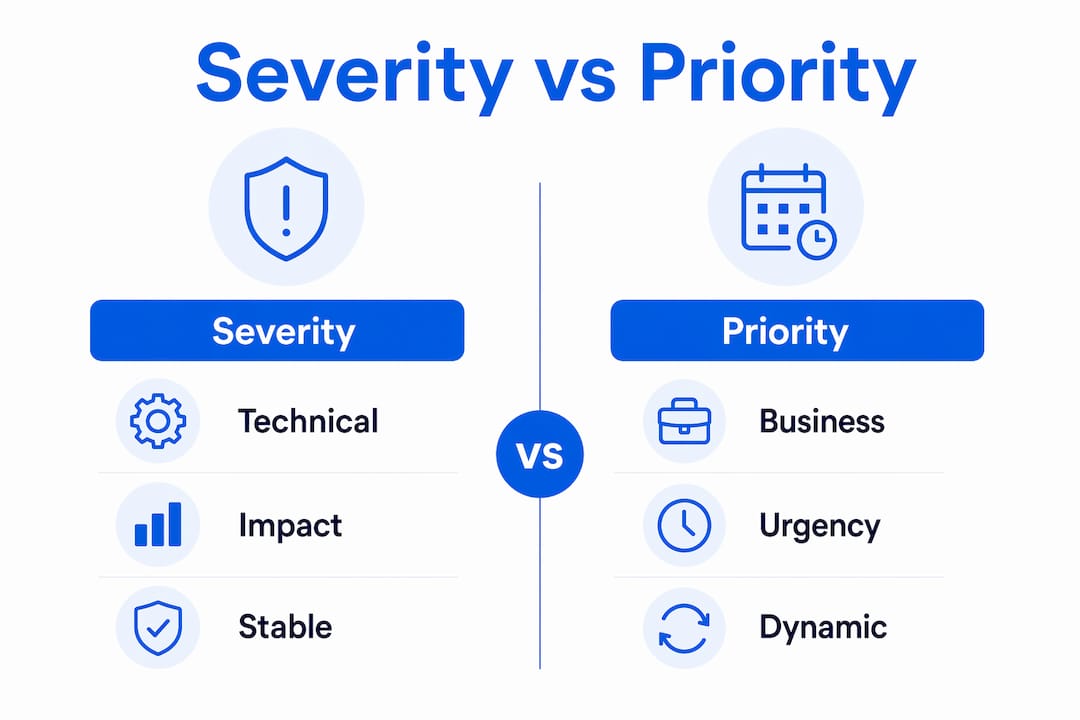
- Severity (set by QA/tester, validated by engineering): a technical assessment of functional impact. It stays stable across the bug’s lifecycle.
- Priority (set by product manager or PM, informed by support and business context): a business urgency call. It changes with release schedules, customer commitments, and available capacity.
Because severity is a technical assessment and priority is a business decision, they answer completely different questions. A login crash on a staging environment used by two internal testers is high severity and low priority. A typo in the CEO’s demo slide deck is low severity and very high priority. Keeping those two fields separate is the single most effective thing a team can do to prevent wasted hotfix windows.
Table of Contents
- What’s the difference between bug severity vs priority?
- How do you assess bug severity correctly?
- How do you assign bug priority consistently?
- The severity×priority matrix every team should use
- Who decides severity and priority, and how does triage work?
- How severity and priority shape release decisions and CI/CD pipelines
- Common triage mistakes and how to avoid them
- Why keeping severity stable improves team health and delivery speed
- Key Takeaways
- Why the classification system is the product
- Wezardapp cuts triage time by fixing reports before they hit your backlog
- Useful sources for deeper reading
What’s the difference between bug severity vs priority?
| Dimension | Severity | Priority |
|---|---|---|
| Definition | Technical impact on functionality, data, or performance | Urgency to fix relative to other work |
| Question it answers | “How badly does this break the system?” | “When should we fix this?” |
| Set by | QA engineer / tester (validated by engineering) | Product manager / PM (informed by support) |
| Stability | Stable — does not change unless the technical impact changes | Dynamic — changes with business context |
| Scale | Critical, Major, Minor, Cosmetic | P1, P2, P3, P4 (or High, Medium, Low) |
| Example | Payment API returns a 500 error for all users | Homepage hero image is misaligned before a product launch |
Two examples worth memorizing:
- High severity, low priority: A crash in a legacy admin panel used by one internal user once a quarter. The system breaks completely, but almost nobody is affected and there is no upcoming release dependency.
- Low severity, high priority: A misspelled product name on the checkout page, visible to every customer, two days before a major marketing campaign goes live.
These combinations are exactly why severity and priority answer different questions and must be tracked as separate fields.
How do you assess bug severity correctly?
Severity is a technical measurement, not a gut feeling. The closest industry-standard framing, aligned with ISTQB-style definitions, anchors severity to functional impact: how much of the system is broken, whether data is at risk, and whether a workaround exists.

Severity levels and what they mean
Severity typically uses four to five levels, and the criteria for each should be written down, not left to interpretation:
- Critical / Blocker: System crash, data loss, security breach, or complete feature failure with no workaround. The application cannot be used for its primary purpose. Example: Payment processing fails for all users in production.
- Major: A core feature is broken or significantly degraded. A workaround may exist but is painful. Example: Users cannot reset their passwords; they must contact support.
- Minor: A feature works but behaves incorrectly in a limited scenario. The workaround is easy. Example: Date formatting is wrong in one locale’s export file.
- Cosmetic: No functional impact. Visual or text issues that do not affect usability. Example: A button label has an extra space.
- Informational: Observations or suggestions with no functional impact, often logged for future consideration.
Severity assessment checklist
Before assigning a level, run through these yes/no questions:
- Does the bug cause a system crash or data loss? → Critical
- Does it block a primary user workflow with no workaround? → Critical or Major
- Does it affect a secondary workflow, with a workaround available? → Major or Minor
- Is the impact limited to visual presentation only? → Cosmetic
- Does it affect security or compliance? → Escalate to Critical regardless of other factors
Pro Tip: Lock severity as a controlled field in your bug tracker, editable only by QA and engineering. If a support agent or PM can freely change it, you will see classification drift within weeks, and your triage data becomes unreliable.
How do you assign bug priority consistently?
Priority is the business side of the equation. It answers “when do we fix this?” and the answer depends entirely on context that QA often does not have. That is why product managers and PMs own this field.

Priority scales and suggested timelines
| Priority Level | Label | Suggested Response |
|---|---|---|
| P1 | Critical / Immediate | Fix within hours; triggers incident response |
| P2 | High | Fix within the current sprint or release cycle |
| P3 | Medium | Schedule in the next sprint or upcoming release |
| P4 | Low | Backlog; address when capacity allows |
Many mature teams use a four-level scale (P1–P4) specifically to reduce debate. A five- or six-level scale sounds more precise, but in practice it creates arguments over whether something is P2 or P3 that eat more time than the bug itself.
Business factors that drive priority
Priority changes when any of these factors change:
- Revenue exposure: A bug affecting the checkout flow on Black Friday is P1 regardless of its technical severity.
- Launch dates: A cosmetic bug becomes P2 if it appears on the landing page launching tomorrow.
- Strategic customers: A bug that one enterprise customer hits repeatedly may jump from P3 to P2 because of contract SLA obligations.
- Legal or compliance risk: A GDPR-related data display issue may be P1 even if the functional impact is Minor.
- Public visibility: Bugs on high-traffic pages or in marketing materials carry higher priority than identical bugs in internal tools.
- Available capacity: If the team is in a code freeze, a P2 may be deferred to the next cycle without changing its severity.
How priority shifts while severity stays the same
Three scenarios that illustrate the dynamic:
- A Major-severity bug in the billing module is P2 during normal sprints. The week before a board demo, it becomes P1 because finance will be using the feature live.
- A Critical-severity crash in a rarely used export tool is P3 because fewer than five users hit it per month and a workaround exists. Deploying a temporary workaround can formally downgrade a P1 to P2, preserving sprint plans.
- A Minor-severity UI misalignment on the homepage is P2 for two weeks before a product launch, then drops to P4 the day after launch when traffic normalizes.
The severity×priority matrix every team should use
The 2×2 matrix below maps the four common combinations to concrete triage actions. Print it, paste it into your team wiki, or add it to your bug tracker’s triage template.
| High Priority | Low Priority | |
|---|---|---|
| High Severity | Quadrant 1: Fix immediately. Incident response, hotfix, all hands. | Quadrant 2: Schedule carefully. Fix before next release; no hotfix needed yet. |
| Low Severity | Quadrant 3: Fix soon. Business context demands it despite low technical impact. | Quadrant 4: Defer. Log it, review quarterly, fix when capacity allows. |
Four real examples, one per quadrant
Quadrant 1 — High severity, high priority: The production login endpoint returns a 500 error for all users. Every customer is locked out. Triage action: declare an incident, assign a hotfix owner, notify stakeholders within 15 minutes, deploy a fix or rollback within the hour.
Quadrant 2 — High severity, low priority: A data export function crashes when a user selects more than 10,000 records. Only two power users hit this monthly, and a workaround (export in batches) exists. Triage action: schedule for the next sprint, document the workaround in the knowledge base, no hotfix.
Quadrant 3 — Low severity, high priority: The company logo is pixelated on the homepage, and a press release goes out tomorrow linking to that page. Triage action: assign to a front-end developer today, fix and deploy before end of business, no incident needed.
Quadrant 4 — Low severity, low priority: A tooltip in the admin settings panel shows the wrong icon. Three internal users have seen it. Triage action: log it, tag it as Cosmetic/P4, review during the next quarterly backlog grooming session.
Who decides severity and priority, and how does triage work?
Ownership confusion is where triage breaks down. When everyone can set both fields, you get negotiation instead of decisions.
Role responsibilities
- QA engineer / tester: Assigns initial severity based on technical impact. Provides repro steps, environment details, and screenshots. Does not set priority.
- Engineering: Validates severity. Can escalate severity if the root cause reveals deeper impact (e.g., a Minor UI bug caused by a broken API call). Does not set priority unilaterally.
- Product manager / PM: Owns priority. Weighs business context, release schedule, and customer commitments. Can override priority but should document the reason.
- Support / customer success: Provides context on customer exposure and frequency. Can recommend a priority change but cannot unilaterally escalate without evidence.
- Engineering lead / release manager: Makes the final call on hotfixes and release blocks when severity and priority conflict.
Triage workflow (step by step)
Bug triage is a cross-functional process that works best when each step has a clear owner:
- Bug reported with evidence: repro steps, environment, screenshots or screen recording, and a suggested severity from the reporter.
- QA assigns severity using the written criteria. Engineering reviews and confirms or adjusts.
- Product assigns priority based on business context. The PM documents the rationale in the ticket.
- Engineering accepts the work and slots it into the sprint or backlog according to the priority level.
- Escalation triggers are checked: if the bug involves security, data loss, a major customer SLA breach, or has recurred three or more times, escalate immediately regardless of current priority.
Pro Tip: Set a triage SLA for each priority level — for example, P1 bugs must have severity confirmed and priority assigned within two hours of being reported. Without a time-bound rule, P1 tickets sit in “needs triage” for days.
How severity and priority shape release decisions and CI/CD pipelines
Triage classifications are only useful if they connect to real release behavior. Here is how to wire them up.
Release gating policies
- Block a release if any Critical-severity bug is open and unresolved, regardless of priority. A Critical bug means the system is broken; shipping it is a product decision that must be made explicitly, not by default.
- Trigger a hotfix when a P1 bug is confirmed in production. The hotfix branch should be scoped to the minimum fix; do not bundle unrelated changes.
- Defer to the next minor release for P2 bugs that are not blocking core user flows. Document the deferral decision in the ticket.
- Sprint allocation rule: P1 and P2 bugs take precedence over new feature work. If P1 bugs consume more than 20% of sprint capacity regularly, that is a signal of systemic quality debt, not a triage problem.
CI/CD gating recommendations
- Block merge on Critical severity: Configure your pipeline (GitHub Actions, Jenkins, Azure DevOps) to flag open Critical bugs linked to the affected component before a merge to main is approved.
- Auto-notify stakeholders when a Critical or P1 bug is opened. Slack alerts, PagerDuty, or email rules tied to severity field changes keep the right people informed without manual escalation.
- Require severity field before close: Make severity a required field in Jira or Azure DevOps. A ticket cannot be closed without it, which prevents the “fixed but never classified” gap in your metrics.
Pro Tip: Use QA standards to define your CI/CD severity gates in writing before the first sprint. Retroactively adding gates mid-project creates friction; building them into the Definition of Done from day one does not.
Common triage mistakes and how to avoid them
Most triage problems come from a handful of repeatable errors. Here are the ones that cost teams the most time.
Do / don’t rules
- Do separate severity (technical) from priority (business). They are different fields, owned by different roles, for different reasons.
- Don’t let support agents unilaterally escalate priority without documented evidence of customer impact. Require a ticket comment with the customer name, frequency, and business impact before any escalation is accepted.
- Do cap the number of open P1 bugs. If your team has 15 open P1s, none of them are actually P1. Treating severity and priority as interchangeable leads to priority inflation, where low-impact issues consume hotfix windows while genuinely damaging defects wait.
- Don’t change severity after a bug is confirmed unless the technical impact has actually changed. Severity is not a negotiating tool.
- Do require a workaround assessment in every triage meeting. If a workaround exists, document it and consider whether it justifies a priority downgrade.
- Don’t use more than four priority levels. A six-level scale sounds precise; it produces arguments.
Minimal bug-report template fields
A structured bug report enforces good classification from the start. Every report should include:
- Title: One-line summary of the defect
- Environment: OS, browser/app version, test environment vs. production
- Steps to reproduce: Numbered, specific, repeatable
- Expected vs. actual behavior: Two sentences maximum
- Screenshots or screen recording: Required for UI bugs; strongly recommended for all others
- Suggested severity: Reporter’s initial assessment (QA confirms)
- Business impact: Who is affected and how often
Pro Tip: If a reporter cannot fill in “steps to reproduce” with at least three numbered steps, the bug is not ready for triage. Send it back. A reproducible bug is the minimum unit of triage.
Why keeping severity stable improves team health and delivery speed
The research case for separating these fields is straightforward. Teams that treat severity as a controlled technical field and priority as a flexible business field report faster mean time to resolution and cleaner SLA routing. The mechanism is simple: when severity is stable, automated rules can route tickets to the right queue without human intervention. When severity drifts, every ticket needs a human to re-examine it.
Management-level checklist for classification health
- Cap open P1 bugs at a number the team can realistically address in one sprint (many teams use five as the ceiling). If the count exceeds the cap, hold a triage review before opening new P1s.
- Restrict P1 escalation authority to product managers and engineering leads. Support and sales should submit escalation requests with evidence, not change the field directly.
- Review classification drift monthly. Pull a report of bugs where severity changed after initial assignment. More than 10% drift suggests the severity criteria are unclear or the field is not locked.
- Track MTTR by priority level. If P2 bugs are resolving slower than P3 bugs, your priority assignments are not reflecting actual urgency.
- Audit workaround documentation. Every open P1 or P2 bug should have a documented workaround or a clear note that none exists. Missing workaround notes are a leading indicator of poor triage hygiene.
The connection to team health is direct. Priority inflation, where everything is P1, burns out engineers and erodes trust in the classification system. When engineers stop believing that P1 means “drop everything,” the label loses its function entirely. Keeping the scale honest is a management responsibility, not a QA one.
Key Takeaways
Severity measures technical impact and stays stable; priority reflects business urgency and changes with context. Keeping them separate, owned by the right roles, is the foundation of fast and predictable bug triage.
| Point | Details |
|---|---|
| Severity vs. priority ownership | QA sets severity; product managers set priority. Never let the same role own both fields. |
| Stability rule | Severity stays fixed unless technical impact changes; priority is dynamic and should be reviewed each sprint. |
| Four-level priority scale | Use P1–P4 only. More levels create debate; fewer levels lose resolution. |
| Matrix triage action | Map every bug to a quadrant: High/High triggers incident response; Low/Low goes to the quarterly backlog. |
| Wezardapp for triage | Wezardapp captures screen recordings and AI-transcribed reports that arrive in Jira or Azure DevOps with severity context already attached, reducing classification ambiguity at the point of entry. |
Why the classification system is the product
Most teams treat severity and priority as administrative overhead. They are not. They are the operating system of your engineering queue.
When classification is inconsistent, every triage meeting becomes a negotiation. Engineers spend time relitigating whether something is P1 or P2 instead of fixing it. Product managers lose confidence in the backlog because they cannot tell which bugs are genuinely urgent. Release managers make gut-call decisions on what to ship because the data does not reflect reality.
The teams that get this right do one thing differently: they treat the classification rules as a product artifact, not a process suggestion. The severity criteria are written down and version-controlled. The priority scale has a hard cap on P1s. Escalation authority is explicit. And the fields are locked so the right person owns each one.
That discipline pays off in throughput, not just tidiness. Predictable triage means predictable releases. Predictable releases mean fewer emergency all-hands calls at 11 PM. That is worth the hour it takes to write the rules down.
Wezardapp cuts triage time by fixing reports before they hit your backlog
The hardest part of bug severity vs priority triage is not the matrix. It is getting reports that contain enough information to classify correctly in the first place. Vague tickets with no repro steps, no environment details, and no screenshot force a QA engineer to investigate before they can even assign a severity level.

Wezardapp solves that at the source. It records the tester’s screen, transcribes the issue in real time, and uses AI to detect duplicate tickets before they reach your Jira or Azure DevOps backlog. Every report arrives with a screen recording, a structured description, and a duplicate check already done.
- Clearer severity assignments: Reports include visual evidence and a real-time transcript, so QA can assign severity on first read without a follow-up investigation.
- Fewer duplicate P1s: AI duplicate detection prevents the same bug from being logged three times with three different priority levels, which is one of the fastest ways to inflate your P1 count.
- Direct backlog integration: Tickets sync to Jira, Azure DevOps, or ServiceNow with the fields your team needs already populated.
If your team is spending triage time reconstructing what a reporter meant rather than classifying what they found, Wezardapp’s bug tracking is the place to start. You can also explore how acceptance testing entry criteria connect to your release gating rules.
Useful sources for deeper reading
- Priority vs Severity: The 2026 Defect Triage Guide — Developers News: Covers role ownership, classification drift, and automated SLA routing rules.
- Bug Triage: Definition, Examples, and Best Practices — Atlassian: Atlassian’s cross-functional triage workflow, including step-by-step process and role guidance.
- Severity vs Priority in Testing: 5 Real Examples — ContextQA: Five concrete bug scenarios mapped to severity and priority combinations.
- Difference Between Priority vs Severity in Testing — QACraft: Practical definitions and a comparison table useful for onboarding new testers.
- What Is Defect Priority? — GeeksforGeeks: Detailed breakdown of defect priority classification, stakeholder roles, and scheduling implications.
- A Bug Prioritization Framework — Matthew Bellantoni: Practical framework for using workarounds to manage priority levels and protect sprint plans.


