
The fastest way to clean up a Jira backlog is to stop duplicates before they arrive. Implement an upstream intake that records UAT sessions, transcribes issues in real time, and runs semantic duplicate checks during ticket creation. Your team can pilot this in 24–72 hours: pick one product area, assign two or three reporter roles, and enable real-time duplicate suggestions before a single new ticket is filed.
Evidence anchors this recommendation:
- Surfacing similar issues at creation time prevents duplicates that Jira’s native UI misses entirely
- A retrieval-then-classification AI pipeline measurably reduces duplicate rates in high-volume bug repos
- Human-in-the-loop confirmation prevents false auto-merges and keeps testers in control
Pro Tip: Set your pilot baseline before enabling any AI feature. Without a pre-pilot duplicate count, you cannot prove ROI to stakeholders.
Key Takeaways
Upstream AI intake, not retrospective grooming, is the fastest and most durable way to reduce Jira backlog noise.
| Point | Details |
|---|---|
| Duplicates enter at creation | Jira has no native similar-issue surface; prevention must happen during ticket creation, not after. |
| Duplicate rates reach 12–30% | High-volume repos lose significant triage capacity to duplicates that structured intake prevents. |
| Two-stage AI pipeline works | Semantic retrieval narrows candidates; a classifier makes the final call, improving accuracy and speed. |
| Human confirmation is required | Auto-linking without tester review causes false merges; the confirmation step keeps the system trustworthy. |
| Wezardapp pilots in days | Screen recording, real-time transcription, AI dedupe, and one-click Jira sync are ready to test in one product area this week. |
Table of Contents
- Why duplicates keep reaching your Jira backlog
- How to stop duplicates at the moment of ticket creation
- How does AI duplicate detection actually work?
- What should every bug report include for AI matching to work?
- How do you pilot a dedupe intake system in your org?
- What does a production-grade deployment look like at enterprise scale?
- What should your team do right now?
- Does upstream deduplication actually justify the cost?
- How do you get reporters to actually change their habits?
- How to evaluate vendors before you commit to a pilot
- Why prevention scales better than extra backlog grooming
- Wezardapp stops duplicates before they reach Jira
- Key research and practical reading
- Sources
Why duplicates keep reaching your Jira backlog
Jira has no built-in mechanism to surface similar issues while a reporter is creating a ticket. By the time triage happens, the duplicate is already in the backlog, consuming sprint capacity and distorting velocity metrics.
The root causes cluster into three areas:
- No shared awareness at intake. Reporters don’t see what already exists. They file what they found, and the system accepts it without question.
- Inconsistent terminology across teams. QA might call it a “login timeout,” while the dev team logged it as “session expiry on idle.” Keyword search fails both parties. This is the non-obvious organizational cause most teams miss: the same defect described in different professional vocabularies is invisible to simple search.
- Missing or thin evidence. Reports without screenshots, repro steps, or environment details are hard to match automatically. The embedding signal is weak, so even a good AI system returns low-confidence suggestions.
- Scale makes manual search impractical. Empirical studies report duplicate rates between roughly 12% and 30% in some project datasets. At that volume, asking reporters to search manually before filing is wishful thinking.
Pro Tip: Run a terminology audit across your last 90 days of tickets. Map the top 10 defect categories and list every synonym each team uses. That map becomes your duplicate-detection vocabulary baseline.
How to stop duplicates at the moment of ticket creation
Process changes here compound faster than any retrospective grooming session. Apply these in order:
- Enforce a structured four-field template. Every ticket must include Expected behavior, Actual behavior, Repro steps (numbered), and Environment. Make each field required in your intake form.
- Require evidence before submission. A screenshot or a 20–60 second video is mandatory. No evidence, no ticket. This single rule eliminates the thin reports that defeat automated matching.
- Surface similar issues in the creation UX. Show top-N candidate matches as the reporter types the title and description. Require them to confirm that none apply before the ticket is created. This is the intervention that prevents duplicates at the source.
- Display resolved matches distinctly. Style closed or resolved similar issues differently in the suggestion panel. Reporters can see that a prior fix exists and link to it rather than opening a new ticket.
- Add a re-fetch step in automation. Jira’s “issue created” trigger can fire before all fields are populated. Build an explicit re-fetch of issue data into any automation that reads new ticket content.
Rollout checklist: update templates this week, pilot the UX change with one team for four weeks, train triage roles on the suggestion panel, and count duplicate hits avoided weekly.
Upstream discovery habits matter too. Making “Who else is thinking about this?” a required question in kickoffs catches overlapping problem statements before they become separate tickets.
Pro Tip: Pilot the template change before enabling AI suggestions. Clean structured data makes the AI dramatically more accurate from day one.
How does AI duplicate detection actually work?
The architecture that holds up in production is a two-stage pipeline, not a single model.
Stage 1: Semantic retrieval. A fine-tuned sentence encoder (MiniLM or MPNet) converts each new ticket into a vector. An approximate nearest-neighbor index, typically FAISS, retrieves the top-N candidates from the existing ticket store. This step is fast and cheap. It narrows thousands of tickets to a handful of plausible matches.
Stage 2: Classification. A stronger classifier, XGBoost or SVM, re-ranks those candidates and makes the final duplicate/not-duplicate call. This combined retrieval-then-classification approach improves accuracy and reduces compute compared to naive all-pairs comparison.
For genuinely ambiguous reports, a selective LLM step can extract keywords and improve retrieval without running the full model on every ticket. The Cupid approach, described in research on LLM-assisted retrieval, uses selection rules to route only hard cases to the language model.
Human-in-the-loop UX sits on top of both stages. The system presents top-N suggestions; the tester confirms, rejects, or reformulates the query. Industrial case-study evidence shows this pattern significantly improves duplicate-locating effectiveness and prevents the false auto-merges that erode team trust in automation.
Engineering constraints to design for: candidate-retrieval latency must fit inside the issue-creation dialog’s response budget, API rate limits need pagination handling, and the vector index must respect Jira project-scope permissions so reporters don’t see tickets they shouldn’t.
Pro Tip: Narrow the search space early by project, component, and a 90-day time window. Precision and recall both improve, and latency drops to a level that feels instant in the UI.

What should every bug report include for AI matching to work?
Structured fields give the embedding model something to work with. A thin, unstructured report produces a low-confidence vector that matches nothing reliably.
The four-field template:
- Expected — one sentence describing the intended behavior
- Actual — one sentence describing what happened instead
- Repro steps — numbered, minimal, reproducible
- Environment — OS, browser/app version, test environment name
Evidence rules, drawn from practical bug-reporting guidance:
- One annotated PNG screenshot per distinct issue; use a single arrow to mark the problem area
- Redact credentials, PII, and API keys before attaching
- For timing or animation issues, attach a 20–60 second screen recording instead
- Include the URL or component path and a minimal log snippet: timestamp, request ID, and error message
These fields increase embedding signal and let retrieval focus on the most diagnostic text. A reporter who fills all four fields in 90 seconds produces a ticket that the AI can match with high confidence. One who skips repro steps produces noise.
Reporter micro-template: Expected: / Actual: / Steps: 1. 2. 3. / Env: — paste this into your intake form as placeholder text.
How do you pilot a dedupe intake system in your org?
Scope matters. A pilot that covers the whole product on day one produces confusing data. Pick one product area, two or three reporter roles, and a four-to-six week window.
Step-by-step:
- Record baseline metrics for two weeks before enabling anything: incoming ticket volume, manually identified duplicate count, average triage time per ticket.
- Install screen-capture UAT flow and enable real-time duplicate suggestions for the pilot group only.
- Train reporters on the suggestion panel in a 30-minute session. Cover how to read resolved-vs-open matches.
- Run parallel logging: capture every suggestion shown, every confirmation, every rejection, and every new ticket created after a suggestion was dismissed.
- At week four, compare pilot metrics against baseline.
Research on similar pipelines reports duplicate rates of 12–30% in high-volume repos. Set your own threshold based on pilot data, not benchmarks alone.
Success criteria for full rollout: duplicate creation reduced by a measurable percentage, triage hours saved per week, and false-suggestion rate below your agreed ceiling.
What does a production-grade deployment look like at enterprise scale?
Reference architecture: client recorder → ingestion pipeline → text extraction and transcription → sentence encoder → vector store (FAISS or Chroma) → classifier → UI suggestion panel and audit log.
Scale considerations:
- Index on a cadence that matches your ticket creation rate; stale indexes miss recent duplicates
- Shard the vector store per project to keep nearest-neighbor search fast
- Cache frequent queries to meet the latency budget for the creation dialog
- Refresh embeddings when the sentence encoder is retrained on new domain data
A production pipeline combining fine-tuned sentence encoders, FAISS, dimensionality reduction, and clustering has been evaluated on approximately 500,000 reports, demonstrating that this architecture holds at enterprise scale and can surface root-cause groups, not just individual duplicates.
Security and integration requirements: SSO for all reporter and reviewer roles, data redaction at capture time before any ticket content leaves the client, permissioned search that respects Jira project scope, and audit logging for every suggestion shown and every human decision recorded.
Common deployment pitfalls:
- Ignoring resolved-issue visibility in the suggestion panel (reporters mistake closed tickets for open ones)
- Under-scoped JQL that silently returns empty candidate sets
- No pagination handling on the Jira API, causing missed results at volume
- Not tracking suggestion rejection rates (a high rejection rate signals a precision problem, not a UX problem)
What should your team do right now?
The path is clear: stop treating backlog grooming as the primary fix and start intercepting duplicates at intake.
Three actions to start this week:
- Assign a pilot owner. One QA lead or PM owns the four-to-six week pilot, sets the baseline metrics, and reports results to the team.
- Enable real-time duplicate suggestions for one product area using a UAT capture tool that integrates directly with Jira.
- Track the false-suggestion rate from day one. It is the leading indicator of model quality and tells you whether to tighten the search scope or retrain.
For tracking feedback status in Jira through the pilot, map each suggestion outcome (confirmed duplicate, rejected, new ticket created) to a Jira status field so the data is queryable at the end of the pilot window.
Does upstream deduplication actually justify the cost?
Yes, and the math is straightforward.
Triage cost per duplicate is not just the 10 minutes to mark it closed. It includes the sprint-planning slot it occupied, the engineer who read it, and the reporter who filed a second ticket because they got no response on the first. Upstream prevention eliminates all three costs at once.
Implementation cost for a SaaS intake tool is a subscription fee, typically per seat or per organization, plus a one-time setup effort of two to four hours for template configuration and integration.
The ROI case is strongest when you can show triage hours saved per week as a concrete number. That is why the pilot baseline matters: without it, the savings are invisible to finance and leadership.
How do you get reporters to actually change their habits?
Workflow adoption fails when the new process adds friction without visible payoff. The fix is to make the right behavior the easiest behavior.
Three change management levers that work:
Make the template the default. Pre-populate the intake form with the four-field structure and placeholder text. Reporters fill in blanks; they don’t write from scratch. Friction drops to near zero.
Show the win immediately. When the duplicate suggestion panel surfaces a match and the reporter links to it instead of filing a new ticket, show a brief confirmation: “Linked to existing issue. Triage team notified.” That feedback loop closes within seconds and reinforces the behavior.
Involve triage leads in training. Reporters trust the people who close their tickets. A 20-minute walkthrough from a triage lead explaining why structured reports get faster responses is more persuasive than any policy document.
Resistance usually comes from senior reporters who have their own filing habits. Give them a two-week grace period with the old template alongside the new one, then switch. Forcing the change on day one creates resentment; a short parallel period creates buy-in.
How to evaluate vendors before you commit to a pilot
A checklist for QA managers and PMs running a vendor evaluation:
- Accuracy on your data. Ask for a proof-of-concept on a sample of your own historical tickets, not a vendor’s curated demo dataset. Recall@10 and precision@5 on your domain are the numbers that matter.
- Latency in the creation dialog. The suggestion panel must return results in under two seconds. Anything slower and reporters will skip it.
- Human-in-the-loop controls. Can testers confirm, reject, and reformulate? Can a reviewer override an auto-link? Tools that auto-merge without confirmation are a liability.
- Integration depth. Native Jira sync, Azure DevOps support, and ServiceNow compatibility are table-stakes for enterprise teams. Verify SSO and permission scoping before signing.
- Security posture. Data redaction at capture time, audit logs, and SOC 2 documentation should be available before procurement, not after.
- Pilot terms. A vendor confident in their accuracy will offer a time-boxed pilot with defined success metrics. Avoid any vendor who requires a full annual commitment before you can measure results.
Evaluate on these six criteria in order. Accuracy on your data is the gate; everything else is secondary.
Why prevention scales better than extra backlog grooming
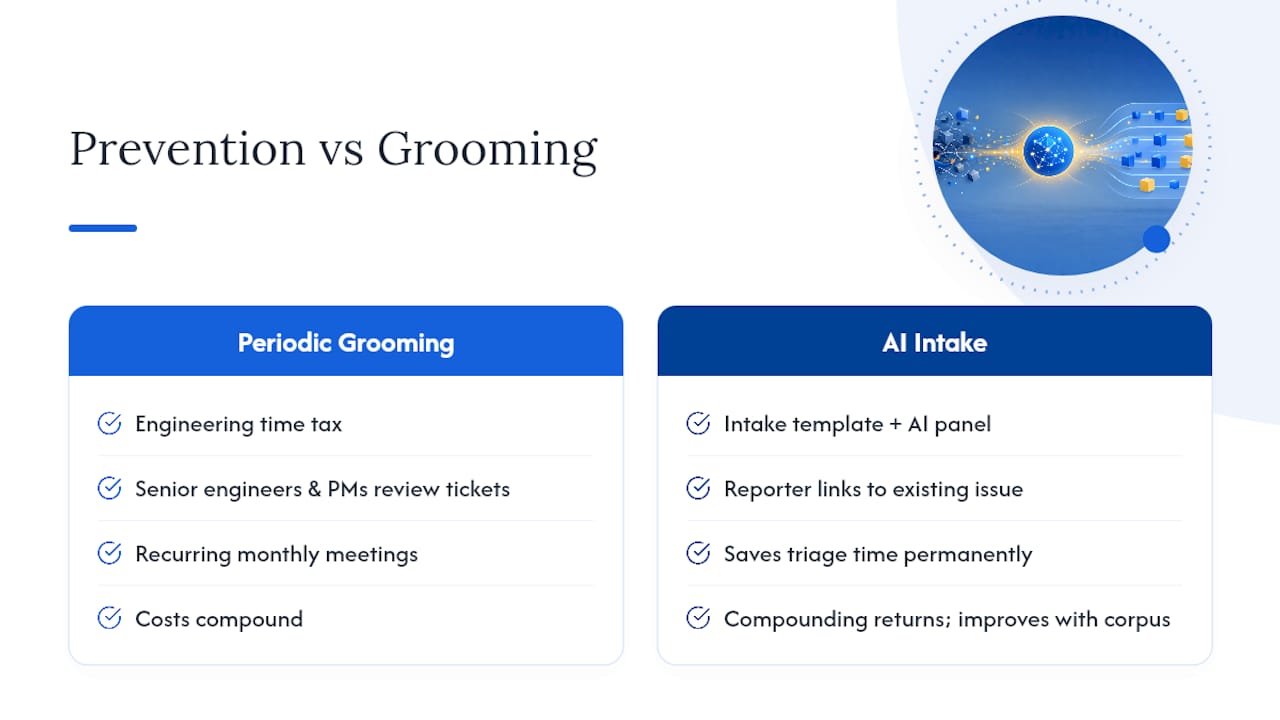
Periodic backlog grooming is a tax on engineering time. Every grooming session is a meeting where senior engineers and PMs review tickets that should never have existed. The cost is real, and it compounds: a team that grooms monthly is spending that time every month, indefinitely.
Upstream prevention, by contrast, has compounding returns. Once the intake template is in place and the AI suggestion panel is live, every reporter who links to an existing issue instead of filing a new one saves triage time permanently. The system gets better as the ticket corpus grows, because the vector index has more signal to match against.
The cultural shift is harder than the technical one. Teams that have always filed tickets freely resist the confirmation step. The framing that works: “We’re not adding a gate. We’re showing you what already exists so your report gets faster attention.” That reframe turns the suggestion panel from a blocker into a service.
One caution: don’t over-automate. Auto-linking without human confirmation erodes trust quickly. A false auto-merge, where two distinct issues get collapsed, can delay a real bug fix by days. The human-in-the-loop step is not optional overhead. It is the mechanism that keeps the system trustworthy enough to use.
Wezardapp stops duplicates before they reach Jira
Wezardapp is built specifically for this problem. It records your UAT sessions, transcribes issues in real time, and runs AI duplicate detection during ticket creation, before anything reaches your Jira backlog. Reporters get a suggestion panel showing similar open and resolved issues; they confirm or dismiss with one click. Only clean, deduplicated tickets sync to Jira.

The one-click Jira integration handles permissioned sync, respects project scope, and supports Azure DevOps and ServiceNow alongside Jira. SSO and enterprise audit logging are included. The pilot setup takes a few hours, not weeks.
For teams ready to move from reactive grooming to upstream prevention, the next step is a live demo or a trial scoped to one product area. Visit Wezardapp’s UAT testing platform to start a trial or book a walkthrough with the team.
Key research and practical reading
- How we built a real-time duplicate issue detector for Jira — engineering lessons on surfacing similar issues at creation time (supports workflow fixes and BLUF)
- Detecting Duplicates in Bug Tracking Systems with AI: A Combined Retrieval and Classification Approach — peer-reviewed evidence for the two-stage pipeline and duplicate rate benchmarks
- Exploring the Role of Automation in Duplicate Bug Report Detection: An Industrial Case Study — case-study evidence for human-in-the-loop accuracy and tester reformulation
- SynapseAI: A Framework for Duplicate Ticket Detection — production-scale evaluation on ~500,000 reports with FAISS and clustering
- Bug report screenshot guide — practical rules for annotated PNG screenshots and structured four-field reports
- Prevent duplicate work in product management — upstream discovery habits that catch overlapping work before tickets are filed
Sources
- How we built a real-time duplicate issue detector for Jira (and why it was harder than expected) – DEV Community
- Detecting Duplicates in Bug Tracking Systems with Artificial Intelligence: A Combined Retrieval and Classification Approach
- Exploring the Role of Automation in Duplicate Bug Report Detection: An Industrial Case Study
- SynapseAI: A Framework for Duplicate Ticket Detection
- Bug report screenshot guide
- Prevent duplicate work in product management


