
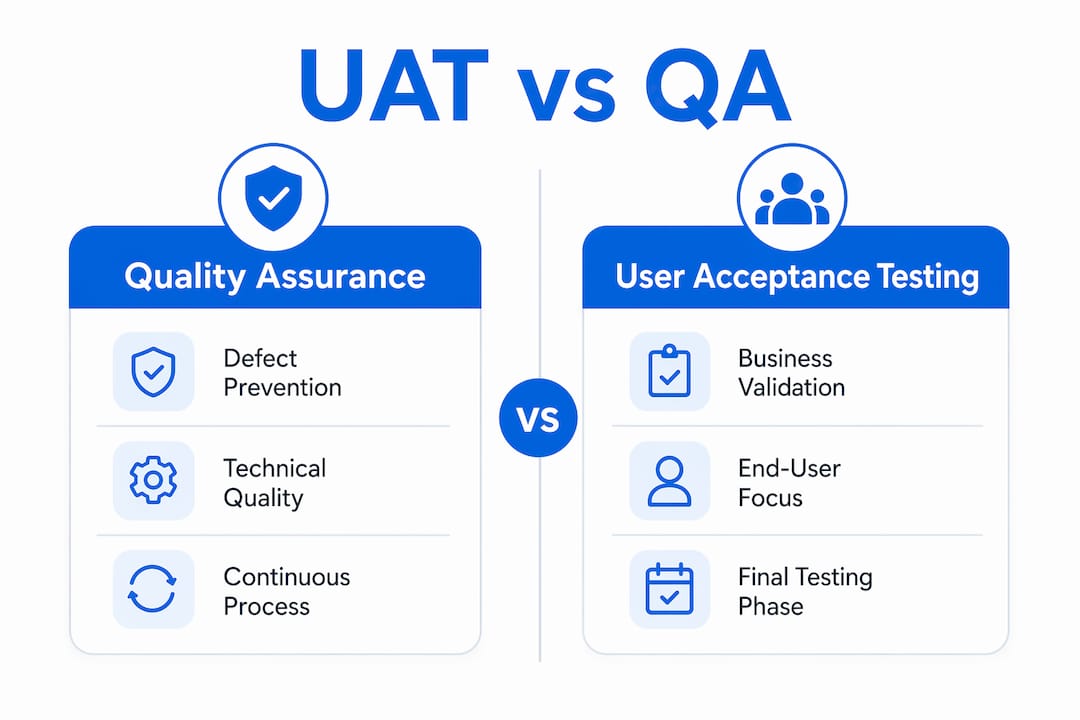
The difference between UAT and QA is this: Quality Assurance is the continuous process of building software correctly, while User Acceptance Testing is the final validation that confirms you built the right thing. QA spans the entire development lifecycle, covering defect prevention, test automation, and process adherence. UAT happens near release, when real users or business stakeholders confirm the software fits their actual workflows. Frameworks like ISTQB formalize this split, and tools like TestRail help teams manage both phases. Understanding where each phase starts and stops is what separates projects that ship cleanly from those that fail in production.
What is the difference between UAT and QA?
Quality Assurance is defined as the overarching quality management process embedded across every stage of software development. QA teams focus on defect prevention, requirements validation, and process adherence. Their goal is to catch problems before they compound, not just before release.
ISTQB defines acceptance testing as formal testing to determine whether a system meets user and customer acceptance criteria. That definition gives UAT a precise scope: it is not about finding bugs in the code. It is about confirming the software satisfies real business needs.
The ISTQB verification versus validation framework captures the split cleanly. Verification answers “are we building the product right?” while validation answers “are we building the right product?” QA owns verification. UAT owns validation. Every confusion between the two phases traces back to blurring that line.
For software teams using tools like TestRail, Jira, or Azure DevOps, this distinction has direct workflow implications. QA tickets track technical defects. UAT feedback tracks business gaps. Mixing them in the same backlog without clear labeling creates noise that slows both teams down.

What does QA actually cover in a software project?
QA is not a single activity. It is a system of practices that runs from requirements review through deployment. QA engineers write test plans, execute functional and regression tests, validate non-functional requirements like performance and security, and maintain test environments.
The core activities in a mature QA process include:
- Requirements analysis: Reviewing specs before development starts to catch ambiguity early
- Test planning and design: Writing test cases that cover functional, integration, and edge-case scenarios
- Test automation: Using frameworks like Selenium, Cypress, or Playwright to run regression suites continuously
- Defect management: Logging, triaging, and tracking bugs through tools like Jira or Azure DevOps
- Process audits: Checking that development teams follow agreed standards and coding practices
QA validates functional and non-functional requirements and finds defects early, before they reach users. Early detection is the economic argument for QA. A defect caught in development costs a fraction of what it costs to fix post-release.
Pro Tip: Set up a shared defect taxonomy in Jira or Azure DevOps from day one. When QA and UAT teams use the same severity labels and component tags, defect triage meetings take minutes instead of hours.
How does UAT work, and why is it a separate phase?
UAT is the final phase of testing performed after internal QA activities complete and before the product ships. Business stakeholders, end users, or designated client representatives run it. Their job is not to find code defects. Their job is to confirm the software supports the workflows they depend on.
The types of UAT you will encounter in practice include:
- Alpha testing: Conducted internally by a select group of users in a controlled environment
- Beta testing: Released to a wider external user group before the official launch
- Contract acceptance testing: Validates that the software meets terms defined in a formal contract
- Regulation acceptance testing: Confirms compliance with legal or industry standards
Acceptance criteria for UAT should be outcome-oriented and measurable, allowing business users to judge software acceptance based on completing real end-to-end workflows. A criterion like “the user can submit a purchase order in under three minutes” is testable. A criterion like “the system is user-friendly” is not.
Writing strong acceptance criteria is where most UAT programs succeed or fail. Wezardapp’s guide on acceptance criteria for software projects covers the structural patterns that make criteria both clear and verifiable.
Pro Tip: Involve business stakeholders in writing UAT acceptance criteria during the requirements phase, not the week before testing starts. Criteria written late tend to reflect what was built, not what was needed.
QA vs UAT: side-by-side comparison
The table below captures the core distinctions. Use it as a reference when scoping project phases or explaining roles to stakeholders.
| Dimension | QA | UAT |
|---|---|---|
| Primary objective | Defect prevention and technical quality | Business validation and real-world usability |
| Timing | Continuous throughout development | Final phase before release |
| Who executes | QA engineers and dedicated test teams | End users, business stakeholders, or clients |
| Focus area | Functional, non-functional, and regression testing | Business workflows and acceptance criteria |
| Outcome | Defect-free, technically sound software | Confirmed fit for business purpose |
| Framework concept | Verification | Validation |
A product can pass all technical QA checks but still fail UAT because it does not support real-world business workflows. That scenario is more common than most teams admit. It happens when QA tests against written requirements that were themselves misaligned with actual user needs.
One persistent misconception is that QA teams can run UAT. They cannot, not effectively. QA teams support UAT by setting up environments, coordinating defect reporting, and facilitating retesting, but UAT requires business user judgment and ownership. A QA engineer testing a payroll workflow does not carry the same authority as the payroll manager who will use it daily.
For a deeper look at how UAT compares to system testing specifically, the UAT vs system testing breakdown is worth reading alongside this comparison.
Why both phases are non-negotiable in software delivery
QA and UAT are not redundant. They answer different questions, and skipping either one creates a specific category of failure.
Without strong QA, UAT sessions become defect hunts. Business users spend their time reporting crashes and broken fields instead of validating workflows. That wastes stakeholder time and delays release. Without UAT, software ships that technically works but fails business expectations. The development team built exactly what the requirements said. The requirements were wrong. UAT is the gate that catches that gap.
QA prepares data, environments, and test artifacts so UAT participants can focus entirely on validating business needs. That division of labor is the correct model. QA handles the technical setup. Users handle the business judgment.
Best practices for coordinating both phases in a project timeline:
- Complete functional and regression QA before UAT begins. Do not run them in parallel unless you have a formal defect triage process that keeps the two streams separate.
- Provide UAT participants with a structured test script covering key workflows, but leave room for exploratory testing. Scripted UAT catches known gaps. Exploratory UAT catches unknown ones.
- Assign a UAT coordinator from the business side who owns sign-off authority. This person is not a QA engineer.
- Set a clear UAT entry criteria. If the defect count from QA exceeds a defined threshold, UAT does not start.
Pro Tip: Run a UAT readiness review before handing off to business users. Confirm that all critical QA defects are resolved, test data is loaded, and the environment mirrors production. A failed UAT caused by environment issues is a QA failure, not a UAT failure.
Six best practices for managing UAT and QA together
Effective coordination between QA and UAT reduces release risk and prevents the blame cycles that slow teams down after a failed launch.
- Write acceptance criteria before development starts. Criteria defined after the build is complete tend to rationalize what was built rather than validate what was needed.
- Keep QA and UAT defect logs separate. QA defects are technical issues. UAT findings are business gaps. Mixing them obscures both.
- Engage the right stakeholders in UAT. The people who run UAT should be the people who use the software daily, not their managers acting as proxies.
- Use AI-assisted reporting tools to reduce duplicate tickets. When multiple UAT participants test the same workflow, they often report the same issue independently. Tools that detect duplicates before they reach your Jira or Azure DevOps backlog save significant triage time.
- Conduct a post-UAT retrospective. Review which UAT findings should have been caught in QA. Use that analysis to improve your QA test coverage for the next release.
- Treat UAT sign-off as a formal gate. Verbal approval is not sign-off. Document acceptance in writing, tied to the specific acceptance criteria that were met.
For teams running exploratory sessions during UAT, Wezardapp’s guide on exploratory testing in UAT covers how to structure those sessions without losing traceability.
Key takeaways
QA and UAT are distinct, sequential phases that together ensure software is both technically correct and genuinely fit for business use.
| Point | Details |
|---|---|
| QA is verification | QA confirms the product is built correctly across the full development lifecycle. |
| UAT is validation | UAT confirms the product meets real user needs and business workflows before release. |
| Timing is fixed | QA runs continuously; UAT starts only after QA completes and before release. |
| Roles must stay separate | Business users own UAT judgment; QA teams support the environment and defect process. |
| Both phases are required | Skipping UAT risks shipping software that works technically but fails in real use. |
Where teams keep getting this wrong
The verification versus validation distinction sounds clean in theory. In practice, I have watched it collapse on almost every project where QA and UAT responsibilities were not explicitly assigned in writing before the project kicked off.
The most common failure pattern is this: QA finishes testing, the team is behind schedule, and someone decides to have QA run UAT to save time. The QA team is thorough. They test every scenario in the acceptance criteria document. They find nothing. The software ships. Then the actual users open it and immediately hit a workflow the acceptance criteria never covered, because no one with real business knowledge wrote those criteria.
UAT identifies requirement miscommunications that pass QA but fail real-world use, and that is exactly what happens when QA substitutes for business user judgment. The QA team is not wrong. They tested what they were given. The process was wrong.
The evolving role of AI in this space is genuinely useful, but only if the fundamentals are right. AI-assisted tools can detect duplicate UAT tickets, transcribe issues in real time, and auto-create Jira tickets. None of that helps if the wrong people are running UAT in the first place. Get the roles right, then let the tooling make those roles more efficient.
— Marketing
Run UAT and QA without the backlog chaos
If your team is losing hours to duplicate UAT tickets, unclear defect ownership, or manual Jira updates after every testing session, Wezardapp is built for exactly that problem.

Wezardapp records your screen during UAT, transcribes issues in real time, and uses AI to detect duplicate tickets before they reach your Jira or Azure DevOps backlog. Your QA team spends less time triaging noise. Your business users spend more time validating workflows. If you want to see how UAT and system testing fit together before your next release, start with the UAT vs system testing guide and explore the full UAT testing platform Wezardapp provides.
FAQ
What is the core difference between UAT and QA?
QA is the ongoing process of verifying technical quality throughout development, while UAT is the final validation by business users confirming the software meets real-world needs. ISTQB frames QA as verification and UAT as validation.
Can QA engineers perform UAT?
QA engineers should not own UAT. Their role is to support UAT by preparing environments and coordinating defect reporting, but actual UAT requires business user judgment and sign-off authority.
When does UAT happen in the software lifecycle?
UAT is the final testing phase, starting after all internal QA activities complete and before the product releases to production. Running UAT before QA finishes typically results in sessions dominated by technical defects rather than business validation.
What makes UAT acceptance criteria effective?
Effective acceptance criteria are outcome-oriented and measurable, focused on completing end-to-end workflows in a real user context. Criteria like “the user can process a refund in under two minutes” are testable. Vague criteria like “the system is intuitive” are not.
Why does software sometimes pass QA but fail UAT?
A product can pass every technical QA check and still fail UAT because QA tests against written requirements, which may not reflect actual user workflows. UAT catches the gap between what was specified and what users actually need to do their jobs.


