UAT works when tests connect to real business intent, real users run them with production-like data, and defects get triaged daily rather than batched at the end. Get those three things right and sign-off becomes a genuine decision, not a ritual. Get them wrong and you ship software that passes every technical check but breaks on day one of actual use.
Start here:
- Map every test case to a specific business requirement, not a technical spec
- Recruit actual end users, not QA staff standing in for them
- Seed the UAT environment with sanitized production-like data, including edge cases
- Use a three-field issue report (what you tried, what happened, screenshot) to keep feedback usable
- Run a daily triage standup so fixes move fast and testers stay engaged
- Define measurable acceptance criteria before development starts, not after
Table of Contents
- What is UAT and why does it matter for software delivery?
- What does a reliable UAT process look like, step by step?
- How do you write UAT test cases that non-technical testers can actually use?
- Who should run UAT, and how do you schedule business testers effectively?
- How should you set up the UAT environment and test data?
- How do you run bug triage and keep communication flowing during UAT?
- What are the most common UAT mistakes, and how do you fix them?
- UAT checklist and sample one-week timeline
- Which metrics tell you whether UAT is actually working?
- Key Takeaways
- The part most UAT guides get wrong
- Wezardapp makes UAT feedback faster to capture and easier to triage
What is UAT and why does it matter for software delivery?
User acceptance testing is the final validation step before a software release, where real business users confirm the system actually supports their day-to-day workflows. The ISTQB glossary defines it as testing performed by intended users to determine whether a system satisfies their needs. That definition is accurate but undersells the stakes.
UAT is not a repeat of QA. System testing checks whether the software behaves according to technical specifications. UAT checks whether it fits the way people actually work, which is a different question entirely. A system can pass every regression test and still fail UAT because the approval workflow requires three clicks where users expect one, or because a report doesn’t include the columns a finance manager needs to close the month. For a deeper look at how UAT differs from system testing, the distinction matters more than most delivery teams realize.
The business value is concrete. UAT catches workflow mismatches before they become post-go-live support tickets. It creates documented acceptance evidence that satisfies auditors and project sponsors. And when done well, it builds user confidence in the system before rollout, which directly affects adoption rates. As Abstracta notes, UAT exposes the gap between design documentation and actual operation. That gap is almost always larger than the delivery team expects.
Operational acceptance deserves equal weight alongside functional acceptance. Testing business rules, permissions, and report generation from a day-to-day user’s perspective, not just technical specs, is what separates a technically correct system from one people can actually operate.
What does a reliable UAT process look like, step by step?
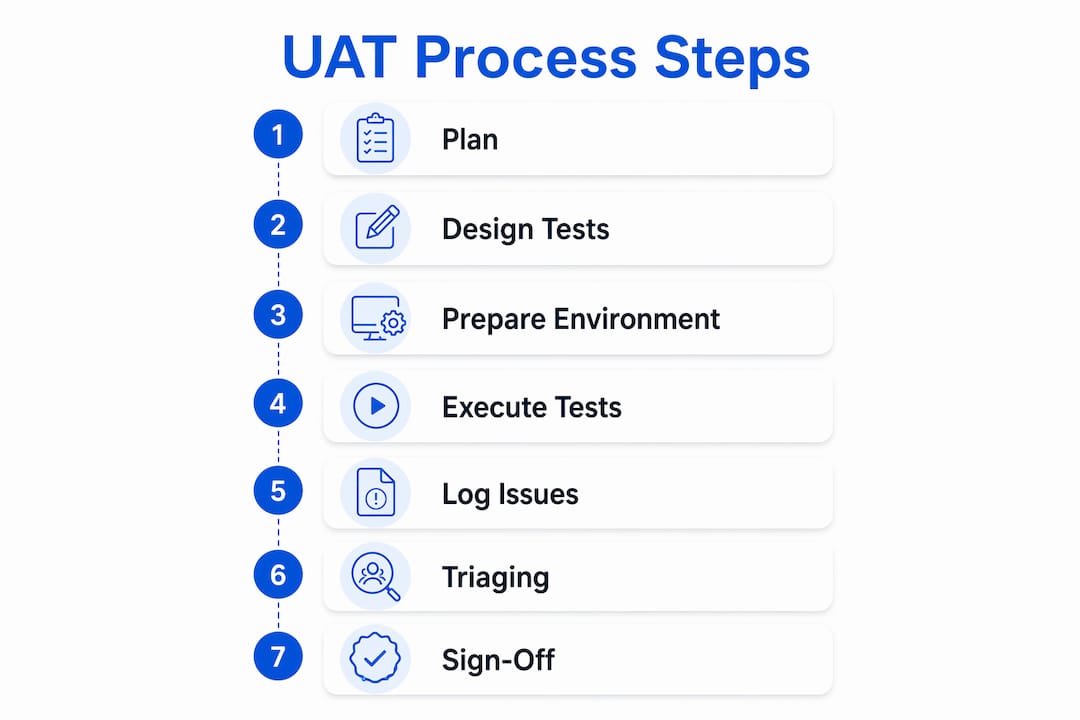
A well-run UAT cycle follows a clear sequence. Skipping steps under deadline pressure is the single most common reason teams reach sign-off with unresolved gaps.
- Define scope and entry criteria. Agree on which business processes are in scope. Set entry criteria: regression tests passing at an agreed threshold, a stable build deployed to the UAT environment, and representative test data available. Detailed guidance on acceptance testing entry criteria helps teams avoid starting UAT on an unstable build.
- Write the UAT test plan. Document objectives, tester roles, schedule, environment details, triage rules, and exit criteria. The plan is the contract between the delivery team and the business.
- Recruit and brief testers. Identify end users who represent the actual user population. Brief them on what UAT is, how to report issues, and what “no wrong answers” means in practice.
- Prepare the environment and data. Deploy to a dedicated UAT instance. Seed it with sanitized, production-like data. Confirm integrations are live and SSO is configured.
- Execute test cases. Testers work through scenarios in business language. The test lead monitors coverage and flags blockers daily.
- Triage defects daily. Run a short standup with developers and stakeholders to classify issues, assign priority, and confirm fix timelines.
- Verify fixes and re-test. Once a fix is deployed to UAT, the original tester re-tests the scenario. Avoid closing issues without tester confirmation.
- Sign off. When exit criteria are met, the product owner and key business stakeholders formally accept the release. Sign-off is a decision, not a formality.
Timeline sizing: A focused UAT window for a mid-size feature set typically runs five to ten business days. Complex ERP or CRM releases often need two to three short rounds rather than one long cycle. UAT validates end-to-end workflows with real users, which means the window must be long enough for testers to work through scenarios without rushing, but short enough to maintain momentum.
Statistic callout: According to PractiTest, UAT is the largest and most process-heavy acceptance testing phase in the software delivery lifecycle, requiring formal entry/exit criteria, structured test-case design, and documented sign-off to be defensible.
How do you write UAT test cases that non-technical testers can actually use?
The biggest friction point in UAT is test cases written for developers rather than business users. A tester who has to decode technical jargon will either skip steps or report vague issues. Plain business-language test cases increase both engagement and the quality of feedback from non-technical users.

Test case template
| Field | What to write |
|---|---|
| Test case ID | Unique reference (e.g., UAT-TC-001) |
| Business requirement | The requirement this test validates (e.g., REQ-001) |
| Objective | One sentence: what business outcome this confirms |
| Preconditions | What must be true before the tester starts (role, data state) |
| Steps (business language) | Numbered actions in plain English, no technical terms |
| Expected result | What the tester should see or be able to do |
| Pass/fail criteria | Specific, observable condition (not “works correctly”) |
| Actual result | Filled in by the tester during execution |
| Status | Pass / Fail / Blocked |
Sample test case (plain-language):
Objective: Confirm a Sales Manager can approve a discount request above 15%.
Preconditions: Logged in as a Sales Manager. A pending discount request of 18% exists in the system.
Steps:
- Open the Approvals dashboard.
- Locate the pending 18% discount request for account “Acme Corp.”
- Click “Review” and read the request details.
- Click “Approve.”
Expected result: The request status changes to “Approved” and the submitting rep receives an email notification within two minutes.
Pass/fail criteria: Status updates to “Approved” AND notification email arrives. Both conditions must be true.
Write acceptance criteria before development starts, not after. Each test case should trace back to a named business requirement so you have end-to-end traceability. For more examples, UAT test scenario examples show how to adapt this structure across different process areas. A deeper look at types of acceptance criteria helps PMs and BAs write criteria that are measurable rather than aspirational.
Pro Tip: Use a three-question issue report: “What were you trying to do? What happened instead? Attach a screenshot.” That format alone eliminates the back-and-forth that slows triage and produces more usable reports from business testers who have never filed a bug before.
Simple issue reporting with plain-language steps and a moderated results-to-issue workflow also reduces duplicate tickets and developer noise.
Who should run UAT, and how do you schedule business testers effectively?
The single most common staffing mistake is using the QA team as UAT testers. QA staff know the system too well and tend to validate the happy path. The goal of UAT is to find the gaps between how the system was designed and how real users actually work. That requires real users.
Recommended roles:
- Business tester (end user): The primary tester. Executes scenarios, reports issues, confirms fixes. Should represent the actual user population, including less tech-savvy users.
- Test lead / UAT coordinator: Owns the test plan, monitors coverage, runs daily triage, escalates blockers. Usually a QA manager or senior BA.
- Business analyst: Clarifies requirements when testers have questions, validates that reported issues represent genuine gaps versus misunderstandings.
- Product owner: Attends triage, makes priority calls, owns the sign-off decision.
- Developer on-call: Available during UAT hours to answer environment questions and receive triage outputs. Not a tester.
Recruiting and scheduling guidance:
- Aim for three to five business testers per major process area. More is not always better; five engaged testers outperform fifteen distracted ones.
- Block dedicated testing time on calendars before UAT starts. Testers squeezed between meetings produce shallow coverage.
- Avoid selecting only power users or system champions. Include at least one “reluctant adopter” per process area; they find the usability gaps that enthusiasts overlook.
- Rotate testers across scenarios to avoid single-tester blind spots.
Tester onboarding checklist:
- What UAT is and what it is not (not a training session, not a performance review)
- How to access the UAT environment and test data
- How to complete a test case and record results
- How to report an issue (the three-question format)
- The “no wrong answers” rule: confusion is a system problem, not a tester failure
- Who to contact when blocked
The “no wrong answers” principle from Panaya’s UAT guidance is worth stating explicitly in every tester briefing. When testers feel safe reporting confusion, you get usability insights that functional testing never surfaces. For a full preparation checklist, how to prepare for UAT sessions covers the briefing and logistics in detail.
How should you set up the UAT environment and test data?
A UAT environment that doesn’t mirror production is one of the most reliable ways to pass UAT and fail go-live. Integration failures, permission mismatches, and reporting errors that only appear in production are almost always traceable to a UAT environment that cut corners.
Environment checklist:
- Separate UAT instance, isolated from development and production
- All integrations active (ERP connectors, payment gateways, email services, SSO)
- Performance baseline confirmed (response times within acceptable range under realistic load)
- User roles and permissions configured to match production role assignments
- SSO and authentication configured for the actual user population
For enterprise ERP, CRM, or cloud customizations, the UAT environment must mirror production systems to catch integration and reporting issues that synthetic environments hide.
Test data guidance:
Use sanitized, production-like data rather than simplified synthetic datasets. Real data exposes failure modes that clean synthetic sets never trigger: legacy records with unexpected field lengths, accounts with null values in required fields, transactions that span fiscal year boundaries. Those edge cases are exactly where enterprise software breaks.

For U.S. organizations, anonymize PII before moving data to UAT. Practical steps include masking Social Security Numbers, replacing real names with generated ones, and substituting real email addresses with test-domain addresses. Tools like Faker (for generated data) or database masking utilities built into platforms like Microsoft SQL Server can automate most of this.
Where mock data is acceptable: low-risk, self-contained features with no integration dependencies. Where production-like data is essential: any workflow that touches financial records, customer data, approval hierarchies, or cross-system integrations. Apply a risk-based rule: the higher the business impact of a failure, the closer the test data should be to production reality.
How do you run bug triage and keep communication flowing during UAT?
Triage that happens at the end of UAT is one of the fastest ways to lose your testers. When issues sit unacknowledged for days, testers conclude their reports don’t matter and stop filing them carefully. Daily triage standups retain engagement and speed fix-to-build visibility.
Minimal issue report template
- What were you trying to do? (business action, not technical description)
- What happened instead? (observable outcome)
- Screenshot or screen recording (attached)
- Steps to reproduce (if the tester can identify them)
- Test case ID (reference to the scenario being executed)
That’s it. Asking non-technical testers to fill in browser versions, log files, or environment variables produces abandoned reports. Keep the bar low and the evidence high.
Triage rules
- Bug vs. change request: If the system behaves differently from the agreed acceptance criteria, it’s a bug. If the tester wants something that was never in scope, it’s a change request. The product owner makes the call.
- Duplicate consolidation: Review incoming reports before the standup. Group reports that describe the same root cause. Wezardapp’s AI-powered duplicate detection does this automatically before issues reach the backlog.
- Priority classification: Critical (blocks a core workflow), High (workaround exists but painful), Medium (cosmetic or edge case), Low (nice-to-have).
Communication plan
- Daily triage standup (15 minutes): Test lead, product owner, developer on-call. Review new issues, confirm priorities, assign fixes.
- Daily status update to testers: A short summary of what was reported, what’s being fixed, and what’s been verified. Testers who see their reports moving forward stay engaged.
- Fix notification: When a fix is deployed to UAT, notify the original tester directly so they can re-test promptly.
- Weekly stakeholder summary: Coverage percentage, open critical issues, projected sign-off date.
Closing the loop on reported items is as important as the triage itself. A tester who never hears what happened to their report will file fewer and lower-quality reports in the next round.
What are the most common UAT mistakes, and how do you fix them?
Using QA as testers. QA staff know the system’s internals and unconsciously avoid the paths that break it. Replace them with real end users for execution. QA’s role in UAT is coordination and triage support, not testing.
Testers squeezed between meetings. A tester with 45-minute windows between calls will rush through scenarios and miss edge cases. Block full half-days on calendars before UAT starts. If the business can’t free testers, the UAT window isn’t ready to open.
Artificial test data. Clean synthetic data hides the exact failure modes that matter most in production. Seed the environment with sanitized real data, including the messy edge cases. Operational acceptance failures — permissions, reporting, business rules — almost always surface only when the data looks like production.
Sign-off as theater. When “yes” is the only socially acceptable answer, sign-off creates false confidence. Define measurable exit criteria upfront: a specific percentage of critical-path scenarios passing, zero open critical defects, all high-priority issues resolved or formally deferred. Then hold the line. For a practical template, how to sign off on test cases walks through the approval workflow in detail.
Unclear acceptance criteria. “The system should work correctly” is not an acceptance criterion. Write observable, binary pass/fail conditions before development starts. Vague criteria produce disputes at sign-off that delay releases and erode trust.
Late triage. Batching defect review until the final days of UAT is a morale killer. Daily triage keeps the feedback loop tight and shows testers their work has immediate impact. Teams that switch from weekly to daily triage consistently report faster resolution cycles and higher tester engagement through the end of the window.
Common tester mistakes that derail releases often trace back to these same structural problems rather than individual tester failure.
UAT checklist and sample one-week timeline
A checklist prevents the steps that get skipped under deadline pressure. Print it, pin it to the project board, and check items off in sequence.
Printable UAT checklist:
- [ ] Scope defined and agreed with stakeholders
- [ ] UAT test plan written and approved
- [ ] Entry criteria confirmed (regression pass rate, stable build, data ready)
- [ ] UAT environment deployed and integrations verified
- [ ] Test data seeded and PII masked
- [ ] Testers recruited, calendars blocked, briefing complete
- [ ] Test cases written in business language, mapped to requirements
- [ ] Issue reporting process communicated to all testers
- [ ] Daily triage standup scheduled
- [ ] Execution complete, coverage logged
- [ ] All critical and high-priority defects resolved or formally deferred
- [ ] Re-tests confirmed by original testers
- [ ] Exit criteria verified
- [ ] Sign-off obtained from product owner and business stakeholders
Sample one-week UAT timeline
| Day | Owner | Activity | Expected output |
|---|---|---|---|
| Monday | Test lead | Environment final check, tester briefing, kick-off | Testers access confirmed, test cases distributed |
| Tuesday | Business testers | Execute priority-1 (critical-path) scenarios | Test results logged, issues filed |
| Tuesday EOD | Test lead + Dev | Daily triage standup | Issues classified, fixes assigned |
| Wednesday | Business testers | Execute priority-2 scenarios; re-test Tuesday fixes | Continued coverage, verified fixes |
| Wednesday EOD | Test lead + Dev | Daily triage standup | Updated issue log, fix ETA confirmed |
| Thursday | Business testers | Execute remaining scenarios; re-test Wednesday fixes | Full scenario coverage reached |
| Thursday EOD | Test lead + PO | Triage + coverage review | Decision: proceed to sign-off or extend |
| Friday AM | Test lead | Exit criteria verification, sign-off package prepared | Sign-off document ready |
| Friday PM | Product owner + stakeholders | Formal sign-off meeting | Signed acceptance or documented deferral list |
Exit criteria to verify before sign-off: All defined critical-path scenarios executed, zero open critical defects, all high-priority defects resolved or formally deferred with owner and date, re-test confirmation from original testers on all fixed items.
Which metrics tell you whether UAT is actually working?
Tracking the right numbers lets you make a defensible call on whether to sign off or extend. These are operational targets, not rigid SLAs.
Critical-path scenario coverage: Percentage of defined critical-path scenarios executed. Target: 100% before sign-off. Anything below 80% means the UAT window wasn’t long enough or testers weren’t available.
Defects per critical scenario: How many issues were found per critical-path test case. A high rate signals either a poor-quality build or under-specified acceptance criteria. A rate of zero on a complex release usually means testers weren’t finding real issues.
Average fix-to-build time: Time from a defect being triaged as “fix required” to a verified fix being available in UAT. Target: 24–48 hours for critical issues. Longer than that and tester momentum stalls.
Duplicate report rate: Percentage of incoming reports that are duplicates of already-filed issues. A high duplicate rate (above 20–25%) signals that testers aren’t seeing status updates on existing issues, or that the issue log isn’t visible to them. AI-assisted duplicate detection, as built into Wezardapp, catches these before they reach the backlog.
Tester engagement: Active testing hours per tester per day. A tester logging less than two hours of active testing daily is either blocked, disengaged, or over-scheduled. Flag it early.
Using metrics to decide on extension: If critical-path coverage is below 100% with one day remaining, extend. If all critical issues are resolved and coverage is complete, proceed. The metrics make that conversation objective rather than political.
Key Takeaways
Effective UAT requires connecting every test to a real business workflow, using actual end users with production-like data, and running daily triage to keep fix cycles short and testers engaged.
| Point | Details |
|---|---|
| Connect tests to business intent | Map every test case to a named business requirement before development starts. |
| Use real users, not QA proxies | Recruit actual end users and block dedicated calendar time so testing isn’t rushed. |
| Seed realistic data | Use sanitized production-like data with edge cases; clean synthetic data hides the failures that matter. |
| Run daily triage | A 15-minute daily standup keeps fix cycles at 24–48 hours and prevents tester disengagement. |
| Wezardapp for evidence capture | Wezardapp records screens, transcribes issues in real time, and detects duplicate tickets before they reach Jira or Azure DevOps. |
The part most UAT guides get wrong
Most UAT guidance focuses on process mechanics: write a test plan, recruit testers, file bugs. That’s all necessary. But the part that actually determines whether UAT produces value is whether the people running it treat it as a genuine learning exercise or as a compliance checkpoint.
The difference shows up in two specific behaviors. First, whether sign-off is a real decision or a social contract. When delivery teams frame UAT as “the last step before go-live,” stakeholders feel pressure to approve even when they have doubts. The fix is structural: define exit criteria with numbers before UAT starts, so the sign-off conversation is about whether those numbers are met, not about whether anyone wants to delay the release.
Second, whether testers are set up to find real problems or to confirm the system works. Giving testers clean synthetic data and happy-path scenarios is a way of running UAT without actually doing it. The uncomfortable truth is that production-like data and real end users will find issues that the delivery team would rather not know about before go-live. That’s the point. Finding them in UAT costs a fraction of what they cost in production.
One thing Wezardapp does differently: it captures screen recordings and transcribes issues in real time, so the evidence quality doesn’t depend on how well a business tester can articulate a technical problem. A tester who can’t describe what broke can still show it. That single change tends to surface more genuine issues per tester per day than any process change alone.
Wezardapp makes UAT feedback faster to capture and easier to triage
Most UAT cycles lose time in two places: testers struggling to describe what went wrong, and developers drowning in duplicate or incomplete reports. Wezardapp solves both with one tool.

Wezardapp records the tester’s screen, transcribes the issue in real time using AI, and detects duplicate tickets automatically before anything reaches your Jira or Azure DevOps backlog. Testers report by voice or video in seconds. The result is a cleaner backlog, faster triage, and a shorter fix-to-build cycle. It connects directly to Jira, Azure DevOps, and ServiceNow, so the feedback your business users generate flows straight into the workflow your developers already use. Enterprise SSO, guided ticket submission, and screenshot attachments are included.
If you’re building or refining your UAT process, the UAT testing feedback tool page shows exactly how Wezardapp fits into the workflow described in this guide. Ready to cut triage time? Request a demo and see it running against your own backlog.
Wezardapp publishes this guide. The product described above is our own.
Further reading and curated sources
- ISTQB UAT definition — The authoritative industry definition of user acceptance testing, useful for aligning terminology across teams.
- Abstracta: UAT best practices — Strategy-level guidance on treating UAT as a collaborative learning step rather than a sign-off ritual.
- Panaya: UAT for enterprise releases — Practical guidance on environment setup, tester briefing, and the “no wrong answers” principle for ERP/CRM contexts.
- TestRiq: Complete UAT process guide — Detailed checklist and triage cadence guidance, including the daily standup recommendation.
- Wezardapp: UAT test case writing best practices — Plain-language test case templates and writing guidelines for business-facing testers.
- Wezardapp: Acceptance testing entry criteria — Deep dive on entry and exit criteria, with examples teams can adapt directly.
- Real-world testing reviews in tech — Context on why real-world user feedback produces different (and more valuable) results than lab-based testing.