For UAT teams, the visual feedback tool to trial first is Wezardapp: it records your screen, transcribes the issue in real time, and uses AI to catch duplicate tickets before they ever reach your Jira or Azure DevOps backlog. The practical result for QA managers is faster triage, fewer duplicate reports, and reproduction steps that actually hold up in a dev handoff. Request a demo or run a two-week pilot on your staging environment to see the difference.
Table of Contents
- What is a visual feedback tool, and why do UAT teams need one?
- Core features QA managers should require from a visual feedback tool
- How do you evaluate and choose the right visual feedback tool?
- How to roll out a visual feedback tool for UAT teams
- What metrics show the real impact of a visual feedback tool?
- Integrated AI visual feedback vs. manual screenshot workflows
- Key Takeaways
- Why this guide is built around QA constraints, not feature lists
- Wezardapp: run a pilot before your next UAT cycle
- Useful links and primary sources
What is a visual feedback tool, and why do UAT teams need one?
A visual feedback tool captures what a tester sees, annotates it with context, and sends a structured report directly to your issue tracker. That sounds simple, but the gap between that and a screenshot pasted into Slack is enormous when you are managing a UAT cycle with dozens of testers and a backlog that needs to stay clean.
The core UAT problem is reproducibility. A tester hits a broken checkout flow on a staging deploy, takes a screenshot, and writes “button doesn’t work” in a comment. The developer gets the ticket, cannot reproduce it, and the issue sits in limbo. A proper UAT bug reporting workflow captures the full session video, the browser version, the device, the URL, and the build number automatically. No one has to remember to include those details.
Here is what that looks like in practice. A tester records a failing payment flow, adds a voice note explaining what they expected to happen, and Wezardapp transcribes it in real time. Before the ticket syncs to Jira, Azure DevOps, or ServiceNow, the AI checks for duplicates. The triage queue gets one clean ticket instead of four variations of the same bug.
- Wezardapp handles screen recording, real-time transcription, and duplicate detection natively.
- Jira and Azure DevOps receive structured tickets with video, metadata, and repro steps already attached.
- ServiceNow teams get the same integration depth for enterprise workflows.
Pro Tip: Set up Wezardapp’s integration with your issue tracker before the first tester session. Tickets that arrive pre-structured with environment metadata cut triage time from the very first report.
Core features QA managers should require from a visual feedback tool
Capture quality and AI automation are the two levers that move the needle fastest. Everything else is table stakes.
Capture fidelity
- Annotated screenshots with pinned comments tied to specific UI elements
- High-fidelity session video that captures the full user path, not just a static frame
- DOM-aware capture that records the actual rendered state, not just a pixel image
- Automatic environment metadata: browser, OS, device, viewport, URL, and build number
Annotation and context
- Pinned comments and highlights on specific screen regions
- Repro steps captured in sequence, not reconstructed from memory
- Voice and video notes so testers can explain intent without typing a paragraph
- Automatic timestamps so developers can jump to the exact moment in a recording
Automation and AI
- Real-time transcription of voice notes into structured ticket text
- Duplicate-ticket detection before backlog sync, which keeps Jira and Azure DevOps clean
- Auto-summaries that populate ticket titles and descriptions from the recording
- Smart categorization by severity or component based on the captured context
Integrations
- Native connectors to Jira, Azure DevOps, and ServiceNow
- Support for custom webhooks or REST APIs for non-standard stacks
- Wezardapp’s Azure DevOps integration and Jira connector handle ticket sync and duplicate detection end-to-end
Workflow and security
- One-click reporting so testers do not need training to file a useful ticket
- Role and permission controls separating reporters, reviewers, and triage owners
- SSO support and enterprise-grade data retention controls
- Compliance features for teams operating under SOC 2 or ISO 27001 requirements
Pro Tip: The two features that cut triage time fastest are real-time AI transcription and duplicate detection. Transcription eliminates the “what did they mean?” back-and-forth; duplicate detection stops the same bug from clogging the backlog three times over.
How do you evaluate and choose the right visual feedback tool?

Start with capture fidelity, integration depth, and AI automation. A tool with a polished UI but screenshots-only capture and no native backlog connector will cost you more in manual triage than it saves in reporting time.
Evaluation checklist
- Capture fidelity: does it record full session video with DOM-aware capture and automatic metadata?
- Annotation: can testers pin comments, add voice notes, and attach repro steps without extra steps?
- AI automation: does it transcribe in real time and detect duplicates before sync?
- Native integrations: Jira, Azure DevOps, ServiceNow connectors, not just Zapier workarounds
- Security: SSO, SOC 2 or ISO attestations, data retention controls
- Admin controls: role management, permission scoping, audit logs
- Deployment: browser extension, no-install option for external testers, staging-environment support
- Support and training: onboarding docs, live support, guided templates
- Pricing: per-seat vs. org licensing, API call limits, archival fees
- Trial availability: can you run a pilot on a real staging deploy with actual users?
For procurement context on how these tools compare across pricing tiers and integration depth, tool review resources can help frame vendor conversations.
Questions to ask vendors during a demo
- Can you auto-create a ticket in Jira, Azure DevOps, or ServiceNow with the session video and transcription already attached?
- How does duplicate detection work, and at what point in the workflow does it fire?
- What SSO options do you support, and do you hold SOC 2 Type II or ISO 27001 attestations?
- Can we run a pilot on our staging environment with real external testers, not just internal accounts?
- What are the per-seat vs. org licensing options, and are there API call or export limits at lower tiers?
Red flags to watch for
- Screenshots only, with no session video or environment metadata
- No native connectors to Jira, Azure DevOps, or ServiceNow
- No option to trial on a staging deploy before committing
- Hidden per-report export fees or API rate limits buried in the contract
- Weak admin controls with no role separation between reporters and triage owners
How to roll out a visual feedback tool for UAT teams
The fastest path to value is a scoped two-to-four-week pilot with three measurable targets: duplicate ticket rate, mean time to triage for high-severity bugs, and first-time-accurate reproduction rate. Nail those, and the business case for full rollout writes itself.
- Define pilot scope and success metrics. Pick one product area, one staging environment, and three KPIs. Assign a QA lead, a PM, and a dev triage owner before day one.
- Configure integrations. Connect Wezardapp to Jira, Azure DevOps, or ServiceNow. Map ticket fields, set severity labels, and confirm duplicate detection is active. The Jira integration guide walks through the field-mapping step by step.
- Onboard testers and reviewers. A 20-minute walkthrough is enough for most testers. Use guided reporting templates so first-time reporters file complete tickets without coaching.
- Run the pilot on staging. Have testers record real sessions on the scoped user path. Encourage voice notes, especially for non-English-speaking testers who find typing in a second language slow.
- Review triage metrics at week two. Compare duplicate rate and mean time to triage against your pre-pilot baseline. Adjust severity labels or ticket templates based on what the data shows.
- Expand organization-wide. Roll out to remaining product areas, add reviewer roles, and connect remaining issue trackers.
For UAT use-case patterns and role definitions that fit different team structures, Wezardapp’s use-cases page covers common pilot configurations.
Practical tips for testers
- Use guided reporting templates to avoid missing environment metadata
- Record full-session video for intermittent failures that are hard to reproduce on demand
- Attach a voice note when the written repro steps would take longer than 30 seconds to type
- Check the acceptance testing entry criteria before the pilot kicks off so testers know what “done” looks like
What metrics show the real impact of a visual feedback tool?
Track five KPIs from day one of the pilot. These are the numbers that translate tool adoption into a business case.
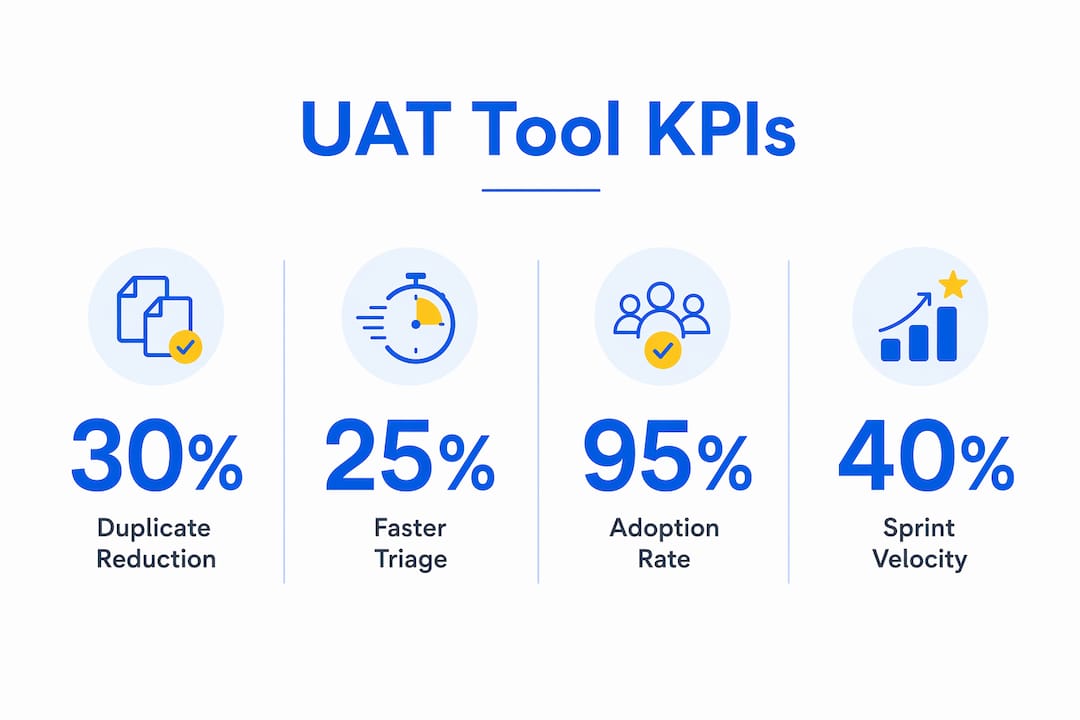
| Metric | How to measure it | Target outcome |
|---|---|---|
| Duplicate ticket rate | Count duplicate tickets flagged by AI vs. total tickets filed | Meaningful reduction within the first two weeks |
| Mean time to triage | Average time from ticket creation to triage assignment in Jira/Azure DevOps | Faster triage for high-severity bugs |
| Ticket quality score | % of tickets with video, metadata, and repro steps attached | Near-complete attachment rate |
| Cycle time: report to fix | Time from ticket creation to PR merge | Shorter cycle for bugs with full context |
| UAT sign-off velocity | Number of user stories signed off per sprint | Faster sign-off when repro evidence is clear |
Collect these metrics through native Jira or Azure DevOps analytics exports, or through Wezardapp’s reporting dashboard. The QA reporting best practices guide covers how to set baseline measurements before the pilot starts.
AI-powered duplicate detection and real-time transcription are the primary drivers behind faster triage and cleaner backlogs. Fewer duplicate tickets mean the triage queue reflects actual unique issues, and transcribed voice notes mean developers get reproduction context without a follow-up conversation.
Integrated AI visual feedback vs. manual screenshot workflows
Integrated AI visual feedback improves traceability, cuts duplicate noise, and shortens triage compared to screenshot-and-email workflows. The table below shows where the gap is widest.
| Dimension | Manual / email / screenshot | Integrated AI visual feedback tool |
|---|---|---|
| Capture fidelity | Static screenshot, no metadata | Full session video, DOM-aware capture, automatic environment metadata |
| Annotation and context | Typed comment, often incomplete | Pinned comments, voice notes, auto-transcribed repro steps |
| Automation and AI | None | Real-time transcription, duplicate detection, auto-summaries |
| Integrations | Manual copy-paste into Jira/ADO | Native connectors with structured ticket creation |
| Workflow fit | Reporter must remember all fields | Guided templates, one-click reporting |
| Security and SSO | Varies by email client | SSO, role controls, data retention policies |
| Ease of deployment | No setup, but no structure | Browser extension or embed; staging-environment support |
| Pricing model | Free but high hidden labor cost | Per-seat or org licensing with clear tier structure |
Teams that rely on screenshots and email threads consistently face the same two problems: tickets that cannot be reproduced and backlogs full of duplicates. An AI-enabled tool with native backlog connectors solves both, which is why UAT sign-off cycles tend to shorten once teams make the switch. For a broader view of how project management integrations affect tool selection, third-party review resources can add useful procurement context.
Key Takeaways
AI-powered visual feedback tools with native Jira, Azure DevOps, and ServiceNow integrations cut duplicate tickets and triage time faster than any other single change a QA team can make.
| Point | Details |
|---|---|
| Prioritize capture and AI | Require session video, DOM-aware capture, real-time transcription, and duplicate detection before evaluating anything else. |
| Ask the right demo questions | Test whether the tool auto-creates a structured ticket with video and transcription attached in your actual issue tracker. |
| Run a scoped pilot first | A 2–4 week pilot on one staging environment with three KPIs proves value before full rollout. |
| Track five core metrics | Duplicate rate, mean time to triage, ticket quality, cycle time, and sign-off velocity show real ROI. |
| Try Wezardapp first | Wezardapp combines screen recording, real-time AI transcription, and duplicate detection with native Jira, Azure DevOps, and ServiceNow connectors. |
Why this guide is built around QA constraints, not feature lists
Most visual feedback tool guides are written for web designers or product managers. They lead with annotation UI and color pickers. QA managers have a different problem: they need reproducible evidence, clean backlogs, and a triage queue that reflects reality, not noise.
The checklist and evaluation questions in this guide are built around that constraint. The pilot structure (two to four weeks, three KPIs, scoped to one staging environment) is designed to produce a defensible business case quickly because QA teams rarely get a long runway to prove a new tool’s value before budget decisions are made.
The recommendation to start with Wezardapp is grounded in one specific capability combination: screen recording plus real-time transcription plus duplicate detection before backlog sync. That combination addresses the three most common UAT failure modes simultaneously. No other step in the reporting workflow has that kind of leverage.
Wezardapp: run a pilot before your next UAT cycle
Fewer duplicate tickets and faster triage are not abstract benefits. They show up in sprint velocity, developer handoff quality, and UAT sign-off timelines. Wezardapp delivers all three in a single tool: screen recording, real-time AI transcription, and duplicate detection, with native connectors to Jira, Azure DevOps, and ServiceNow already built in.

Start a pilot on your staging environment and measure duplicate rate and mean time to triage against your current baseline. The UAT testing workflow page covers how to scope a pilot, configure integrations, and define the acceptance criteria your team needs to sign off confidently. If you want to see the duplicate detection and transcription features live before committing, request a demo and run it against a real staging deploy.
Useful links and primary sources
- Wezardapp UAT testing overview: capture methods, team roles, and pilot scoping
- Wezardapp use cases: real workflow patterns for testers, triage owners, and PMs
- Azure DevOps integration guide: connector setup and duplicate detection configuration
- Jira integration and ticket tracking: field mapping and triage workflow setup
- QA reporting best practices: baseline measurement and ticket quality standards
- Acceptance testing entry criteria: sign-off checklists and pilot success definitions
- How to sign off on test cases after UAT: step-by-step sign-off guidance
- Toolsplorer project management tool reviews: third-party integration and procurement context