
In this guide, a voice of customer survey means something specific: narrated, screen-recorded UAT feedback that gets transcribed and converted into structured bug and usability reports your developers can act on the same day.
If you want to start now, here is the fast path:
- Record short, scenario-scoped sessions where testers narrate what they expect before they act.
- Transcribe the audio with speech-to-text, then run an LLM pass to flag the moments that matter.
- Confirm flagged moments with a vision-language model (VLM) against the actual screenshots.
- Export JSON, Markdown, and interactive HTML, then sync clean reports to Jira, Azure DevOps, or ServiceNow.
Platforms built specifically for this, like Wezard, run this exact pipeline end to end and check for duplicates before anything hits your backlog.
Pro Tip: Record one scenario per clip. Short recordings scoped to a single user flow transcribe and analyze more accurately than longer recordings covering multiple features.
Key Takeaways
Structured voice of customer survey reports require narrated screen recordings, an STT to LLM to VLM pipeline, and a validation gate before tickets sync to a tracker.
| Point | Details |
|---|---|
| Scope every recording | Limit each session to one scenario so the LLM and VLM extract clean, accurate findings. |
| Use the full field template | Include reporter, timestamp, steps to reproduce, severity, and attachments in every report. |
| Match mode to risk | Run automated review for volume and human-first analyze for ambiguous or high-severity issues. |
| Gate high-severity tickets | Add a five to ten minute human check before auto-creating tickets for critical bugs. |
| Choose a purpose-built pipeline | Wezard runs the recording, transcription, and duplicate-detection steps natively, syncing directly to Jira, Azure DevOps, and ServiceNow. |
Table of Contents
- What Is a Voice of Customer Survey for UAT Teams?
- What Fields Belong in a UAT Feedback Report Template?
- How Does the Recording-to-Report Pipeline Actually Work?
- How Do You Map Reports Into Jira, Azure DevOps, or ServiceNow?
- How Do You Train Testers to Give Clear Narrated Feedback?
- Should You Automate Review or Keep Humans in the Loop?
- What Should Triagers Check Before Creating a Ticket?
- What Changes When a Team Switches to Voice-First UAT Reporting
- How Wezard Puts This Workflow Into Practice
- Frequently Asked Questions
- Sources
What Is a Voice of Customer Survey for UAT Teams?
Forget the customer satisfaction survey definition you have seen elsewhere. For QA managers and product teams running user acceptance testing, a voice of customer survey is a narrated screen recording where the tester talks through what they expected and what actually happened, captured while they work through a test scenario.
That distinction matters because text-only bug reports lose the two things developers need most: the exact sequence of steps and the tester’s real-time reasoning. A narrated recording keeps both. The tester says “I expect clicking Save to persist my changes,” clicks it, and the screen shows nothing happening. That single ten-second clip tells a developer more than a five-line Jira ticket ever could.
- Reproduction steps come for free, timestamped against the actual click sequence.
- Tester intent is captured in their own words, not reconstructed after the fact.
- Visual context (what the screen actually showed) removes the guesswork from “cannot reproduce” tickets.
Research on UAT execution backs this up directly: session capture tools like screen recording and screenshots substantially improve defect quality by giving developers reproduction evidence instead of a tester’s memory of what happened. That is the entire case for narrated recordings over text forms. A form asks someone to reconstruct a bug after the fact. A recording captures it as it happens.
What Fields Belong in a UAT Feedback Report Template?
A voice recording is only useful once it becomes a structured entry someone can act on. The standard UAT feedback report template calls for a specific set of fields, and skipping any of them is how reports end up bouncing back for clarification.
| Field | Example Value | Why It Matters |
|---|---|---|
| Reporter and timestamp | J. Alvarez | Establishes who found it and when, for accountability and build tracking |
| Steps to reproduce | Click Save on the Profile tab after editing the display name | Gives developers the exact repro path without follow-up questions |
| Severity and priority | High severity | Signals urgency so triage can queue it correctly |
| Attachments | short clip with timestamp | Provides visual proof and eliminates ambiguity about what happened |
A UI bug example reads clean: “Expected the confirmation modal to close on click; instead it stays open and the background scrolls.” A business-logic failure looks different: “Expected order total to include tax for California addresses; the checkout total shows $0.00 tax on a $50.00 California order.” Both need a consent checkbox and a short spoken script (“This session is being recorded for QA purposes”) before the tester starts talking.
How Does the Recording-to-Report Pipeline Actually Work?
The pipeline behind screenscribe illustrates the pattern most modern UAT tools now follow: audio extraction, speech-to-text transcription, an LLM pass to surface actionable moments, and a VLM to confirm those moments against real screenshots. The output lands as JSON for machines, Markdown for quick reading, and an interactive HTML report with clickable timestamps for anyone triaging the backlog.
Two modes cover most team situations. Review mode runs the whole pipeline automatically, end to end, and is built for volume. Point it at a batch of recordings overnight and wake up to structured reports. Analyze mode is a human-first dashboard where a tester or triager scrubs through the recording, marks specific moments, and lets the AI dig into just those flagged segments. Save analyze mode for ambiguous UX issues where you need a person’s judgment before the AI weighs in.
| Output | Format | Primary User |
|---|---|---|
| report.json | Machine-readable | Integration scripts syncing to trackers |
| report.md | Plain text markdown | Developers reading in their editor |
| report.html | Interactive, timestamped | QA managers and triagers reviewing sessions |
| Screenshots | Image files | Anyone verifying the reported state |
Sequencing the AI work this way, running the LLM pass first and reserving the VLM for flagged timestamps only, cuts processing cost while improving precision, since the model isn’t wasting cycles analyzing frames nobody cares about.
Pro Tip: Keep each recording scoped to a single scenario. A UX QA workflow built around one acceptance criterion per session maps far more cleanly to structured findings than a sprawling multi-feature walkthrough.
How Do You Map Reports Into Jira, Azure DevOps, or ServiceNow?
Field mapping is where most teams either save hours or lose them. Get the mapping right once and every future sync is automatic; get it wrong and someone is manually retyping descriptions every sprint.
- Report title maps to issue summary.
- The action versus result narration becomes the issue description.
- Steps to reproduce map directly into the tracker’s reproduction field.
- Screenshot and clip attachments carry over as issue attachments.
- Severity maps to the tracker’s priority field, whether that is Jira’s priority levels, Azure DevOps’ severity field, or ServiceNow’s impact and urgency combination.
Before anything syncs, run an AI duplicate-detection pass to group similar findings. Three testers narrating the same broken Save button as three separate recordings should become one ticket, not three, and this single step is often the difference between a clean backlog and a noisy one.
Set a minimum bar for auto-creation: repro steps, a screenshot, and a timestamp, or the report routes to a UAT coordinator for enrichment instead of the tracker. Daily triage with agreed severity categories keeps this from backing up during a busy UAT window.
Pro Tip: Add a five to ten minute human validation gate for anything flagged high severity before it auto-creates a ticket. A short review step before automatic creation catches false blockers before they derail a sprint.
How Do You Train Testers to Give Clear Narrated Feedback?
Most narrated feedback goes wrong before recording even starts, usually because nobody briefed the tester on cadence or data values. A short pre-UAT checklist fixes most of it: confirm the environment and build number, use anonymized but realistic data, agree on expected output format, and have the tester read a one-line consent script out loud before hitting record.
Give testers a script pattern, not just instructions. Something like: “I expect the Save button to persist changes. When I click Save, nothing happens and the spinner stays active for ten seconds.” That single sentence gives an LLM a clean expected-versus-actual pair to extract.
- State the expected behavior before performing the action, not after.
- Name the exact data values used, not “a test record.”
- Pause briefly between actions so timestamps stay clean and distinct.
Vague expectations and missing session capture are among the most common causes of UAT breakdowns, and a five-minute training session solves both.
Pro Tip: Cap each recorded scenario at two minutes. Shorter clips mean less triage time downstream and far more accurate LLM extraction.
Should You Automate Review or Keep Humans in the Loop?
Neither mode wins outright. The right mix depends on volume, risk, and who is available to look at what comes in.
Automated review handles high-volume, low-risk defects well, and it’s the right default for initial triage across large test runs where a human cannot look at every clip. Human-first analysis earns its place for ambiguous UX complaints, complex business-logic bugs, and final sign-off on anything marked high severity, since UAT itself is ultimately a business validation decision with real accept, accept-with-conditions, or reject outcomes attached to it.
- Run automated review continuously across incoming recordings.
- Set a human-review trigger for high severity or low duplicate-detection confidence.
- Fix escalation thresholds and staffing windows before UAT starts, not during it.
- Agree on a fix-to-deploy cadence, ideally daily, so review does not silently pile up.
What Should Triagers Check Before Creating a Ticket?
When a voice-based report lands, run the same sequence every time rather than improvising:
- Confirm consent was recorded and the environment/build is correctly logged.
- Reproduce the issue using the timestamp and screenshot before touching the tracker.
- Classify it: defect, change request, training gap, or works-as-designed.
- Run duplicate-detection against open tickets before creating anything new.
- Assign priority and an owner, not just a severity label.
Auto-create only when repro steps, screenshot, and timestamp are all present. Anything short of that goes back to the tester or a UAT coordinator for enrichment.
Pro Tip: Have the original reporter verify the fix on the UAT build. A developer confirming their own fix is not the same validation as the person who found the bug confirming it’s actually gone.
What Changes When a Team Switches to Voice-First UAT Reporting
Teams that move from text tickets to narrated recordings almost always describe the same shift: fewer “cannot reproduce” cycles and faster triage, because the evidence arrives attached to the report instead of trailing behind it in a comment thread three days later.
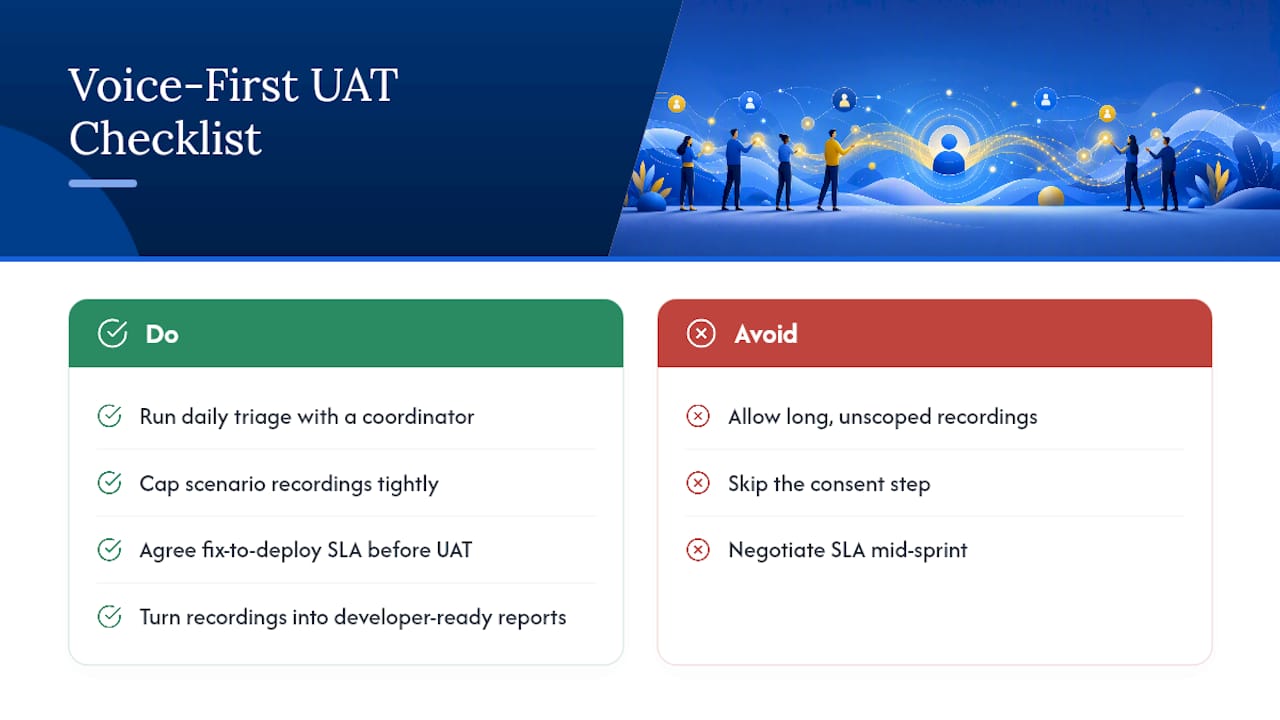
The operational changes that make this stick are small but specific. Daily triage with a dedicated UAT coordinator, not a rotating volunteer. Scenario recordings capped tight enough that nobody rambles through four unrelated features in one clip. A fix-to-deploy SLA agreed before UAT starts, not negotiated mid-sprint when things are already behind.
The mistakes are just as consistent. Letting testers record long, unscoped journeys turns every clip into a triage puzzle. Skipping the consent step creates legal exposure that nobody notices until it’s a problem. One recurring pattern worth watching for: a tester narrates a subtle data mismatch, like a tax calculation showing $0.00 on an order that clearly should have tax applied, and because the narration states the expected value out loud, the fix gets verified and closed the same day instead of bouncing between QA and engineering for a week.
None of this requires exotic tooling. It requires discipline about scope, a coordinator who owns triage daily, and a pipeline that turns talk into structured, developer-ready reports.
How Wezard Puts This Workflow Into Practice
Everything covered above, the recording, the transcription, the duplicate check, the tracker sync, is what Wezard is built to do without you stitching five separate tools together.

Wezard records the tester’s screen, transcribes the narration in real time, and runs AI-powered duplicate detection before anything reaches your Jira or Azure DevOps backlog. Reports export as structured data your team can hand straight to engineering, cutting the manual cleanup that normally eats a triager’s morning. Enterprise plans include SSO and enterprise-grade security for teams that need it.
Pro Tip: Turn on short-scenario recording limits and the pre-sync validation gate in your Wezard settings. Both together produce noticeably cleaner backlog imports than default settings.
Ready to see it against your own UAT workflow? Start a Wezard trial and run your next test cycle with narrated, AI-transcribed reporting from day one.
Frequently Asked Questions
What is a voice of customer survey in the context of UAT?
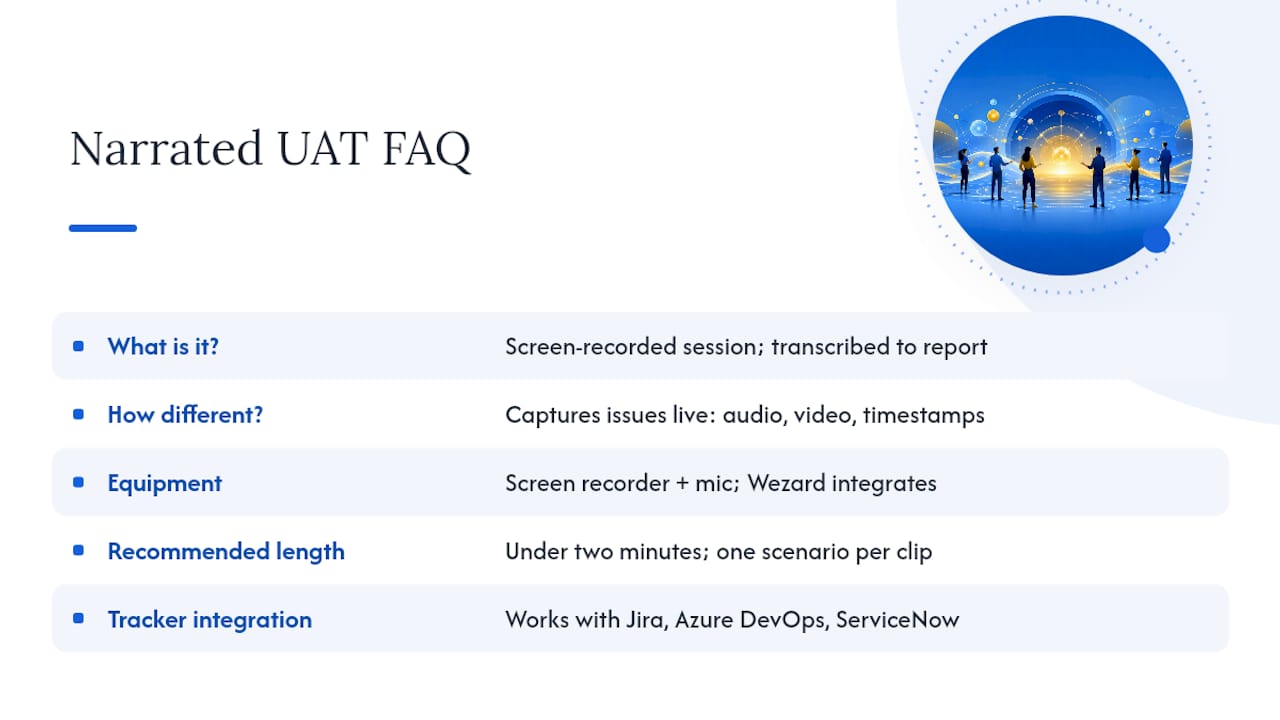
It’s a narrated, screen-recorded testing session where the tester describes expected behavior out loud while working through a scenario, later transcribed and converted into a structured bug or usability report.
How is this different from a standard customer feedback survey?
A standard customer feedback survey collects opinions after the fact through forms or ratings. This approach captures the bug or usability issue as it happens, with audio, video, and timestamps attached as evidence.
Do I need special equipment to record narrated UAT sessions?
No. Screen recording software with a microphone is enough. Platforms like Wezard build the recording, transcription, and reporting into one workflow so you don’t need separate tools.
How long should a single narrated recording be?
Keep it under two minutes and scoped to one scenario. Shorter, focused clips produce more accurate AI transcription and extraction than long, multi-feature walkthroughs.
Can this integrate with our existing issue tracker?
Yes. The field mapping pattern (title to summary, narration to description, steps to reproduction fields, severity to priority) works across Jira, Azure DevOps, and ServiceNow.
What happens to duplicate reports from multiple testers?
AI duplicate-detection groups similar findings before they reach the tracker, so three testers reporting the same bug become one ticket instead of three separate ones.


