
End user testing puts real, representative people in front of your product to complete realistic tasks while you watch, so you catch usability problems before they hit production. QA managers and product owners typically schedule it before major releases, and again after significant UI changes. Start small: a formative round with a small number of participants per user segment surfaces most severe usability issues at a fraction of the cost of a large study. Save bigger, statistically powered samples for summative validation, when you need to compare against a benchmark or defend a launch decision.
- Run formative rounds early and often, ideally every sprint or two
- Reserve summative testing (20+ participants) for final validation before a major release
- Treat every session as a chance to generate a ticket, not just a talking point
Key Takeaways
End user testing works best as an iterative, measured process: small formative rounds catch most usability problems cheaply, and findings only create value once they become assigned tickets.
| Point | Details |
|---|---|
| Start small, scale deliberately | Run formative rounds with 5 to 8 participants per segment, and reserve 20+ participant summative rounds for major validation. |
| Match method to the question | Choose moderated versus unmoderated and remote versus in-person based on whether you need depth or scale, not convenience. |
| Design nonleading tasks | Write tasks around real goals (“share this report”) instead of steps (“click export”) to test actual usability. |
| Verify AI-assisted synthesis | Tag and cluster automated summaries manually before trusting them, since automated themes can miss nuance or invent patterns. |
| Convert findings into tickets | Wezardapp records sessions, transcribes issues in real time, and flags duplicates before tickets reach Jira or Azure DevOps. |
Table of Contents
- What Is End User Testing, and How Does It Differ From QA and UAT?
- Which Testing Method Fits Your Goal: Moderated, Remote, or Formative?
- When Should You Schedule a Testing Round?
- How Do You Run an End User Testing Study Step by Step?
- What Metrics Should You Track, and How Many Participants Do You Need?
- Which Tools Actually Fit Your Testing Approach?
- What Separates a Good Study From a Wasted One?
- How Wezardapp Fits Into This Workflow
- Why Testing Has to Become a Habit, Not an Event
- Turn Every Session Into a Ticket, Not a Slide Deck
- Sources
What Is End User Testing, and How Does It Differ From QA and UAT?
End user testing means observing actual or representative users interact with your software to complete real tasks, without a script that dictates their behavior. It’s fundamentally different from QA, which verifies that code matches specifications, and different again from formal user acceptance testing (UAT), which confirms a business stakeholder or client signs off that a build meets contractual requirements. QA asks “does this work as coded?” UAT asks “does this meet the agreed criteria?” End user testing asks a harder question: “can a real person actually use this without getting stuck?”
That distinction matters more than most teams realize. A feature can pass every QA script and clear UAT sign-off and still confuse the people who have to use it daily. Jakob Nielsen’s usability research treats observing real users on realistic tasks as the empirical core of usability practice, because no amount of code review reveals that your “Save” button and “Submit” button look identical to someone unfamiliar with your internal terminology.
End user testing typically happens at two points in the SDLC: early, on low-fidelity prototypes, to validate concepts before engineering invests real time, and later, on near-final builds, to catch usability regressions before launch. A few examples show the gap it fills:
- A checkout flow that passes every QA test case but loses a significant share of first-time users because “Continue” and “Next” appear on the same screen with unclear hierarchy
- An internal dashboard where testers can’t find the export function because it lives under a menu labeled with an acronym only the product team understands
Neither of those failures would show up in a QA regression suite or a UAT checklist. They only surface when you watch someone unfamiliar with the product try to get something done.
Which Testing Method Fits Your Goal: Moderated, Remote, or Formative?
The method you choose depends on what question you’re trying to answer, not on what’s trendy. Three decisions drive almost every study design.
- Moderated vs. unmoderated. In a moderated session, a facilitator sits with the participant (in person or over video) and can ask follow-up questions in real time. This produces richer qualitative insight, especially when you need to understand why someone hesitated. Unmoderated testing sends participants a task list and lets them work through it alone, on their own schedule, which scales faster and costs less per participant but sacrifices the ability to probe confusion as it happens.
- Remote vs. in-person. Remote sessions, now the dominant modality for most product teams, cut recruitment time and let you test with users in their actual work environment, on their own hardware. In-person sessions cost more to arrange but let you observe body language and environmental friction (glare on a warehouse tablet, noise on a factory floor) that a webcam misses entirely.
- Formative vs. summative. Formative testing happens early and often, with small samples, to catch and fix problems while changes are cheap. Summative testing happens later, with larger samples, to measure whether a design meets a target (task success rate above 85%, for example) and to compare against a previous version or a competitor.
Most mature testing programs blend these dimensions rather than picking one permanently. A team might run moderated remote sessions for a brand-new feature (where you need to understand confusion) and switch to unmoderated remote testing for a routine flow check once the design has stabilized. The trade-off between richness and speed should drive the choice, not habit or convenience.
When Should You Schedule a Testing Round?
A handful of signals almost always justify pulling together a study, even a fast one. Shipping a new feature without any user validation is the most obvious trigger, but it’s far from the only one.
- A key metric (signups, checkout completion, feature adoption) drops sharply after a release
- You’re making accessibility changes and need to confirm they work for people who rely on assistive technology
- Regulatory or compliance requirements demand documented usability evidence
- Support tickets cluster around confusion with a specific screen or flow
- You’re about to invest significant engineering time in a redesign and want to validate direction first
The business case comes down to timing. A usability problem caught in a five-person formative round costs a design tweak and maybe a day of engineering time. The same problem caught after launch costs a hotfix, a support surge, and a chunk of user trust you don’t get back easily. That asymmetry is why teams that run end user testing regularly report less rework and faster adoption than teams that treat it as a one-time pre-launch checkbox.
How Do You Run an End User Testing Study Step by Step?
A repeatable process is what separates a useful study from a session where you just watch someone click around and hope you learn something. Nielsen’s own step-by-step framework for usability testing treats the whole exercise like an engineering discipline: defined inputs, controlled execution, explicit outputs.
- Define your research question and success criteria first. “Can new users complete account setup in under three minutes without help?” is testable. “Is the onboarding good?” is not. Write down what you’re trying to learn before you write a single task.
- Design realistic, nonleading tasks. Instead of “click the blue button to export your report,” write “you need to share last month’s sales numbers with your manager. Show me how you’d do that.” The first version tells the user what to do; the second tests whether they can figure it out.
- Recruit participants who match your actual audience. Testing with colleagues or developers creates misleading results, because people who understand your system’s internal logic can’t experience it the way a first-time user does. Build a screener that filters for real usage patterns, and recruit a couple of backups per session slot, because no-shows happen more often than teams expect.
- Run a pilot session before the real ones. A pilot with one internal tester (not a developer who built the feature) catches broken links, confusing wording, and timing issues in your script before you burn a real participant’s slot on a bug in your process rather than the product.
- Facilitate with discipline. Use the think-aloud protocol, where participants narrate their thoughts as they work. Keep prompts neutral: “what are you thinking right now?” instead of “do you see the search bar?” The think-aloud method only produces reliable data when the facilitator resists the urge to guide.
- Record everything. Screen and audio recording lets you go back and verify a moment you might have misread live, and it gives you clips to use later when persuading skeptical stakeholders.
- Analyze systematically. Affinity mapping, grouping observations by theme rather than by session, reveals patterns a single transcript won’t. Structure every finding as problem, then evidence, then recommendation, so nothing you report is just an opinion floating without support.
- Convert recommendations into prioritized tickets. A finding that lives only in a slide deck dies in a slide deck. Write specific, assigned backlog items, and schedule a follow-up round to confirm the fix actually worked. Presenting findings this way, with evidence tied directly to a priority, is what actually moves recommendations into shipped fixes.
Pro Tip: Keep a standing moderator script template you reuse across studies, and only edit the task list. Reinventing your intro, consent language, and wrap-up questions every time wastes prep time you could spend on task design instead.
What Metrics Should You Track, and How Many Participants Do You Need?
Four metrics cover most of what a usability study needs to answer, and each one measures something different. Task completion rate is the percentage of participants who finish a task successfully without giving up. Time on task measures how long completion actually takes, which matters most when speed is part of the product promise. Error rate counts how often participants take a wrong action before recovering or failing. Assists track how many times a participant needed help from the facilitator, a number that should be zero in a well-designed flow. Standardized surveys like the System Usability Scale (SUS) or the single-item Single Ease Question (SEQ) add a subjective satisfaction layer that raw task data misses.
Sample size is where most teams either overspend or under-trust their own findings. The widely cited guidance, often shortened to the “five-user rule,” holds that formative tests with five to eight participants per user segment uncover the majority of severe usability problems, because usability issues tend to repeat across users rather than appear randomly. Summative testing, where you need a statistically defensible completion rate or a comparison between two designs, requires a larger sample, typically 20 or more, sometimes backed by a formal power analysis if the result will inform a major investment decision.
- Formative round: 5 to 8 participants per segment, run iteratively across sprints
- Summative round: 20+ participants, run less often, timed to major milestones
- Mixed approach: small iterative formative rounds followed by a targeted summative run tend to be the most cost-effective pattern for product teams that test continuously rather than once a year
Which Tools Actually Fit Your Testing Approach?
Tool selection should follow your method, not the other way around. Four categories cover most of what teams need. Prototype test runners (built into design tools like Figma) let you validate flows before a line of code exists. Session-recording tools capture screen activity and clicks on live products, useful for spotting friction you didn’t think to ask about. Unmoderated remote platforms handle recruitment, task delivery, and basic analytics at scale. Synthesis and tagging tools help you turn hours of session footage into organized, shareable findings.
When comparing options within a category, weigh a handful of practical factors:
- Panel size and recruitment speed for your target user profile
- Integrations with your existing stack, particularly Figma for prototypes and Jira or Azure DevOps for turning findings into tickets
- Whether the tool can generate short highlight clips for stakeholder presentations
- Export formats and how easily findings move into your existing reporting workflow
- Pricing model, since per-session pricing scales very differently from a flat seat license as your testing cadence grows
AI-assisted synthesis, auto-summaries, highlight reels, and automated tagging have genuinely sped up analysis, but it comes with a catch. Automated theme detection needs human verification, because an AI model clustering feedback by keyword similarity can miss the nuance a trained researcher would catch, or worse, invent a pattern that isn’t really there. Tag raw clips first, then validate the clusters manually before you present them as findings, and keep the representative video clips on hand for each one so a skeptical stakeholder can see the evidence directly rather than take your summary on faith.
What Separates a Good Study From a Wasted One?
Most testing failures trace back to a handful of repeatable mistakes, not bad luck. Fix the process and the results get more reliable almost immediately.
Do this:
- Define a clear research question before writing a single task
- Run a pilot session to catch script and tech problems early
- Recruit participants who match your real user base, not whoever’s available in the office
- Record every session for later verification and stakeholder clips
- Convert every finding into a specific, assigned backlog item
Avoid this:
- Using developers or internal staff as stand ins for real users
- Writing tasks that tell participants exactly what to click
- Skipping the pilot because you’re short on time
- Reporting vague impressions instead of evidence tied to specific tasks
Accessibility deserves its own line item in your recruiting plan, not an afterthought. Include participants with relevant accessibility needs, screen reader users, people with motor impairments, low-vision testers, and use the W3C’s Web Content Accessibility Guidelines as your reference standard when translating findings into fixes. A study that only recruits able-bodied, tech-fluent participants will miss the exact problems that create the most legal and reputational risk.
Pro Tip: Build a standing “accessibility screener” question set you attach to every recruitment round, even ones not specifically about accessibility. It costs nothing extra and means you’re never scrambling to find qualified participants when a compliance deadline shows up.
How Wezardapp Fits Into This Workflow

Wezardapp’s screen recording, real-time transcription, and AI duplicate detection map directly onto the process above: capture the session, transcribe the issue as it happens, and route a clean ticket into Jira or Azure DevOps without manual write-up. Related resources: the UAT checklist, a breakdown of UAT versus system testing, and example UAT scenarios for QA teams building out their own scripts.
Why Testing Has to Become a Habit, Not an Event
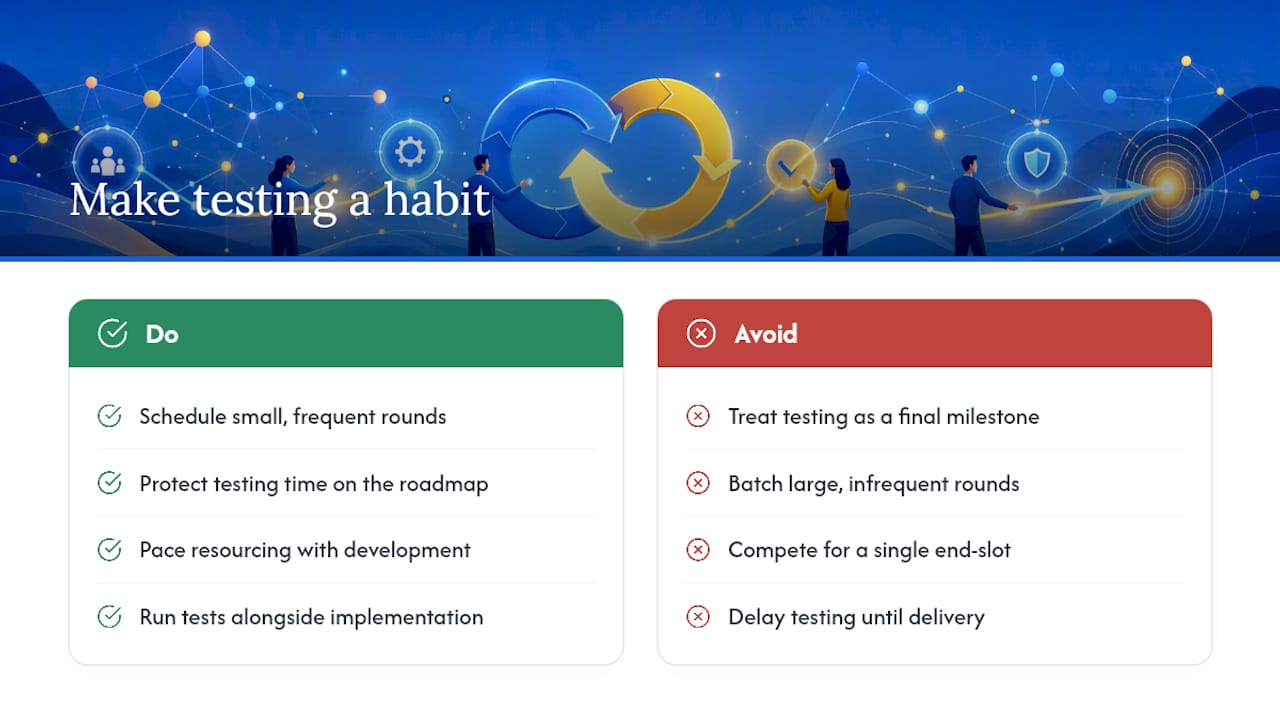
Teams that treat end user testing as a routine, not a milestone, ship fewer surprises. The hard part usually isn’t the methodology, it’s convincing a roadmap-driven organization to protect the time. Run smaller rounds more often, and pace resourcing so testing rides alongside development instead of competing with it for a slot at the end.
Turn Every Session Into a Ticket, Not a Slide Deck
Most teams lose the value of a testing session somewhere between the recording and the backlog. Someone watches the footage, writes up notes hours later from memory, and by the time a ticket exists, half the context is gone and a duplicate has already been filed by someone else on the team. Wezardapp closes that gap directly: it records the screen, transcribes the issue in real time as the tester talks through it, and uses AI to flag duplicate tickets before they ever reach your backlog.

For QA managers and product teams running the formative rounds described above, that means less time reconciling scattered notes and more time acting on verified findings. A tester hits a snag, narrates it out loud, and Wezardapp turns that into a structured ticket synced directly to Jira or Azure DevOps, with the recording attached as evidence. If you’re ready to see how it fits your own test cycle, start with the UAT testing feedback tool and walk through a session the way your next study will actually run.
Sources
- 12 Steps for Usability Testing: Plan, Run, Analyze, Report
- Usability testing — Textbook of Usability
- W3C/WAI: Web Content Accessibility Guidelines (WCAG)
- Usability testing: Complete guide for UX teams (2026)


