
Standardized bug reporting is a consistent, structured process where every tester submits reports using the same fields, format, and evidence requirements so developers can reproduce and fix issues without follow-up. Without a uniform bug reporting process, QA teams produce wildly inconsistent tickets. One tester writes three sentences. Another writes three paragraphs with no steps to reproduce. Developers waste time chasing context instead of fixing code. The methods covered here, from structured templates to objective severity rubrics, give QA teams and project managers a practical path to bug report consistency that actually holds up under deadline pressure.
How to standardize bug reporting across testers with a structured template
A single structured template is the foundation of any uniform bug reporting process. Developers mentally triage every report using a fixed checklist: where is the bug, what was expected, what actually happened, what environment was it in, and how urgent is it. A template provides that checklist upfront, eliminating the back-and-forth that kills fix velocity.
The seven fields every template must include are Title, Environment, Steps to Reproduce, Expected Result, Actual Result, Visual Proof, and Severity/Priority. Each field exists for a specific reason. A vague title like “button broken” forces a developer to open the ticket and read everything before understanding the scope. A precise title like “Submit button unresponsive on iOS 17.4 in Safari after form validation error” lets a developer triage in seconds.

One incomplete visual bug report can waste 25–40 minutes of team time before a fix attempt even begins. That number compounds fast across a testing cycle with dozens of open tickets. Requiring screenshots or screen recordings as mandatory fields, not optional attachments, cuts that waste directly.
| Field | Description | Purpose |
|---|---|---|
| Title | One-line summary with component and condition | Enables fast triage without opening the full ticket |
| Environment | OS, browser, device, app version | Prevents “can’t reproduce” responses from developers |
| Steps to reproduce | Numbered sequence from a clean state | Gives developers an executable path to the bug |
| Expected result | What should happen per spec | Defines the standard the bug violates |
| Actual result | What actually happens | Describes the defect precisely |
| Visual proof | Screenshot, video, or log file | Removes ambiguity and speeds up diagnosis |
| Severity/Priority | S1–S4 classification with dropdown | Guides triage and resource allocation |
Pro Tip: Lock the template in your bug tracking system so testers cannot submit a report with empty required fields. Enforcement at the tool level beats enforcement through reminders every time.
How to enforce evidence quality and reproduction steps
Reproduction steps are the most abused field in any bug report. Testers often write “click the button and it breaks” instead of a numbered sequence starting from a clean application state. Rex Black’s guidelines recommend treating reproduction steps as executable evidence: numbered, specific, and starting from a defined baseline.
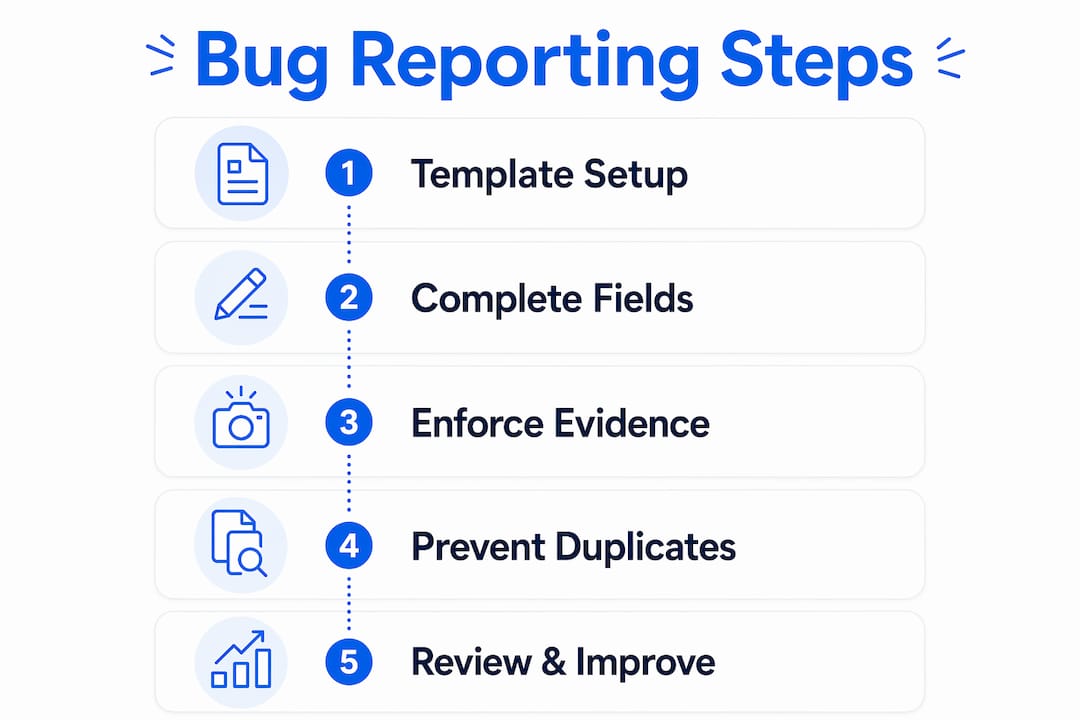
The “three attempts” rule is the clearest standard for reproduction quality. Before filing a report, a tester must attempt to reproduce the bug three times. If the bug recurs consistently, the tester documents clean, numbered steps. If the bug appears only sometimes, the tester notes it explicitly as intermittent and records the conditions under which it appeared.
Intermittent bugs are the most dangerous category to mishandle. A developer who receives no intermittence note will assume the bug is consistent, spend hours trying to reproduce it, and eventually close the ticket as “cannot reproduce.” That reopen cycle is entirely preventable with one sentence in the report.
- Require a numbered step list starting from a fresh login or clean app state
- Mandate a “Reproducibility” field with options: Always, Intermittent, Once
- For intermittent bugs, require testers to note frequency (e.g., 2 out of 3 attempts)
- Reject any report where steps begin mid-flow without a defined starting point
- Treat reproduction steps as the primary deliverable of a bug report, not an afterthought
Pro Tip: Ask testers to follow their own steps on a second device or browser before submitting. This single habit catches roughly half of all “cannot reproduce” tickets before they reach the developer queue.
Strategies to prevent duplicate bug reports across testers
Duplicate reports are a direct measure of process discipline. Typical duplicate rates run 5–10% across testing teams. Rates above 10% signal that testers are not searching the existing database before filing, which wastes developer triage time and inflates backlog numbers.
The fix is a mandatory pre-submission search step built into the workflow. Before a tester files any new report, they must search the bug database using the component name, error message, or affected feature. This step takes under two minutes and prevents the most common form of duplicate: two testers finding the same bug in the same sprint.
- Add a “Duplicate check completed” checkbox as a required field in the template
- Train testers to search by component, error text, and affected user flow before filing
- Assign a QA lead to review new submissions daily and flag likely duplicates within 24 hours
- Track your team’s duplicate rate monthly as a process health metric
- When a duplicate is found, link it to the original ticket and close it with a “Duplicate of #[ID]” note so the history is preserved
Tracking duplicate rates monthly gives project managers a concrete signal about reporting discipline. A team that drops from 12% to 6% over two sprints has measurably improved its process, not just its intentions. Share that metric in sprint retrospectives so testers understand their individual impact on backlog quality.
Wezardapp addresses this problem directly. It uses AI to detect duplicate tickets before they reach your Jira or Azure DevOps backlog, which means the duplicate check happens automatically rather than relying on tester memory or manual search.
How to use objective severity and priority rubrics
Severity inflation is one of the most common failures in testing team bug reporting. When every bug is marked “Critical,” the label loses meaning and developers cannot prioritize effectively. Objective severity classifications from S1 to S4 solve this by defining exactly what each level means, removing the tester’s subjective judgment from the equation.
The table below defines a standard four-level severity rubric that QA teams can adopt directly.
| Severity | Label | Criteria | Example |
|---|---|---|---|
| S1 | Critical | Application crash, data loss, security breach, no workaround | Login page returns 500 error for all users |
| S2 | High | Major feature broken, workaround exists but is painful | Payment form skips tax calculation on checkout |
| S3 | Medium | Feature works but behaves incorrectly in edge cases | Date picker shows wrong month on leap years |
| S4 | Low | Cosmetic issue, minor UX problem, no functional impact | Button label has a typo on the settings page |
Severity and priority are not the same field, and conflating them creates triage confusion. Severity describes the technical impact of the bug. Priority describes when the team should fix it relative to other work. An S4 cosmetic bug on a homepage might carry high priority before a product launch. An S2 functional bug in a rarely used admin panel might carry low priority. Both fields belong in the template as separate dropdowns with guidance text.
Requiring dropdowns rather than free-text fields for severity and priority removes ambiguity at the source. A tester cannot type “very urgent” into a dropdown. They must select S1, S2, S3, or S4 against defined criteria. That single design decision produces consistent data across every report your team files.
Measuring and improving standardization outcomes
Metrics turn standardization from a policy into a feedback loop. The two most useful metrics for bug report consistency are the reopen rate and the defect rejection rate. A healthy reopen rate sits below 10%. Higher rates indicate that reports are missing details developers need to fix bugs correctly the first time.
The reopen rate formula is straightforward: divide the number of reopened bugs by the total number of closed bugs in a given period, then multiply by 100. A defect rejection rate measures how often developers reject reports as invalid, out of scope, or not reproducible. Both rates point directly at reporting quality, not developer quality.
- Reopen rate above 10%: Audit recent reopened tickets for missing fields, vague steps, or absent environment details
- Rejection rate above 5%: Review rejected tickets for pattern failures such as missing reproduction steps or incorrect severity labels
- Duplicate rate above 10%: Reinforce the pre-submission search requirement and consider adding AI-assisted duplicate detection
- All three rates low: Introduce peer review as a quality checkpoint before submission to maintain standards as the team scales
Peer review is the one non-negotiable step in a mature standardization process. Two reports on the same bug can differ in style but must not differ in substance. A peer reviewer catches the missing environment field, the vague step two, and the inflated severity label before the ticket reaches a developer. Schedule peer review as a daily 15-minute team habit, not an occasional audit.
Good bug reports focus on facts and exact reproduction sequences, avoiding speculation entirely. A report that says “I think the database might be timing out” gives a developer a hypothesis to chase. A report that says “API returns 504 after exactly 30 seconds on the /checkout endpoint with a cart containing more than 10 items” gives a developer a location, a condition, and a starting point.
Key takeaways
Standardizing bug reporting across testers requires a mandatory structured template, objective severity rubrics, enforced reproduction steps, and measurable quality metrics tracked every sprint.
| Point | Details |
|---|---|
| Use a seven-field template | Include Title, Environment, Steps to Reproduce, Expected/Actual Result, Visual Proof, and Severity/Priority as required fields. |
| Enforce the three-attempts rule | Require testers to reproduce bugs three times and note intermittence explicitly before filing. |
| Track duplicate rates monthly | Healthy teams keep duplicate rates at 5–10%; rates above that signal a process gap. |
| Apply S1–S4 severity rubrics | Use defined severity criteria with dropdowns to eliminate subjective “everything is critical” inflation. |
| Monitor reopen rates | A reopen rate below 10% indicates reports contain enough detail for developers to fix bugs on the first attempt. |
The part of standardization most teams skip
Most QA teams invest heavily in template design and almost nothing in peer review. That is the wrong ratio. A template tells testers what to fill in. Peer review tells them whether they filled it in well. Those are different problems, and only one of them scales.
I have seen teams roll out detailed bug report templates, celebrate the launch, and then watch reopen rates stay flat for two sprints. The template was fine. The problem was that testers were technically completing every field while still writing vague steps and assigning severity by gut feel. No template catches that. A peer reviewer does.
The cultural shift that actually moves metrics is treating bug reports as professional deliverables, not administrative tasks. When a tester knows a colleague will read their report before it reaches a developer, the quality of that report changes. Not because of fear, but because professional pride kicks in. That is the mechanism behind Rex Black’s peer review recommendation, and it works in practice exactly as described in theory.
Standardization should also evolve. The template you launch in sprint one will not be the template you need in sprint ten. Collect feedback from developers about which fields are most useful. Track which fields testers consistently leave vague despite completing them. Adjust the guidance text in dropdowns based on what you learn. A living template beats a perfect template every time.
— Marketing
Wezardapp and the case for automated standardization
QA teams that rely entirely on manual enforcement hit a ceiling. Templates get bypassed under deadline pressure. Duplicate checks get skipped. Severity fields get inflated. Wezardapp is built to close those gaps automatically.

Wezardapp records your screen, transcribes the issue in real time, and uses AI to detect duplicate tickets before they reach your Jira or Azure DevOps backlog. The template enforcement happens at the point of capture, not after the fact. For teams running user acceptance testing, that means every report arrives in the developer queue with complete fields, verified evidence, and no duplicates already filtered out. The result is a backlog that reflects real issues, not reporting noise.
FAQ
What fields must every standardized bug report include?
A complete bug report requires Title, Environment, Steps to Reproduce, Expected Result, Actual Result, Visual Proof, and Severity/Priority. These seven core fields give developers everything they need to reproduce and fix a bug without follow-up.
What is a healthy reopen rate for bug reports?
A reopen rate below 10% indicates that reports contain sufficient detail for developers to fix bugs correctly on the first attempt. Rates above 10% signal missing fields or vague reproduction steps.
How do you prevent duplicate bug reports across testers?
Require testers to search the bug database before filing any new report, and add a “Duplicate check completed” checkbox as a required template field. Teams with duplicate rates above 10% should also consider AI-assisted duplicate detection tools like Wezardapp.
What is the difference between severity and priority in bug reporting?
Severity describes the technical impact of a bug on the application. Priority describes when the team should fix it relative to other work. Both fields belong in every bug report as separate dropdowns with defined criteria.
How does peer review improve bug report consistency?
Peer review catches quality issues that templates cannot, including vague steps, missing environment details, and inflated severity labels. Peer review is the one non-negotiable step in a mature standardization process because two reports on the same bug can differ in style but must not differ in substance.


