A solid UAT checklist is the difference between a release that surprises production and one that doesn’t. Before any sign-off, every UAT cycle must clear these gates: scope is defined and agreed, the environment mirrors production, realistic test data is loaded, testers are onboarded with documented scenarios, all critical-path workflows are executed and logged, defects are triaged by severity, no critical issues remain open, and a named stakeholder has formally accepted the build.
According to the qa::checklist UAT guide, a complete user acceptance testing checklist covers scope and goals, stakeholder approvers, a production-like environment, realistic test data, end-to-end scenarios, role and permission checks, integrations, and explicit sign-off artifacts. That’s the backbone. Here’s the ready-to-run version:
- Scope and objectives documented and approved by the product owner
- Acceptance criteria written for every in-scope requirement
- UAT environment confirmed as production-like (data, integrations, auth)
- Test data loaded: realistic, scrubbed if using production records
- Testers identified, onboarded, and given access
- Test cases mapped to business scenarios and prioritized by risk
- Execution logged with pass/fail/blocked status per scenario
- All defects captured with severity, steps to reproduce, and evidence
- No open critical or high-severity defects at sign-off
- Named approver has reviewed results and signed the acceptance record
Minimum exit criteria before sign-off: All acceptance criteria are met, zero critical defects remain open, all high-severity defects are either resolved or formally accepted with documented risk justification, and the named release authority has signed the acceptance form with a date and go/no-go decision.
Key Takeaways
A complete UAT checklist requires scope, environment parity, scenario-based test cases, structured defect triage, and a formal sign-off record with named approvers before any release goes live.
| Point | Details |
|---|---|
| Exit criteria are non-negotiable | Zero open critical defects and all acceptance criteria met are the minimum conditions before any sign-off. |
| Environment parity determines result validity | A UAT environment that differs from production in configuration or data produces results that won’t hold in production. |
| Traceability matrix makes sign-off defensible | Every test case must map to a business requirement and acceptance criterion so coverage gaps are visible before execution. |
| Tester friction kills UAT quality | Automating ticket creation and enabling voice/video reporting keeps business stakeholders engaged through the full cycle. |
| Wezardapp removes the biggest UAT bottleneck | Screen recording, real-time transcription, and AI duplicate detection cut defect report time and backlog noise in one step. |
Table of Contents
- What is UAT and how does it differ from QA testing?
- Which type of UAT fits your release?
- What must be ready before UAT starts?
- How to build a UAT plan and write scenario-based test cases
- Who should run UAT and what are their responsibilities?
- How do you run UAT sessions and capture defects effectively?
- How do regression testing and exit criteria work together?
- Ready-to-copy templates and sample checklist items
- What are the most common UAT mistakes and how do you avoid them?
- What should you look for in modern UAT tools?
- How should you handle user feedback and change requests after UAT?
- How do you manage risk during UAT?
- What UAT experience actually teaches you
- Wezardapp cuts UAT feedback time from hours to minutes
- Sources
What is UAT and how does it differ from QA testing?
User Acceptance Testing (UAT) is the final validation phase where business stakeholders confirm that a system meets agreed requirements before release. It answers one question: does this software do what the business needs it to do?
That’s a different question from what QA and system testing answer. System testing verifies that the application functions correctly against technical specifications. Integration testing checks that components communicate as designed. UAT validates business outcomes, not technical correctness. A system can pass every technical test and still fail UAT because it doesn’t match how real users actually work.
The sign-off authority matters here. QA engineers own system and regression test sign-off. UAT sign-off belongs to business stakeholders: product owners, department leads, or designated customer representatives. That distinction shapes everything from who writes the test cases to who has the final go/no-go vote. Acceptance criteria are the shared language between both worlds: they define what “done” means in business terms and give testers an objective pass/fail standard. A traceability matrix ties each acceptance criterion back to a business requirement, making sign-off defensible rather than subjective.
For a deeper comparison of where each phase begins and ends, the UAT vs system testing breakdown is worth reading before you build your plan.
Which type of UAT fits your release?
Not every release needs the same UAT approach. Picking the wrong type wastes time and misses the actual risk.
- Alpha testing: Internal end-to-end testing by employees or a controlled internal group before any external exposure. Use it when the product is feature-complete but not yet stable enough for outside users.
- Beta testing: External testing by a selected group of real users in their own environments. Run it when you need real-world usage patterns, edge cases, and volume that internal teams can’t replicate.
- Operational acceptance testing (OAT): Validates that the system can be operated, maintained, and supported in production. Focuses on backup/restore, failover, monitoring, and admin workflows. Involve IT operations and support staff.
- Contractual acceptance testing: Confirms the delivered system meets contractual terms. Common in government and enterprise contracts where specific deliverables are legally defined.
- Regulatory acceptance testing: Validates compliance with industry regulations (HIPAA, SOX, PCI-DSS). Requires documented evidence and often involves a compliance officer or auditor.
- Pilot/field testing: A limited production rollout to a subset of real users before full release. Useful for high-risk changes where a controlled rollout reduces blast radius.
Hybrid approaches are common in Agile delivery. A sprint-level smoke test confirms the build is stable enough to hand to business testers, followed by a dedicated business UAT window at the end of the sprint or release cycle. The key is not conflating the two: smoke tests are a gate, not a substitute for scenario-based business validation.
What must be ready before UAT starts?
TestRail’s UAT guide is direct on this: known high-impact defects must be resolved, system and integration testing must be complete, and business requirements must be available to testers before UAT begins. Skipping these gates doesn’t accelerate delivery; it just moves failures to a more expensive phase.
Entry criteria checklist
- All in-scope features are code-complete and deployed to the UAT environment
- System testing and regression testing are signed off
- No open critical or high-severity defects from prior test phases
- Acceptance criteria are documented and accessible to testers
- Test data is loaded and verified
Environment parity checklist
- UAT environment configuration matches production (OS, middleware, database version)
- Third-party integrations are active and pointing to UAT-equivalent endpoints
- Authentication, roles, and permissions mirror production user profiles
- Monitoring and logging are enabled so defects can be reproduced with context
Deployment and rollback checklist
- Deployment runbook is documented and tested
- Known-issues log is shared with testers before sessions start
- Rollback plan is validated and the responsible engineer is identified
- Backup of pre-deployment state is confirmed
Data and privacy notes
Using production data in UAT is a common shortcut that creates real legal risk. Mask or anonymize PII before loading it into the UAT environment. Where full anonymization isn’t practical, use a representative synthetic subset. If your release touches data governed by HIPAA, CCPA, or similar regulations, get legal sign-off on the data handling approach before UAT starts.
Pro Tip: Three coverage areas teams routinely skip in UAT are WCAG accessibility validation, performance under realistic concurrent load, and basic security checks. Each one has caused production incidents when left to post-release discovery.
How to build a UAT plan and write scenario-based test cases
BrowserStack’s UAT checklist outlines what a strong UAT plan must document: scope, objectives, roles, entry and exit criteria, environment details, test data needs, defect handling, and sign-off authority. That’s the skeleton. Here’s how to build it.
UAT plan outline
- Objectives: What business outcomes does this release need to deliver?
- Scope and exclusions: Which features are in scope? What is explicitly out?
- Entry and exit criteria: Conditions that must be true to start and to accept the release.
- Schedule: Test windows, tester availability, retest cycles, and sign-off deadline.
- Roles and responsibilities: Who writes test cases, who executes, who triages, who signs off.
- Traceability matrix: Business requirement → acceptance criterion → test case mapping.
- Environment and test data: Environment URL, data setup instructions, access credentials location.
- Defect handling: Severity definitions, triage process, SLA for fixes, retest protocol.
- Communication plan: Daily status channel, escalation path, stakeholder reporting cadence.
- Tools: Test management platform, defect tracker, feedback capture tool.
Test case template (business scenario format)
For writing scenario-based UAT test cases, each case should map directly to a business requirement:
- Test case ID: TC-001
- Business requirement: REQ-042 — User can submit a purchase order under $10,000 without manager approval
- Goal: Confirm the PO workflow routes correctly for sub-threshold amounts
- Preconditions: User logged in with Buyer role; at least one active vendor in the system
- Steps: Navigate to PO creation, enter amount of $9,500, select vendor, submit
- Expected result: PO status changes to “Submitted” and no approval request is generated
- Test data needed: Buyer account credentials, active vendor ID
- Severity/priority: High / P1
- Acceptance criterion: PO submits without triggering approval workflow for amounts below $10,000
Prioritization
Start with smoke tests to confirm the build is stable, then move to critical-path business workflows. Use a risk-and-impact matrix: high business impact plus high likelihood of failure gets tested first. Time-box long exploratory scenarios to prevent a single edge case from consuming the entire test window.
The traceability matrix is what makes sign-off defensible. OutpostQA’s process guide is clear: a functioning UAT process requires a traceability matrix to prove which business requirement each test case validates. Without it, sign-off is an opinion, not evidence.
Who should run UAT and what are their responsibilities?
The most common tester selection mistake is using only QA engineers. UAT is business validation, and QA engineers are trained to find technical defects, not to represent how a finance manager or a customer service rep actually uses the system. The right tester mix includes product owners, business analysts, customer representatives, power users from each affected department, and support staff who handle escalations.
TechTarget’s Agile UAT guide makes the case plainly: setting up a highly accessible test environment and automating ticket creation reduces tester friction and administrative burden, which is what keeps business stakeholders engaged through the full cycle.
Responsibilities by role
- Product owner: Defines acceptance criteria, reviews results, holds final sign-off authority.
- Business analyst: Writes test cases, maps requirements to scenarios, supports testers during execution.
- Business testers (power users): Execute test cases, log pass/fail, capture evidence, flag issues.
- QA lead: Manages the test environment, triages defects, coordinates retest cycles.
- IT/DevOps: Maintains environment stability, deploys fixes, validates rollback readiness.
Tester onboarding checklist
- Environment access confirmed and tested before the first session
- Test documentation distributed (plan, test cases, defect reporting instructions)
- Walkthrough session completed: testers know how to log a pass, a fail, and a defect
- Reporting expectations set: what to capture, where to log it, how quickly
- Time commitments confirmed: dedicated test windows blocked on calendars
- Escalation path communicated: who to contact when blocked
Reducing friction for business testers matters more than most teams realize. Concise test scripts, dedicated test windows that don’t compete with day-job meetings, and a simple feedback channel (ideally one that doesn’t require testers to manually fill out a five-field form) are what keep participation rates high. For more on tester roles and engagement strategies, the linked guide covers the full responsibility breakdown.
How do you run UAT sessions and capture defects effectively?
Execution is where most UAT plans either hold together or fall apart. The process has two modes: scripted runs (testers follow documented test cases step by step) and exploratory testing (testers use the system freely within a defined scope). Both have a place. Scripted runs validate acceptance criteria; exploratory testing finds the edge cases no one thought to write a scenario for.
Execution process
- Run scripted test cases first, logging pass/fail/blocked for each step
- Capture evidence for every failure: screenshot, screen recording, or video walkthrough
- Note qualitative observations alongside pass/fail: “the workflow worked but took 12 clicks where 4 were expected”
- Reserve the last portion of each session for exploratory testing within scope
- Hold a brief daily sync to surface blockers and triage new defects before they pile up
Defect report template
- Test case reference: TC-001
- Steps to reproduce: Numbered, specific, reproducible
- Expected result: What should have happened
- Actual result: What actually happened
- Evidence: Screenshot or screen recording attached
- Severity: Critical / High / Medium / Low
- Recommended workaround: If one exists
- Environment details: Browser, OS, user role, test data used
Triage checklist and SLA guidance
TestFiesta’s UAT best practices confirm that structured defect triage with severity levels evaluated in real time prevents late-release surprises. Apply these classification rules immediately when a defect is logged:
- Critical: System crash, data loss, security breach, or complete workflow failure. Target fix within 24 hours.
- High: Core business workflow broken with no workaround. Target fix within 48 hours.
- Medium: Non-critical feature broken; workaround exists. Fix before sign-off.
- Low: Cosmetic or minor UX issue. Document and schedule for a future sprint.
Pro Tip: Voice and video bug reporting cuts the time testers spend writing defect descriptions by letting them narrate what they see in real time. It also reduces misinterpreted reports, which is one of the top causes of unnecessary retest cycles.
How do regression testing and exit criteria work together?
After fixes are deployed, you need a retest cycle that’s targeted, not exhaustive. Retest only the specific scenarios that failed, plus a regression sweep of any functionality the fix could have touched. Test automation complements UAT here: automated regression runs catch regressions fast so the UAT window focuses on business validation, not re-verifying stable functionality.
The order matters. Deploy the fix, run automated regression, then hand targeted retests to the business tester who originally logged the defect. That person has context the QA engineer doesn’t. If the fix introduces a new failure, the cycle repeats. If it passes, the defect is closed and the traceability matrix is updated.
Exit criteria checklist
- All acceptance criteria are met (verified against the traceability matrix)
- Zero open critical defects
- All high-severity defects resolved or formally accepted with documented risk justification
- Stakeholder review of test results completed
- Rollback plan validated and the responsible engineer confirmed
- Accessibility, performance, and security acceptance checks completed
Sign-off template
The formal acceptance record should include:
- Release name and version
- Named approver and role
- Date of sign-off
- Test summary: total scenarios, pass rate, defects by severity
- Accepted open issues: list with risk justification for each
- Release conditions: any conditions attached to go-live (e.g., monitoring alert thresholds set)
- Go/no-go decision: explicit statement
Readiness metrics
Track these four numbers going into sign-off: overall pass rate, count of open critical defects, average time-to-fix for high-severity issues, and tester coverage by scenario (what percentage of planned scenarios were actually executed). A high pass rate with low scenario coverage is a false signal. For a detailed walkthrough of how to sign off on test cases after UAT, the linked guide covers the full artifact checklist.
Ready-to-copy templates and sample checklist items
Centercode’s UAT checklist guide frames it well: a UAT process without a checklist is easy to rush or cut short. The three readiness dimensions to cover are product readiness, tester readiness, and team readiness.
Product readiness checklist
- Feature-complete build deployed to UAT environment
- No open critical defects from prior test phases
- Known-issues log distributed to testers
- Deployment runbook and rollback plan confirmed
Tester readiness checklist
- All testers have confirmed environment access
- Test cases and instructions distributed
- Onboarding walkthrough completed
- Feedback channel and defect reporting tool confirmed
Team readiness checklist
- Roles and sign-off authority documented
- Triage schedule and daily sync cadence confirmed
- Fix SLAs agreed with the development team
- Communication plan active (status channel, escalation path)
One-page sign-off sample
UAT Acceptance Record
Release: [Name / Version] Test period: [Start date] to [End date] Total scenarios executed: [N] | Pass rate: [X%] Open defects at sign-off: Critical: 0 | High: [N, with risk notes] | Medium: [N] Accepted open issues: [List with justification] Release conditions: [Any conditions] Decision: GO / NO-GO
Approver: [Name, Title] | Date: [Date] | Signature: ___________
Template types at a glance
| Template | Purpose | When to use |
|---|---|---|
| Quick checklist (one page) | Fast readiness gate before execution starts | Sprint UAT, small releases |
| Full UAT plan | Complete documentation for complex or regulated releases | Enterprise, contractual, regulatory UAT |
| Test case template | Scenario-based pass/fail record tied to requirements | Any UAT where traceability is required |
| Sign-off form | Formal acceptance record with go/no-go decision | Every release, no exceptions |
What are the most common UAT mistakes and how do you avoid them?
Abstracta’s UAT best practices identify the single biggest failure mode: scheduling UAT at the end of a sprint without dedicated time or resources. When UAT is an afterthought squeezed into the last two days of a sprint, testers are rushed, defects are underdocumented, and sign-off becomes a formality rather than a gate.
Do this
- Integrate UAT windows into sprint planning from the start, not as a post-sprint add-on
- Use business scenarios, not technical test scripts, so business testers can follow them without QA support
- Set explicit retest windows so fixes don’t arrive the day before sign-off
- Confirm environment parity before testers start — a single misconfigured integration invalidates hours of test results
- Document every decision made during triage, including accepted risks
Avoid this
- Letting QA engineers run UAT solo without business stakeholder involvement
- Starting UAT with open high-severity defects from system testing
- Accepting verbal sign-off without a written record
- Treating every tester observation as a defect (change requests need a separate workflow)
- Skipping the traceability matrix because “everyone knows what the requirements are”
Pro Tip: UAT best practices for delivery teams consistently show that teams who treat UAT as shared learning rather than a pass/fail gate get higher-quality feedback and faster triage. The mindset shift from “catching failures” to “confirming readiness” changes how testers engage.
Timeline and effort expectations
UAT duration depends on scope, not just team size. A single-feature sprint UAT may run a few days, while a major platform release with regulatory requirements may take several weeks. Budget for at least one retest cycle in your timeline. The most common planning error is allocating time for execution but not for triage, fixes, and retesting.
What should you look for in modern UAT tools?
The right tooling doesn’t replace a good process; it removes the friction that causes business testers to disengage. For a full overview of UAT software capabilities, the key features to evaluate are:
- Screen recording and screenshot capture: Evidence attached automatically to defect reports, no manual upload required
- Voice and video transcription: Testers narrate what they see; the tool transcribes it into a structured ticket. Especially valuable when testers are non-technical and struggle to write reproducible steps
- AI-powered duplicate detection: During broad beta programs or large UAT cycles, the same defect gets reported dozens of times. Automatic duplicate detection before tickets reach the backlog keeps Jira or Azure DevOps clean
- Direct backlog integration: One-click sync to Jira, Azure DevOps, or ServiceNow means testers never leave the UAT workflow to file a ticket manually
- Guided ticket submission: Structured fields that separate bugs from change requests at the point of capture, not during triage
- Feedback analytics: Pass rate, defect volume by severity, tester coverage, and time-to-fix tracked in one place
Pro Tip: Use visual feedback tools for UAT sessions where testers are geographically distributed or working asynchronously. A screen recording with narration communicates more context in 90 seconds than a three-paragraph written defect report.
When testers are non-technical, voice transcription is the single feature that most reduces report quality issues. When running a broad beta with many external testers, duplicate detection is what keeps the backlog from becoming noise. Match the capability to the UAT type you’re running.
How should you handle user feedback and change requests after UAT?
UAT surfaces two distinct categories of findings: defects (the system doesn’t do what was specified) and change requests (the system does what was specified, but the business wants something different). Conflating the two is one of the most common causes of scope creep and delayed releases.
Defects go through the fix/retest cycle and must be resolved or formally accepted before sign-off. Change requests are a different conversation. They represent new requirements, and they belong in the product backlog for a future sprint, not in the current release scope unless the product owner explicitly accepts the scope change with a revised timeline and budget.
The practical workflow: when a tester logs a finding, the triage team classifies it immediately as a defect or a change request. Defects get a severity rating and enter the fix queue. Change requests get logged with the tester’s description, the business justification, and a priority rating, then routed to the product owner for backlog grooming. Neither category should sit in a shared “issues” list without classification, because unclassified findings are what cause sign-off meetings to spiral.
Post-UAT, send a brief summary to all testers: what was fixed, what was accepted as a known issue, and what was logged as a future change request. Testers who see their feedback acknowledged are more engaged in the next cycle.
How do you manage risk during UAT?
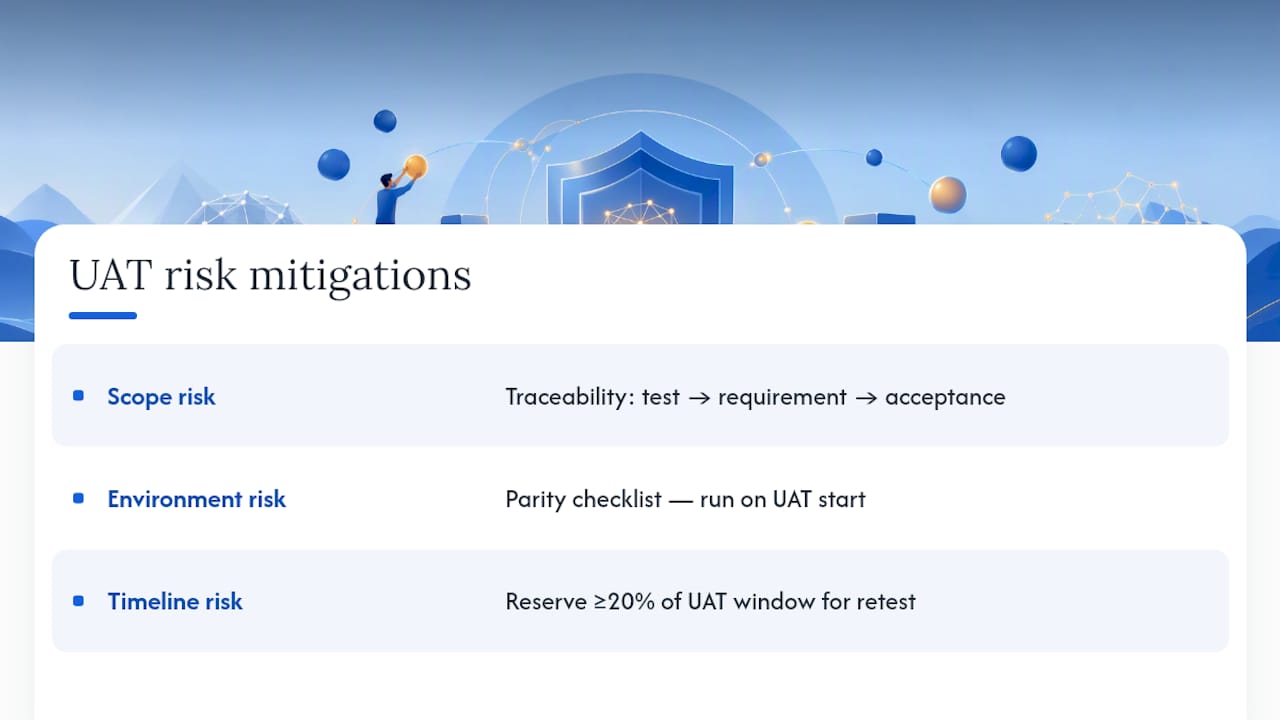
Risk in UAT comes from three directions: scope risk (testing the wrong things), environment risk (results that don’t reflect production behavior), and timeline risk (not enough time to retest after fixes). Each one needs a mitigation plan before UAT starts.
Scope risk is mitigated by the traceability matrix. If every test case maps to a business requirement and every requirement maps to an acceptance criterion, you have evidence of coverage. Gaps in the matrix are gaps in the test plan, and they’re visible before execution rather than after.
Environment risk is the most underestimated. A UAT environment that differs from production in configuration, data volume, or integration state will produce results that don’t hold in production. The environment parity checklist in the prerequisites section is the mitigation. Run it on the day UAT starts, not the week before.
Timeline risk is managed by building retest cycles into the schedule from the start. If you plan for one retest cycle and need two, you have a problem. If you plan for two and only need one, you finish early. Reserve a buffer of at least 20% of the total UAT window for retesting and triage.
A risk register for UAT doesn’t need to be complex. A simple log with the risk description, likelihood, impact, mitigation action, and owner is enough. Review it at the daily sync. The risks that matter most are the ones that could block sign-off: a critical defect with no workaround, a third-party integration that’s unavailable, or a key approver who is traveling during the sign-off window.
What UAT experience actually teaches you
The lesson that takes the longest to learn is that UAT quality is determined in the planning phase, not the execution phase. Teams that rush the plan and spend their energy managing chaos during execution consistently produce lower-quality sign-offs than teams that invest an extra day in writing clear acceptance criteria and onboarding testers properly.
A specific process change that reduces triage friction: hold a 30-minute kickoff with all testers on day one of execution. Walk through the top five highest-priority scenarios together. Testers who understand the intent behind a test case write better defect reports than testers who are just following steps. That one session typically cuts the “I don’t understand what this test is asking” questions by more than half.
The other lesson: document every decision made during UAT, including the ones that feel obvious. When a stakeholder asks six months later why a known issue was accepted at sign-off, the answer needs to be in writing. A sign-off form with a one-line risk justification for each accepted issue takes five minutes to complete and saves hours of post-release debate.
Wezardapp cuts UAT feedback time from hours to minutes
Most UAT cycles lose time in the same place: testers find something, spend 10 minutes writing a defect report, and the development team still can’t reproduce it because the context is missing. Wezardapp solves that specific problem.

Wezardapp records the tester’s screen, transcribes the issue in real time, and uses AI to detect duplicate tickets before they reach your Jira, Azure DevOps, or ServiceNow backlog. Testers report by voice or video, guided fields separate bugs from change requests at the point of capture, and tickets sync directly to your backlog with screenshots and session context attached. The result: less time filing, less noise in the backlog, and faster triage for the QA lead.
For teams running broad beta programs or large enterprise UAT cycles, the AI duplicate detection alone prevents the backlog from becoming unmanageable. For teams with non-technical business testers, voice transcription removes the biggest barrier to quality defect reports.
Start your UAT feedback workflow with Wezardapp and see how much triage time you recover in the first cycle.
Sources
The sources below cover the full UAT process from entry criteria through sign-off, with templates, checklists, and best practices you can apply directly.
- User Acceptance Testing Process Guide That Works | OutpostQA