
A design project plan is a strategic baseline document that defines what you’re building, why it matters, who owns each piece, and how success gets measured — all before a single task is assigned. According to UXPin Studio, it transforms vague ideas into a concrete blueprint covering purpose, key features, success criteria, and major deliverables. PMI calls this the planning phase anchor; Wezardapp uses it specifically to gate UAT entry. Copy this minimal checklist and get stakeholder sign-off before scheduling anything else:
- Purpose: One sentence on why this project exists and what problem it solves
- Scope in/out: What’s included and explicitly excluded
- Key deliverables: Named outputs with format and owner
- Single owner: One accountable name per deliverable (not a team)
- Milestones: Dates tied to decisions, not just activities
- Budget summary: Total approved spend with a contingency line
- Risk highlights: Top three risks with a mitigation note each
- Approval: Named approvers and the sign-off date
That list is your minimum viable plan. Everything in the sections below builds on it.
Key Takeaways
A signed baseline with named owners, explicit scope boundaries, and gated UAT criteria is the single most reliable predictor of on-time, on-budget delivery.
| Point | Details |
|---|---|
| Baseline before execution | Lock the plan with stakeholder sign-off before any task is assigned; changes after that point go through change control. |
| Single owner per deliverable | Assign one accountable name, not a team, to every deliverable in the plan. |
| WBS drives estimation | Break deliverables into 8–80 hour work packages before estimating; skip this and every schedule is a guess. |
| UAT needs entry and exit criteria | Define what “ready to test” and “passed” mean in the plan itself, with a named triage owner and a budget contingency line. |
| Wezardapp for UAT integration | Wezardapp records, transcribes, and deduplicates UAT issues before they reach Jira or Azure DevOps, keeping the backlog clean and sign-off fast. |
Table of Contents
- Why does a design project plan matter in the project lifecycle?
- How to design a project plan in 7 steps
- What sections belong in a project plan template?
- How do you estimate time and cost reliably?
- Which tools and templates should you use?
- What planning mistakes actually derail projects?
- How do you adapt the plan for different project types?
- How do you integrate UAT and QA into the project plan?
- The planning discipline most teams underestimate
- Wezardapp closes the UAT gap in your project plan
- Sources
Why does a design project plan matter in the project lifecycle?
The project lifecycle runs from initiation through planning, execution, monitoring, and closure. The design project plan lives in the planning phase and functions as the baseline everything else is measured against. Monday draws a sharp line between planning and management: planning defines goals, responsibilities, timelines, and resources before execution starts; management tracks and adjusts against that baseline once work is underway. Conflating the two is where most teams lose control.
A well-built plan does four concrete things:
- Alignment: Every stakeholder reads the same scope and success criteria, so “done” means the same thing to engineering, marketing, and the sponsor.
- Scope control: Defining what’s out is as important as what’s in. Northeastern University’s project management guide identifies skipped stakeholder engagement as a consistent cause of scope creep and unrealistic budgets.
- Measurable success criteria: Vague goals (“improve the product”) produce vague sign-offs. Specific KPIs tied to deliverables give approvers something to check.
- Reduced rework: ResearchGate research on project strategy links misaligned deliverables directly to rework costs; plans connected to business strategy reduce that misalignment.
Lock the baseline at the end of the planning phase, after stakeholder sign-off. Then schedule formal plan reviews at each milestone gate — not on a calendar cadence, but when a decision point is reached. That keeps the plan a living control document rather than a shelf artifact.
How to design a project plan in 7 steps
ClickUp’s project plan guide validates this seven-step sequence across methodologies. Each step maps to an owner, an artifact, and a typical timebox for a mid-size project.
-
Define goals and success criteria (Owner: Sponsor + PM / Artifact: Project charter / Timebox: 1–2 days). Write the business objective in one sentence, then list three to five measurable KPIs. A KPI without a target number is a wish, not a criterion. The charter is the sponsor’s formal commitment to fund and support the work.
-
Run stakeholder interviews and gather requirements (Owner: PM + Business Analyst / Artifact: Requirements log / Timebox: 3–5 days). Northeastern University is direct: explicit requirements gathering is the mandatory first step. Skipping it makes every estimate that follows unreliable. Use a structured interview guide from resources like Design Kit’s project plan method to keep sessions consistent.
-
Define scope and create a WBS (Owner: PM + Team Leads / Artifact: Scope statement + WBS / Timebox: 2–3 days). Break deliverables into work packages small enough to estimate. The 8–80 hour guideline is practical: if a package takes less than eight hours, it’s a task; if it takes more than 80, split it. This is where scope-in and scope-out get documented formally.
-
Build the schedule and identify the critical path (Owner: PM / Artifact: Gantt or milestone list / Timebox: 1–2 days). Sequence work packages, assign durations, and find the longest dependency chain. That chain is your critical path — any slip there slips the end date. Add a buffer of 10–15% on the critical path, not on every task.
-
Assign resources and confirm capacity (Owner: PM + Resource Managers / Artifact: Resource plan / Timebox: 1 day). Match work packages to named people, not roles. Confirm availability against other active projects before committing. An overallocated team member is a schedule risk the plan should flag explicitly.
-
Assess risks and build the communication plan (Owner: PM + Team / Artifact: Risk register + RACI + Comms plan / Timebox: 1–2 days). List risks by probability and impact, assign a mitigation owner, and set a trigger for escalation. The communication plan answers four questions: who needs what information, how often, in what format, and who sends it.
-
Get stakeholder sign-off and baseline the plan (Owner: Sponsor + PM / Artifact: Signed baseline document / Timebox: 1–2 days). Atlassian’s project plan guide emphasizes iterating with feedback before locking the baseline. Send the draft to approvers with a clear deadline, resolve open items, and capture the signed version as the controlling document. Any change after this point goes through change control.
Total typical timebox for planning phase: 10–17 working days for a mid-size project. Compress it only with pre-existing requirements; never skip steps.
What sections belong in a project plan template?
Project Management Formula’s planning guide describes the plan as a living document with sections for governance, stakeholder roles, communication, scope, change control, budget, and risk. The table below maps each section to its key fields and the format that works best for each.
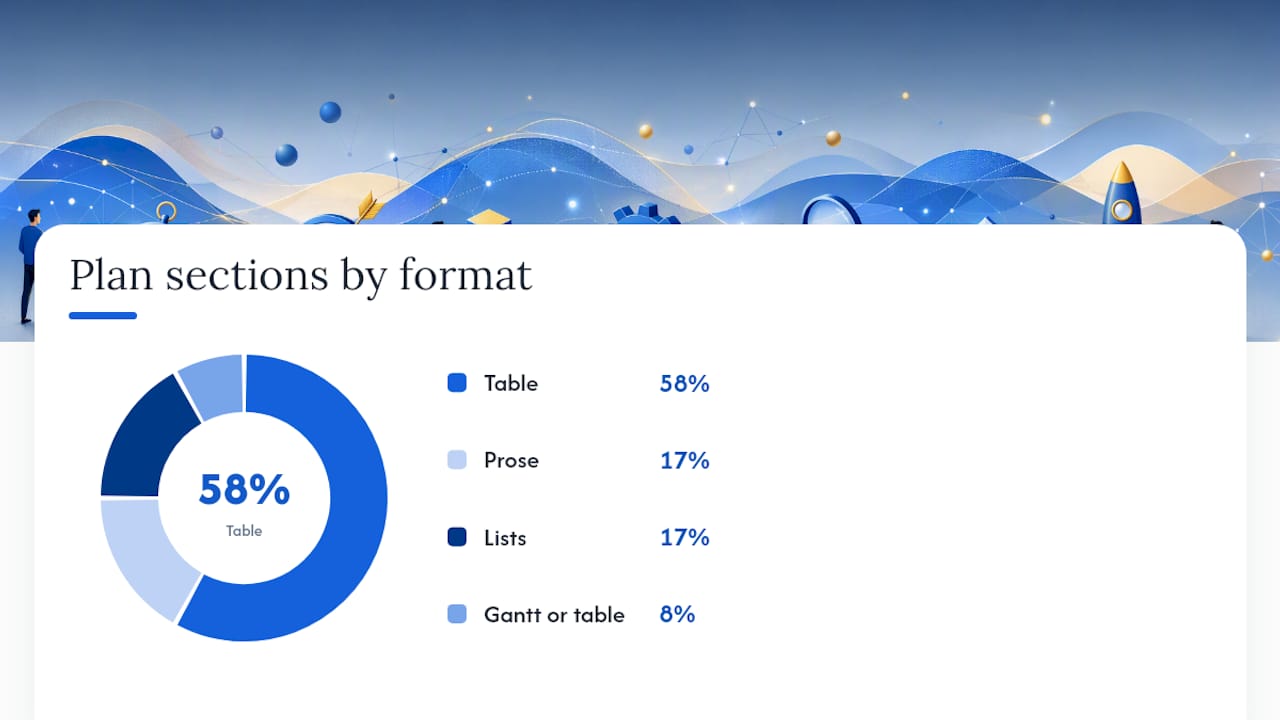
| Template Section | Key Fields to Capture | Best Format |
|---|---|---|
| Project overview | Name, sponsor, PM, business objective, one-sentence scope | Prose (2–3 sentences) |
| Scope in/out | Included deliverables, explicit exclusions, assumptions | Bullet list |
| Deliverables | Name, description, owner, acceptance criteria, due date | Table |
| WBS summary | Level-2 work packages with IDs and parent deliverable | Numbered outline |
| Schedule and milestones | Milestone name, target date, predecessor, owner | Gantt or table |
| Resource plan | Name, role, allocation %, project dates, cost rate | Table |
| Budget summary | Category, estimated cost, approved budget, contingency | Table |
| Risk register | Risk ID, description, probability, impact, mitigation, owner | Table |
| Communication plan | Audience, message type, frequency, channel, sender | Table |
| Change control | Change request process, approval authority, log location | Prose + link |
| Success criteria and KPIs | KPI name, baseline, target, measurement method, review date | Table |
| Approvals | Approver name, role, signature, date | Table |
A few practical notes on format choices:
- Word or Google Docs works for prose-heavy sections (overview, change control policy, communication narrative). It’s easy to share and comment on, but version control gets messy fast without a naming convention.
- Spreadsheets handle budget, resource allocation, and risk registers well because the data changes frequently and formulas catch arithmetic errors.
- Tool-native templates (Asana, ProjectManager) embed the plan directly into task management, so milestones and owners stay in sync with actual work. Use these when the team will live in the tool daily.
For software projects, add a UAT section between “Success criteria” and “Approvals.” That section should list acceptance criteria types, entry and exit criteria for testing, and the triage owner for reported issues.
Pro Tip: Keep one canonical version of the plan in a single location (Confluence page, shared Drive folder, or tool-native document) and link to it from every status report. Teams that maintain parallel copies in email threads spend more time reconciling versions than managing the project.
How do you estimate time and cost reliably?
Estimation is where plans fall apart most often. The WBS is the fix. Once deliverables are broken into work packages at the 8–80 hour level, you have something concrete to estimate against rather than guessing at a phase-level number.
Three estimation methods worth knowing:
-
Three-point estimation (PERT): Collect optimistic, most likely, and pessimistic estimates from the person doing the work. Calculate the weighted average: (O + 4M + P) / 6. Use this when uncertainty is high and you need a defensible range for the sponsor.
-
Analogous estimating: Pull actuals from a similar past project and adjust for scope differences. Fast and useful in early planning when the WBS isn’t fully decomposed yet. Accuracy depends entirely on how similar the reference project actually was.
-
Planning poker: The team votes simultaneously on effort using a Fibonacci-style scale (1, 2, 3, 5, 8, 13…). Outliers explain their reasoning, and the group re-votes until convergence. Best for Agile teams estimating backlog items in story points.
| Method | Best for | Accuracy | Speed |
|---|---|---|---|
| Three-point (PERT) | High-uncertainty work packages | Medium-high | Slow |
| Analogous | Early-phase rough estimates | Medium | Fast |
| Planning poker | Agile sprint planning | High (within team) | Medium |
| Parametric | Repeatable, data-rich work | High | Fast |
Setting the baseline: Once estimates are in, sequence tasks, assign resources, and calculate the critical path. The resulting schedule becomes the baseline when the sponsor signs off. Re-baseline only when a formal change request is approved — not every time a task slips. Frequent re-baselining hides schedule performance and makes trend analysis useless.

Which tools and templates should you use?
The right tool depends on how the team works, not on which platform has the most features. Here’s a practical breakdown:
Asana is the strongest choice for teams that need a design project plan template with built-in collaboration and creative approval workflows. The Asana design project plan template gives creative teams a pre-built structure with task dependencies, milestone tracking, and comment threads attached to deliverables. It works especially well for marketing and product design projects where feedback loops are frequent.
ProjectManager suits teams that need Gantt-based scheduling with resource load charts and baseline tracking in one place. It’s particularly useful when the project has complex dependencies and the PM needs to show variance against the original plan at status meetings.
FigJam (Figma’s whiteboard tool) handles the early planning phase well — stakeholder mapping, WBS brainstorming, and timeline sketching before the plan moves into a formal document. It’s not a project management tool, but as a collaborative planning canvas it reduces the friction of getting a distributed team to agree on structure before committing to a tool-native template.
- Use Word or Google Docs when the plan is primarily narrative (governance, communication policy, change control procedures) and stakeholders prefer commenting in a document.
- Use a spreadsheet for budget tracking, resource allocation, and risk registers where formulas matter.
- Use a Gantt tool (Asana, ProjectManager, or similar) when dependencies and critical path visibility are the priority.
- Use a Kanban board for iterative teams running short cycles where the backlog is the plan.
- Use FigJam for early-stage facilitation and visual planning before the formal baseline is set.
Monday notes that AI is shifting planning from manual baseline creation toward predictive and adaptive baselines. Tools that connect planning data directly to execution reduce the administrative overhead of keeping the plan current — worth factoring into tool selection for larger programs.
What planning mistakes actually derail projects?
Most project failures trace back to a small set of planning decisions made (or skipped) in the first two weeks. Here’s what to watch for and how to fix each one before the baseline is locked:
-
Ambiguous scope: The plan says “redesign the checkout flow” without specifying which platforms, which user types, or what “redesign” means. Fix: write scope-out statements as explicitly as scope-in. If it’s not listed as included, it’s excluded.
-
Missing single owners: A deliverable owned by “the team” is owned by no one. Fix: assign one accountable name per deliverable in the plan. That person can delegate, but they can’t share accountability.
-
Optimistic estimates: Teams routinely underestimate by 20–40% when they estimate without historical data and without accounting for interruptions. Fix: use three-point estimation for any work package with meaningful uncertainty, and add a contingency line to the budget rather than padding individual tasks.
-
Skipped stakeholder interviews: Northeastern University’s research is unambiguous: skipping requirements gathering is a primary driver of project failure. Fix: block time for structured interviews before the scope statement is written, not after.
-
Weak change control: Teams approve verbal scope changes in stand-ups and never update the plan. Fix: define a change request process in the plan itself — who can request, who approves, and how the baseline gets updated.
-
No communication plan: Stakeholders who don’t hear from the project team fill the silence with assumptions. Fix: answer the four questions (who, what, how often, how) in a one-page comms table before the baseline is signed.
Pro Tip: Before the sign-off meeting, run a 30-minute “pre-mortem” with the core team. Ask: “It’s six months from now and the project failed — what happened?” The answers surface risks and scope gaps the risk register missed, and they cost nothing to capture.
How do you adapt the plan for different project types?
The 12-section template above works across project types, but each type has specific additions and emphasis shifts.
Software projects need the most additions. Include a UAT section with entry and exit criteria, a backlog integration note (which tool, who triages), and acceptance criteria mapped to each deliverable. Understanding the different software testing phases helps you schedule testing milestones accurately rather than treating QA as a single end-of-project phase. Agile teams should use a Kanban board or sprint backlog as the execution layer, with the plan document serving as the governance baseline above it.
Marketing projects shift emphasis to campaign milestones and creative approval gates. Add a creative brief reference, a content calendar link, and explicit approval checkpoints for copy, design, and legal review. The schedule section should show go/no-go dates tied to launch windows, not just task completion dates. Gantt tools work well here because campaign dependencies (copy before design, design before dev, dev before launch) are linear and visible.
Construction projects require the most upfront planning rigor. Add permit acquisition milestones, procurement lead times for long-lead materials, and subcontractor mobilization dates. The risk register needs weather, supply chain, and inspection delay scenarios. The schedule must show float on non-critical paths because construction rarely runs exactly to plan, and knowing where float exists is how a PM recovers from a delay without blowing the end date.
Across all three types, the governance and communication sections stay structurally the same. What changes is the vocabulary, the milestone triggers, and the tools the team uses to execute.
How do you integrate UAT and QA into the project plan?
UAT belongs in the plan as a gated milestone, not an afterthought scheduled after development wraps. When UAT is treated as a formal phase with entry and exit criteria, sign-off times shrink and rework costs fall — because testers know exactly what “ready to test” means and approvers know exactly what “passed” means.
Here’s how to wire UAT into the plan:
- Entry criteria: Define what must be true before UAT starts. Typical examples: all unit and integration tests passing, test environment stable, test data loaded, and acceptance criteria documented and reviewed. Collaborating with testers on acceptance conditions early prevents last-minute criteria disputes.
- Exit criteria: Define what must be true before UAT closes. Typical examples: all critical defects resolved, no open high-severity issues, business owner sign-off on each acceptance criterion.
- Acceptance criteria mapping: Each deliverable in the plan should link to its acceptance criteria. UAT test case writing practices provide concrete formats for writing criteria that testers can actually execute against.
- Triage ownership: Assign one person to own defect triage during UAT. That person decides severity, routes issues to the right developer, and tracks resolution. Without a named triage owner, bugs sit in a queue and UAT drags past its exit date.
- Budget contingency: Build a UAT contingency line into the budget — typically 10–15% of the development cost — to cover rework from issues found during testing. If UAT goes cleanly, the contingency returns to reserve.
The feedback loop from UAT back into the backlog is where plans most often break down. Issues found during testing need to flow into the same backlog the development team works from, with enough context (screen, steps to reproduce, expected vs. actual behavior) that developers can act without a follow-up meeting.
Pro Tip: Schedule a UAT readiness review two weeks before the planned UAT start date. Check entry criteria status, confirm the test environment, and verify that testers have been briefed. Teams that skip this review routinely delay UAT start by a week because something basic wasn’t ready.
The planning discipline most teams underestimate
The plan isn’t the hard part. Getting the team to treat it as the controlling document after it’s signed — that’s where discipline breaks down.
Early stakeholder interviews and a signed baseline are the two highest-leverage investments in any project. Teams that skip the interviews produce plans that look complete but don’t reflect what stakeholders actually need. Teams that never formally baseline the plan have no way to distinguish a legitimate scope change from scope creep, which means every request feels urgent and the schedule absorbs all of it.
The practical outcome of good planning is faster approvals and less rework. Not because the plan predicted everything correctly, but because it gave the team a shared reference point to return to when reality diverged from the schedule.
Wezardapp closes the UAT gap in your project plan
Most project plans schedule UAT but don’t specify how issues get captured, deduplicated, or routed to the backlog. That gap is where rework accumulates.

Wezardapp’s UAT testing tool records the tester’s screen, transcribes the issue in real time, and uses AI to detect duplicate tickets before they reach your Jira or Azure DevOps backlog. Testers submit bugs by voice or video without writing a single line of text. The result: your backlog stays clean, developers get full context on every issue, and UAT sign-off happens faster because nothing falls through the cracks. It fits directly into the UAT milestone you’ve already built into the plan. See how teams use Wezardapp across the full UAT workflow and start a trial to close the gap between your plan and your sign-off.
Sources
- Design planning — UXPin Studio
- Project planning in project management – Project Management Formula
- How to Create a Project Plan in 2026 : 7 Steps and Examples — ClickUp
- Monday
- How to write an effective project plan in 6 simple steps – Atlassian
- Developing a project management plan — Northeastern University


