
In this context, a quality management system is an AI-powered platform that records a tester’s screen, transcribes what they say about a bug in real time, and uses AI to catch duplicate tickets before they ever hit your backlog. That’s the working definition for this article, and it’s the one that matters if you’re evaluating tools like Wezardapp for user acceptance testing.
Three things to remember before you read further:
- Look for capture, not just tracking. The best platforms record screens and voice simultaneously, so testers don’t have to translate what they saw into a written report after the fact.
- Duplicate detection is the real time-saver. AI that flags repeat tickets before they reach Jira or Azure DevOps can cut triage time dramatically, according to workflow patterns documented in tools like BugReel.
- Adoption has one catch: business testers won’t use a tool that takes more than a couple of minutes to learn, a threshold Appsierra’s UAT best practices guide treats as non-negotiable. Pair any rollout with a short IT Project Problem Diagnostic Checklist-style readiness review, and lean on principles from the Rapid Software Testing (Satisfice) methodology when deciding what testers should document versus investigate.
Key Takeaways
An AI-powered UAT platform reduces late-stage surprises by capturing evidence at the source and flagging duplicate tickets before they reach a backlog.
| Point | Details |
|---|---|
| Definition matters | This term means an AI platform that records screens, transcribes issues, and flags duplicates, not an org-wide ISO system. |
| Capture beats recollection | Screen recording and real-time transcription remove the memory gap between what a tester saw and what gets written down. |
| Run pre-UAT scenario checks | Walking risky workflows early catches implicit business rules while fixes are still cheap. |
| Split roles clearly | Testers capture symptoms and context; developers handle root-cause analysis and fixes. |
| Wezardapp maps to the checklist | Wezardapp pairs screen recording, transcription, and AI duplicate detection with Jira, Azure DevOps, and ServiceNow integrations. |
Table of Contents
- Core Features That Make an AI-Powered UAT Platform Work
- How Does This Change UAT Outcomes?
- What Should Testers Capture vs. What Should Developers Investigate?
- Evaluation and Rollout Checklist for QA Teams
- Why Wezardapp Fits This Checklist
- Frequently Asked Questions
- Sources
Core Features That Make an AI-Powered UAT Platform Work
A tool earns the “quality management system” label in this sense by solving specific, recurring UAT headaches, not by offering a vague bundle of testing features.
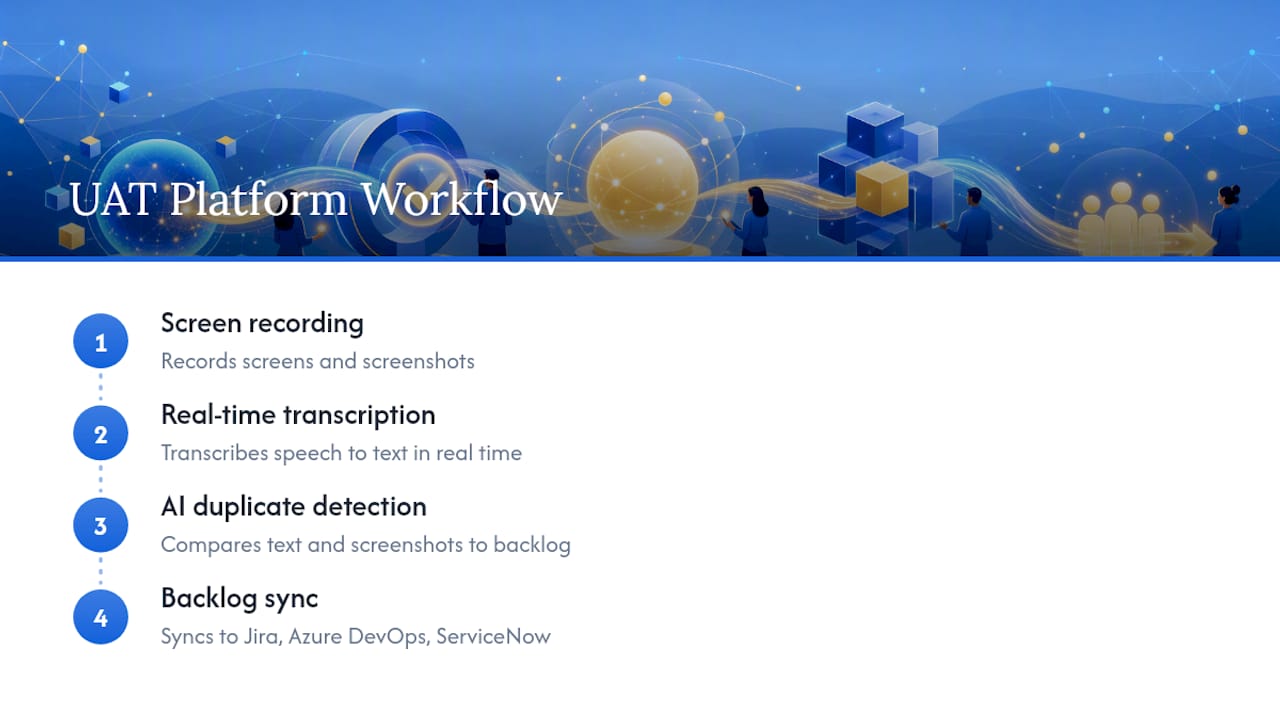
- Screen recording captures exactly what the tester saw, removing the guesswork from “I clicked something and it broke.”
- Real-time transcription turns spoken frustration into a written record while the tester talks, so nobody has to reconstruct memory after the session ends.
- Automatic steps-to-reproduce extraction pulls the click sequence and voice narration into a structured bug report, addressing the single biggest complaint developers have about tester-submitted tickets: missing repro steps.
- Key-frame screenshots and console/action capture preserve the technical context testers can’t describe themselves.
- AI duplicate detection compares new reports against existing tickets before they sync, stopping the pile-up of near-identical issues that clog a sprint backlog.
- One-click export to Jira, Azure DevOps, or ServiceNow removes the manual copy-paste step that causes context loss between testing and development.
- Replayable recordings and evidence packs give sign-off reviewers something concrete to check against acceptance criteria, rather than a paragraph of prose.
- SSO and hosting flexibility (self-hosted or SaaS) let security teams control where recorded data lives.
Session capture like this measurably improves defect reproducibility, according to SD Times’ analysis of exploratory testing for UAT, and the same artifacts can later feed automated regression checks.
How Does This Change UAT Outcomes?
Most UAT failures aren’t really about bugs. They’re about requirements nobody wrote down clearly enough. UAT commonly surfaces gaps that should have been caught earlier, and the fix isn’t more testing hours. It’s turning vague requirements into explicit business scenarios before the session starts, a practice BA Unplugged’s research on UAT timing ties directly to fewer late-stage surprises.
An AI-powered recording tool changes three things in that workflow:
- Acceptance evidence gets sharper. A recorded session with a transcript beats a two-line ticket that says “form doesn’t work.”
- Triage happens live. Business users and developers can watch the same replay instead of arguing over a written description.
- Reproduce-and-fix loops shrink, because the developer sees the actual click path instead of guessing at it.
A human-centered, shift-left approach to UAT, one that brings business users in early and maps real journeys before testing starts, prevents a large share of post-launch defects according to Assurity’s research on UAT approaches. Recording tools support that shift by making early scenario checks cheap to run and easy to review.
Pro Tip: Before your official UAT window opens, run a 15-minute pre-UAT scenario check on your two riskiest workflows. Record the walkthrough, keep the transcript short, and you’ll catch implicit business rules while they’re still cheap to fix. This mirrors the pre-UAT scenario check approach that catches acceptance gaps before they become sprint fires.
What Should Testers Capture vs. What Should Developers Investigate?
Business testers are not developers, and asking them to diagnose root causes wastes their time and yours. The job split matters more than most QA teams admit.
Testers should capture:
- The symptom, in plain language
- Steps performed, ideally via recording and transcript rather than typed notes
- Screenshots and the specific data values used
- Expected outcome versus what actually happened
- Business context: how badly this blocks a real workflow
Developers and responsible testers should handle:
- Log and stack trace analysis
- Root-cause diagnosis
- Code-level fixes and regression checks
Bug reporting works a bit like a sales pitch: testers should frame the issue clearly and preserve strong evidence, not attempt deep technical forensics themselves, an approach the Rapid Software Testing bug-reporting guide lays out in detail. That guide also recommends a roughly ten-minute investigation heuristic: if a supporting tester can’t identify the cause within about ten minutes, escalate rather than keep digging. Most business users genuinely struggle to articulate technical detail, which is exactly why voice-based reporting paired with screen recording earns its place in the workflow, according to the same SD Times exploratory testing research.
Evaluation and Rollout Checklist for QA Teams
Before signing a contract or greenlighting a pilot, run any candidate platform through this checklist:
- Backlog integration – Does it sync natively with Jira, Azure DevOps, or ServiceNow, or does it require manual export?
- Recording and transcription fidelity – Is audio-to-text accurate enough that developers trust it without re-listening?
- Duplicate detection accuracy – Can the AI model be tuned as your backlog grows, or does accuracy degrade at scale?
- Data residency and hosting – Self-hosted or SaaS, and does that match your compliance requirements?
- SSO and permissions – Can you control who records, views, and exports evidence?
- Audit and evidence export – Can reviewers pull a defensible package for sign-off, not just a raw video file?
- Developer workflow compatibility – Webhooks and issue templates that match how your engineers already work?
- Pilot metrics – Track repro-time reduction and duplicate ticket rate over a defined pilot window.
A defensible UAT sign-off needs documented exit criteria, a categorized defect list, and an explicit named approver. Skip any of those and acceptance becomes a judgment call instead of a decision anyone can point back to later. For teams building this into a formal process, defining entry criteria up front makes the exit conversation far less contentious.
On the adoption side, brief business testers for no more than a couple of minutes, run a short pilot on two or three critical workflows, and measure time-to-triage and UAT duration before and after. Ownership of recorded artifacts, who can view them, how long they’re retained, deserves a policy decision before rollout, not after your first security review.
Why Wezardapp Fits This Checklist
Wezardapp was built around the exact gaps this checklist exposes. Screen recording and real-time transcription cover fidelity and evidence capture. AI duplicate detection runs before tickets ever reach your backlog, addressing the accuracy and tuning line directly. Native integrations with Jira, Azure DevOps, and ServiceNow handle the workflow compatibility item without custom scripting.
- Enterprise SSO and hosting options address data residency and permissions requirements.
- Replayable recordings double as the evidence pack a formal sign-off needs.
- Real product use-cases show how teams structure pilots around specific workflows rather than testing everything at once.
If you’re planning a pilot, request a trial and scope it around two or three critical scenarios first. Measure repro-time and duplicate rate over one or two weeks before deciding whether to expand.
The First Two Weeks Look Different
Teams that adopt this approach usually change one habit first: they stop writing bug reports from memory and start recording sessions as they happen. The AI-suggested duplicates cut triage meetings noticeably within the first pilot.

Pick two critical workflows, run a one to two week pilot with real business users, and track the checklist metrics before rolling out further.
Try Wezardapp for Your Next UAT Pilot
Skip the manual write-up-then-file cycle that eats hours during every UAT round. Wezardapp records the session, transcribes the issue as the tester talks, and flags likely duplicates before anything reaches your backlog, so your triage meetings start with fewer, better tickets instead of a pile of half-written reports.

Structure your pilot around three critical scenarios. Brief participants for about 30 minutes, run sessions for one week, triage daily, and measure repro-time reduction, duplicate ticket rate, and overall UAT duration against your last cycle. If those numbers move, you have your answer. Explore the bug tracking integrations available for Jira, Azure DevOps, and ServiceNow, and request a trial to scope your first pilot this week.
Frequently Asked Questions
What is a quality management system in the context of UAT?
Here, it refers to an AI-powered platform that records screens, transcribes issues in real time, and uses AI to catch duplicate tickets before they sync to Jira, Azure DevOps, or ServiceNow.
How does AI duplicate detection actually work?
The system compares a new ticket’s content, including transcribed speech and screenshots, against existing backlog items to flag likely repeats before a human ever sees them.
Do business testers need technical training to use these tools?
No. Effective UAT tools should be usable within a couple of minutes, following the low-friction standard Appsierra’s UAT guide recommends for business-user adoption.
What’s the difference between what a tester captures and what a developer investigates?
Testers document symptoms, steps, and business context. Developers handle log analysis, root-cause diagnosis, and code fixes, a split reinforced by the Rapid Software Testing methodology.
How long should a pilot of an AI UAT platform run?
One to two weeks is usually enough to measure repro-time reduction, duplicate ticket rate, and UAT duration against your previous cycle.
Sources
- Rapid Software Testing Guide to bug reporting (Satisfice)
- Why UAT Keeps Finding Basic Requirement Gaps Too Late
- Exploratory testing for UAT – SD Times


