
A test management tool is software that centralizes the planning, organization, execution, and reporting of software testing activities across a development team. Also called test case management software in formal QA contexts, these platforms replace scattered spreadsheets and email threads with a single source of truth for your entire testing process. Teams not using structured test management spend up to 40% more time on regression testing and face a 3x higher chance of missing critical bugs before release. That gap between structured and unstructured QA is exactly why adoption of dedicated tools has accelerated in 2026.
What is a test management tool and what does it do?
A test management tool centralizes planning, execution, and reporting of testing, including managing test cases, tracking defects, maintaining traceability, and integrating with CI/CD pipelines and issue trackers like Jira. Think of it as the control room for your QA team. Every test case lives there, every result gets logged there, and every bug links back to the test that found it.
Without this structure, QA teams operate reactively. A tester finds a bug, files it somewhere, and hopes someone connects it to the right feature. A test management tool makes that connection automatic and auditable. The result is a complete picture of software quality at any point in the release cycle.

These tools serve teams of all sizes, from a two-person startup running user acceptance testing to an enterprise QA department managing thousands of test cases across multiple products. The core function stays the same: replace guesswork with documented, traceable testing.
What features do test management tools include?
The best test management tools share a common set of capabilities that define the category. Here is what to expect from any serious platform:
- Test case management: Create, organize, and version test cases in a structured library. Group them by feature, sprint, or release.
- Test plan creation: Define the scope, schedule, and resources for a testing cycle before execution begins.
- Execution tracking: Log pass, fail, or blocked results for each test case in real time as testers work through a cycle.
- Defect linking: Connect failed test cases directly to bug reports in tools like Jira or Azure DevOps, so nothing falls through the cracks.
- Coverage analysis: See which requirements or user stories have test coverage and which do not.
- Reporting dashboards: Generate progress reports, pass/fail summaries, and release readiness metrics without manual data collection.
- CI/CD integration: Trigger test runs automatically from build pipelines and pull results back into the tool for review.
Pro Tip: Look for tools that support bidirectional Jira integration. One-way syncing means your defect data lives in two places and gets out of sync fast.
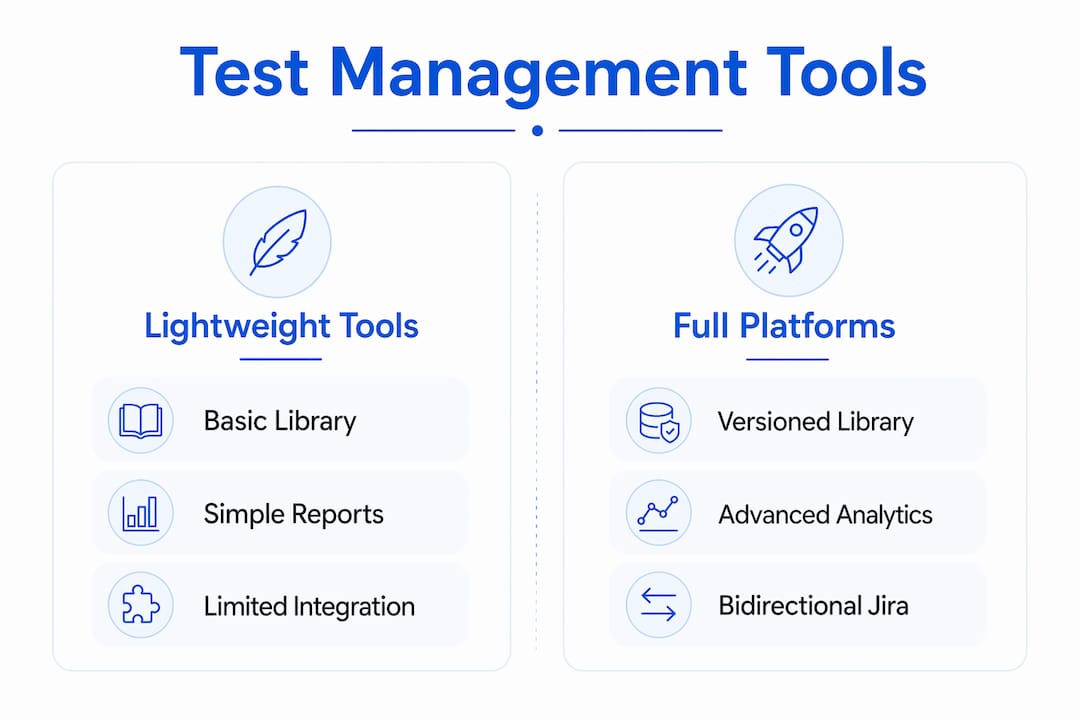
Here is a quick comparison of core feature categories across tool types:
| Feature | Lightweight Tools | Full Platforms |
|---|---|---|
| Test case library | Basic folders | Versioned, tagged, searchable |
| Defect linking | Manual | Automated via integration |
| Reporting | Static exports | Live dashboards |
| CI/CD integration | Limited or none | Native pipelines |
| AI assistance | Rare | Increasingly standard in 2026 |
Why use a test management tool instead of spreadsheets?
Manual testing management is sustainable for small projects but becomes error-prone and unsustainable at scale. Most teams discover this the hard way, after a missed bug reaches production or an audit reveals gaps in their testing records.
The measurable advantages of switching are significant:
- Faster test case creation. AI-powered features in tools like TestKase reduce test case creation time by 40–60% compared to traditional methods. That is hours recovered per sprint.
- Fewer bugs shipped. Structured test management cuts the bug miss rate dramatically. The 3x higher miss rate for unstructured teams is not a minor inefficiency. It is a product quality risk.
- Real-time visibility. Atlassian describes the goal as reducing “administrative friction” by giving teams live visibility to detect bottlenecks before they delay releases. Spreadsheets cannot do this.
- Compliance and audit trails. Test management tools provide historical audit trails critical for post-incident analysis. When something breaks in production, you need to trace exactly what was tested and what was skipped.
- Quality culture. Tools embed a quality culture by making test assignments explicit and tracking progress centrally. The “did we test that?” question disappears when every test case has an owner and a result.
“Transitioning to professional test management tools is essential beyond small projects to reduce errors and maintain compliant audit trails.” — Tricentis
Teams often underestimate how much redundancy exists in their manual processes. Moving to tool-based management frequently reveals duplicate test cases, untested requirements, and documentation gaps that everyone assumed were covered.
How do you choose the right test management tool?
Choosing the wrong tool costs more than staying with spreadsheets. A platform your team refuses to use is worse than no platform at all. Here is how to evaluate your options without getting distracted by feature lists:
- Ease of adoption. The right tool must integrate smoothly with your existing bug tracking and development tools to minimize learning curves. If onboarding takes weeks, adoption will stall.
- Integration depth. Check whether the tool connects natively to your CI/CD pipeline, your issue tracker, and your project management platform. Surface-level integrations that require manual exports defeat the purpose.
- Reporting flexibility. Your QA lead and your product manager need different views of the same data. Look for customizable dashboards rather than fixed report templates.
- AI-assisted features. In 2026, AI test management capabilities are no longer a premium add-on. Tools that auto-generate test cases from requirements or flag duplicate defects save meaningful time every sprint. Explore how AI improves test reporting to understand what to look for.
- Team size and scale. A five-person team does not need an enterprise platform with 200 configuration options. Match the tool’s complexity to your actual workflow.
Pro Tip: Run a two-week pilot with your most active QA team before committing. Real usage reveals integration gaps and usability friction that demos never show.
Here is a comparison framework to apply when evaluating tools:
| Evaluation Factor | Small Team Priority | Enterprise Priority |
|---|---|---|
| Setup time | Under one day | Weeks acceptable |
| Integration options | Jira or GitHub | Full DevOps stack |
| AI features | Nice to have | Expected standard |
| Reporting depth | Basic pass/fail | Custom dashboards |
| Pricing model | Per user, low cost | Volume licensing |
What are the best test management tools in 2026?
The test management tools comparison in 2026 shows a market split between AI-first platforms and traditional workflow tools. Each category serves a different team profile.
TestKase leads the AI-powered segment. It generates test cases from requirements, tracks coverage automatically, and connects to Jira and CI/CD pipelines. Its AI features directly address the 40–60% time savings on test case creation that structured management enables.
Jira (with QA plugins like Zephyr Scale or Xray) remains the default for teams already inside the Atlassian ecosystem. Jira provides powerful issue tracking, customizable workflows, and comprehensive reporting for Agile QA teams. The tradeoff is setup complexity. Jira requires configuration to function as a test management tool, not just an issue tracker.
TestCollab targets teams that want dedicated test management without enterprise pricing. It focuses on simplicity and scales cleanly from small QA teams to mid-size organizations. The interface is purpose-built for testers rather than adapted from a project management tool.
For teams just starting out, well-structured spreadsheets can serve as basic test management. The shift to specialized tools becomes necessary as test suite size grows and manual tracking creates errors. The transition from manual to AI-assisted testing follows a predictable pattern: spreadsheets work until they do not, and the breaking point usually arrives during a high-stakes release.
| Tool | Best For | AI Features | Jira Integration |
|---|---|---|---|
| TestKase | AI-first teams | Yes, native | Yes |
| Jira + Xray | Atlassian shops | Limited | Native |
| TestCollab | Mid-size simplicity | Partial | Yes |
Key takeaways
A test management tool is the single most effective way to reduce bug miss rates, cut regression testing time, and build a repeatable QA process your team can defend in any audit.
| Point | Details |
|---|---|
| Core definition | A test management tool centralizes test planning, execution, defect tracking, and reporting in one platform. |
| Measurable impact | Unstructured teams miss 3x more bugs and spend 40% more time on regression testing. |
| AI advantage | AI-powered tools reduce test case creation time by 40–60%, recovering hours per sprint. |
| Selection priority | Integration with Jira, Azure DevOps, and CI/CD pipelines matters more than feature count. |
| Scale consideration | Spreadsheets work for small projects; dedicated tools become necessary as test suites grow. |
The uncomfortable truth about test management tools
Most teams adopt a test management tool after a painful incident, not before one. A critical bug ships to production, an audit reveals gaps in testing records, or a release gets delayed because no one knew which test cases were still failing. The tool becomes the solution to a problem that already cost something real.
What I have seen consistently is that the tool itself is rarely the hard part. The hard part is the process change that comes with it. Teams that treat a test management tool as a filing cabinet for test cases miss most of the value. The real gain comes from using the traceability features, the coverage reports, and the defect links to make decisions earlier in the release cycle.
The AI features arriving in 2026 change this dynamic. When a tool can generate draft test cases from a requirements document, the barrier to structured testing drops significantly. Teams that previously skipped formal test case documentation because it took too long now have a starting point in minutes. That shift matters more than any individual feature comparison.
One misconception worth addressing: bigger is not always better. A 200-feature enterprise platform used at 10% capacity is worse than a focused tool used thoroughly. The best test management tool for your team is the one your testers actually open every day. Reviewing UAT test case best practices alongside your tool selection will help you get more out of whichever platform you choose.
— Marketing
How Wezardapp fits into your test management workflow
If your team runs user acceptance testing, the gap between finding a bug and getting it into your backlog is where quality slips. Wezardapp is the only UAT tool that records your screen, transcribes the issue in real time, and uses AI to detect duplicate tickets before they reach your Jira or Azure DevOps backlog.

That means testers spend less time writing bug reports and your developers stop triaging the same issue filed three different ways. Wezardapp connects directly to Jira bug tracking and Azure DevOps, so every confirmed bug lands in the right place automatically. If you want to see how structured UAT fits into a broader QA workflow, the guide on acceptance testing entry criteria is a practical next step.
FAQ
What is the definition of a test management tool?
A test management tool is software that organizes, tracks, and reports on software testing activities, including test case management, defect tracking, and integration with development pipelines. It replaces manual spreadsheets with a centralized, auditable system.
What does a test management tool do for agile teams?
For Agile teams, a test management tool tracks test execution across sprints, links defects to user stories, and provides real-time dashboards that show release readiness without manual status updates. Tools like Jira with Xray or Zephyr Scale are built specifically for this workflow.
How do i choose between a lightweight and a full test management platform?
Choose a lightweight tool if your team has fewer than 10 testers and a single product. Move to a full platform when your test suite exceeds a few hundred cases, you need CI/CD integration, or compliance requires documented audit trails.
Can spreadsheets replace a test management tool?
Spreadsheets work for small projects with simple test suites, but they become error-prone at scale and provide no audit trail, no real-time visibility, and no defect traceability. Most teams outgrow them faster than they expect.
How much time do ai-powered test management tools save?
AI-powered test management features reduce test case creation time by 40–60% compared to traditional manual methods, according to TestKase’s 2026 research. That translates to hours saved per sprint on documentation alone.


