
Choose Wezard when your team needs automated, developer-ready tickets with AI duplicate detection sent directly to Jira or Azure DevOps. Choose BugHerd when your workflow centers on visible, in-page conversation threads during design reviews or client-facing QA rounds.
The core decision axis: Independent comparisons frame this as tickets versus conversations. Pick the artifact your team actually works from — a developer ticket with console logs and repro steps, or a page-pinned thread a designer or client can see and reply to.
- Pick Wezard if: your primary need is AI-powered duplicate detection, screen recording with real-time transcription, and automated ticket creation that maps directly to your Jira or Azure DevOps backlog.
- Pick BugHerd if: your primary need is pinned on-page comments with automatic screenshots that capture dynamic page states, visible to all reviewers without a developer handoff.
Jump to the pilot checklist below to start evaluating shortly.
Table of Contents
- How do Wezard and BugHerd compare side by side?
- How does each tool actually capture feedback and build a ticket?
- What integrations do Wezard and BugHerd offer, and how do they fit your pipeline?
- How much triage work lands on your developers after a report is filed?
- How do non-technical reviewers and clients experience each tool?
- What security and enterprise features should you verify before buying?
- Which tool should your team choose?
- Key Takeaways
- How to run a two-week pilot and decide
- The case for AI ticket automation in UAT
- Wezardapp is built for engineering-led UAT pilots
- Useful sources and vendor docs
How do Wezard and BugHerd compare side by side?
| Dimension | Wezardapp | BugHerd |
|---|---|---|
| Capture method | Screen recording + voice/video transcription | In-page pinned comments + automatic screenshots |
| AI automation & duplicate detection | AI duplicate detection before tickets reach backlog | Visible pins reduce accidental duplicates; no AI dedup |
| Integrations | Jira, Azure DevOps, ServiceNow | Jira, GitHub, Basecamp, Zapier |
| Ticket quality | Console logs, repro steps, environment metadata, attachments | Browser/OS/screen metadata, screenshot, page URL |
| Workflow automation | Auto-creates tickets; maps to backlog fields automatically | Manual triage via kanban board |
| Collaboration & UX | Guided reporter flow; structured for non-technical users | Page-pinned threads; visible to all reviewers in context |
| Reporting & analytics | Feedback tracking dashboard | Kanban board; basic task reporting |
| Security & SSO | Enterprise-grade security, SSO | Standard security; SSO on higher tiers |
| Pricing & scale | Subscription SaaS; org-wide access | Per-seat pricing (Standard, Studio, Premium, Deluxe) |
| Best for | Engineering-led UAT, QA teams, enterprise product orgs | Design reviews, agency client feedback, visual QA rounds |
For engineering-led UAT, Wezardapp’s automation and duplicate detection help reduce the triage burden developers face when tickets arrive incomplete or redundant. For design and agency work, BugHerd’s page-anchored conversation model keeps feedback visible to everyone in context, which is exactly what a client review cycle needs.
How does each tool actually capture feedback and build a ticket?
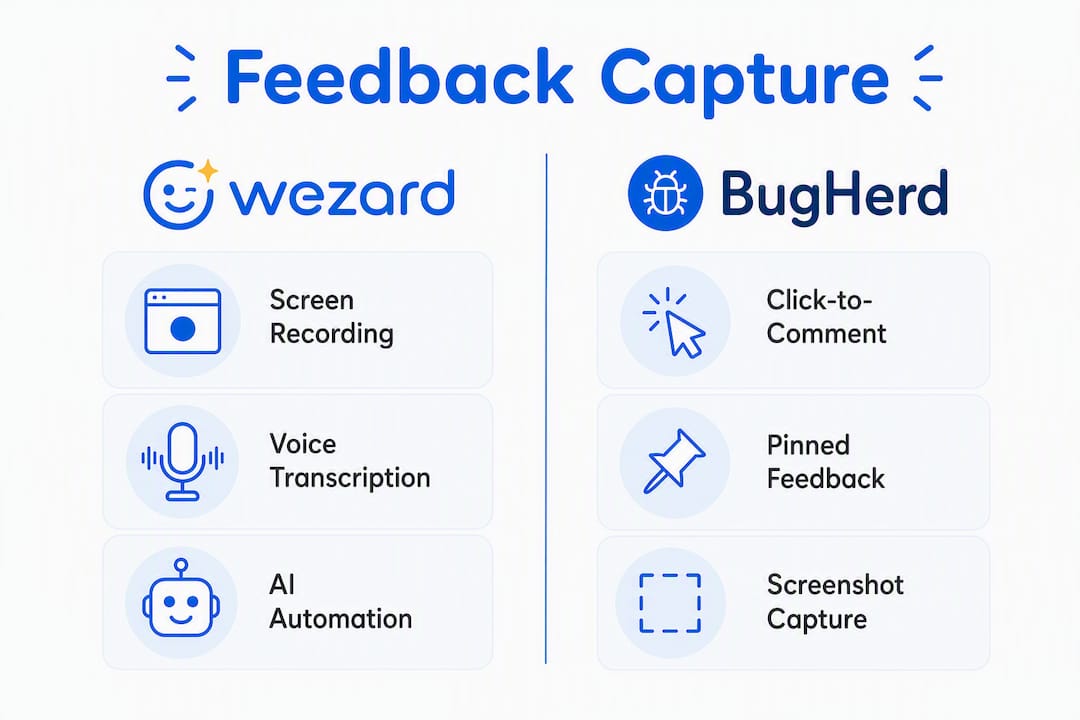
Wezardapp records the screen while the reporter narrates the issue. Real-time transcription converts that narration into structured ticket text, and the platform automatically attaches environment metadata before the report ever reaches a tracker. Before the ticket lands in Jira or Azure DevOps, AI duplicate detection checks it against existing issues and flags or suppresses redundant reports. The resulting ticket payload typically includes a summary, description (transcribed), screen recording, console logs, repro steps, browser and OS metadata, and any attached files.
BugHerd works differently. A reviewer clicks directly on a live page element, types a comment, and BugHerd pins it there. The tool automatically captures a screenshot that preserves dynamic states — open dropdowns, hover effects, modal dialogs — along with browser, OS, and screen size metadata. That pin becomes a task card on a kanban board. There is no recording, no transcription, and no AI layer; the feedback lives as a visible conversation anchored to the exact page element.
Pro Tip: When evaluating either tool during a pilot, insist the vendor demonstrate a ticket payload that includes console logs, network traces, reproduction steps, and file attachments. If those fields are absent or require manual entry, your developers will fill them in themselves — and that cost adds up fast.
The table below shows the typical payload difference:
| Field | Wezardapp ticket | BugHerd task card |
|---|---|---|
| Summary | Auto-generated from transcription | Reporter-typed comment |
| Screen recording | Yes | No |
| Console / network logs | Yes | No |
| Repro steps | Transcribed automatically | Manual or absent |
| Screenshot | Yes | Yes (dynamic state) |
| Browser / OS metadata | Yes | Yes |
| Attachments | Yes | Yes |
| AI duplicate check | Yes | No |
What integrations do Wezard and BugHerd offer, and how do they fit your pipeline?
Wezardapp integrates natively with Jira and Azure DevOps, mapping ticket fields — summary, description, labels, attachments, and custom fields — directly to backlog items. For teams already tracking work in Jira, that means a reported issue moves from screen recording to developer-assigned ticket with no manual copy-paste. The Jira integration supports auto-ticket creation, and the Azure DevOps integration follows the same pattern for Microsoft-stack teams.

BugHerd connects to Jira, GitHub, Basecamp, and Zapier. Its Jira integration pushes task cards as issues, but the field mapping is shallower: you get the comment, the screenshot, and the metadata, but not a screen recording or transcribed repro steps. Zapier extends BugHerd to hundreds of other tools, which gives it flexibility, though that flexibility requires setup time.
Common integration gotchas to test during any pilot:
- Field mismatch: Confirm that custom Jira fields (priority, component, sprint) map correctly — not just summary and description.
- Attachment transfer: Verify that screen recordings and files actually appear in the destination ticket, not just as links that expire.
- Project/key mapping: Test that reports filed against different pages or features route to the correct Jira project or Azure DevOps area path.
- Two-way sync: Check whether status changes in Jira (resolved, closed) reflect back in the feedback tool, or whether your team will manage two separate boards.
For a practical guide on tracking feedback status in Jira, Wezardapp’s documentation covers field mapping and workflow configuration in detail.
How much triage work lands on your developers after a report is filed?
This is where the two tools diverge most sharply in practice. A BugHerd task card gives a developer a screenshot, a comment, and browser metadata. Reproducing the bug still requires reading the comment, visiting the page, and manually reconstructing the steps. For a design-review issue (“this button is misaligned”), that is usually enough. For a functional bug in a complex workflow, it often is not.
Wezardapp’s AI duplicate detection and automated ticket creation address two distinct costs: the time spent merging duplicate reports, and the time spent writing up context a developer needs to act. When a tester records a screen and narrates the issue, the resulting ticket arrives with repro steps already transcribed, the recording attached, and the environment captured. Developers spend less time asking follow-up questions.
BugHerd’s visible pins do reduce duplicate reports organically — if a reviewer can see that someone already pinned a comment on a broken element, they are less likely to file the same issue again. That is a real benefit for small, co-located review teams. It does not scale the same way AI deduplication does when you have dozens of testers filing reports across a sprint.
To measure triage effort during a pilot, track these four metrics during the pilot period:
- Tickets reopened due to missing information
- Average time-to-assign from report creation to developer pickup
- Duplicate reports filed per sprint
- Developer follow-up questions per ticket (comments asking for clarification)
How do non-technical reviewers and clients experience each tool?
BugHerd’s UX is genuinely low-friction for non-technical users. A client or designer visits the live page, clicks a browser extension button, clicks on the element they want to comment on, and types. No training required. The pinned comment is visible to every other reviewer on the same page, which makes it easy to see what has already been flagged and to reply in context. For agency work and client sign-off rounds, that visibility is the whole point.
The collaboration tradeoff: BugHerd keeps feedback as a visible conversation on the page — ideal when clients and designers need to see each other’s comments in context. Wezardapp structures feedback as a guided recording flow — ideal when you need the output to be a developer-ready ticket, not a thread a developer has to interpret.
Wezardapp’s guided reporter flow works differently. A tester clicks record, narrates the issue while reproducing it, and submits. The structure comes from the tool, not from the reporter’s ability to write a clear bug description. That matters for UAT rounds where testers are business users, not QA professionals — they describe what they saw, and the platform handles the ticket formatting.
For cross-functional UAT where business analysts, product managers, and end users are all filing reports, Wezardapp’s guided flow tends to produce more consistent ticket quality than an open comment field. For pure design review where a client needs to mark up a page and have a conversation with the designer, BugHerd’s model is the cleaner fit.
What security and enterprise features should you verify before buying?
Both tools handle web-based feedback, but their security profiles differ in ways that matter to enterprise procurement teams. Before signing a contract, verify these items with each vendor:
| Feature | Verify with vendor |
|---|---|
| SSO (SAML / OIDC) | Supported tier; IdP compatibility |
| SCIM provisioning | Available or roadmap |
| Data retention & export | Retention period; export format |
| Audit logs | User actions logged; retention window |
| Role-based access | Admin, reviewer, reporter roles |
| Tenant separation | Single-tenant or multi-tenant architecture |
| Screen recording PII | Redaction options; consent screen support |
| Data residency | US / EU storage options |
Screen recording raises a specific concern BugHerd’s screenshot model does not: if testers record screens that contain PII (customer names, financial data, health information), you need to confirm the vendor supports redaction or local storage limits before deploying broadly. Wezardapp positions enterprise-grade security and SSO as part of its offering; confirm the specific SAML configuration and data residency options directly with the team before a production rollout.
Which tool should your team choose?
Engineering-led UAT teams: Start with Wezardapp. The AI ticket automation, duplicate detection, and direct Jira/Azure DevOps integration reduce triage overhead in ways BugHerd’s kanban board cannot replicate.
Design review and client-facing QA teams: Start with BugHerd. The page-pinned conversation model keeps feedback visible and contextual for non-technical reviewers without requiring a developer handoff.
Quick decision rules:
- Need console logs and network traces in every ticket → Wezardapp
- Need visible page pins clients can see and reply to → BugHerd
- Scaling UAT across dozens of testers with duplicate-report risk → Wezardapp
- Running a design review with a small client team → BugHerd
- Integrating with Azure DevOps or ServiceNow → Wezardapp
When neither fits cleanly: Run a two-week pilot with both tools against the same test scenario. Measure tickets reopened, duplicate reports, and average time-to-assign. The numbers will tell you which model fits your team’s actual workflow, not the one that looked better in a demo.
Buyer guides note that teams commonly switch away from BugHerd when they need broader integrations, advanced reporting, or pricing that scales better than per-seat models at larger team sizes. If you are already anticipating those constraints, factor them into the pilot criteria now.
Key Takeaways
Wezardapp wins on ticket automation and AI duplicate detection for engineering-led UAT; BugHerd wins on visible, page-anchored conversation for design and client review.
| Point | Details |
|---|---|
| Core decision axis | Choose based on the artifact your team works from: a developer ticket or a page-visible conversation thread. |
| Ticket quality gap | Wezardapp auto-attaches console logs, repro steps, and screen recordings; BugHerd delivers screenshots and comments. |
| Deduplication approach | Wezardapp uses AI to detect duplicates before they reach the backlog; BugHerd relies on visible pins to discourage repeat reports. |
| Integration depth | Wezardapp maps fields automatically to Jira and Azure DevOps; BugHerd connects via Jira and Zapier with shallower field mapping. |
| Wezardapp pilot path | Start a two-week UAT pilot using the checklist below; measure tickets reopened, duplicates, and time-to-assign to validate fit. |
How to run a two-week pilot and decide
Before committing to either tool, run a structured two-week pilot against a real sprint or UAT cycle. Here is a practical checklist:
- Define success metrics upfront: Set baseline numbers for tickets reopened, duplicate reports per sprint, and average time-to-assign before the pilot starts.
- Set pilot seat count: Limit to 5–10 testers representing your actual reviewer mix (QA engineers, business analysts, clients, or designers depending on your use case).
- Test integrations on day one: File a test ticket and confirm it appears correctly in Jira or Azure DevOps with all expected fields populated.
- Measure triage metrics weekly: Track reopened tickets, follow-up questions per ticket, and duplicate reports at the end of each week.
- Set acceptance criteria: A reasonable bar for a two-week pilot is fewer than 10% of tickets reopened for missing information and fewer than 5% duplicate reports.
For UAT-specific pilot planning, Wezardapp’s acceptance testing entry criteria guide and UAT testing tool page cover the setup steps in detail. If you are mapping to a Jira workflow, the feedback status tracking guide walks through field configuration.
The case for AI ticket automation in UAT
The conventional wisdom in this category is that the best feedback tool is the one with the lowest adoption friction. That framing is not wrong, but it is incomplete. Low friction for the reporter often means high friction for the developer. A tool that makes it effortless to drop a comment on a page is also a tool that makes it effortless to drop an incomplete, duplicate, or ambiguous comment on a page.
The more useful question is: where do you want the work to happen? BugHerd moves the work to the developer’s side — they receive a comment and a screenshot, then reconstruct the context. Wezardapp moves the work to the capture layer — the tool structures the report so the developer receives a ticket they can act on immediately.
For teams running formal UAT cycles with dozens of testers and a Jira backlog, that distinction has a real cost attached to it. A developer who spends 15 minutes per ticket asking follow-up questions across 30 tickets a sprint is spending 7.5 hours on triage that better tooling could eliminate. BugHerd is genuinely the right answer for design review and client feedback. For engineering-led UAT at any meaningful scale, the automation layer matters.
One honest caveat: if your UAT is primarily a visual design review with a small client team and no developer triage bottleneck, BugHerd’s page-pinned model will feel faster and more natural. Automation adds value when there is a volume problem to solve.
Wezardapp is built for engineering-led UAT pilots
Fewer duplicate tickets, developer-ready context on every report, and direct sync to Jira and Azure DevOps — that is the concrete difference Wezardapp delivers over a comment-and-screenshot workflow. If your team is running formal UAT cycles and triage overhead is the bottleneck, the AI bug tracking and ticket automation Wezardapp provides is designed for exactly that scenario.

Start a pilot using the checklist above. Wezardapp’s UAT use cases page shows how engineering and QA teams configure the tool for real acceptance testing workflows. To go deeper on acceptance criteria before your pilot kicks off, the types of software acceptance criteria guide is a practical next read.
Useful sources and vendor docs
- Wezardapp AI bug tracking and ticket automation — primary product page for Wezard’s capture model, duplicate detection, and Jira/Azure DevOps integration specs.
- Wezardapp Jira integration — field mapping details and auto-ticket creation configuration for Jira pilots.
- Wezardapp Azure DevOps integration — integration documentation for Microsoft-stack teams evaluating enterprise deployment.
- Marker.io vs BugHerd: Bug Reports or Page Comments? (Simple Commenter, 2026) — independent comparison that frames the tickets-vs-conversations decision axis; useful for validating the category framing.
- BugHerd vs Marker.io comparison (Toolradar, 2026) — third-party feature breakdown covering BugHerd’s capture model and pricing tiers.
- Top BugHerd competitors (ITQlick, 2026) — buyer guide covering common switch reasons including integration gaps and per-seat pricing at scale.
- Wezard alternatives (SaaSHub) — category listing useful for cross-checking feature claims and exploring adjacent tools.
- Audio software testing and debugging workflow (Vector DSP) — technical background on capturing debug context in testing workflows; relevant for teams evaluating console log and network trace requirements.
Validate SSO configuration, data retention periods, and export formats directly with each vendor’s sales or security team before finalizing procurement. The integration docs above cover field mapping, but data residency and SCIM provisioning details are not always published publicly and require a direct conversation.


