
A reliable Jira intake process needs three things and nothing more to start: a dedicated intake project or portal separated from execution work, a form whose responses map to a small set of Jira fields, and automation rules that route and prioritize submissions the moment they land. Everything else, including extra fields, extra approval steps, extra dashboards, is optimization you add later.
TL;DR:
- Keep the intake process simple by creating a dedicated project or portal with only essential required fields and automation rules for routing.
- Design intake forms to serve as task templates, using only a few fields that directly trigger reports, automations, or searches, avoiding unnecessary complexity.
- Track key metrics such as triage time and clarification rate to identify bottlenecks and improve request quality through ongoing pilots and feedback.
- Limit global custom fields with clear ownership and justification to prevent field sprawl and security issues before launching the intake form.
- Use high-fidelity bug reporting tools like screen recordings and AI duplicate detection to improve detail, reduce clarification loops, and prioritize automation.
Table of Contents
- Setting Up a Jira Intake Process Step by Step
- How Should You Design Jira Intake Forms?
- Building the Triage Workflow and Automation Rules
- Choosing the Right Intake Channels
- Measuring and Improving Your Intake Pipeline
- Avoiding Field Sprawl and Security Gaps Before You Publish
- Where High-Fidelity Bug Reports Fit Into Jira Intake
- Templates and Guides Worth Bookmarking
- What Most Teams Get Wrong About Jira Intake
- Sources
Setting Up a Jira Intake Process Step by Step
Most teams overbuild their first intake form, then wonder why triage takes forever. Start smaller than feels comfortable.
- Create a dedicated intake project or JSM portal. Define request types (bug, feature, access request, whatever your team actually receives) so submissions never mix with execution backlogs.
- Decide required fields and map the critical ones. Not every question needs a Jira field. Only the ones automation or dashboards touch do.
- Appoint a triage owner with a defined review window (same-day is realistic for most teams) and clear Approved/Rejected statuses.
- Build automation rules that assign owners, set priority from a mapped field, and push approved items into the right execution project automatically.
- Pilot with a small group (one team, two weeks) before rolling it out wide.
This mirrors how Atlassian recommends structuring intake: separate the request stage from the work itself, then let automation rules handle routing and prioritization instead of a human sorting tickets by hand every morning.
Pro Tip: Run your pilot with real requests, not test tickets. Fake data hides the exact friction points, like a missing required field or a confusing dropdown, that a live submitter will trip over immediately.
How Should You Design Jira Intake Forms?
Before adding any field to a form, ask four questions: Does this field feed a report someone actually reads? Does it trigger an automation rule or SLA clock? Does someone need to search for it in JQL later? Does it need to persist across projects? If the answer to all four is no, leave it as form context instead of a mapped field.
That distinction matters more than it sounds. Community guidance on Jira intake design frames it plainly: treat forms as task templates, not just data entry, where the checklist attaches to the issue and guides the assignee, while only a handful of answers actually become searchable Jira fields.
Practical rules that keep forms usable:
- Use conditional logic so a bug report and an access request don’t share fifteen identical questions.
- Pre-fill known values through URL parameters when the form is launched from a known context, like a specific product area.
- Map severity to Priority, not to a custom field nobody queries.
- Map a “team” dropdown to a label or component so automation can route by ownership.
- Leave narrative fields (steps to reproduce, business justification) as form context unless a report specifically needs to filter on them.
Building the Triage Workflow and Automation Rules
A minimal triage workflow looks like this: Submitted → Triage → Approved or Rejected → In Progress or Blocked → Done. Five stages, no detours.
Assign a small triage team, two or three people at most, with a defined review window and a named escalation path when something sits too long. Vague ownership is the single biggest reason intake queues stall.
Automation carries the weight once triage decides:
- Auto-assign by request type so bugs go to QA leads and feature requests go to product owners.
- Set Priority automatically from the severity field mapped during form design.
- Add labels for reporting so dashboards can slice by department or product line without manual tagging.
- Auto-create subtasks for multi-step requests, like a data migration that always needs a backup step first.
Track one number above all others: time-to-first-triage. Teams that let this metric drift past 24 to 48 hours tend to see stakeholders route around the intake process entirely and ping people directly on Slack, which defeats the entire point of building the pipeline. Atlassian’s own guidance on bug triage treats fast, templated triage as the mechanism that prevents that kind of backlog noise from accumulating.
Choosing the Right Intake Channels
Not every request should arrive the same way. A Jira Service Management portal fits recurring, structured requests where self-service and SLAs matter, since JSM is built to handle service requests as a distinct workstream with defined request types and agent roles. Confluence forms work well for internal, lower-stakes requests tied to a specific document or project space.
Whatever channel you pick, capture the same core evidence every time:
- Screenshots or screen recordings that show the actual state, not a description of it.
- Environment metadata (browser, OS, app version) so triage doesn’t have to ask.
- A structured field for expected versus actual behavior on bug reports specifically.
In-app recording or voice capture is worth considering for QA and bug intake, since it removes an entire layer of typed explanation that often turns out to be inaccurate anyway.
Measuring and Improving Your Intake Pipeline
Four numbers tell you almost everything about intake health:
- Triage time: how long a request sits before a decision.
- Clarification rate: how often triage has to ask for more information.
- Resolved without follow-up: the percentage of requests that move straight from Approved to Done.
- Duplicate rate: how many submissions describe an issue already logged.
Build a dashboard that shows these by request type. If one category shows a high clarification rate, that’s a sign of a missing mapped field, not a sign you need more fields overall. Run short pilots when you change the form, gather feedback for a week or two, then adjust mappings before you consider adding anything new.
Avoiding Field Sprawl and Security Gaps Before You Publish
The fastest way to wreck a clean intake process is to keep adding global custom fields every time someone asks a one-off question. A better governance rule: no new global field without a named owner and a stated automation or reporting justification, a standard that keeps form data mapped deliberately instead of accumulating by accident.
Before publishing any form, confirm:
- An owner is assigned and named, not just “the team.”
- At least one response maps to a real Jira field that drives automation.
- Access level is deliberately set (open link versus verified users only).
- PII collection is minimized to what triage genuinely needs.
- A pilot plan and a review date, 60 or 90 days out, are both written down.
Where High-Fidelity Bug Reports Fit Into Jira Intake
Text-based intake forms lose detail the moment a bug report gets typed instead of shown. A submitter writing “the button doesn’t work” forces triage into a clarification loop that a 20-second recording would have skipped entirely.
There are tools that pair screen recording with real-time transcription, so a report arrives with the exact reproduction steps already narrated, not summarized after the fact. Some offer AI duplicate detection that scans incoming reports before they ever reach your Jira or Azure DevOps backlog, catching the same issue submitted multiple times.
- Screen recording plus transcription raises reproduction accuracy and cuts clarification cycles at triage.
- Duplicate detection runs before ticket creation, not after, so triage teams stop wasting review windows on repeats.
- Reports sync into Jira with metadata intact, which matters when you’ve set up external tester permissions for outside QA contributors.
Pro Tip: If your intake process handles UAT feedback from non-technical testers, prioritize a capture tool over a longer form. Testers describe problems better out loud than in a text box.
Templates and Guides Worth Bookmarking
Atlassian’s intake form template and its service request management guide cover the platform basics. For the field-versus-form mapping decision specifically, the community writeup on designing Jira intake is worth a full read before you publish your first form. For prioritization logic once requests land in triage, the RICE versus WSJF comparison is a solid reference.
What Most Teams Get Wrong About Jira Intake
The conventional advice treats intake as a form-building exercise: add fields until you’ve captured everything anyone might want to report on someday. That’s backwards. Every unmapped field you add is a field nobody automates against and nobody reliably fills in correctly, which means it becomes noise a triage owner has to mentally filter every single time.
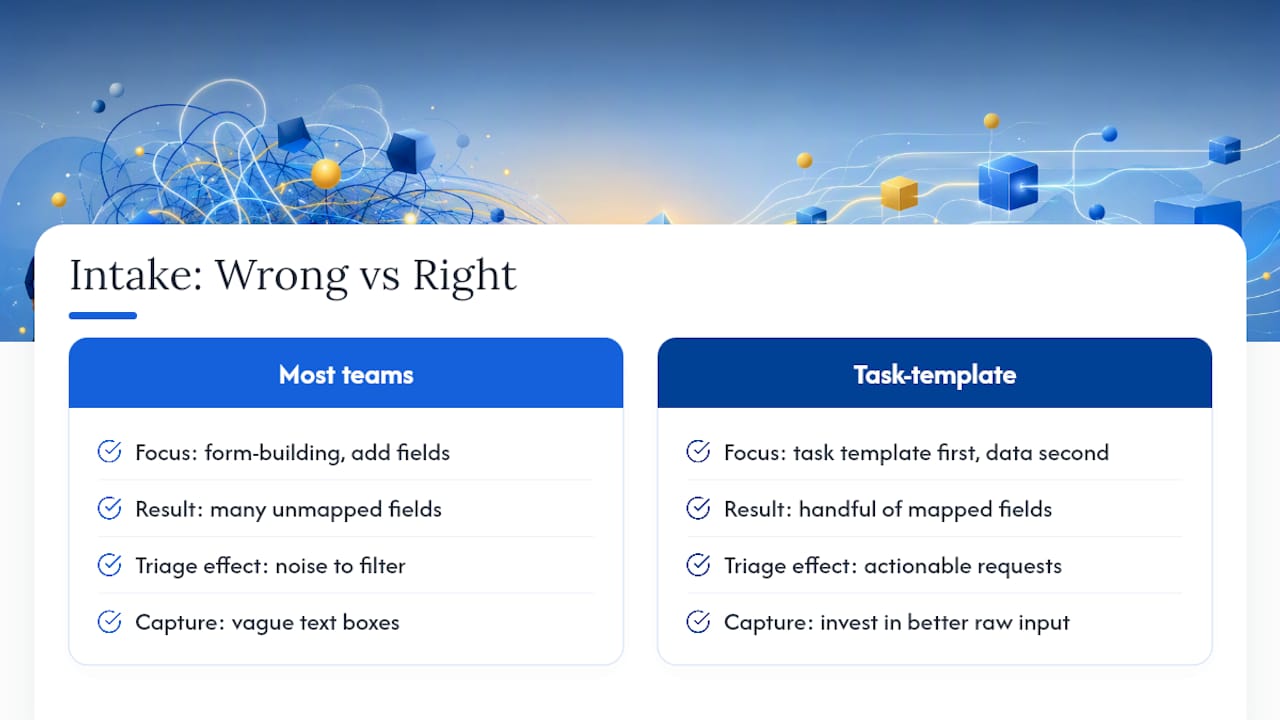
The teams that get this right treat the form as a task template first and a data collection tool second. The form’s job is to guide the submitter toward a complete, actionable request. Only a handful of answers ever need to become real Jira fields, and those should be chosen because they trigger something, an automation rule, a dashboard, a JQL filter, not because they seemed useful to know.
Where teams underinvest is at the capture layer itself. A perfectly mapped form still produces a vague ticket if the submitter can only describe the problem in a text box. That’s the piece worth fixing before you touch your automation rules again: get better raw input, and the rest of the pipeline gets easier to build.
— Marketing


